
How to Use SOLAR CHARGE CONTROL: Examples, Pinouts, and Specs
 Design with SOLAR CHARGE CONTROL in Cirkit Designer
Introduction
A Solar Charge Controller is a critical component in solar power systems. It regulates the voltage and current coming from solar panels to prevent overcharging of batteries, ensuring efficient energy storage and prolonging battery life. By managing the flow of energy, it protects batteries from damage and enhances the overall performance of the solar power system.
Explore Projects Built with SOLAR CHARGE CONTROL
 Open Project in Cirkit Designer
 Open Project in Cirkit Designer
 Open Project in Cirkit Designer
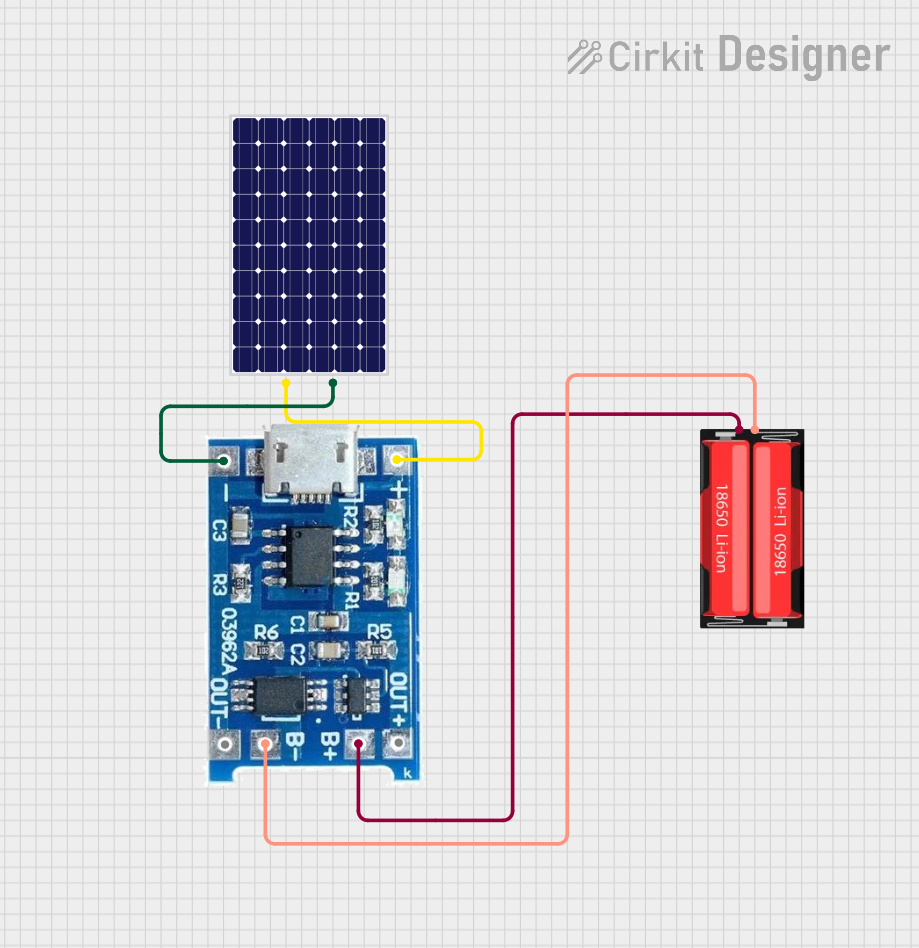 Open Project in Cirkit Designer
Explore Projects Built with SOLAR CHARGE CONTROL
Open Project in Cirkit DesignerOpen Project in Cirkit DesignerOpen Project in Cirkit DesignerOpen Project in Cirkit DesignerCommon Applications and Use Cases
- Solar-powered homes and off-grid systems
- Solar street lighting
- Portable solar power kits
- RVs, boats, and other mobile solar setups
- Industrial solar installations
Technical Specifications
Below are the general technical specifications for a typical Solar Charge Controller. Always refer to the datasheet of your specific model for precise details.
Key Technical Details
- Input Voltage Range: 12V to 48V (depending on the model)
- Output Voltage: 12V or 24V (auto-detect or manual selection)
- Maximum Input Current: 10A to 60A (model-dependent)
- Battery Type Compatibility: Lead-acid, AGM, Gel, Lithium-ion
- Efficiency: Up to 98%
- Operating Temperature: -20°C to 60°C
- Protection Features: Overcharge, over-discharge, short circuit, reverse polarity
Pin Configuration and Descriptions
The Solar Charge Controller typically has terminals for connecting solar panels, batteries, and loads. Below is a table describing the connections:
| Pin/Terminal | Label | Description |
|---|---|---|
| 1 | Solar Panel (+) | Positive terminal for connecting the solar panel. |
| 2 | Solar Panel (-) | Negative terminal for connecting the solar panel. |
| 3 | Battery (+) | Positive terminal for connecting the battery. |
| 4 | Battery (-) | Negative terminal for connecting the battery. |
| 5 | Load (+) | Positive terminal for connecting the DC load (optional, depending on the model). |
| 6 | Load (-) | Negative terminal for connecting the DC load (optional, depending on the model). |
Usage Instructions
How to Use the Solar Charge Controller in a Circuit
Connect the Battery First:
- Connect the positive and negative terminals of the battery to the corresponding Battery (+) and Battery (-) terminals on the controller.
- This step is crucial as it allows the controller to detect the battery voltage and configure itself accordingly.
Connect the Solar Panel:
- Connect the positive and negative terminals of the solar panel to the Solar Panel (+) and Solar Panel (-) terminals.
- Ensure the solar panel is placed in direct sunlight for optimal performance.
Connect the Load (Optional):
- If your controller supports load output, connect the DC load to the Load (+) and Load (-) terminals.
- This allows the controller to manage power delivery to the load and protect it from over-discharge.
Power On:
- Once all connections are secure, the controller will automatically start regulating the energy flow.
Important Considerations and Best Practices
- Battery Type Selection: Ensure the controller is compatible with your battery type and configure it accordingly if manual selection is required.
- Wire Sizing: Use appropriately sized wires to handle the current without overheating or voltage drops.
- Placement: Install the controller in a well-ventilated area, away from direct sunlight and moisture.
- Reverse Polarity: Double-check all connections to avoid reverse polarity, which can damage the controller or other components.
- Firmware Updates: If your controller supports firmware updates, keep it updated for optimal performance and new features.
Arduino UNO Integration Example
Some advanced Solar Charge Controllers support communication protocols like UART or I2C, allowing integration with microcontrollers like Arduino UNO. Below is an example of how to read battery voltage from a controller using UART:
#include <SoftwareSerial.h>

// Define RX and TX pins for communication with the Solar Charge Controller
SoftwareSerial solarController(10, 11); // RX = Pin 10, TX = Pin 11

void setup() {
  Serial.begin(9600); // Initialize Serial Monitor
  solarController.begin(9600); // Initialize communication with the controller

  Serial.println("Solar Charge Controller Monitoring Started");
}

void loop() {
  // Request battery voltage from the controller (example command, varies by model)
  solarController.print("GET_VOLTAGE\n");

  // Wait for a response
  if (solarController.available()) {
    String response = solarController.readStringUntil('\n');
    Serial.print("Battery Voltage: ");
    Serial.println(response); // Display the voltage on the Serial Monitor
  }

  delay(1000); // Wait 1 second before the next request
}
Note: The communication protocol and commands vary by controller model. Refer to the manufacturer's documentation for specific details.
Troubleshooting and FAQs
Common Issues and Solutions
Controller Not Powering On:
- Cause: Incorrect battery connection or insufficient battery voltage.
- Solution: Verify the battery connections and ensure the battery voltage is within the controller's operating range.
Battery Overcharging or Undercharging:
- Cause: Incorrect battery type selection or faulty controller.
- Solution: Check the battery type settings and ensure they match your battery. Replace the controller if necessary.
Load Not Receiving Power:
- Cause: Load output disabled or battery voltage too low.
- Solution: Enable the load output (if applicable) and ensure the battery is sufficiently charged.
Solar Panel Not Charging the Battery:
- Cause: Insufficient sunlight, loose connections, or damaged panel.
- Solution: Ensure the solar panel is in direct sunlight, check all connections, and test the panel for faults.
FAQs
Q1: Can I use the Solar Charge Controller with an inverter?
A1: Yes, connect the inverter directly to the battery terminals. The controller will manage the battery charging, while the inverter handles AC power conversion.
Q2: How do I know if the controller is working properly?
A2: Most controllers have LED indicators or an LCD screen to display system status, such as charging, battery level, and load status.
Q3: Can I connect multiple solar panels to the controller?
A3: Yes, but ensure the combined voltage and current of the panels do not exceed the controller's input ratings. Use series or parallel connections as needed.
Q4: Is it safe to leave the controller connected all the time?
A4: Yes, Solar Charge Controllers are designed for continuous operation and will automatically manage the charging process.