
How to Use 3S LiPo Battery: Examples, Pinouts, and Specs
 Design with 3S LiPo Battery in Cirkit Designer
Introduction
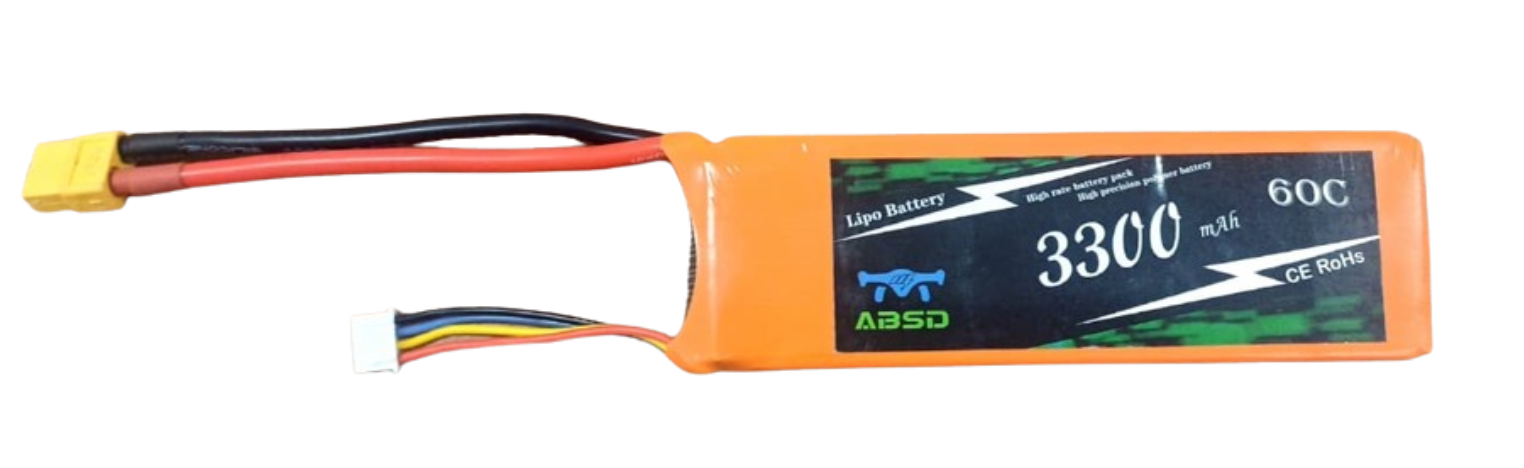
The 3S LiPo Battery (Manufacturer Part ID: Generic 3S LiPo 3300 mAh Battery) is a rechargeable lithium polymer battery consisting of three cells connected in series. This configuration provides a nominal voltage of 11.1V (3.7V per cell) and is capable of delivering high energy density in a lightweight package. With a capacity of 3300 mAh, this battery is ideal for applications requiring reliable and long-lasting power, such as RC vehicles, drones, and portable electronics.
Explore Projects Built with 3S LiPo Battery
 Open Project in Cirkit Designer
 Open Project in Cirkit Designer
 Open Project in Cirkit Designer
 Open Project in Cirkit Designer
Explore Projects Built with 3S LiPo Battery
Open Project in Cirkit DesignerOpen Project in Cirkit DesignerOpen Project in Cirkit DesignerOpen Project in Cirkit DesignerCommon Applications
- RC Vehicles: Cars, boats, and planes requiring high current and lightweight power.
- Drones: Multirotors and quadcopters for extended flight times.
- Robotics: Powering motors and control systems in mobile robots.
- Portable Electronics: Devices requiring compact, high-capacity batteries.
Technical Specifications
The following table outlines the key technical details of the 3S LiPo Battery:
| Parameter | Specification |
|---|---|
| Nominal Voltage | 11.1V (3.7V per cell) |
| Maximum Voltage | 12.6V (4.2V per cell) |
| Minimum Safe Voltage | 9.0V (3.0V per cell) |
| Capacity | 3300 mAh |
| Discharge Rate (C-Rating) | 25C (82.5A max continuous) |
| Charge Voltage | 12.6V |
| Charge Current | 1C (3.3A recommended) |
| Connector Type | XT60 (Power) and JST-XH (Balance) |
| Dimensions | 135mm x 45mm x 25mm |
| Weight | ~250g |
Pin Configuration
The 3S LiPo Battery typically includes two connectors:
- Power Connector (XT60): Supplies power to the load.
- Balance Connector (JST-XH): Used for balancing individual cells during charging.
| Pin Number | JST-XH Balance Connector Description |
|---|---|
| 1 | Cell 1 Positive (+) |
| 2 | Cell 1 Negative (-) / Cell 2 Positive (+) |
| 3 | Cell 2 Negative (-) / Cell 3 Positive (+) |
| 4 | Cell 3 Negative (-) |
Usage Instructions
How to Use the 3S LiPo Battery in a Circuit
- Connect the Power Connector: Use the XT60 connector to supply power to your circuit or device.
- Monitor Voltage Levels: Ensure the battery voltage does not drop below 9.0V to prevent damage.
- Balance Charging: Always use a LiPo-compatible charger with a balance charging feature to maintain cell health.
- Secure the Battery: Use straps or holders to secure the battery in place, especially in mobile applications like drones or RC vehicles.
Important Considerations and Best Practices
- Charging: Use a LiPo charger set to 3S (11.1V) mode. Do not exceed the recommended charge current of 3.3A.
- Storage: Store the battery at a voltage of 11.4V (3.8V per cell) for long-term storage to prevent degradation.
- Temperature: Avoid exposing the battery to temperatures above 60°C or below 0°C.
- Discharge: Do not exceed the maximum continuous discharge current of 82.5A to prevent overheating or damage.
- Safety: Never puncture, short-circuit, or overcharge the battery. Use a fireproof LiPo bag during charging for added safety.
Example: Using the 3S LiPo Battery with an Arduino UNO
To power an Arduino UNO with a 3S LiPo Battery, use a DC-DC step-down converter to regulate the voltage to 5V. Below is an example circuit and code:
Circuit Setup
- Connect the XT60 power connector to the input of the DC-DC step-down converter.
- Adjust the converter output to 5V using a multimeter.
- Connect the converter output to the Arduino UNO's Vin and GND pins.
Example Code
// Example code to read battery voltage using an Arduino UNO
// Ensure a voltage divider is used to step down the 11.1V to a safe level for the Arduino

const int batteryPin = A0; // Analog pin connected to the voltage divider
const float voltageDividerRatio = 5.7; // Adjust based on resistor values used

void setup() {
  Serial.begin(9600); // Initialize serial communication
}

void loop() {
  int rawValue = analogRead(batteryPin); // Read the analog value
  float batteryVoltage = (rawValue / 1023.0) * 5.0 * voltageDividerRatio;

  Serial.print("Battery Voltage: ");
  Serial.print(batteryVoltage);
  Serial.println(" V");

  delay(1000); // Wait 1 second before the next reading
}
Note: Use a voltage divider circuit to step down the battery voltage to a safe range (0-5V) for the Arduino's analog input.
Troubleshooting and FAQs
Common Issues
Battery Swelling:
- Cause: Overcharging, over-discharging, or physical damage.
- Solution: Stop using the battery immediately and dispose of it safely.
Uneven Cell Voltages:
- Cause: Imbalanced charging or aging cells.
- Solution: Use a balance charger to equalize cell voltages.
Battery Not Charging:
- Cause: Faulty charger, damaged connectors, or over-discharged battery.
- Solution: Check the charger and connectors. If the battery voltage is below 9.0V, it may not charge.
Short Runtime:
- Cause: High discharge rate, aging battery, or insufficient capacity.
- Solution: Reduce the load or replace the battery if it has degraded.
FAQs
Q1: Can I use the 3S LiPo Battery for a 12V device?
A1: Yes, but ensure the device can handle the voltage range of 9.0V to 12.6V. Use a DC-DC converter if a stable 12V is required.
Q2: How do I know when the battery is fully charged?
A2: The battery is fully charged when the charger indicates completion, and the voltage reads 12.6V.
Q3: What happens if I over-discharge the battery?
A3: Over-discharging can permanently damage the cells. Use a low-voltage alarm or cutoff circuit to prevent this.
Q4: Can I charge the battery without a balance charger?
A4: It is not recommended. A balance charger ensures all cells are charged evenly, prolonging battery life.