Cirkit Designer Logo
Cirkit Designer
Your all-in-one circuit design IDE
Home / 
Component Documentation

How to Use vibration motor module: Examples, Pinouts, and Specs
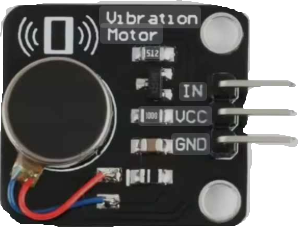

Image of vibration motor module
Cirkit Designer LogoDesign with vibration motor module in Cirkit Designer

Introduction

A vibration motor module is a small device that converts electrical energy into mechanical vibrations. It typically consists of a motor with an unbalanced weight attached to its shaft, which creates vibrations when the motor spins. These modules are widely used in applications requiring haptic feedback, such as mobile devices, wearables, and robotics. They are also employed in alert systems, gaming controllers, and other interactive devices to provide tactile feedback to users.

Explore Projects Built with vibration motor module

Use Cirkit Designer to design, explore, and prototype these projects online. Some projects support real-time simulation. Click "Open Project" to start designing instantly!
Arduino Nano-Based Assistive Device for Blind People with Ultrasonic Sensor, GPS, and Voice Recognition
Image of Commission: A project utilizing vibration motor module in a practical application
This circuit is designed to assist blind people by integrating an ultrasonic sensor for obstacle detection, a GPS module for location tracking, a voice recognition module for receiving voice commands, and a vibration motor for tactile feedback. The Arduino Nano serves as the central controller, processing sensor data and voice commands to provide real-time guidance through the vibration motor. The circuit also includes a SIM800L module for cellular communication, a DC-DC boost converter to step up voltage for the SIM800L, and transistors and resistors for controlling the vibration motor.
Cirkit Designer LogoOpen Project in Cirkit Designer
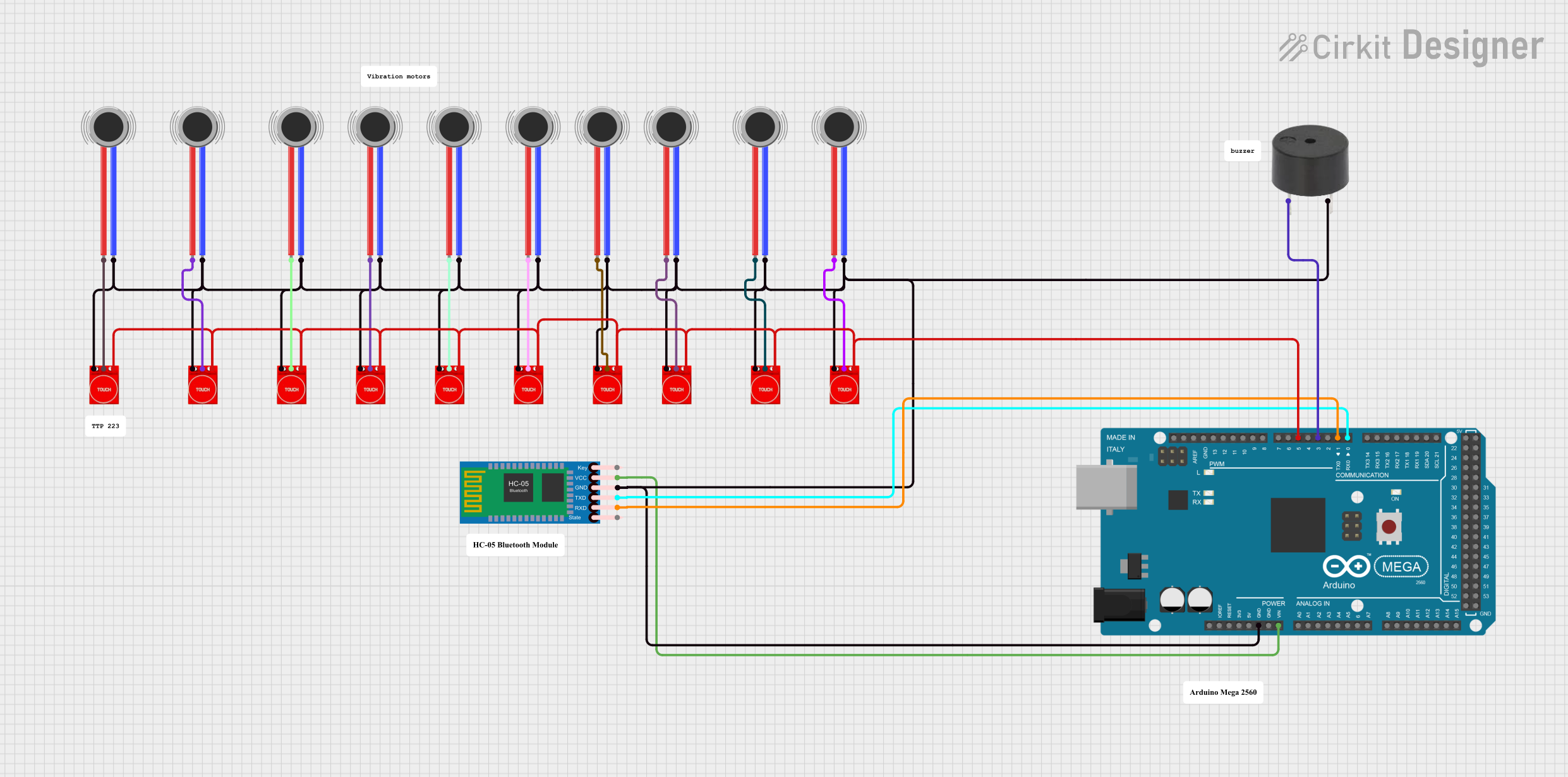
Arduino Mega 2560 Bluetooth-Controlled Touch-Activated Vibration Motor System
Image of circuitcycle: A project utilizing vibration motor module in a practical application
This circuit is a touch-activated feedback system that uses an Arduino Mega 2560 to control multiple vibration motors and a buzzer. Touch sensors (TTP233) are used to detect user input, which then triggers the corresponding vibration motor and buzzer via the Arduino. Additionally, an HC-05 Bluetooth module is included for wireless communication.
Cirkit Designer LogoOpen Project in Cirkit Designer
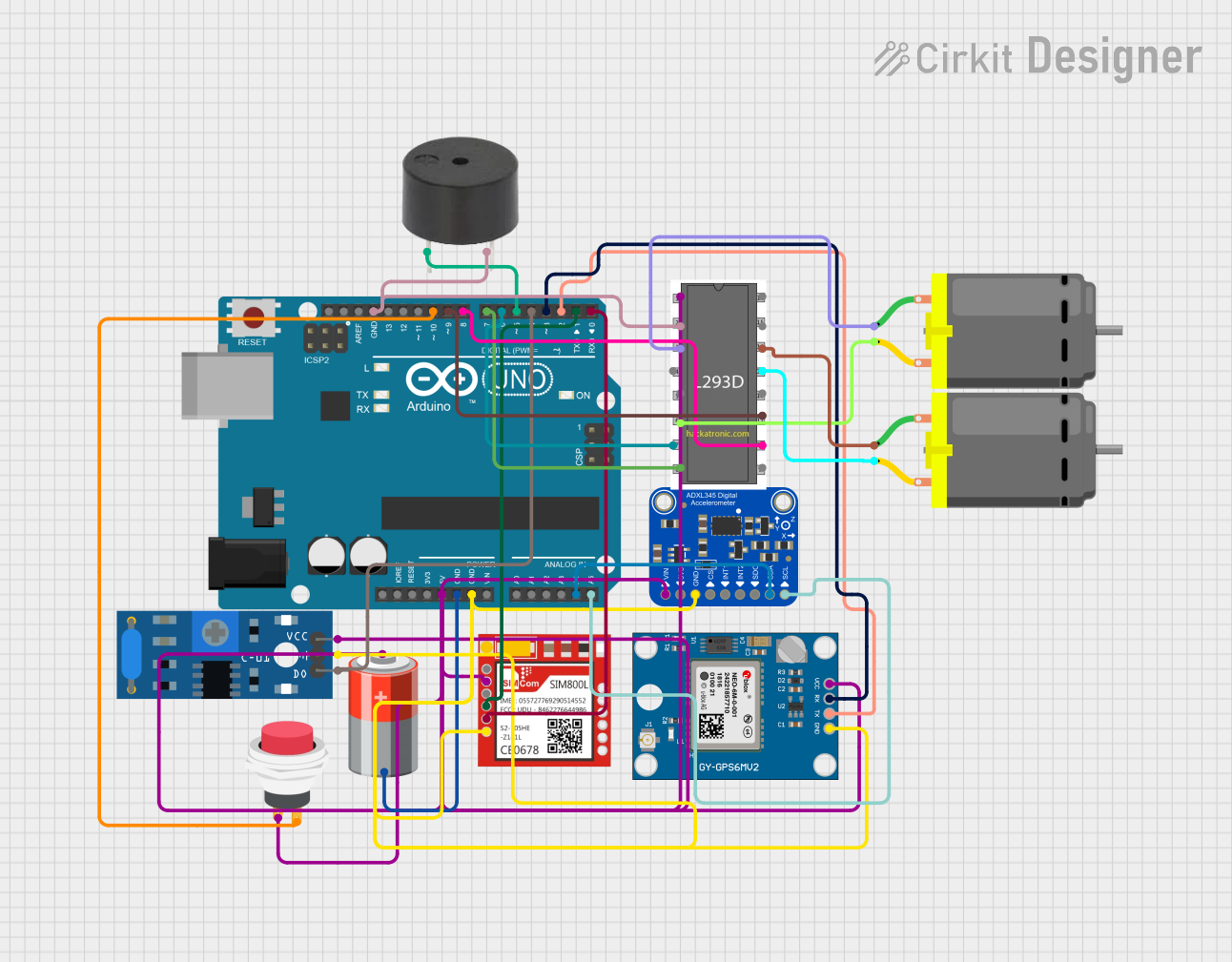
Arduino UNO-Based GPS and GSM-Enabled Vibration Sensor System with Motor Control
Image of gps based accident detection and alert system: A project utilizing vibration motor module in a practical application
This circuit is a GPS-based tracking system with vibration detection and motor control capabilities. It uses an Arduino UNO to interface with a Neo 6M GPS module for location data, a Sim800l module for GSM communication, an ADXL345 accelerometer for motion sensing, and an SW-420 vibration sensor to detect vibrations. The system also includes a motor driver to control two DC motors and a buzzer for alerts, all powered by a 5V battery.
Cirkit Designer LogoOpen Project in Cirkit Designer
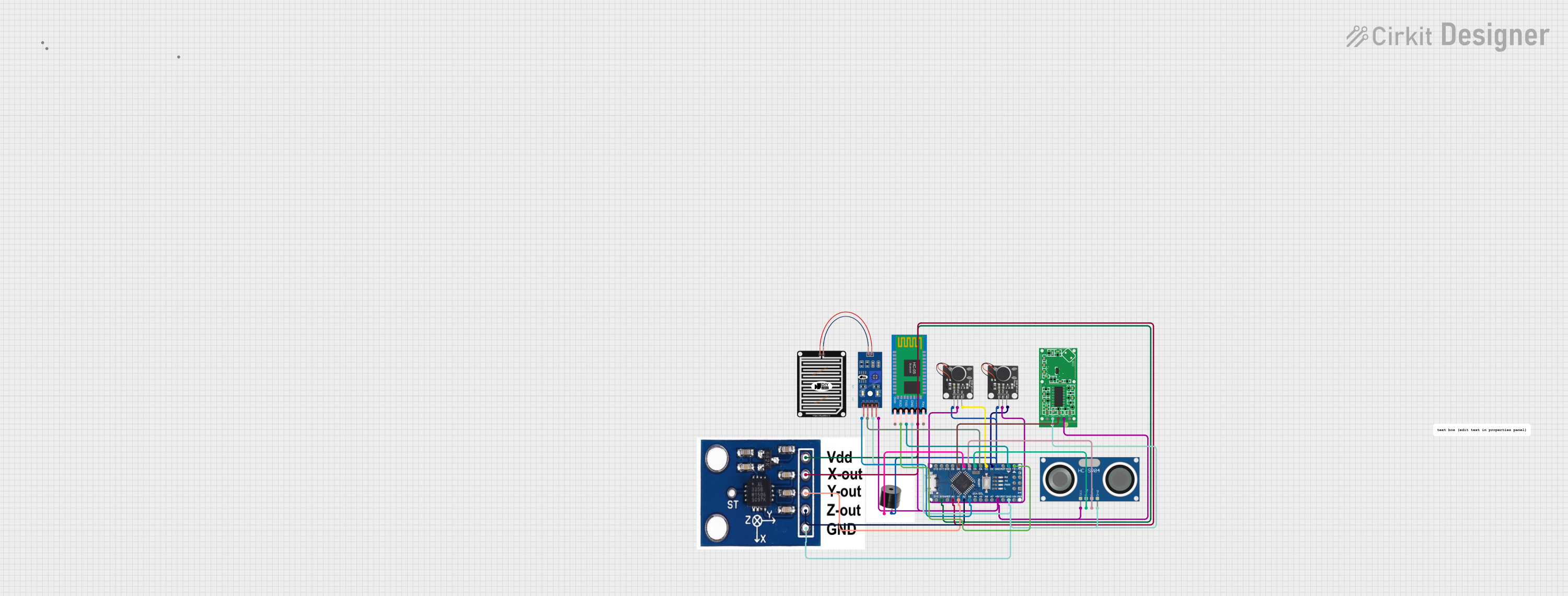
Arduino Nano-Based Haptic Navigation Shoe for the Visually Impaired with Bluetooth Connectivity
Image of Blind shoes layer 2: A project utilizing vibration motor module in a practical application
This circuit is a haptic navigation system for the visually impaired, utilizing an Arduino Nano to interface with various sensors including a rain sensor, ultrasonic sensor, accelerometer, radar sensor, and Bluetooth module. The system provides feedback through vibration motors and a buzzer, and sends sensor data to a mobile app via Bluetooth for tracking and alerts.
Cirkit Designer LogoOpen Project in Cirkit Designer

Explore Projects Built with vibration motor module

Use Cirkit Designer to design, explore, and prototype these projects online. Some projects support real-time simulation. Click "Open Project" to start designing instantly!
Image of Commission: A project utilizing vibration motor module in a practical application
Arduino Nano-Based Assistive Device for Blind People with Ultrasonic Sensor, GPS, and Voice Recognition
This circuit is designed to assist blind people by integrating an ultrasonic sensor for obstacle detection, a GPS module for location tracking, a voice recognition module for receiving voice commands, and a vibration motor for tactile feedback. The Arduino Nano serves as the central controller, processing sensor data and voice commands to provide real-time guidance through the vibration motor. The circuit also includes a SIM800L module for cellular communication, a DC-DC boost converter to step up voltage for the SIM800L, and transistors and resistors for controlling the vibration motor.
Cirkit Designer LogoOpen Project in Cirkit Designer
Image of circuitcycle: A project utilizing vibration motor module in a practical application
Arduino Mega 2560 Bluetooth-Controlled Touch-Activated Vibration Motor System
This circuit is a touch-activated feedback system that uses an Arduino Mega 2560 to control multiple vibration motors and a buzzer. Touch sensors (TTP233) are used to detect user input, which then triggers the corresponding vibration motor and buzzer via the Arduino. Additionally, an HC-05 Bluetooth module is included for wireless communication.
Cirkit Designer LogoOpen Project in Cirkit Designer
Image of gps based accident detection and alert system: A project utilizing vibration motor module in a practical application
Arduino UNO-Based GPS and GSM-Enabled Vibration Sensor System with Motor Control
This circuit is a GPS-based tracking system with vibration detection and motor control capabilities. It uses an Arduino UNO to interface with a Neo 6M GPS module for location data, a Sim800l module for GSM communication, an ADXL345 accelerometer for motion sensing, and an SW-420 vibration sensor to detect vibrations. The system also includes a motor driver to control two DC motors and a buzzer for alerts, all powered by a 5V battery.
Cirkit Designer LogoOpen Project in Cirkit Designer
Image of Blind shoes layer 2: A project utilizing vibration motor module in a practical application
Arduino Nano-Based Haptic Navigation Shoe for the Visually Impaired with Bluetooth Connectivity
This circuit is a haptic navigation system for the visually impaired, utilizing an Arduino Nano to interface with various sensors including a rain sensor, ultrasonic sensor, accelerometer, radar sensor, and Bluetooth module. The system provides feedback through vibration motors and a buzzer, and sends sensor data to a mobile app via Bluetooth for tracking and alerts.
Cirkit Designer LogoOpen Project in Cirkit Designer

Common Applications:

  • Haptic feedback in mobile phones and wearables
  • Robotics for tactile signaling
  • Gaming controllers for immersive experiences
  • Alert systems in industrial or medical devices
  • Educational and DIY electronics projects

Technical Specifications

Key Technical Details:

  • Operating Voltage: 3.3V to 5V DC
  • Operating Current: ~80mA (typical)
  • Motor Type: DC motor with an eccentric rotating mass (ERM)
  • Vibration Frequency: ~100 Hz (varies with voltage)
  • Dimensions: ~27mm x 12mm x 10mm (module size)
  • Weight: ~5g
  • Control Type: Digital (ON/OFF) or PWM for intensity control

Pin Configuration and Descriptions:

Pin Name Description
VCC Power supply input (3.3V to 5V DC)
GND Ground connection
IN Control signal input (Digital or PWM)

Usage Instructions

How to Use the Vibration Motor Module in a Circuit:

  1. Power the Module: Connect the VCC pin to a 3.3V or 5V power source and the GND pin to the ground of your circuit.
  2. Control the Motor: Use the IN pin to control the motor. A HIGH signal (3.3V or 5V) will activate the motor, while a LOW signal (0V) will turn it off.
  3. PWM Control (Optional): To adjust the vibration intensity, provide a PWM signal to the IN pin. The duty cycle of the PWM signal determines the motor's speed and, consequently, the vibration intensity.

Important Considerations and Best Practices:

  • Power Supply: Ensure the power supply can provide sufficient current (~80mA) to drive the motor.
  • Signal Voltage: Match the control signal voltage to the module's operating voltage (3.3V or 5V).
  • Decoupling Capacitor: Add a small decoupling capacitor (e.g., 0.1µF) across the power pins to reduce noise.
  • Mounting: Secure the module firmly to prevent unwanted movement during operation.
  • Prolonged Use: Avoid running the motor continuously for extended periods to prevent overheating.

Example: Connecting to an Arduino UNO

Below is an example of how to connect and control the vibration motor module using an Arduino UNO:

Circuit Connections:

  • Connect the VCC pin of the module to the 5V pin on the Arduino.
  • Connect the GND pin of the module to the GND pin on the Arduino.
  • Connect the IN pin of the module to digital pin 9 on the Arduino.

Arduino Code:

// Vibration Motor Module Example Code
// This code demonstrates how to control the vibration motor module
// using an Arduino UNO. The motor will vibrate for 1 second, then stop
// for 1 second, in a loop.

#define MOTOR_PIN 9  // Define the pin connected to the IN pin of the module

void setup() {
  pinMode(MOTOR_PIN, OUTPUT);  // Set the motor pin as an output
}

void loop() {
  digitalWrite(MOTOR_PIN, HIGH);  // Turn the motor ON
  delay(1000);                    // Wait for 1 second
  digitalWrite(MOTOR_PIN, LOW);   // Turn the motor OFF
  delay(1000);                    // Wait for 1 second
}

Adjusting Vibration Intensity with PWM:

To control the vibration intensity, replace digitalWrite() with analogWrite() in the code. For example:

analogWrite(MOTOR_PIN, 128);  // Set motor intensity to 50% (128 out of 255)

Troubleshooting and FAQs

Common Issues and Solutions:

  1. Motor Not Vibrating:

    • Cause: Insufficient power supply or incorrect wiring.
    • Solution: Verify the power supply voltage and current. Check all connections.
  2. Weak or No Vibration:

    • Cause: Low PWM duty cycle or insufficient voltage.
    • Solution: Increase the PWM duty cycle or ensure the supply voltage is within the specified range.
  3. Overheating:

    • Cause: Prolonged continuous operation or excessive voltage.
    • Solution: Limit the motor's runtime and ensure the supply voltage does not exceed 5V.
  4. Noise in Circuit:

    • Cause: Motor operation causing electrical noise.
    • Solution: Add a decoupling capacitor across the power pins and use proper grounding.

FAQs:

  • Q: Can I use the module with a 3.3V microcontroller?
    A: Yes, the module is compatible with 3.3V systems. Ensure the control signal matches the operating voltage.

  • Q: How do I reduce vibration intensity?
    A: Use a PWM signal on the IN pin to control the motor speed and vibration intensity.

  • Q: Can I run the motor continuously?
    A: While the motor can run continuously, it is recommended to allow periodic rest to prevent overheating.

  • Q: Is the module polarity-sensitive?
    A: Yes, ensure correct polarity when connecting the power supply to avoid damage.

This documentation provides a comprehensive guide to understanding, using, and troubleshooting the vibration motor module.