
How to Use F9p: Examples, Pinouts, and Specs
 Design with F9p in Cirkit Designer
Introduction
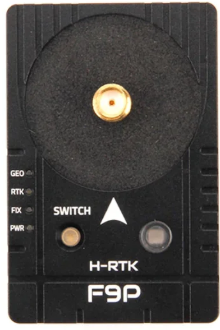
The F9p is a high-performance fuse manufactured by Holybro, designed to protect electrical circuits from overcurrent conditions. By interrupting the flow of electricity when the current exceeds a specified threshold, the F9p prevents damage to sensitive components and ensures the safety of the overall system. Its robust design and reliable performance make it an essential component in a wide range of applications.
Explore Projects Built with F9p
 Open Project in Cirkit Designer
 Open Project in Cirkit Designer
 Open Project in Cirkit Designer
 Open Project in Cirkit Designer
Explore Projects Built with F9p
Open Project in Cirkit DesignerOpen Project in Cirkit DesignerOpen Project in Cirkit DesignerOpen Project in Cirkit DesignerCommon Applications and Use Cases
- Protection of power supplies in consumer electronics
- Automotive electrical systems
- Industrial machinery and equipment
- Renewable energy systems, such as solar inverters
- Circuit protection in IoT devices and embedded systems
Technical Specifications
The F9p fuse is engineered to meet stringent safety and performance standards. Below are its key technical specifications:
| Parameter | Value |
|---|---|
| Rated Voltage | 250V AC / 125V DC |
| Rated Current | 1A, 2A, 5A, 10A (varies by model) |
| Breaking Capacity | 1000A @ Rated Voltage |
| Fuse Type | Fast-acting (F-Type) |
| Operating Temperature | -40°C to +85°C |
| Housing Material | Flame-retardant ceramic |
| Compliance Standards | UL 248-14, IEC 60127-2 |
Pin Configuration and Descriptions
The F9p is a two-terminal component with the following pin configuration:
| Pin | Description |
|---|---|
| Pin 1 | Input terminal (connect to power source) |
| Pin 2 | Output terminal (connect to load) |
Usage Instructions
How to Use the F9p in a Circuit
- Determine the Required Fuse Rating: Select the appropriate F9p model based on the circuit's operating voltage and current. Ensure the fuse's rated current is slightly higher than the normal operating current of the circuit.
- Placement in the Circuit: Place the F9p in series with the load to ensure it can interrupt the current flow in case of an overcurrent condition.
- Soldering: If using a through-hole version, solder the fuse terminals securely to the PCB. For surface-mount versions, use appropriate reflow soldering techniques.
- Testing: After installation, test the circuit to ensure proper operation and verify that the fuse is functioning as intended.
Important Considerations and Best Practices
- Avoid Overrating: Do not use a fuse with a current rating significantly higher than the circuit's normal operating current, as this may compromise protection.
- Check for Voltage Compatibility: Ensure the fuse's rated voltage matches or exceeds the circuit's operating voltage.
- Inspect for Damage: Before installation, inspect the fuse for any visible damage or cracks in the housing.
- Use Proper Holders: If the fuse is replaceable, use a compatible fuse holder to ensure secure and reliable connections.
- Environmental Conditions: Avoid exposing the fuse to extreme temperatures or humidity beyond its specified operating range.
Example Circuit with Arduino UNO
The F9p can be used to protect an Arduino UNO from overcurrent conditions. Below is an example of how to integrate the F9p into a simple circuit:
/*
  Example: Using the F9p Fuse to Protect an Arduino UNO
  This circuit demonstrates how to use the F9p fuse to protect the Arduino UNO
  from overcurrent conditions caused by a short circuit or excessive load.
*/

// No specific code is required for the fuse itself, as it operates passively.
// Below is a simple Arduino sketch to demonstrate a protected circuit.

void setup() {
  pinMode(13, OUTPUT); // Set pin 13 as an output (e.g., for an LED)
}

void loop() {
  digitalWrite(13, HIGH); // Turn on the LED
  delay(1000);            // Wait for 1 second
  digitalWrite(13, LOW);  // Turn off the LED
  delay(1000);            // Wait for 1 second
}

/*
  Circuit Description:
  - Connect the F9p fuse in series with the Arduino UNO's power supply (VIN or 5V).
  - Ensure the fuse's rated current matches the Arduino's power requirements.
  - If an overcurrent condition occurs, the fuse will blow, protecting the Arduino.
*/
Troubleshooting and FAQs
Common Issues and Solutions
| Issue | Solution |
|---|---|
| Fuse blows immediately after power-on | Verify that the fuse's rated current matches the circuit's normal operating current. Check for short circuits. |
| Circuit does not power on | Ensure the fuse is properly installed and not damaged. Replace the fuse if necessary. |
| Fuse does not blow during overcurrent | Confirm that the overcurrent condition exceeds the fuse's rated current. Use a lower-rated fuse if needed. |
FAQs
Can the F9p be reused after it blows?
No, the F9p is a single-use fuse. Once it blows, it must be replaced with a new one.How do I choose the correct F9p model for my circuit?
Determine the circuit's normal operating current and select a fuse with a slightly higher rated current. Ensure the fuse's voltage rating matches or exceeds the circuit's operating voltage.What happens if I use a fuse with a higher current rating than required?
Using an overrated fuse may delay or prevent the fuse from blowing during an overcurrent condition, potentially damaging the circuit.Can the F9p be used in DC circuits?
Yes, the F9p is suitable for both AC and DC circuits, provided the voltage and current ratings are not exceeded.
By following this documentation, users can effectively integrate the Holybro F9p fuse into their circuits, ensuring reliable protection and optimal performance.