
How to Use GX12-6PIN: Examples, Pinouts, and Specs
 Design with GX12-6PIN in Cirkit Designer
Introduction
The GX12-6PIN is a circular electrical connector with six pins, designed for secure and reliable connections in electronic systems. Its robust construction and compact design make it ideal for applications requiring both power and signal transmission. The GX12-6PIN is widely used in industrial equipment, robotics, audio systems, and DIY electronics projects.
Explore Projects Built with GX12-6PIN
 Open Project in Cirkit Designer
 Open Project in Cirkit Designer
 Open Project in Cirkit Designer
 Open Project in Cirkit Designer
Explore Projects Built with GX12-6PIN
Open Project in Cirkit DesignerOpen Project in Cirkit DesignerOpen Project in Cirkit DesignerOpen Project in Cirkit DesignerCommon Applications
- Industrial machinery and automation systems
- Robotics and motor control
- Audio and video equipment
- DIY electronics and prototyping
- Power and signal transmission in embedded systems
Technical Specifications
Key Technical Details
| Parameter | Specification |
|---|---|
| Manufacturer | GX12-6PIN |
| Part ID | GX12-6PIN |
| Number of Pins | 6 |
| Connector Type | Circular |
| Rated Voltage | 250V AC/DC |
| Rated Current | 5A |
| Contact Resistance | ≤ 5 mΩ |
| Insulation Resistance | ≥ 1000 MΩ |
| Operating Temperature | -50°C to +85°C |
| Material (Shell) | Zinc alloy with nickel plating |
| Material (Contacts) | Brass with silver plating |
| Mounting Style | Panel mount or cable mount |
| Locking Mechanism | Threaded coupling |
Pin Configuration and Descriptions
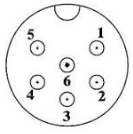
The GX12-6PIN connector has six pins arranged in a circular pattern. Below is the pinout description:
| Pin Number | Description | Typical Use Case |
|---|---|---|
| 1 | Signal/Power Line 1 | Positive voltage or signal |
| 2 | Signal/Power Line 2 | Negative voltage or signal |
| 3 | Signal/Power Line 3 | Ground or common connection |
| 4 | Signal/Power Line 4 | Auxiliary signal or power line |
| 5 | Signal/Power Line 5 | Auxiliary signal or power line |
| 6 | Signal/Power Line 6 | Auxiliary signal or power line |
Usage Instructions
How to Use the GX12-6PIN in a Circuit
Connector Assembly:
- For cable mounting, solder the wires to the corresponding pins on the connector.
- Ensure proper insulation to avoid short circuits between pins.
- Use the threaded coupling to securely connect the male and female parts of the connector.
Panel Mounting:
- Drill a hole in the panel to fit the connector's diameter (12mm).
- Secure the connector using the provided nut and washer.
Wiring:
- Identify the pin numbers on the connector (usually marked on the back).
- Match the pins to the corresponding signals or power lines in your circuit.
Testing:
- After assembly, test the connections using a multimeter to ensure continuity and proper wiring.
Important Considerations and Best Practices
- Voltage and Current Ratings: Do not exceed the rated voltage (250V) or current (5A) to avoid damage or overheating.
- Environmental Conditions: Ensure the connector is used within the specified temperature range (-50°C to +85°C).
- Secure Connections: Always tighten the threaded coupling to prevent accidental disconnection.
- Polarity: Double-check the polarity of power lines to avoid reverse connections.
Example: Connecting to an Arduino UNO
The GX12-6PIN can be used to connect external sensors or devices to an Arduino UNO. Below is an example of wiring and code for reading a sensor signal:
Wiring
- Pin 1: Connect to Arduino 5V
- Pin 2: Connect to Arduino GND
- Pin 3: Connect to Arduino Analog Pin A0 (sensor signal)
- Pins 4-6: Not used in this example
Arduino Code
// Example code for reading a sensor signal via GX12-6PIN connector
const int sensorPin = A0; // Pin A0 connected to GX12-6PIN Pin 3
int sensorValue = 0;      // Variable to store sensor reading

void setup() {
  Serial.begin(9600); // Initialize serial communication at 9600 baud
  pinMode(sensorPin, INPUT); // Set sensor pin as input
}

void loop() {
  sensorValue = analogRead(sensorPin); // Read the sensor value
  Serial.print("Sensor Value: ");      // Print the sensor value to the serial monitor
  Serial.println(sensorValue);
  delay(500); // Wait for 500ms before the next reading
}
Troubleshooting and FAQs
Common Issues and Solutions
Loose Connections:
- Issue: The connector feels loose or disconnects easily.
- Solution: Ensure the threaded coupling is tightened securely.
No Signal or Power:
- Issue: The connected device does not receive power or signal.
- Solution: Check the wiring and ensure the correct pins are connected. Use a multimeter to verify continuity.
Overheating:
- Issue: The connector becomes hot during operation.
- Solution: Ensure the current does not exceed the 5A rating. Check for short circuits.
Corrosion or Damage:
- Issue: The connector shows signs of corrosion or physical damage.
- Solution: Replace the connector and ensure it is used in a suitable environment.
FAQs
Q1: Can the GX12-6PIN be used outdoors?
A1: The GX12-6PIN is not inherently waterproof. For outdoor use, ensure it is housed in a weatherproof enclosure.
Q2: What tools are needed for assembly?
A2: You will need a soldering iron, wire stripper, and a wrench for securing the panel mount.
Q3: Can I use all six pins for power lines?
A3: Yes, but ensure the total current does not exceed the 5A rating.
Q4: Is the GX12-6PIN compatible with other GX connectors?
A4: The GX12-6PIN is only compatible with other GX12-6PIN connectors. It will not mate with GX16 or GX20 connectors.