Cirkit Designer Logo
Cirkit Designer
Your all-in-one circuit design IDE
Home / 
Component Documentation

How to Use GSR Sensor: Examples, Pinouts, and Specs
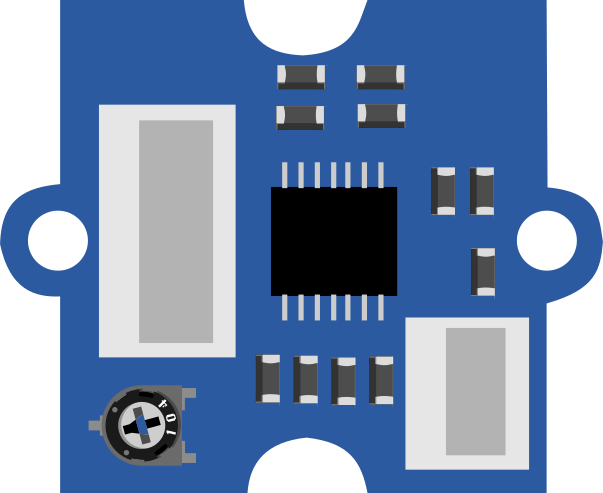

Image of GSR Sensor
Cirkit Designer LogoDesign with GSR Sensor in Cirkit Designer

Introduction

  • A Galvanic Skin Response (GSR) sensor measures the electrical conductance of the skin, which varies with the skin's moisture level. This property is influenced by sweat gland activity, which is controlled by the autonomic nervous system.
  • GSR sensors are commonly used in biofeedback systems, psychological studies, lie detection systems, and wearable health monitoring devices to assess emotional arousal or stress levels.

Explore Projects Built with GSR Sensor
Use Cirkit Designer to design, explore, and prototype these projects online. Some projects support real-time simulation. Click "Open Project" to start designing instantly!
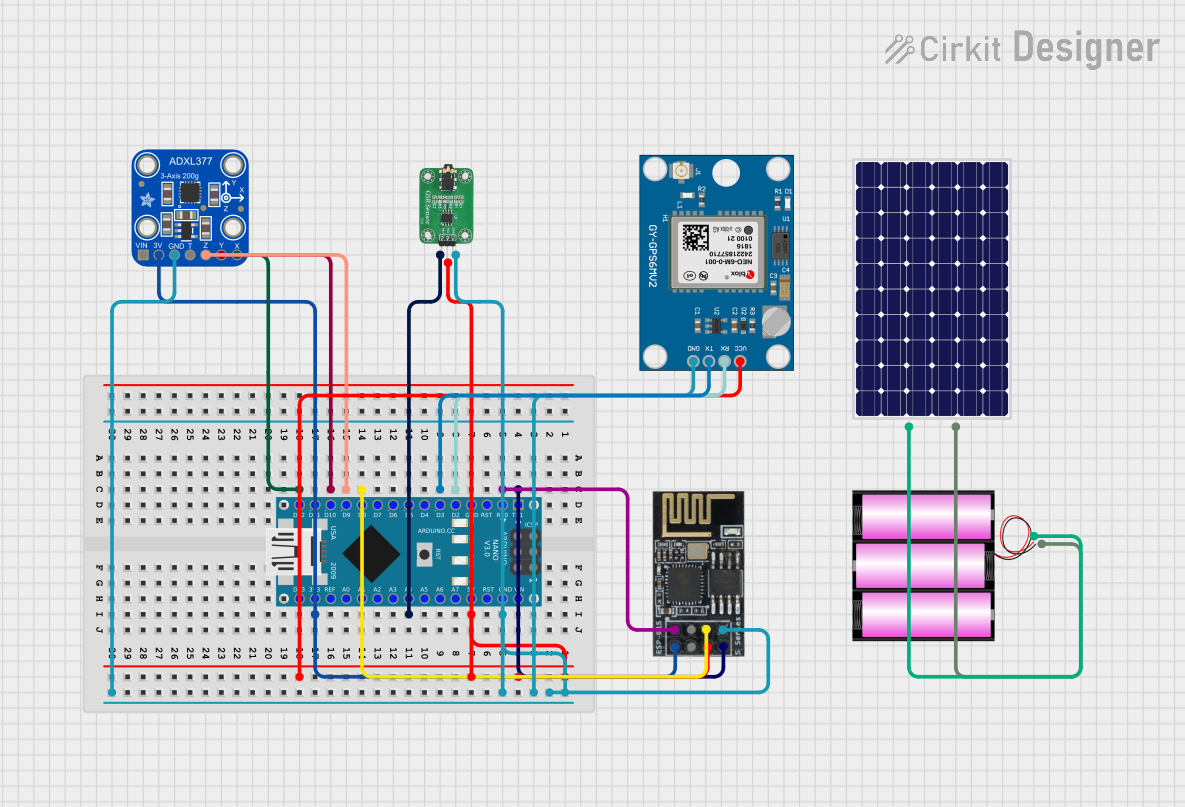
Arduino Nano-Based Health Monitoring System with Wi-Fi and GPS
Image of zekooo: A project utilizing GSR Sensor in a practical application
This circuit is a sensor-based data acquisition system using an Arduino Nano, which collects data from a GSR sensor, an ADXL377 accelerometer, and a Neo 6M GPS module. The collected data is then transmitted via a WiFi module (ESP8266-01) for remote monitoring. The system is powered by a 12V battery, which is charged by a solar panel.
Cirkit Designer LogoOpen Project in Cirkit Designer
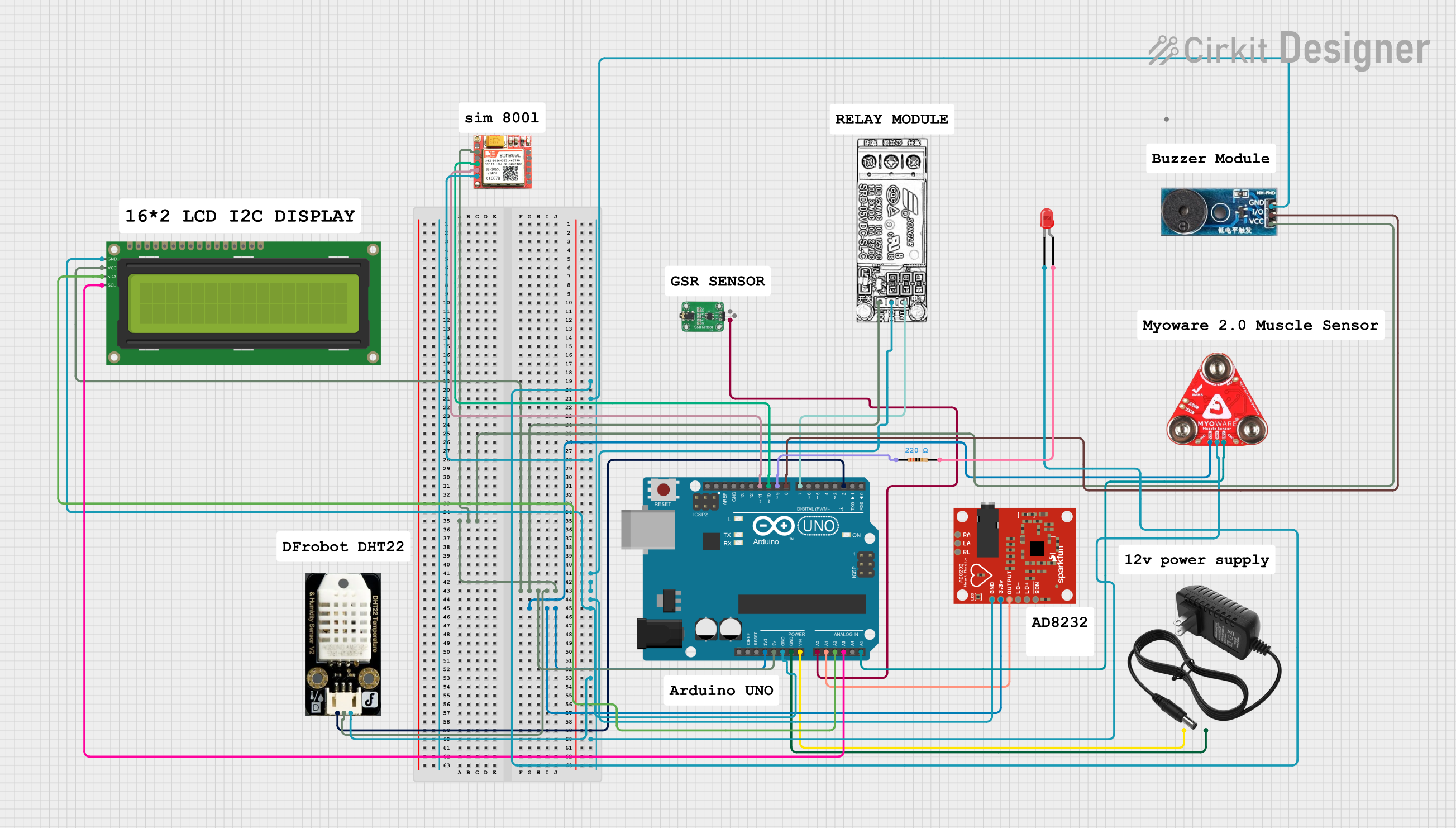
Arduino UNO Based Health Monitoring System with GSM Reporting
Image of BODY MONITORING SYSTEM: A project utilizing GSR Sensor in a practical application
This circuit is designed for a health monitoring system that measures temperature, heart rate, galvanic skin response (GSR), and muscle activity (EMG). It uses an Arduino UNO as the central processing unit, interfacing with a DHT22 temperature and humidity sensor, an AD8232 heart rate monitor, a GSR sensor, a Myoware muscle sensor, and a SIM800L GSM module for communication. The system can control a relay for a steam generator, sound a buzzer, and display data on an I2C LCD screen, with the ability to send SMS alerts based on sensor readings.
Cirkit Designer LogoOpen Project in Cirkit Designer
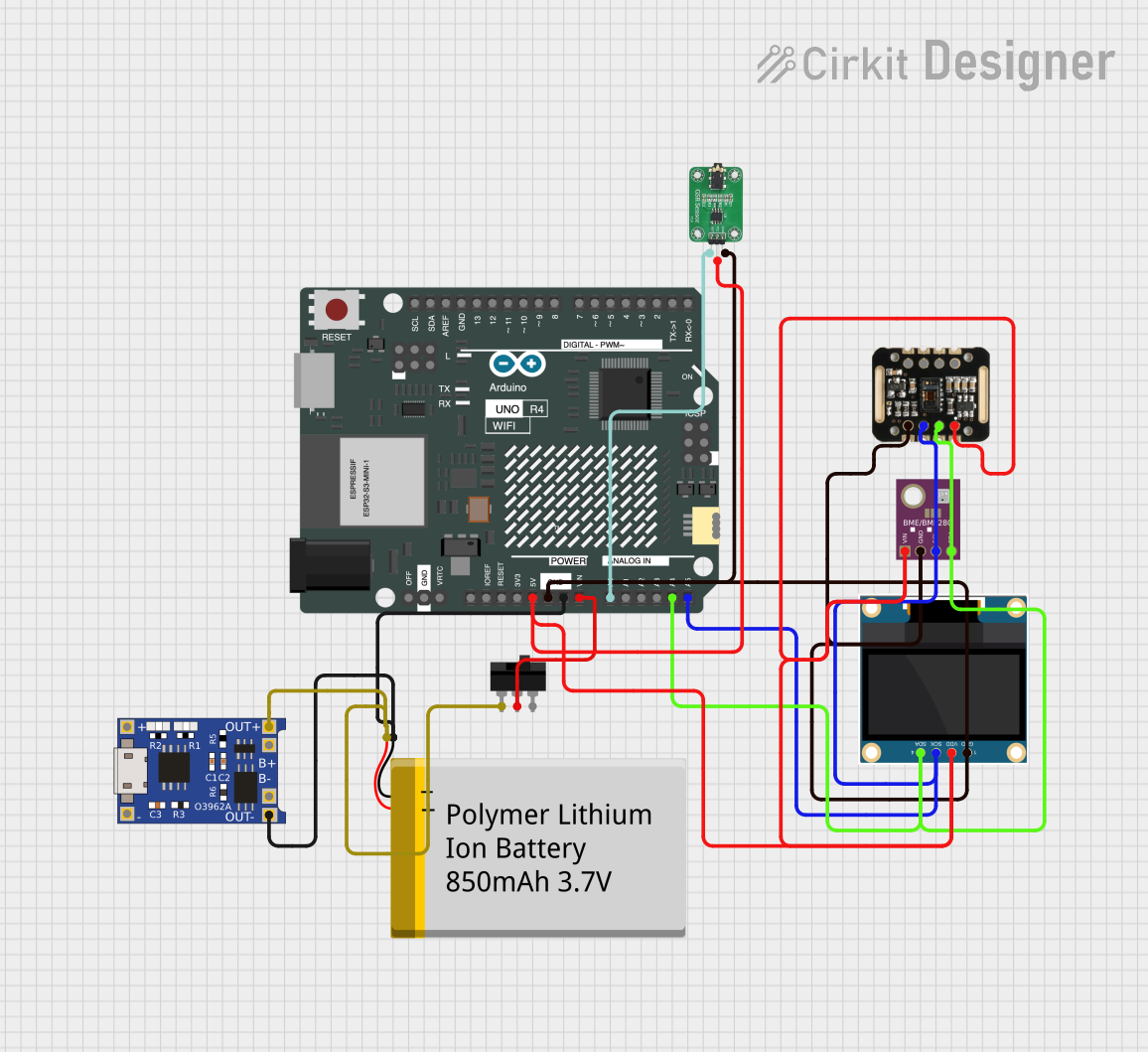
Arduino UNO R4 WiFi-Based Health Monitoring System with OLED Display
Image of SMD: A project utilizing GSR Sensor in a practical application
This circuit is designed for a health monitoring device that measures temperature, heart rate, and galvanic skin response (GSR). It uses an Arduino UNO R4 WiFi as the central microcontroller, interfacing with a BME/BMP280 sensor for temperature, a MAX30100 sensor for heart rate and oxygen saturation, and a GSR sensor for skin conductivity. The circuit includes a 0.96" OLED display for output, a TP4056 module for battery charging, a toggle switch for power control, and a polymer lithium-ion battery for power supply.
Cirkit Designer LogoOpen Project in Cirkit Designer
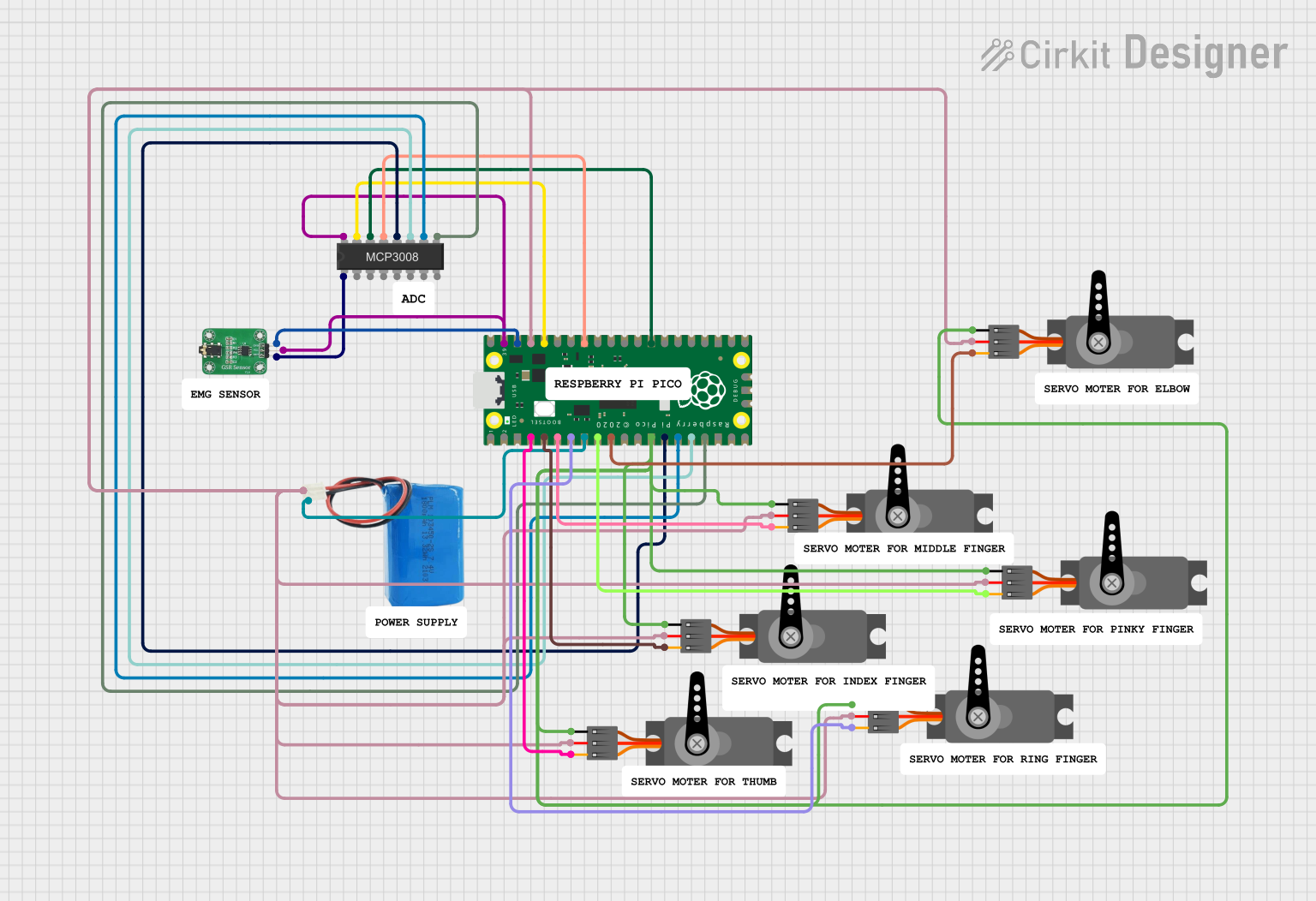
Raspberry Pi Pico Controlled Multi-Servo System with GSR Sensor and Battery Power
Image of prosthetic arm 01: A project utilizing GSR Sensor in a practical application
This circuit uses a Raspberry Pi Pico microcontroller to control multiple servos and read data from a GSR sensor through an MCP3008 ADC. The servos are powered by a 5V battery, and the GSR sensor provides input to the ADC, which then communicates with the microcontroller for processing.
Cirkit Designer LogoOpen Project in Cirkit Designer

Explore Projects Built with GSR Sensor

Use Cirkit Designer to design, explore, and prototype these projects online. Some projects support real-time simulation. Click "Open Project" to start designing instantly!
Image of zekooo: A project utilizing GSR Sensor in a practical application
Arduino Nano-Based Health Monitoring System with Wi-Fi and GPS
This circuit is a sensor-based data acquisition system using an Arduino Nano, which collects data from a GSR sensor, an ADXL377 accelerometer, and a Neo 6M GPS module. The collected data is then transmitted via a WiFi module (ESP8266-01) for remote monitoring. The system is powered by a 12V battery, which is charged by a solar panel.
Cirkit Designer LogoOpen Project in Cirkit Designer
Image of BODY MONITORING SYSTEM: A project utilizing GSR Sensor in a practical application
Arduino UNO Based Health Monitoring System with GSM Reporting
This circuit is designed for a health monitoring system that measures temperature, heart rate, galvanic skin response (GSR), and muscle activity (EMG). It uses an Arduino UNO as the central processing unit, interfacing with a DHT22 temperature and humidity sensor, an AD8232 heart rate monitor, a GSR sensor, a Myoware muscle sensor, and a SIM800L GSM module for communication. The system can control a relay for a steam generator, sound a buzzer, and display data on an I2C LCD screen, with the ability to send SMS alerts based on sensor readings.
Cirkit Designer LogoOpen Project in Cirkit Designer
Image of SMD: A project utilizing GSR Sensor in a practical application
Arduino UNO R4 WiFi-Based Health Monitoring System with OLED Display
This circuit is designed for a health monitoring device that measures temperature, heart rate, and galvanic skin response (GSR). It uses an Arduino UNO R4 WiFi as the central microcontroller, interfacing with a BME/BMP280 sensor for temperature, a MAX30100 sensor for heart rate and oxygen saturation, and a GSR sensor for skin conductivity. The circuit includes a 0.96" OLED display for output, a TP4056 module for battery charging, a toggle switch for power control, and a polymer lithium-ion battery for power supply.
Cirkit Designer LogoOpen Project in Cirkit Designer
Image of prosthetic arm 01: A project utilizing GSR Sensor in a practical application
Raspberry Pi Pico Controlled Multi-Servo System with GSR Sensor and Battery Power
This circuit uses a Raspberry Pi Pico microcontroller to control multiple servos and read data from a GSR sensor through an MCP3008 ADC. The servos are powered by a 5V battery, and the GSR sensor provides input to the ADC, which then communicates with the microcontroller for processing.
Cirkit Designer LogoOpen Project in Cirkit Designer

Technical Specifications

  • Operating Voltage: 3.3V to 5V DC
  • Output Signal: Analog voltage (proportional to skin conductance)
  • Measurement Range: 10 kΩ to 10 MΩ skin resistance
  • Interface: Analog output pin
  • Power Consumption: Low power (typically <10 mA)
  • Operating Temperature: 0°C to 50°C

Pin Configuration and Descriptions

Pin Name Type Description
VCC Power Input Connect to 3.3V or 5V DC power supply.
GND Ground Connect to the ground of the power supply.
SIG Analog Output Outputs an analog voltage proportional to the skin's electrical conductance.

Usage Instructions

  1. Connecting the GSR Sensor:

    • Connect the VCC pin to a 3.3V or 5V power source.
    • Connect the GND pin to the ground of your circuit.
    • Connect the SIG pin to an analog input pin of a microcontroller (e.g., Arduino UNO).
  2. Using the GSR Sensor in a Circuit:

    • Place the sensor electrodes on the skin (commonly on fingers or palms) to measure skin conductance.
    • Ensure the electrodes are clean and make good contact with the skin for accurate readings.
    • Avoid excessive movement during measurements to reduce noise in the signal.
  3. Arduino UNO Example Code: Below is an example of how to use the GSR sensor with an Arduino UNO to read and display the sensor's output:

    // Define the analog pin connected to the GSR sensor's SIG pin
    const int GSR_PIN = A0;
    
    void setup() {
      Serial.begin(9600); // Initialize serial communication at 9600 baud
      pinMode(GSR_PIN, INPUT); // Set the GSR pin as an input
    }
    
    void loop() {
      int sensorValue = analogRead(GSR_PIN); // Read the analog value from the sensor
      
      // Convert the analog value to voltage (assuming 5V reference)
      float voltage = sensorValue * (5.0 / 1023.0);
    
      // Print the raw sensor value and voltage to the Serial Monitor
      Serial.print("Raw Value: ");
      Serial.print(sensorValue);
      Serial.print(" | Voltage: ");
      Serial.println(voltage);
    
      delay(500); // Wait for 500ms before the next reading
    }
    
    • Note: Adjust the reference voltage in the code if using a 3.3V system.
  4. Best Practices:

    • Ensure the sensor is calibrated for the specific application to improve accuracy.
    • Avoid using the sensor in environments with high humidity or extreme temperatures.
    • Clean the electrodes regularly to maintain consistent performance.

Troubleshooting and FAQs

Common Issues

  1. No Output or Constant Readings:

    • Cause: Poor connection between the sensor and the skin.
    • Solution: Ensure the electrodes are securely placed on the skin and making good contact.
  2. Fluctuating or Noisy Readings:

    • Cause: Excessive movement or environmental interference.
    • Solution: Minimize movement during measurements and ensure the sensor is used in a stable environment.
  3. Low Sensitivity:

    • Cause: Dirty or worn-out electrodes.
    • Solution: Clean the electrodes with a soft cloth and ensure they are free of dirt or oils.
  4. Incorrect Voltage Readings:

    • Cause: Incorrect reference voltage in the code.
    • Solution: Verify the power supply voltage and update the code accordingly.

FAQs

  • Q: Can the GSR sensor be used with a 3.3V microcontroller?
    A: Yes, the sensor is compatible with both 3.3V and 5V systems. Ensure the reference voltage in the code matches the power supply voltage.

  • Q: How do I improve the accuracy of the sensor?
    A: Use high-quality electrodes, ensure good skin contact, and calibrate the sensor for your specific application.

  • Q: Can the GSR sensor be used for continuous monitoring?
    A: Yes, but ensure the sensor is periodically cleaned, and the electrodes are replaced as needed for long-term use.

  • Q: What type of electrodes should I use?
    A: Use conductive adhesive electrodes or reusable metal electrodes designed for GSR measurements.