
How to Use TP4056 Charging module: Examples, Pinouts, and Specs
 Design with TP4056 Charging module in Cirkit Designer
Introduction
The TP4056 is a lithium-ion battery charger IC that provides a constant current/constant voltage (CC/CV) charging profile. It is specifically designed for charging single-cell lithium-ion batteries. The module integrates overcharge protection, thermal regulation, and a simple interface for monitoring the charging process. Its compact design and ease of use make it a popular choice for DIY electronics projects and battery-powered devices.
Explore Projects Built with TP4056 Charging module
 Open Project in Cirkit Designer
 Open Project in Cirkit Designer
 Open Project in Cirkit Designer
 Open Project in Cirkit Designer
Explore Projects Built with TP4056 Charging module
Open Project in Cirkit DesignerOpen Project in Cirkit DesignerOpen Project in Cirkit DesignerOpen Project in Cirkit DesignerCommon Applications and Use Cases
- Charging single-cell lithium-ion or lithium-polymer batteries
- Power banks and portable chargers
- Battery-powered IoT devices
- Wearable electronics
- DIY electronics projects requiring rechargeable batteries
Technical Specifications
The TP4056 charging module is designed to provide safe and efficient charging for lithium-ion batteries. Below are its key technical specifications:
| Parameter | Value |
|---|---|
| Input Voltage Range | 4.5V to 5.5V |
| Charging Voltage | 4.2V ± 1% |
| Maximum Charging Current | Adjustable up to 1A (default: 1A) |
| Charging Method | Constant Current / Constant Voltage (CC/CV) |
| Battery Overcharge Protection | Yes |
| Operating Temperature | -40°C to +85°C |
| Dimensions | ~25mm x 19mm |
Pin Configuration and Descriptions
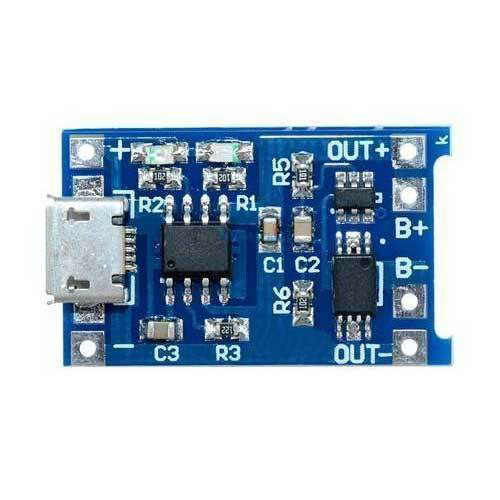
The TP4056 module typically has six pins. Below is the pinout and description:
| Pin Name | Description |
|---|---|
| IN+ | Positive input voltage (4.5V to 5.5V, typically connected to USB 5V) |
| IN- | Negative input voltage (ground) |
| BAT+ | Positive terminal of the lithium-ion battery |
| BAT- | Negative terminal of the lithium-ion battery |
| OUT+ | Positive output voltage (connected to the load, optional) |
| OUT- | Negative output voltage (connected to the load, optional) |
Usage Instructions
How to Use the TP4056 Charging Module in a Circuit
Connect the Input Voltage:
- Connect a 5V power source (e.g., USB power) to the
IN+andIN-pins. - Ensure the input voltage is within the range of 4.5V to 5.5V to avoid damaging the module.
- Connect a 5V power source (e.g., USB power) to the
Connect the Battery:
- Connect the positive terminal of the lithium-ion battery to the
BAT+pin. - Connect the negative terminal of the battery to the
BAT-pin.
- Connect the positive terminal of the lithium-ion battery to the
Optional Load Connection:
- If you want to power a load while charging the battery, connect the load to the
OUT+andOUT-pins.
- If you want to power a load while charging the battery, connect the load to the
Adjust the Charging Current (if needed):
- The default charging current is set to 1A. To adjust it, replace the onboard resistor (Rprog) with a resistor of the appropriate value. Use the formula: [ I_{CHG} = \frac{1200}{R_{PROG}} ] where ( I_{CHG} ) is the charging current in mA, and ( R_{PROG} ) is the resistor value in kΩ.
Monitor the Charging Status:
- The module has two onboard LEDs:
- Red LED (CHRG): Indicates the battery is charging.
- Blue LED (DONE): Indicates the battery is fully charged.
- The module has two onboard LEDs:
Important Considerations and Best Practices
- Battery Compatibility: Only use the TP4056 module with single-cell lithium-ion or lithium-polymer batteries.
- Heat Dissipation: The module may heat up during operation. Ensure proper ventilation or heat sinking if charging at high currents.
- Reverse Polarity Protection: The module does not have reverse polarity protection. Double-check all connections before powering the module.
- Avoid Overloading: Do not exceed the maximum input voltage (5.5V) or charging current (1A) to prevent damage.
Example: Using TP4056 with Arduino UNO
The TP4056 module can be used to charge a battery that powers an Arduino UNO. Below is an example of how to monitor the battery voltage using the Arduino:
// Example code to monitor battery voltage using Arduino UNO
const int batteryPin = A0; // Analog pin connected to BAT+ via a voltage divider
const float voltageDividerRatio = 2.0; // Adjust based on your resistor values
const float referenceVoltage = 5.0; // Arduino reference voltage (5V for UNO)

void setup() {
  Serial.begin(9600); // Initialize serial communication
  pinMode(batteryPin, INPUT); // Set the battery pin as input
}

void loop() {
  int rawValue = analogRead(batteryPin); // Read the analog value
  float batteryVoltage = (rawValue / 1023.0) * referenceVoltage * voltageDividerRatio;

  // Print the battery voltage to the Serial Monitor
  Serial.print("Battery Voltage: ");
  Serial.print(batteryVoltage);
  Serial.println(" V");

  delay(1000); // Wait for 1 second before the next reading
}
Note: Use a voltage divider to ensure the battery voltage does not exceed the Arduino's analog input range (0-5V). For example, use two resistors of equal value (e.g., 10kΩ each) to divide the voltage by 2.
Troubleshooting and FAQs
Common Issues and Solutions
The module is not charging the battery:
- Check the input voltage. Ensure it is within the range of 4.5V to 5.5V.
- Verify the battery connections (BAT+ and BAT-) are correct.
- Ensure the battery is not over-discharged (below 2.5V). If it is, pre-charge the battery using a low current.
The module overheats:
- Reduce the charging current by increasing the value of the Rprog resistor.
- Ensure proper ventilation or add a heatsink to the module.
The LEDs are not lighting up:
- Check the input power source and connections.
- Verify that the LEDs are not damaged.
The battery does not reach full charge:
- Ensure the battery is compatible with the TP4056 (single-cell lithium-ion or lithium-polymer).
- Check for a faulty or degraded battery.
FAQs
Q: Can I use the TP4056 module to charge multiple batteries in series?
A: No, the TP4056 is designed for single-cell lithium-ion batteries only. Charging multiple batteries in series requires a specialized charger with balancing capabilities.
Q: Can I power a load while charging the battery?
A: Yes, you can connect the load to the OUT+ and OUT- pins. However, ensure the load does not draw more current than the module can supply.
Q: How do I adjust the charging current?
A: Replace the onboard Rprog resistor with a resistor of the appropriate value. Use the formula ( I_{CHG} = \frac{1200}{R_{PROG}} ) to calculate the desired charging current.
Q: Is the TP4056 module safe to use?
A: Yes, the module includes overcharge protection and thermal regulation. However, always follow best practices to ensure safe operation.