
How to Use MCB Schneider 20A Single Pole: Examples, Pinouts, and Specs
 Design with MCB Schneider 20A Single Pole in Cirkit Designer
Introduction
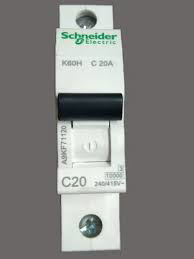
The MCB Schneider 20A Single Pole is a miniature circuit breaker (MCB) designed to protect electrical circuits from overloads and short circuits. With a current rating of 20 amps, this device is ideal for safeguarding residential, commercial, and industrial electrical systems. Its single-pole design makes it suitable for circuits with a single live wire, ensuring reliable protection in compact installations.
Explore Projects Built with MCB Schneider 20A Single Pole
 Open Project in Cirkit Designer
 Open Project in Cirkit Designer
 Open Project in Cirkit Designer
 Open Project in Cirkit Designer
Explore Projects Built with MCB Schneider 20A Single Pole
Open Project in Cirkit DesignerOpen Project in Cirkit DesignerOpen Project in Cirkit DesignerOpen Project in Cirkit DesignerCommon Applications and Use Cases
- Protection of lighting circuits in residential buildings
- Safeguarding power outlets in commercial spaces
- Industrial equipment protection for single-phase systems
- Use in distribution boards for branch circuit protection
Technical Specifications
The following table outlines the key technical details of the MCB Schneider 20A Single Pole:
| Parameter | Specification |
|---|---|
| Rated Current (In) | 20 A |
| Rated Voltage (Un) | 230/240 V AC |
| Number of Poles | 1 (Single Pole) |
| Breaking Capacity | 6 kA (at 230/240 V AC) |
| Tripping Curve | Type C (moderate inrush current) |
| Frequency | 50/60 Hz |
| Mounting Type | DIN Rail (35 mm) |
| Operating Temperature | -5°C to +55°C |
| Terminal Capacity | 1.5 mm² to 25 mm² (cable size) |
| Standards Compliance | IEC/EN 60898-1 |
Pin Configuration and Descriptions
The MCB Schneider 20A Single Pole has two primary connection points:
| Pin | Description |
|---|---|
| Line Terminal | Connects to the incoming live wire (power source) |
| Load Terminal | Connects to the outgoing live wire (to the load) |
Usage Instructions
How to Use the Component in a Circuit
Preparation:
- Ensure the power supply is turned off before installation.
- Verify that the circuit's load does not exceed the MCB's rated current (20 A).
Installation:
- Mount the MCB onto a standard 35 mm DIN rail in the distribution board.
- Connect the incoming live wire to the Line Terminal.
- Connect the outgoing live wire (to the load) to the Load Terminal.
- Tighten the terminal screws securely to ensure proper contact.
Operation:
- Switch the MCB to the "ON" position to allow current flow.
- In case of an overload or short circuit, the MCB will trip to the "OFF" position, cutting off the circuit.
Important Considerations and Best Practices
- Always use an appropriately rated MCB for the circuit's load to prevent nuisance tripping or insufficient protection.
- Ensure proper cable sizing to match the MCB's terminal capacity and the circuit's current rating.
- Periodically inspect the MCB for signs of wear, damage, or loose connections.
- Avoid using the MCB as a regular switch for turning circuits on and off, as this may reduce its lifespan.
Example: Connecting to an Arduino UNO
While MCBs are not directly connected to microcontrollers like the Arduino UNO, they can be used to protect circuits powered by the Arduino. For example, if you are powering a motor or other high-current device through a relay controlled by the Arduino, you can use the MCB to safeguard the motor's power supply.
// Example Arduino code to control a relay for a motor circuit protected by an MCB
const int relayPin = 7; // Pin connected to the relay module

void setup() {
  pinMode(relayPin, OUTPUT); // Set relay pin as output
  digitalWrite(relayPin, LOW); // Ensure relay is off at startup
}

void loop() {
  // Turn on the relay to power the motor
  digitalWrite(relayPin, HIGH);
  delay(5000); // Keep the motor running for 5 seconds

  // Turn off the relay to stop the motor
  digitalWrite(relayPin, LOW);
  delay(5000); // Wait for 5 seconds before restarting
}
Note: Ensure the MCB is installed on the motor's power supply line to protect against overloads or short circuits.
Troubleshooting and FAQs
Common Issues Users Might Face
MCB Trips Frequently:
- Cause: The connected load exceeds the MCB's rated current (20 A).
- Solution: Reduce the load or replace the MCB with one of a higher rating, if appropriate.
MCB Does Not Trip During a Fault:
- Cause: Faulty MCB or improper installation.
- Solution: Inspect the MCB for damage and verify correct wiring. Replace if necessary.
Loose Connections at Terminals:
- Cause: Improper tightening of terminal screws.
- Solution: Turn off the power, tighten the screws securely, and ensure proper contact.
MCB Feels Warm During Operation:
- Cause: High current flow near the rated limit or poor ventilation.
- Solution: Ensure the load is within the rated current and improve ventilation around the MCB.
Solutions and Tips for Troubleshooting
- Always turn off the power supply before inspecting or troubleshooting the MCB.
- Use a multimeter to check for continuity and proper voltage levels in the circuit.
- If the MCB trips without an apparent cause, inspect the connected devices for internal faults or short circuits.
- Replace the MCB if it shows signs of physical damage, such as cracks or burn marks.
By following this documentation, users can effectively install, operate, and maintain the MCB Schneider 20A Single Pole for reliable circuit protection.