
How to Use ebyte e220-400t22d: Examples, Pinouts, and Specs
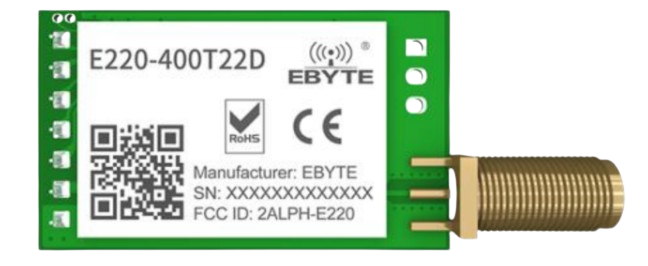
 Design with ebyte e220-400t22d in Cirkit Designer
Introduction
The Ebyte E220-400T22D is a low-power, long-range wireless transceiver module that operates in the 400 MHz frequency band. It is designed for applications requiring reliable data transmission over distances up to several kilometers. This module is ideal for IoT systems, remote monitoring, industrial automation, and smart agriculture, where robust and efficient communication is essential.
Explore Projects Built with ebyte e220-400t22d
 Open Project in Cirkit Designer
 Open Project in Cirkit Designer
 Open Project in Cirkit Designer
 Open Project in Cirkit Designer
Explore Projects Built with ebyte e220-400t22d
Open Project in Cirkit DesignerOpen Project in Cirkit DesignerOpen Project in Cirkit DesignerOpen Project in Cirkit DesignerCommon Applications
- Internet of Things (IoT) networks
- Remote monitoring and control systems
- Smart agriculture and environmental monitoring
- Industrial automation and telemetry
- Wireless sensor networks
Technical Specifications
Key Technical Details
| Parameter | Value |
|---|---|
| Frequency Range | 410 MHz – 441 MHz |
| Modulation Method | LoRa |
| Transmission Power | Up to 22 dBm (160 mW) |
| Communication Distance | Up to 5 km (line of sight) |
| Operating Voltage | 2.8 V – 5.5 V |
| Operating Current | 120 mA (transmitting at max power) |
| Sleep Current | < 5 µA |
| Interface | UART (TTL) |
| Baud Rate | 1200 bps – 115200 bps |
| Operating Temperature | -40°C to +85°C |
| Dimensions | 24 mm × 43 mm × 3 mm |
Pin Configuration and Descriptions
| Pin Number | Pin Name | Description |
|---|---|---|
| 1 | M0 | Mode selection pin (used to configure the module's operating mode) |
| 2 | M1 | Mode selection pin (used to configure the module's operating mode) |
| 3 | RXD | UART data input (connect to the TX pin of the microcontroller) |
| 4 | TXD | UART data output (connect to the RX pin of the microcontroller) |
| 5 | AUX | Auxiliary pin (indicates module status, e.g., busy or idle) |
| 6 | VCC | Power supply input (2.8 V – 5.5 V) |
| 7 | GND | Ground |
Usage Instructions
How to Use the E220-400T22D in a Circuit
- Power Supply: Connect the VCC pin to a stable power source (2.8 V – 5.5 V) and the GND pin to ground.
- UART Communication: Connect the RXD pin to the TX pin of your microcontroller and the TXD pin to the RX pin of your microcontroller.
- Mode Selection: Use the M0 and M1 pins to configure the module's operating mode:
- Mode 0 (Normal Mode): M0 = 0, M1 = 0
- Mode 1 (Wake-up Mode): M0 = 1, M1 = 0
- Mode 2 (Power-saving Mode): M0 = 0, M1 = 1
- Mode 3 (Configuration Mode): M0 = 1, M1 = 1
- AUX Pin: Monitor the AUX pin to check the module's status. For example, when the AUX pin is high, the module is idle or ready to transmit/receive data.
Important Considerations
- Use a proper antenna to ensure optimal communication range and signal quality.
- Avoid placing the module near sources of electromagnetic interference (EMI).
- Ensure the UART baud rate of the microcontroller matches the module's configured baud rate.
- Use decoupling capacitors near the VCC pin to stabilize the power supply.
Example: Connecting to an Arduino UNO
Below is an example of how to connect the E220-400T22D to an Arduino UNO and send data.
Wiring Diagram
| E220-400T22D Pin | Arduino UNO Pin |
|---|---|
| VCC | 5V |
| GND | GND |
| RXD | D3 (via voltage divider if using 5V logic) |
| TXD | D2 |
| M0 | D4 |
| M1 | D5 |
| AUX | D6 |
Arduino Code Example
#include <SoftwareSerial.h>

// Define pins for SoftwareSerial
#define E220_RX 2  // Arduino pin connected to E220 TXD
#define E220_TX 3  // Arduino pin connected to E220 RXD
#define M0 4       // Mode selection pin M0
#define M1 5       // Mode selection pin M1
#define AUX 6      // Auxiliary pin

SoftwareSerial e220Serial(E220_RX, E220_TX);

void setup() {
  // Initialize serial communication
  Serial.begin(9600);  // For debugging
  e220Serial.begin(9600);  // Communication with E220 module

  // Configure mode selection pins
  pinMode(M0, OUTPUT);
  pinMode(M1, OUTPUT);
  pinMode(AUX, INPUT);

  // Set module to Normal Mode (M0 = 0, M1 = 0)
  digitalWrite(M0, LOW);
  digitalWrite(M1, LOW);

  Serial.println("E220-400T22D Initialized");
}

void loop() {
  // Send data to the E220 module
  e220Serial.println("Hello, E220!");

  // Wait for the module to process the data
  delay(1000);

  // Check if data is received
  if (e220Serial.available()) {
    String receivedData = e220Serial.readString();
    Serial.print("Received: ");
    Serial.println(receivedData);
  }

  delay(2000);  // Delay between transmissions
}
Troubleshooting and FAQs
Common Issues
No Communication Between Module and Microcontroller
- Ensure the UART baud rate matches between the module and the microcontroller.
- Verify the wiring connections, especially RXD and TXD.
Poor Communication Range
- Check the antenna connection and ensure it is properly installed.
- Avoid obstacles or interference in the communication path.
Module Not Responding
- Verify the power supply voltage is within the specified range (2.8 V – 5.5 V).
- Check the AUX pin to ensure the module is not busy.
FAQs
Q: Can I use the E220-400T22D with a 3.3V microcontroller?
A: Yes, the module supports a wide operating voltage range (2.8 V – 5.5 V). Ensure proper logic level matching for UART communication.
Q: How do I configure the module's parameters (e.g., baud rate, channel)?
A: Set the module to Configuration Mode (M0 = 1, M1 = 1) and use AT commands via UART to configure parameters.
Q: What is the maximum communication distance?
A: The module can achieve up to 5 km in line-of-sight conditions with a proper antenna and minimal interference.
Q: Can I use multiple E220 modules in the same network?
A: Yes, you can configure multiple modules to operate on the same channel and address for communication.