
How to Use Trminal Strip 2x6: Examples, Pinouts, and Specs
 Design with Trminal Strip 2x6 in Cirkit Designer
Introduction
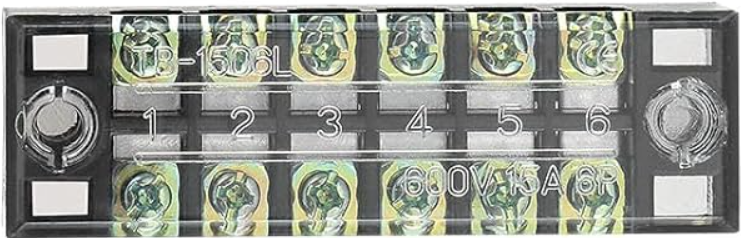
The Terminal Strip 2x6 is a versatile and reliable component designed for organizing and connecting multiple wires in a circuit. It features two rows of six connection points, allowing for a total of 12 connections. This component is commonly used in electrical and electronic projects to simplify wiring, ensure secure connections, and facilitate troubleshooting.
Explore Projects Built with Trminal Strip 2x6
 Open Project in Cirkit Designer
 Open Project in Cirkit Designer
 Open Project in Cirkit Designer
 Open Project in Cirkit Designer
Explore Projects Built with Trminal Strip 2x6
Open Project in Cirkit DesignerOpen Project in Cirkit DesignerOpen Project in Cirkit DesignerOpen Project in Cirkit DesignerCommon Applications and Use Cases
- Prototyping and testing circuits: Easily connect and disconnect wires during development.
- Industrial control panels: Organize wiring for clean and efficient layouts.
- Home automation systems: Manage connections for sensors, actuators, and controllers.
- Audio and speaker systems: Distribute signals to multiple devices.
- DIY electronics projects: Simplify wiring for hobbyist and educational purposes.
Technical Specifications
The following table outlines the key technical details of the Terminal Strip 2x6:
| Parameter | Specification |
|---|---|
| Number of Rows | 2 |
| Number of Connection Points per Row | 6 |
| Total Connection Points | 12 |
| Rated Voltage | Up to 300V AC/DC |
| Rated Current | Up to 15A |
| Material | Insulating base (e.g., plastic) with metal terminals |
| Terminal Type | Screw-type |
| Mounting Style | Panel mount or free-standing |
| Wire Compatibility | 22 AWG to 12 AWG |
| Operating Temperature | -40°C to 105°C |
Pin Configuration and Descriptions
The Terminal Strip 2x6 does not have traditional "pins" like an IC but instead features screw terminals for wire connections. Below is a description of its layout:
| Row | Connection Points | Description |
|---|---|---|
| Row 1 | 1 to 6 | Top row for wire connections |
| Row 2 | 7 to 12 | Bottom row for wire connections |
Each connection point is paired with a corresponding point in the opposite row, enabling easy bridging or isolation of circuits.
Usage Instructions
How to Use the Terminal Strip 2x6 in a Circuit
Prepare the Wires:
- Strip approximately 5-7mm of insulation from the ends of the wires you intend to connect.
- Ensure the exposed wire is clean and free of frayed strands.
Insert the Wires:
- Loosen the screw on the desired terminal using a screwdriver.
- Insert the stripped end of the wire into the terminal opening.
- Tighten the screw securely to clamp the wire in place. Avoid overtightening to prevent damage.
Connect the Circuit:
- Repeat the process for all wires, ensuring proper organization and labeling if necessary.
- Use jumpers or bridges to connect terminals if required for your circuit design.
Mount the Terminal Strip (if applicable):
- Secure the terminal strip to a panel or enclosure using screws or adhesive mounts.
Important Considerations and Best Practices
- Wire Gauge: Ensure the wire gauge is compatible with the terminal strip (22 AWG to 12 AWG).
- Tight Connections: Verify that all screws are tightened properly to avoid loose connections, which can cause electrical faults.
- Insulation: Use heat shrink tubing or electrical tape to insulate exposed wires near the terminal strip.
- Avoid Overloading: Do not exceed the rated voltage (300V) or current (15A) to prevent overheating or damage.
- Labeling: Use labels or color-coded wires to identify connections for easier troubleshooting.
Example: Connecting to an Arduino UNO
The Terminal Strip 2x6 can be used to organize connections between an Arduino UNO and external components such as sensors or LEDs. Below is an example of how to connect an LED to an Arduino using the terminal strip:
Circuit Setup
- Connect the Arduino's GND pin to one terminal on the strip (e.g., Row 1, Point 1).
- Connect the Arduino's digital pin 13 to another terminal (e.g., Row 1, Point 2).
- Connect the LED's cathode (-) to the terminal linked to GND.
- Connect the LED's anode (+) to the terminal linked to digital pin 13 via a 220-ohm resistor.
Arduino Code
// Simple LED Blink Example
// This code blinks an LED connected to digital pin 13 via a terminal strip.

void setup() {
  pinMode(13, OUTPUT); // Set pin 13 as an output
}

void loop() {
  digitalWrite(13, HIGH); // Turn the LED on
  delay(1000);            // Wait for 1 second
  digitalWrite(13, LOW);  // Turn the LED off
  delay(1000);            // Wait for 1 second
}
Troubleshooting and FAQs
Common Issues Users Might Face
Loose Connections:
- Problem: Wires are not securely clamped, causing intermittent connections.
- Solution: Ensure screws are tightened properly and wires are fully inserted.
Overheating:
- Problem: Terminal strip becomes hot during operation.
- Solution: Check that the current does not exceed the 15A rating. Use thicker wires if necessary.
Short Circuits:
- Problem: Adjacent terminals are accidentally bridged.
- Solution: Inspect connections for stray wire strands or accidental contact. Use insulation where needed.
Corrosion:
- Problem: Terminals show signs of rust or oxidation.
- Solution: Use terminal strips with corrosion-resistant materials or apply a protective coating.
FAQs
Q: Can I use the Terminal Strip 2x6 for high-frequency signals?
A: While the terminal strip can handle low-frequency signals, it is not ideal for high-frequency applications due to potential signal loss or interference.
Q: How do I bridge two terminals?
A: Use a jumper wire or a metal bridging plate to connect two terminals. Ensure the bridge is securely fastened.
Q: Can I mount the terminal strip on a DIN rail?
A: The Terminal Strip 2x6 is typically designed for panel mounting, but adapters may be available for DIN rail compatibility.
Q: Is the terminal strip suitable for outdoor use?
A: Standard terminal strips are not weatherproof. For outdoor applications, use a weatherproof enclosure to protect the strip.
By following this documentation, you can effectively use the Terminal Strip 2x6 in your projects while ensuring safe and reliable connections.