The DIY MORE PH-4502C pH probe module is a versatile sensor designed to measure the acidity or alkalinity (pH) of a solution. It features a glass electrode that detects hydrogen ion concentration and outputs an analog signal proportional to the pH level. This module is widely used in applications such as water quality monitoring, aquariums, hydroponics, and laboratory experiments. Its compatibility with microcontrollers like Arduino makes it an excellent choice for both hobbyists and professionals.
Explore Projects Built with pH probe module
Use Cirkit Designer to design, explore, and prototype these projects online. Some projects support real-time simulation. Click "Open Project" to start designing instantly!
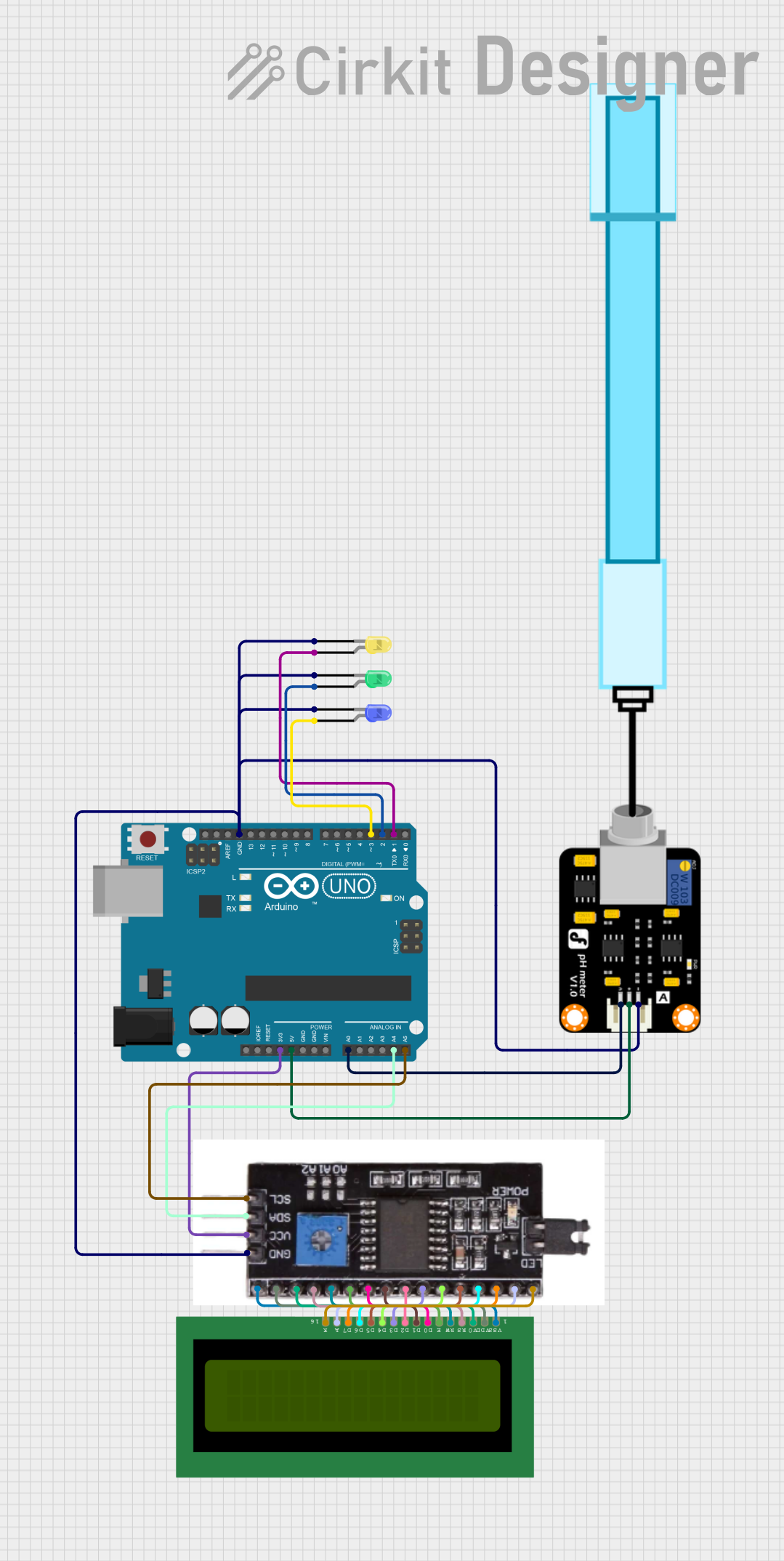
This circuit is designed to measure the pH level of a solution and display the value on an LCD screen. It uses an Arduino UNO microcontroller to read the pH sensor's signal and control three LEDs (yellow, green, blue) to indicate the pH level: yellow for acidic (pH < 5), green for neutral (pH 5-8), and blue for basic (pH > 8). The LCD displays a welcome message on startup and then continuously updates with the current pH value.
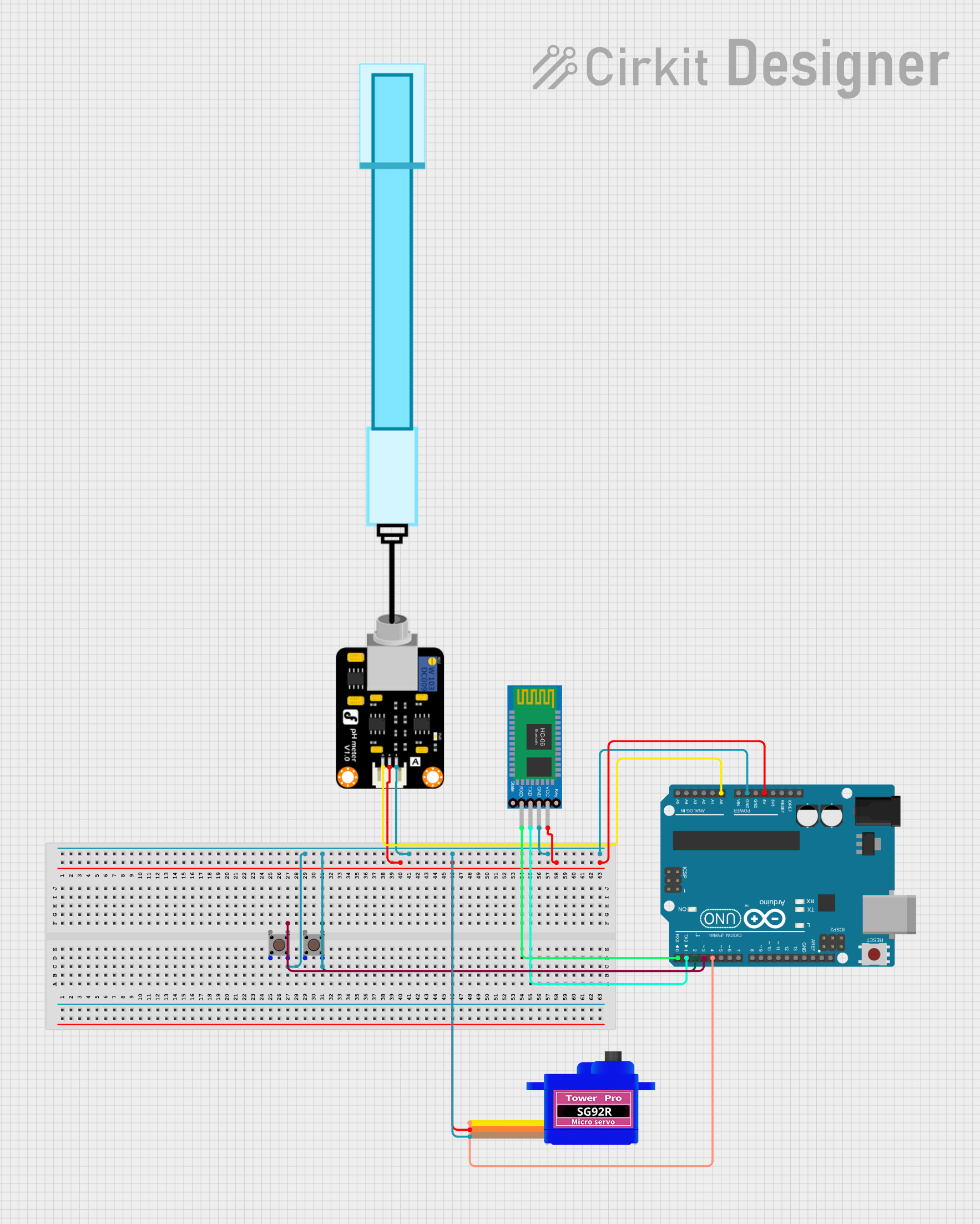
This circuit is designed to measure pH levels using a pH meter connected to an Arduino UNO, which processes the sensor data and controls a servomotor based on the readings. The Arduino also interfaces with a Bluetooth HC-06 module for wireless communication, potentially to send pH data to a remote device. Two pushbuttons are included in the circuit, likely for user input, and the servomotor's operation is presumably linked to the pH readings, although the specific functionality is not detailed in the provided code.
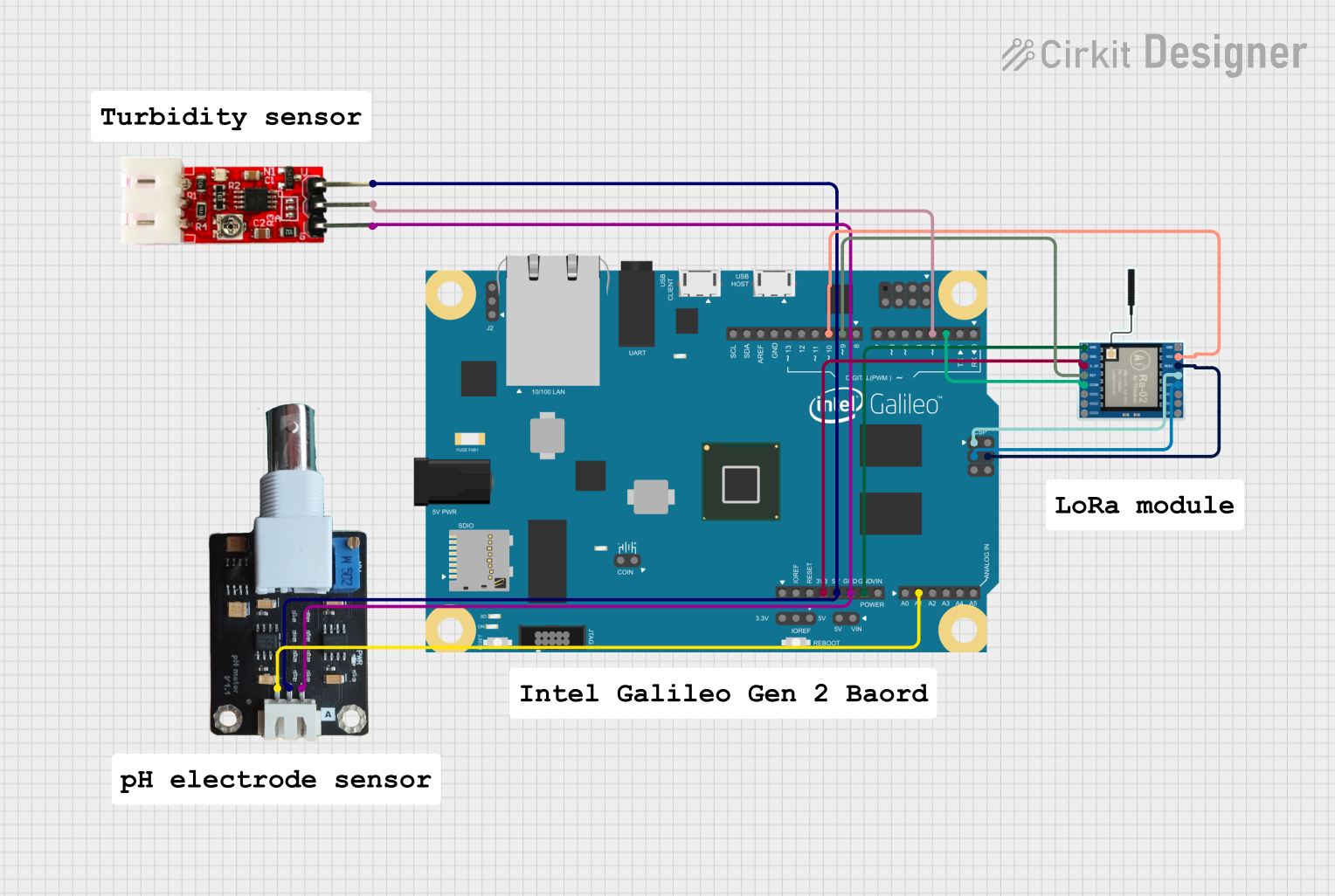
This circuit integrates an Intel Galileo microcontroller with a pH meter, a turbidity module, and a LoRa Ra-02 SX1278 module. The Intel Galileo reads data from the pH meter and turbidity module, and communicates wirelessly using the LoRa module. The system is designed for environmental monitoring applications, such as water quality assessment.
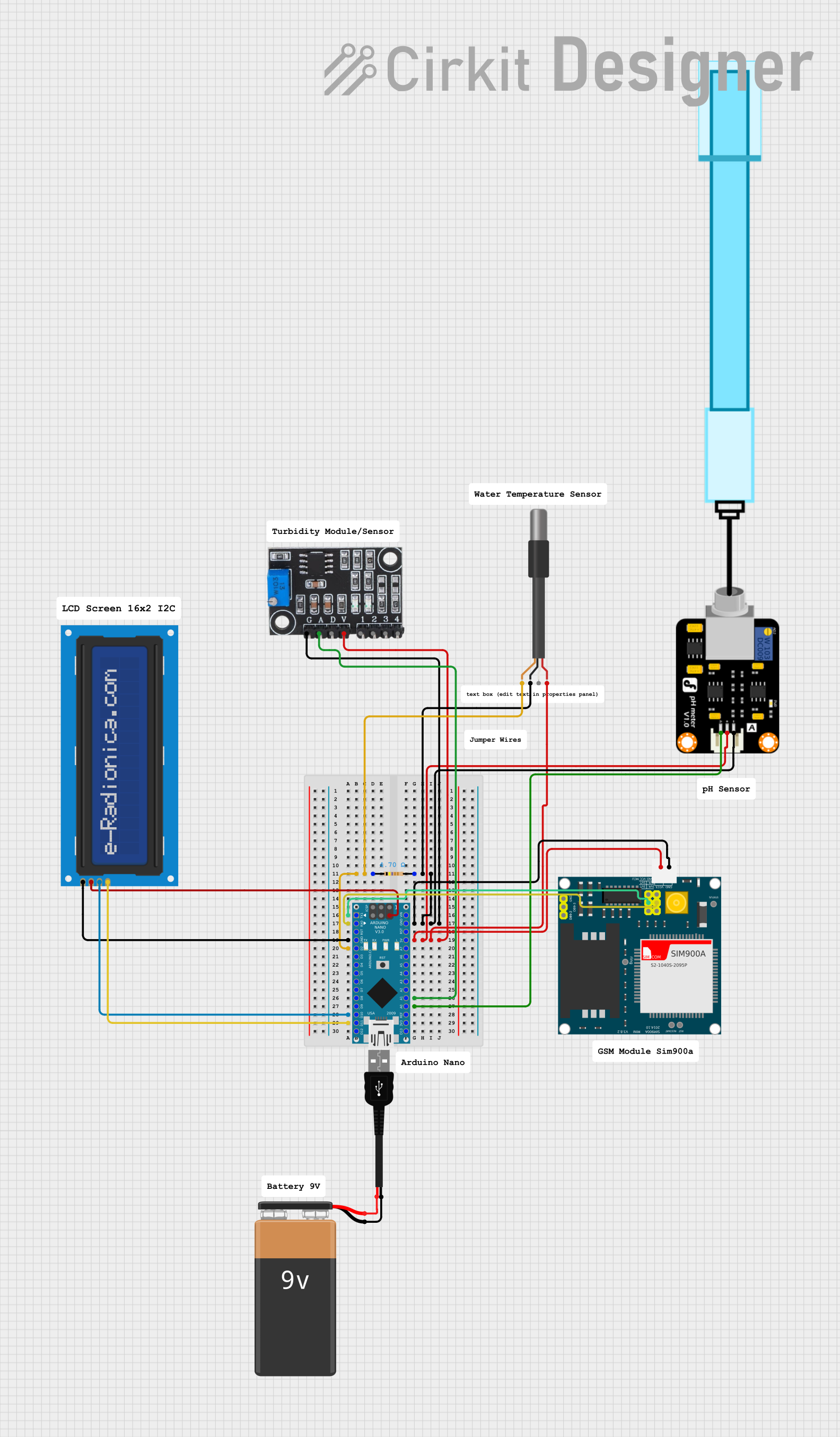
This circuit is designed for environmental monitoring, specifically for detecting harmful algal blooms (HABs) by measuring pH, turbidity, and temperature. It uses an Arduino Nano interfaced with a pH meter, turbidity module, and DS18B20 temperature sensor to collect data, and a SIM900A GSM module to send SMS alerts when the readings exceed predefined thresholds. The circuit also includes an LCD screen for displaying the measurements and a resistor for the temperature sensor setup.
Calibration: Single-point calibration using a potentiometer
Connector Type: BNC for the pH probe, 3-pin header for microcontroller interface
Pin Configuration and Descriptions
The PH-4502C module has a 3-pin interface for connecting to a microcontroller. The pin configuration is as follows:
Pin Name
Description
Notes
VCC
Power Supply (5V DC)
Connect to the 5V pin of the MCU
GND
Ground
Connect to the GND pin of the MCU
AO
Analog Output
Outputs a voltage proportional to the pH level
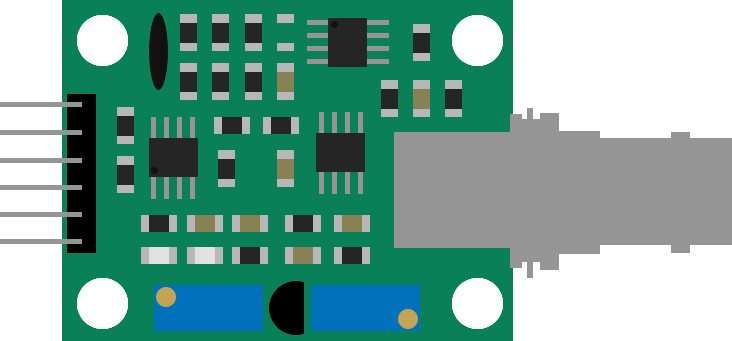
The module also includes a BNC connector for attaching the pH probe and a potentiometer for calibration.
Usage Instructions
Connecting the Module
Hardware Setup:
Connect the pH probe to the BNC connector on the module.
Use jumper wires to connect the module's pins to your microcontroller:
VCC to the 5V pin
GND to the GND pin
AO to an analog input pin (e.g., A0 on Arduino UNO)
Ensure the probe is immersed in the solution to be measured.
Calibration:
Immerse the pH probe in a standard buffer solution (e.g., pH 7.0).
Adjust the potentiometer on the module until the output voltage corresponds to the known pH value.
Arduino Example Code
Below is an example of how to use the PH-4502C module with an Arduino UNO:
// PH-4502C pH Probe Module Example Code
// Reads the pH value from the module and prints it to the Serial Monitor

const int pH_Pin = A0; // Analog pin connected to AO on the module
float voltage;         // Variable to store the analog voltage
float pH_Value;        // Variable to store the calculated pH value

void setup() {
  Serial.begin(9600); // Initialize serial communication at 9600 baud
  pinMode(pH_Pin, INPUT); // Set the pH pin as input
}

void loop() {
  // Read the analog voltage from the pH module
  int sensorValue = analogRead(pH_Pin);
  voltage = sensorValue * (5.0 / 1023.0); // Convert ADC value to voltage

  // Convert voltage to pH value (calibration may be required)
  pH_Value = 3.5 * voltage; // Example conversion factor (adjust as needed)

  // Print the pH value to the Serial Monitor
  Serial.print("pH Value: ");
  Serial.println(pH_Value);

  delay(1000); // Wait 1 second before the next reading
}
Important Considerations
Calibration: Regularly calibrate the module using standard buffer solutions to ensure accurate readings.
Probe Maintenance: Rinse the pH probe with distilled water after each use to prevent contamination.
Temperature Compensation: The module does not include automatic temperature compensation. For precise measurements, consider the effect of temperature on pH readings.
Avoid Drying: Store the pH probe in a storage solution to prevent the glass electrode from drying out.
Troubleshooting and FAQs
Common Issues
Inaccurate Readings:
Ensure the module is properly calibrated using a standard buffer solution.
Check for contamination or damage to the pH probe.
No Output Signal:
Verify all connections between the module and the microcontroller.
Ensure the module is powered with 5V DC.
Fluctuating Readings:
Ensure the probe is fully immersed in the solution.
Minimize electrical noise by using shorter wires and proper grounding.
FAQs
Q: Can the module measure pH values outside the 0-14 range?
A: No, the PH-4502C module is designed to measure pH values within the standard range of 0 to 14.
Q: How often should I calibrate the module?
A: Calibration frequency depends on usage, but it is recommended to calibrate before each use for critical applications.
Q: Can I use the module with a 3.3V microcontroller?
A: The module is designed for 5V operation. If using a 3.3V microcontroller, a level shifter may be required for proper operation.
Q: What should I do if the probe dries out?
A: Soak the probe in a storage solution or pH 4.0 buffer solution for several hours to rehydrate it.
By following this documentation, users can effectively integrate the PH-4502C pH probe module into their projects and achieve reliable pH measurements.

 Open Project in Cirkit Designer