
How to Use tps63802: Examples, Pinouts, and Specs
 Design with tps63802 in Cirkit Designer
Introduction
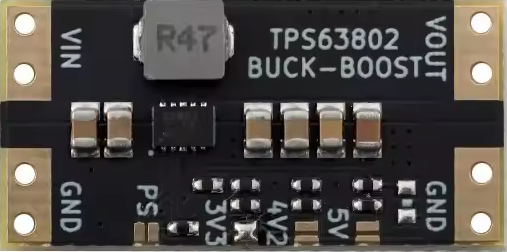
The TPS63802, manufactured by W, is a high-efficiency, step-down DC-DC converter designed for low-power applications. It is optimized for portable electronics and battery-powered devices, offering a wide input voltage range, low quiescent current, and adjustable output voltage. This component is ideal for applications requiring efficient power conversion and compact design.
Explore Projects Built with tps63802
 Open Project in Cirkit Designer
 Open Project in Cirkit Designer
 Open Project in Cirkit Designer
 Open Project in Cirkit Designer
Explore Projects Built with tps63802
Open Project in Cirkit DesignerOpen Project in Cirkit DesignerOpen Project in Cirkit DesignerOpen Project in Cirkit DesignerCommon Applications
- Wearable devices
- IoT (Internet of Things) devices
- Portable medical equipment
- Battery-powered sensors
- Smartphones and tablets
Technical Specifications
Key Specifications
| Parameter | Value |
|---|---|
| Input Voltage Range | 1.3 V to 5.5 V |
| Output Voltage Range | 1.8 V to 5.2 V (adjustable) |
| Maximum Output Current | 2 A |
| Efficiency | Up to 95% |
| Quiescent Current | 15 µA (typical) |
| Switching Frequency | 2.4 MHz |
| Package | 2.0 mm × 1.5 mm, 10-pin WSON |
Pin Configuration and Descriptions
The TPS63802 is available in a 10-pin WSON package. Below is the pinout and description:
| Pin Number | Pin Name | Description |
|---|---|---|
| 1 | VIN | Input voltage supply (1.3 V to 5.5 V). Connect to the power source. |
| 2 | EN | Enable pin. Drive high to enable the device, low to disable it. |
| 3 | FB | Feedback pin for output voltage regulation. Connect to a resistor divider. |
| 4 | VOUT | Regulated output voltage. Connect to the load. |
| 5 | GND | Ground. Connect to system ground. |
| 6 | PG | Power Good indicator. Open-drain output. |
| 7 | MODE/SYNC | Mode selection or external clock synchronization. |
| 8 | NC | No connection. Leave floating or connect to ground. |
| 9 | SW | Switching node. Connect to the inductor. |
| 10 | AGND | Analog ground. Connect to system ground. |
Usage Instructions
How to Use the TPS63802 in a Circuit
- Power Supply: Connect the input voltage (VIN) to a power source within the range of 1.3 V to 5.5 V. Use a decoupling capacitor (e.g., 10 µF) close to the VIN pin to reduce noise.
- Output Voltage Configuration: Use a resistor divider network connected to the FB pin to set the desired output voltage. Refer to the formula in the datasheet to calculate resistor values.
- Inductor Selection: Choose an inductor with a suitable current rating (e.g., 2.5 A) and low DC resistance for optimal efficiency.
- Enable Pin: Drive the EN pin high to enable the device. Pull it low to disable the converter.
- Mode Selection: Use the MODE/SYNC pin to select between automatic mode (high efficiency at light loads) or forced PWM mode (constant frequency operation).
- Output Capacitor: Connect a low-ESR capacitor (e.g., 22 µF) to the VOUT pin for stable operation.
Important Considerations
- Ensure proper grounding by connecting GND and AGND to a common ground plane.
- Place all external components (capacitors, resistors, and inductors) as close as possible to the IC to minimize noise and improve stability.
- Avoid exceeding the maximum input voltage (5.5 V) or output current (2 A) to prevent damage to the device.
Example: Using TPS63802 with Arduino UNO
The TPS63802 can be used to power an Arduino UNO from a battery source. Below is an example circuit and Arduino code to monitor the Power Good (PG) signal.
Circuit Connections
- Connect the battery (e.g., 3.7 V Li-ion) to the VIN pin.
- Set the output voltage to 5 V using a resistor divider on the FB pin.
- Connect the VOUT pin to the Arduino UNO's 5 V input.
- Connect the PG pin to a digital input pin on the Arduino (e.g., D2).
Arduino Code
// Arduino code to monitor the Power Good (PG) signal from TPS63802

const int pgPin = 2; // PG pin connected to Arduino digital pin 2

void setup() {
  pinMode(pgPin, INPUT); // Set PG pin as input
  Serial.begin(9600);    // Initialize serial communication
}

void loop() {
  int pgStatus = digitalRead(pgPin); // Read the PG pin status

  if (pgStatus == HIGH) {
    // PG is high, output voltage is within regulation
    Serial.println("Power Good: Output voltage is stable.");
  } else {
    // PG is low, output voltage is not within regulation
    Serial.println("Warning: Output voltage is out of regulation!");
  }

  delay(1000); // Wait for 1 second before checking again
}
Troubleshooting and FAQs
Common Issues and Solutions
No Output Voltage
- Cause: EN pin is not driven high.
- Solution: Ensure the EN pin is connected to a high logic level (e.g., VIN).
Output Voltage is Incorrect
- Cause: Incorrect resistor values in the feedback network.
- Solution: Verify the resistor divider values and recalculate using the formula in the datasheet.
Device Overheating
- Cause: Excessive load current or poor thermal management.
- Solution: Ensure the load current does not exceed 2 A. Improve PCB layout for better heat dissipation.
PG Pin Always Low
- Cause: Output voltage is not within the regulation range.
- Solution: Check the input voltage, load conditions, and feedback network.
FAQs
Q1: Can the TPS63802 operate with a 1.5 V battery?
A1: Yes, the TPS63802 supports input voltages as low as 1.3 V, making it suitable for single-cell batteries.
Q2: What is the maximum efficiency of the TPS63802?
A2: The TPS63802 can achieve up to 95% efficiency under optimal conditions.
Q3: Can I synchronize the TPS63802 with an external clock?
A3: Yes, the MODE/SYNC pin allows synchronization with an external clock signal.
Q4: Is the TPS63802 suitable for powering microcontrollers?
A4: Yes, the adjustable output voltage and high efficiency make it ideal for powering microcontrollers like Arduino or ESP32.
Q5: What is the recommended inductor value?
A5: A typical inductor value of 1 µH to 2.2 µH is recommended, depending on the application requirements.