
How to Use PCB Circuit 5x7: Examples, Pinouts, and Specs
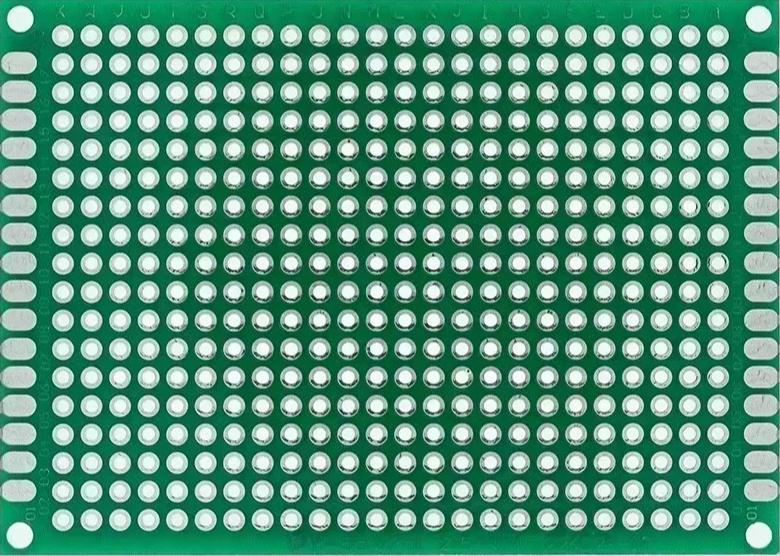
 Design with PCB Circuit 5x7 in Cirkit Designer
Introduction
The PCB Circuit 5x7 is a printed circuit board measuring 5x7 inches, designed for mounting and interconnecting electronic components. Manufactured in China, this versatile PCB is widely used in prototyping, DIY electronics projects, and small-scale production. Its standardized layout and durable construction make it an essential tool for hobbyists, students, and professionals alike.
Explore Projects Built with PCB Circuit 5x7
 Open Project in Cirkit Designer
 Open Project in Cirkit Designer
 Open Project in Cirkit Designer
 Open Project in Cirkit Designer
Explore Projects Built with PCB Circuit 5x7
Open Project in Cirkit DesignerOpen Project in Cirkit DesignerOpen Project in Cirkit DesignerOpen Project in Cirkit DesignerCommon Applications and Use Cases
- Prototyping and testing electronic circuits
- DIY electronics projects
- Educational purposes in electronics labs
- Small-scale production of custom circuits
- Repair and modification of existing circuits
Technical Specifications
The PCB Circuit 5x7 is a general-purpose board with the following specifications:
| Specification | Details |
|---|---|
| Dimensions | 5 x 7 inches (127 x 178 mm) |
| Material | FR4 (Flame Retardant 4) |
| Thickness | 1.6 mm |
| Copper Layer | Single-sided or double-sided |
| Hole Diameter | 1.0 mm |
| Hole Pitch | 2.54 mm (standard grid spacing) |
| Surface Finish | HASL (Hot Air Solder Leveling) |
| Solder Mask Color | Green (common) |
| Operating Temperature | -40°C to 105°C |
| Maximum Voltage | 250V |
Pin Configuration and Descriptions
The PCB Circuit 5x7 does not have predefined pins but features a grid of plated through-holes for mounting components. Below is a description of its layout:
| Feature | Description |
|---|---|
| Plated Through-Holes | Allow for secure mounting of components and soldering. |
| Grid Layout | Standard 2.54 mm pitch for compatibility with DIP components, headers, and connectors. |
| Copper Traces | Can be manually added using solder or conductive ink. |
| Edge Connectors | Optional, for interfacing with external circuits. |
Usage Instructions
How to Use the PCB Circuit 5x7 in a Circuit
Plan Your Circuit Layout:
- Sketch the circuit diagram and determine the placement of components on the PCB.
- Ensure components fit within the 5x7-inch area and align with the hole grid.
Insert Components:
- Place components (e.g., resistors, capacitors, ICs) into the plated through-holes.
- Ensure proper orientation for polarized components like diodes and electrolytic capacitors.
Solder Components:
- Use a soldering iron and solder wire to secure components to the PCB.
- Trim excess leads after soldering to avoid short circuits.
Add Connections:
- Use solder bridges, jumper wires, or copper traces to connect components as per the circuit design.
- Verify connections with a multimeter to ensure continuity.
Test the Circuit:
- Power the circuit and test its functionality.
- Make adjustments or repairs as needed.
Important Considerations and Best Practices
- Avoid Overheating: Excessive heat during soldering can damage the PCB or components.
- Use Flux: Apply flux to improve solder flow and ensure strong connections.
- Clean the PCB: Remove flux residue with isopropyl alcohol to prevent corrosion.
- Label Connections: Use a marker or silkscreen to label key points for easier debugging.
- Protect the Circuit: Use an enclosure to shield the PCB from dust, moisture, and physical damage.
Example: Connecting to an Arduino UNO
The PCB Circuit 5x7 can be used to create custom shields or breakout boards for an Arduino UNO. Below is an example of connecting an LED and a resistor to an Arduino using the PCB:
// Arduino code to blink an LED connected via the PCB Circuit 5x7
// Connect the LED's anode to pin 13 and cathode to GND through a 220-ohm resistor.

void setup() {
  pinMode(13, OUTPUT); // Set pin 13 as an output pin
}

void loop() {
  digitalWrite(13, HIGH); // Turn the LED on
  delay(1000);            // Wait for 1 second
  digitalWrite(13, LOW);  // Turn the LED off
  delay(1000);            // Wait for 1 second
}
Troubleshooting and FAQs
Common Issues Users Might Face
Cold Solder Joints:
- Issue: Poor electrical connections due to insufficient heat or solder.
- Solution: Reheat the joint and apply more solder for a shiny, smooth finish.
Short Circuits:
- Issue: Solder bridges between adjacent pads or traces.
- Solution: Use a solder wick or desoldering pump to remove excess solder.
Component Misalignment:
- Issue: Components are not properly aligned with the hole grid.
- Solution: Double-check placement before soldering and use a breadboard for prototyping.
Damaged PCB:
- Issue: Overheating or excessive force damages the copper layer or holes.
- Solution: Handle the PCB carefully and use appropriate soldering techniques.
FAQs
Q: Can I cut the PCB Circuit 5x7 to a smaller size?
A: Yes, the PCB can be cut using a hacksaw or PCB cutter. Ensure edges are smoothed to prevent shorts.
Q: Is the PCB compatible with surface-mount components?
A: While primarily designed for through-hole components, surface-mount components can be used with additional soldering techniques.
Q: How do I create custom traces on the PCB?
A: Use solder, jumper wires, or adhesive copper tape to create custom connections between components.
Q: Can I reuse the PCB after desoldering components?
A: Yes, but repeated soldering and desoldering may degrade the PCB's quality over time.