Cirkit Designer Logo
Cirkit Designer
Your all-in-one circuit design IDE
Home / 
Component Documentation

How to Use Traffic LED module2: Examples, Pinouts, and Specs
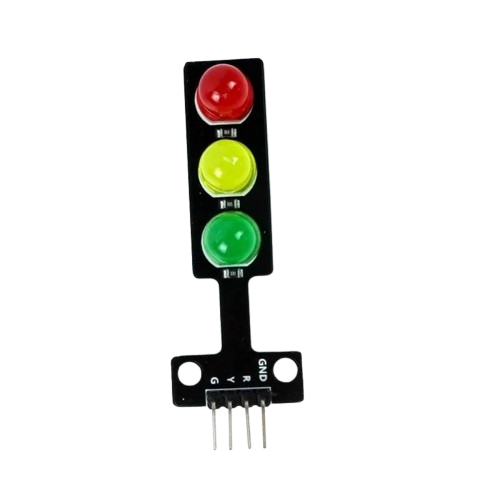

Image of Traffic LED module2
Cirkit Designer LogoDesign with Traffic LED module2 in Cirkit Designer

Introduction

The Traffic LED Module2 is a versatile electronic component designed for signaling and traffic management applications. It features bright, high-visibility LEDs that can be used to indicate traffic conditions, directions, or warnings. This module is commonly employed in traffic lights, road signs, and other safety systems to enhance visibility and ensure smooth traffic flow. Its compact design and ease of integration make it suitable for both small-scale and large-scale projects.

Explore Projects Built with Traffic LED module2
Use Cirkit Designer to design, explore, and prototype these projects online. Some projects support real-time simulation. Click "Open Project" to start designing instantly!
Arduino UNO Controlled Traffic Light System
Image of rbt: A project utilizing Traffic LED module2 in a practical application
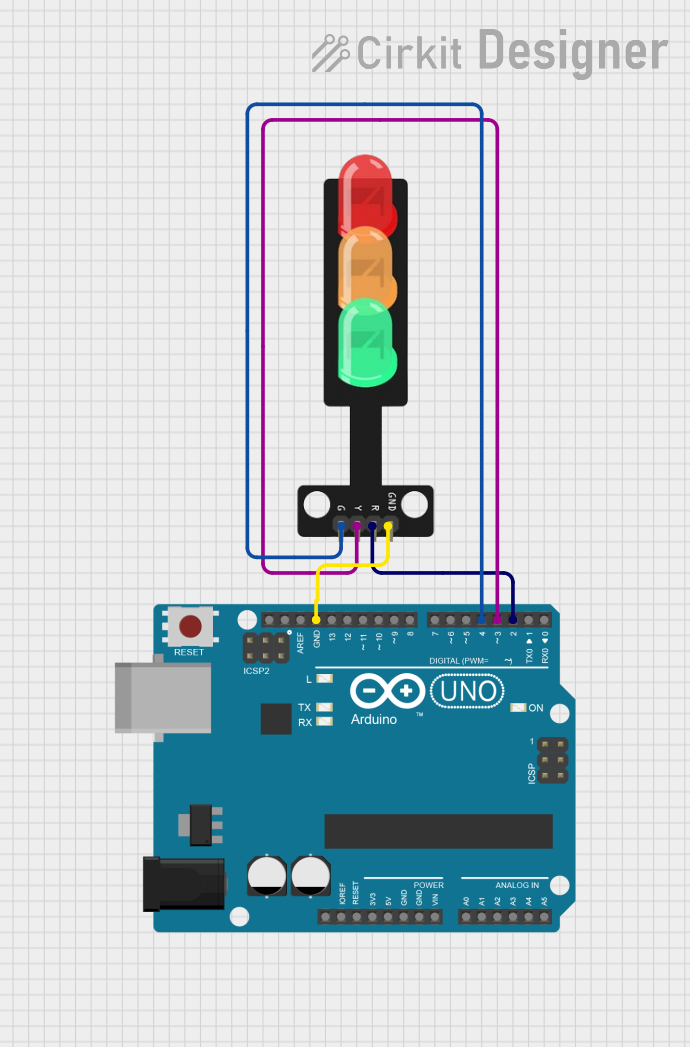
This circuit is designed to simulate a traffic light system using an Arduino UNO microcontroller and a traffic light module with green, yellow, and red LEDs. The Arduino sequentially illuminates the LEDs to mimic traffic light behavior: green for 5 seconds, yellow for 2 seconds, and red for 5 seconds, in a continuous loop. The ground (GND) of the traffic light module is connected to the GND of the Arduino, and each LED is controlled by a separate digital output pin on the Arduino (D4 for green, D3 for yellow, D2 for red).
Cirkit Designer LogoOpen Project in Cirkit Designer
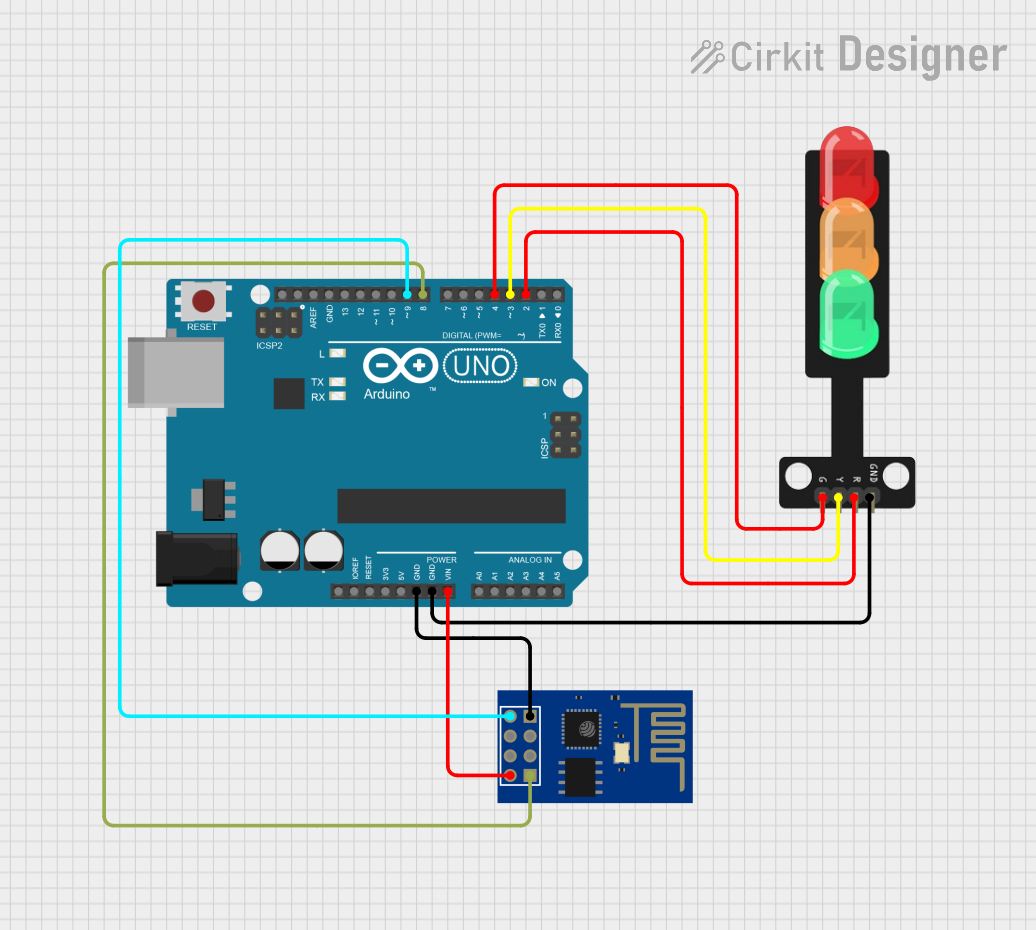
Arduino UNO and ESP8266 Wi-Fi Controlled Traffic Light System
Image of camera sensor: A project utilizing Traffic LED module2 in a practical application
This circuit is a traffic light controller system using an Arduino UNO, which controls a traffic light module with red, yellow, and green LEDs. The Arduino is also connected to an ESP8266 WiFi module for communication, allowing the system to send status updates after each traffic light cycle.
Cirkit Designer LogoOpen Project in Cirkit Designer
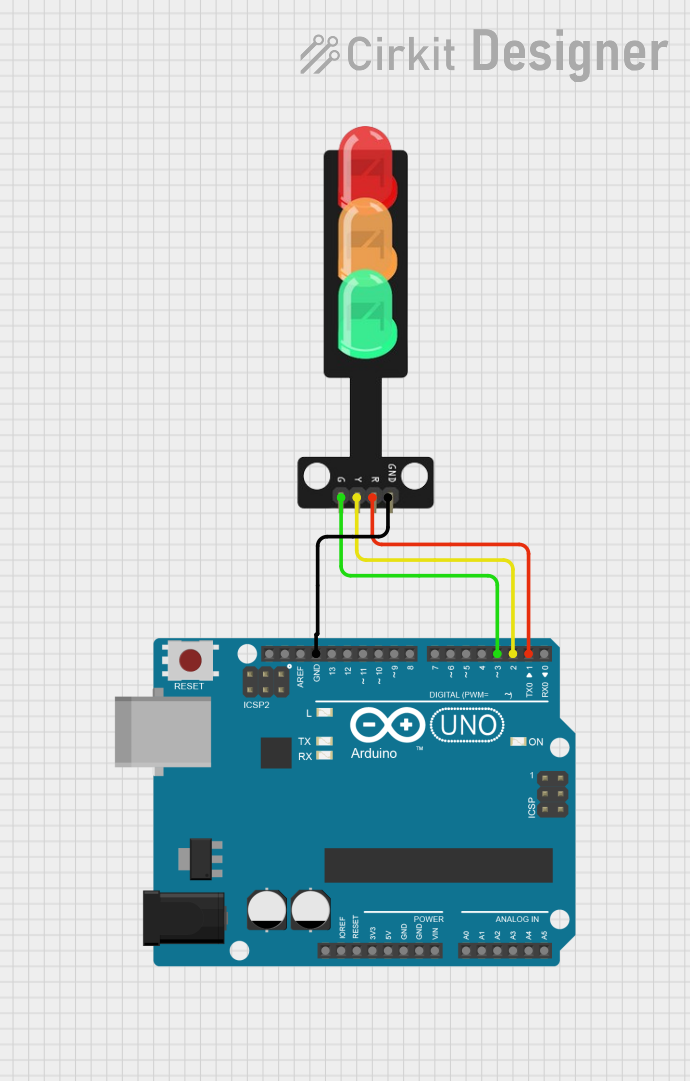
Arduino UNO Controlled Traffic Light Simulation
Image of traffic light (1): A project utilizing Traffic LED module2 in a practical application
This circuit is designed to simulate a traffic light using an Arduino UNO and a traffic light module with three LEDs (Red, Yellow, Green). The Arduino cycles through the traffic light sequence by turning on the Green LED for 5 seconds, followed by the Yellow LED for 2 seconds, and then the Red LED for 5 seconds, in a continuous loop. The LEDs are controlled through digital pins D1, D2, and D3 on the Arduino, which correspond to the Red, Yellow, and Green LEDs on the traffic light module, respectively.
Cirkit Designer LogoOpen Project in Cirkit Designer
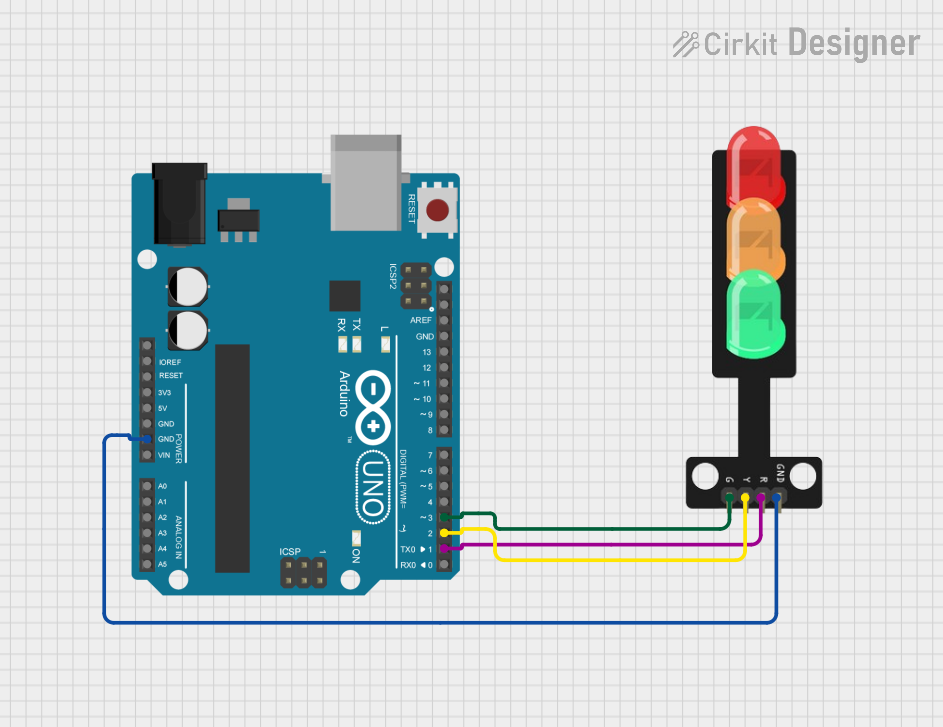
Arduino UNO Controlled Traffic Light System
Image of traffic light red 1: A project utilizing Traffic LED module2 in a practical application
This circuit is designed to simulate a traffic light system using an Arduino UNO and a traffic light module with Red, Yellow, and Green LEDs. The Arduino is programmed to control the LEDs in a typical traffic light sequence: Red for 5 seconds, Yellow for 2 seconds, and Green for 5 seconds, repeating indefinitely. The Arduino's digital pins D1, D2, and D3 are connected to the Red, Yellow, and Green LEDs of the traffic light, respectively, and a common ground is shared between the Arduino and the traffic light module.
Cirkit Designer LogoOpen Project in Cirkit Designer

Explore Projects Built with Traffic LED module2

Use Cirkit Designer to design, explore, and prototype these projects online. Some projects support real-time simulation. Click "Open Project" to start designing instantly!
Image of rbt: A project utilizing Traffic LED module2 in a practical application
Arduino UNO Controlled Traffic Light System
This circuit is designed to simulate a traffic light system using an Arduino UNO microcontroller and a traffic light module with green, yellow, and red LEDs. The Arduino sequentially illuminates the LEDs to mimic traffic light behavior: green for 5 seconds, yellow for 2 seconds, and red for 5 seconds, in a continuous loop. The ground (GND) of the traffic light module is connected to the GND of the Arduino, and each LED is controlled by a separate digital output pin on the Arduino (D4 for green, D3 for yellow, D2 for red).
Cirkit Designer LogoOpen Project in Cirkit Designer
Image of camera sensor: A project utilizing Traffic LED module2 in a practical application
Arduino UNO and ESP8266 Wi-Fi Controlled Traffic Light System
This circuit is a traffic light controller system using an Arduino UNO, which controls a traffic light module with red, yellow, and green LEDs. The Arduino is also connected to an ESP8266 WiFi module for communication, allowing the system to send status updates after each traffic light cycle.
Cirkit Designer LogoOpen Project in Cirkit Designer
Image of traffic light (1): A project utilizing Traffic LED module2 in a practical application
Arduino UNO Controlled Traffic Light Simulation
This circuit is designed to simulate a traffic light using an Arduino UNO and a traffic light module with three LEDs (Red, Yellow, Green). The Arduino cycles through the traffic light sequence by turning on the Green LED for 5 seconds, followed by the Yellow LED for 2 seconds, and then the Red LED for 5 seconds, in a continuous loop. The LEDs are controlled through digital pins D1, D2, and D3 on the Arduino, which correspond to the Red, Yellow, and Green LEDs on the traffic light module, respectively.
Cirkit Designer LogoOpen Project in Cirkit Designer
Image of traffic light red 1: A project utilizing Traffic LED module2 in a practical application
Arduino UNO Controlled Traffic Light System
This circuit is designed to simulate a traffic light system using an Arduino UNO and a traffic light module with Red, Yellow, and Green LEDs. The Arduino is programmed to control the LEDs in a typical traffic light sequence: Red for 5 seconds, Yellow for 2 seconds, and Green for 5 seconds, repeating indefinitely. The Arduino's digital pins D1, D2, and D3 are connected to the Red, Yellow, and Green LEDs of the traffic light, respectively, and a common ground is shared between the Arduino and the traffic light module.
Cirkit Designer LogoOpen Project in Cirkit Designer

Common Applications

  • Traffic light systems for intersections
  • Pedestrian crossing signals
  • Roadside warning signs
  • Directional indicators in parking lots or construction zones
  • Educational projects and prototyping

Technical Specifications

The following table outlines the key technical details of the Traffic LED Module2:

Parameter Value
Operating Voltage 5V DC
Operating Current 20mA per LED (typical)
LED Colors Red, Yellow, Green
Dimensions 30mm x 70mm x 10mm
Mounting Type PCB-mounted or standalone
Control Method Digital I/O pins or PWM

Pin Configuration

The Traffic LED Module2 has a simple pinout for easy integration. The table below describes each pin:

Pin Name Description
1 VCC Power supply input (5V DC)
2 GND Ground connection
3 RED Control pin for the red LED
4 YELLOW Control pin for the yellow LED
5 GREEN Control pin for the green LED

Usage Instructions

How to Use the Traffic LED Module2 in a Circuit

  1. Power Connection: Connect the VCC pin to a 5V DC power source and the GND pin to the ground of your circuit.
  2. Control Pins: Use digital output pins from a microcontroller (e.g., Arduino UNO) to control the RED, YELLOW, and GREEN LEDs. Set the corresponding pin HIGH to turn on the LED and LOW to turn it off.
  3. Resistors: It is recommended to use current-limiting resistors (e.g., 220Ω) in series with each control pin to prevent excessive current draw.

Example Arduino Code

Below is an example code snippet to control the Traffic LED Module2 using an Arduino UNO:

// Pin definitions for the Traffic LED Module2
const int redPin = 3;    // Connect to the RED pin of the module
const int yellowPin = 4; // Connect to the YELLOW pin of the module
const int greenPin = 5;  // Connect to the GREEN pin of the module

void setup() {
  // Set the LED pins as outputs
  pinMode(redPin, OUTPUT);
  pinMode(yellowPin, OUTPUT);
  pinMode(greenPin, OUTPUT);
}

void loop() {
  // Simulate a traffic light sequence

  // Turn on the green LED for 5 seconds
  digitalWrite(greenPin, HIGH);
  delay(5000); // Wait for 5 seconds
  digitalWrite(greenPin, LOW);

  // Turn on the yellow LED for 2 seconds
  digitalWrite(yellowPin, HIGH);
  delay(2000); // Wait for 2 seconds
  digitalWrite(yellowPin, LOW);

  // Turn on the red LED for 5 seconds
  digitalWrite(redPin, HIGH);
  delay(5000); // Wait for 5 seconds
  digitalWrite(redPin, LOW);
}

Best Practices

  • Always use current-limiting resistors to protect the LEDs from overcurrent.
  • Ensure the power supply provides a stable 5V DC to avoid damaging the module.
  • Avoid exposing the module to extreme temperatures or moisture to maintain its longevity.

Troubleshooting and FAQs

Common Issues and Solutions

  1. LEDs Not Lighting Up

    • Cause: Incorrect wiring or insufficient power supply.
    • Solution: Double-check the connections and ensure the VCC and GND pins are properly connected to a 5V power source.
  2. LEDs Flickering

    • Cause: Unstable power supply or loose connections.
    • Solution: Use a regulated power supply and ensure all connections are secure.
  3. One LED Not Working

    • Cause: Faulty LED or control pin.
    • Solution: Test the LED by connecting it directly to the power supply with a resistor. If it works, check the microcontroller's output pin.
  4. Module Overheating

    • Cause: Excessive current draw due to missing resistors.
    • Solution: Always use appropriate current-limiting resistors in the circuit.

FAQs

Q: Can I use the Traffic LED Module2 with a 3.3V microcontroller?
A: Yes, but the brightness of the LEDs may be reduced. Ensure the control pins are compatible with 3.3V logic levels.

Q: Can I control the LEDs using PWM for brightness adjustment?
A: Yes, the module supports PWM control for dimming the LEDs. Use the analogWrite() function on Arduino to adjust brightness.

Q: Is the module waterproof?
A: No, the Traffic LED Module2 is not waterproof. Use a protective enclosure for outdoor applications.

Q: Can I use this module for AC-powered systems?
A: No, the module is designed for DC-powered systems only. Use a DC power supply for operation.