
How to Use 2 POLE MCB: Examples, Pinouts, and Specs
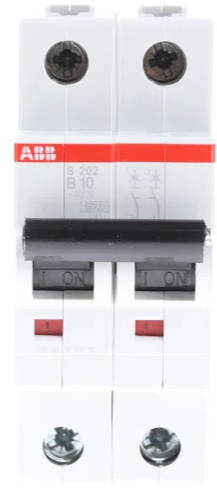
 Design with 2 POLE MCB in Cirkit Designer
Introduction
The ABB System Pro M Compact S200 Miniature Circuit Breaker (MCB) is a 2-pole safety device designed to protect electrical circuits from overloads and short circuits. It ensures the safety of both live and neutral wires in a circuit, making it an essential component in residential, commercial, and industrial electrical installations. This MCB is compact, reliable, and easy to install, providing robust protection for electrical systems.
Explore Projects Built with 2 POLE MCB
 Open Project in Cirkit Designer
 Open Project in Cirkit Designer
 Open Project in Cirkit Designer
 Open Project in Cirkit Designer
Explore Projects Built with 2 POLE MCB
Open Project in Cirkit DesignerOpen Project in Cirkit DesignerOpen Project in Cirkit DesignerOpen Project in Cirkit DesignerCommon Applications and Use Cases
- Residential Installations: Protects household wiring and appliances from electrical faults.
- Commercial Buildings: Ensures safety in office and retail electrical systems.
- Industrial Applications: Safeguards machinery and equipment from electrical damage.
- Renewable Energy Systems: Used in solar and wind power installations for circuit protection.
- Control Panels: Provides protection in electrical distribution boards and control panels.
Technical Specifications
The following table outlines the key technical details of the ABB System Pro M Compact S200 2 Pole MCB:
| Parameter | Specification |
|---|---|
| Manufacturer | ABB |
| Part ID | ABB System Pro M Compact S200 |
| Number of Poles | 2 |
| Rated Voltage | Up to 440 V AC |
| Rated Current | 0.5 A to 63 A (varies by model) |
| Breaking Capacity | 6 kA to 25 kA (depending on variant) |
| Tripping Characteristics | B, C, D curves (for different load types) |
| Frequency | 50/60 Hz |
| Mounting Type | DIN Rail Mount |
| Operating Temperature | -25°C to +55°C |
| Standards Compliance | IEC/EN 60898-1, IEC/EN 60947-2 |
Pin Configuration and Descriptions
The ABB 2 Pole MCB has the following terminal configuration:
| Pin/Terminal | Description |
|---|---|
| Terminal 1 (Input) | Connects to the live wire of the incoming power supply. |
| Terminal 2 (Input) | Connects to the neutral wire of the incoming power supply. |
| Terminal 3 (Output) | Connects to the live wire of the outgoing circuit/load. |
| Terminal 4 (Output) | Connects to the neutral wire of the outgoing circuit/load. |
Usage Instructions
How to Use the Component in a Circuit
Preparation:
- Ensure the power supply is turned off before installation.
- Verify the rated current and voltage of the MCB match the circuit requirements.
Installation:
- Mount the MCB onto a standard DIN rail in the distribution board.
- Connect the incoming live and neutral wires to the input terminals (Terminal 1 and Terminal 2).
- Connect the outgoing live and neutral wires to the output terminals (Terminal 3 and Terminal 4).
- Tighten all terminal screws securely to ensure proper electrical contact.
Operation:
- Switch the MCB to the "ON" position to energize the circuit.
- In case of an overload or short circuit, the MCB will trip automatically to the "OFF" position.
Important Considerations and Best Practices
- Always select an MCB with the appropriate current rating and tripping curve for your application.
- Avoid overloading the circuit beyond the MCB's rated capacity.
- Periodically inspect the MCB for signs of wear or damage.
- Ensure proper grounding of the electrical system for enhanced safety.
- For renewable energy systems, verify compatibility with DC circuits if required.
Arduino UNO Integration
While MCBs are not directly interfaced with microcontrollers like the Arduino UNO, they can be used in circuits that power Arduino-based systems. For example, an MCB can protect the power supply line feeding an Arduino project.
Here is an example of how an MCB might be used in a circuit powering an Arduino UNO:
Power Supply (AC) --> MCB --> Step-Down Transformer --> DC Power Supply --> Arduino UNO
Troubleshooting and FAQs
Common Issues Users Might Face
MCB Trips Frequently:
- Cause: Overloaded circuit or short circuit.
- Solution: Reduce the load on the circuit or check for wiring faults.
MCB Does Not Trip During a Fault:
- Cause: Incorrect current rating or faulty MCB.
- Solution: Verify the MCB's rating and replace it if necessary.
Loose Connections:
- Cause: Improperly tightened terminal screws.
- Solution: Ensure all connections are secure and properly tightened.
MCB Feels Hot During Operation:
- Cause: Overloading or poor ventilation.
- Solution: Reduce the load or improve ventilation around the MCB.
Solutions and Tips for Troubleshooting
- Use a multimeter to check for continuity and voltage levels in the circuit.
- Inspect the wiring for any visible damage or loose connections.
- Replace the MCB if it shows signs of physical damage or wear.
- Consult the ABB technical support team or documentation for advanced troubleshooting.
By following this documentation, users can safely and effectively utilize the ABB System Pro M Compact S200 2 Pole MCB in their electrical installations.