
Cirkit Designer
Your all-in-one circuit design IDE
Home /
Component Documentation
How to Use Seeed Studio XIAO ESP32-S3 Sense: Examples, Pinouts, and Specs
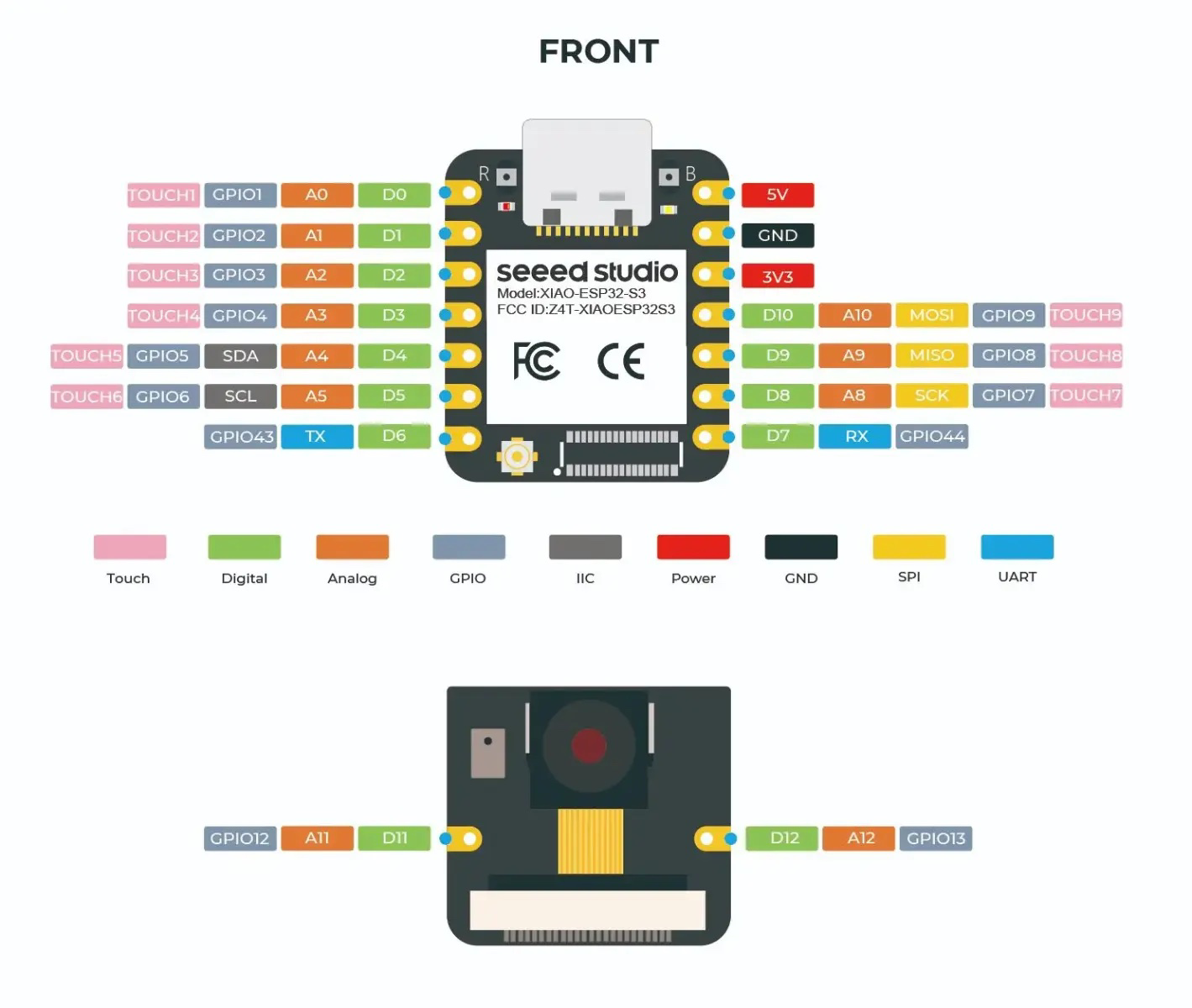
 Design with Seeed Studio XIAO ESP32-S3 Sense in Cirkit Designer
Introduction
The Seeed Studio XIAO ESP32-S3 Sense is a compact microcontroller board powered by the ESP32-S3 chip. It features dual-core Xtensa LX7 processors, integrated Wi-Fi and Bluetooth 5.0 connectivity, and onboard sensors, making it ideal for IoT, edge computing, and AI applications. Its small form factor and rich feature set make it suitable for wearable devices, smart home systems, and portable electronics.
Explore Projects Built with Seeed Studio XIAO ESP32-S3 Sense
Xiao ESP32 C3 Based Temperature and Humidity Monitoring System
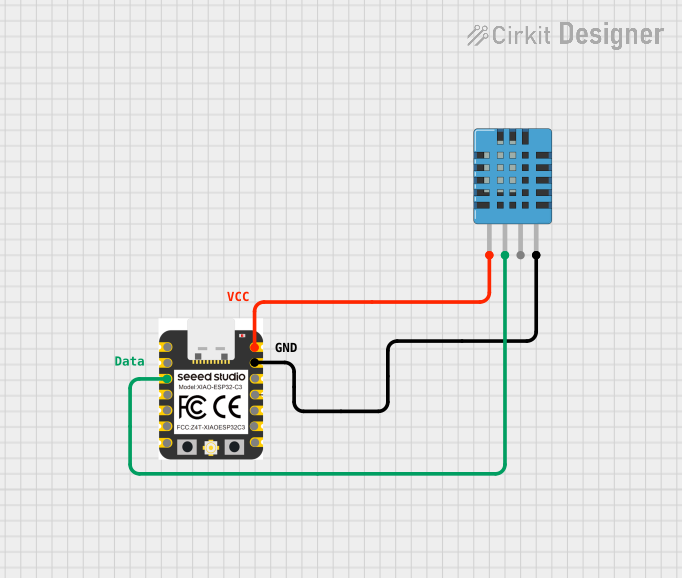
This circuit features a Xiao ESP32 C3 microcontroller connected to a DHT11 Humidity and Temperature Sensor. The ESP32 C3 provides power to the DHT11 sensor through its VUSB pin and receives data from the sensor's DATA pin via the ESP32's D2 pin. The circuit is designed to measure environmental temperature and humidity, with the microcontroller processing and potentially communicating the sensor data.
Open Project in Cirkit DesignerESP32-Based Environmental Monitoring System with Motion Detection
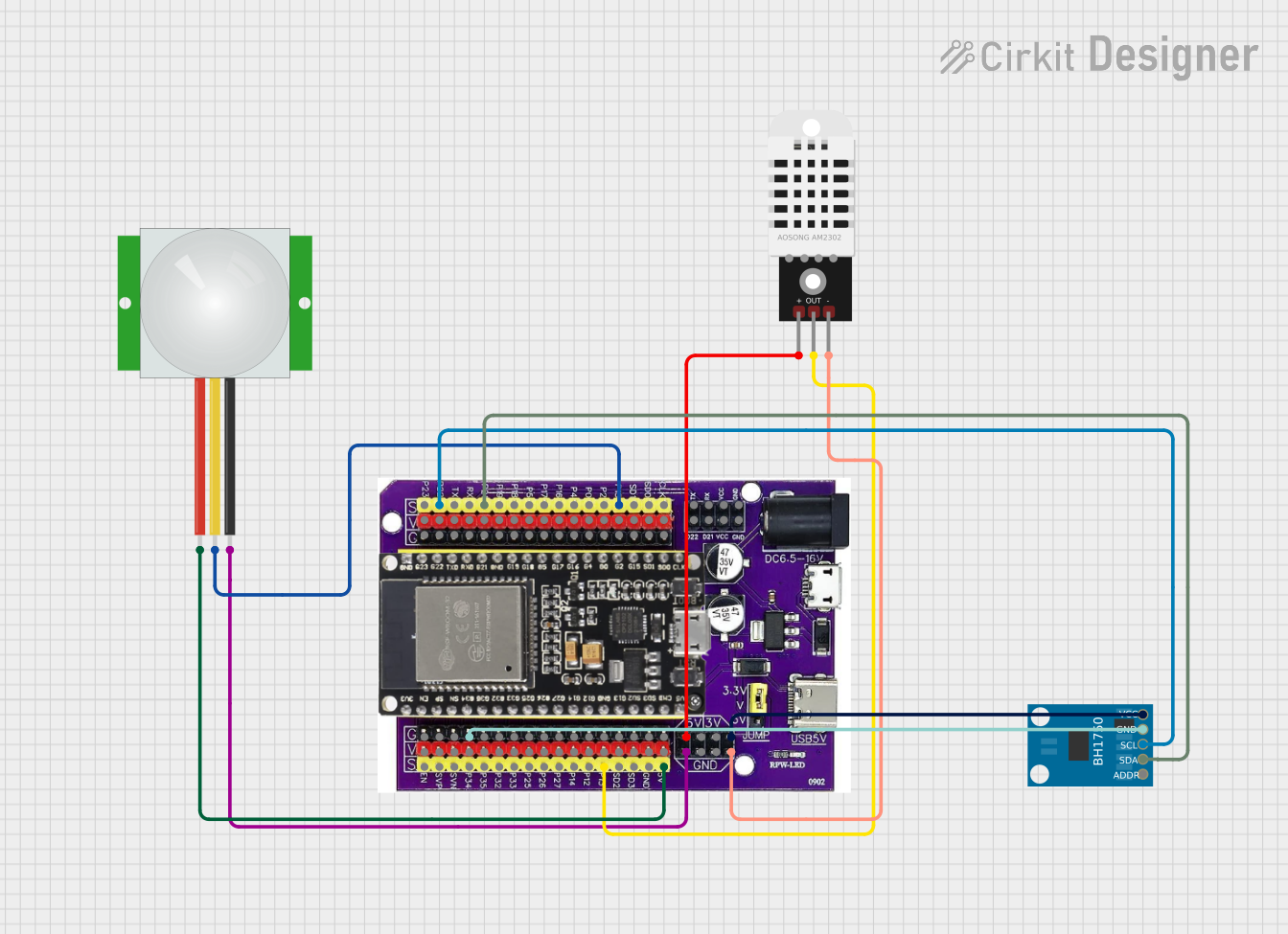
This circuit features an ESP32 microcontroller on a baseboard that interfaces with a PIR sensor for motion detection, a DHT22 sensor for measuring temperature and humidity, and a BH1750 sensor for detecting ambient light levels. The ESP32 is configured to communicate with the BH1750 using I2C protocol, with GPIO22 and GPIO21 serving as the SCL and SDA lines, respectively. Power is supplied to the sensors from the ESP32's voltage output pins, and sensor outputs are connected to designated GPIO pins for data acquisition.
Open Project in Cirkit DesignerESP32C3 and LoRa-Enabled Environmental Sensing Node
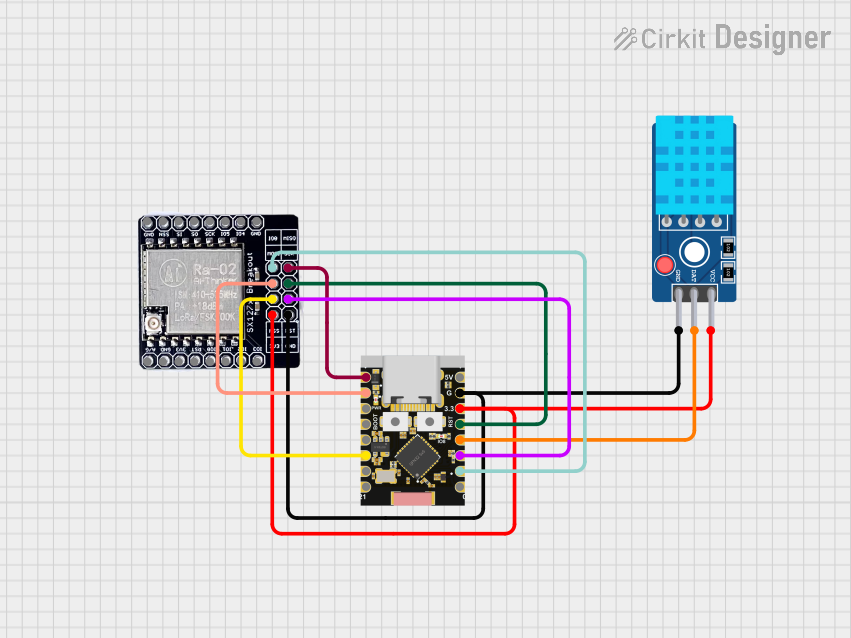
This circuit features an ESP32C3 Supermini microcontroller connected to a LORA_RA02 module and a DHT11 temperature and humidity sensor. The ESP32C3 handles communication with the LORA module via SPI (using GPIO05, GPIO06, GPIO10, and GPIO04 for MISO, MOSI, NSS, and SCK respectively) and GPIO01 and GPIO02 for additional control signals. The DHT11 sensor is interfaced through GPIO03 for data reading, and all components share a common power supply through the 3.3V and GND pins.
Open Project in Cirkit DesignerESP32-Based Smart Weather Station with Wi-Fi Connectivity
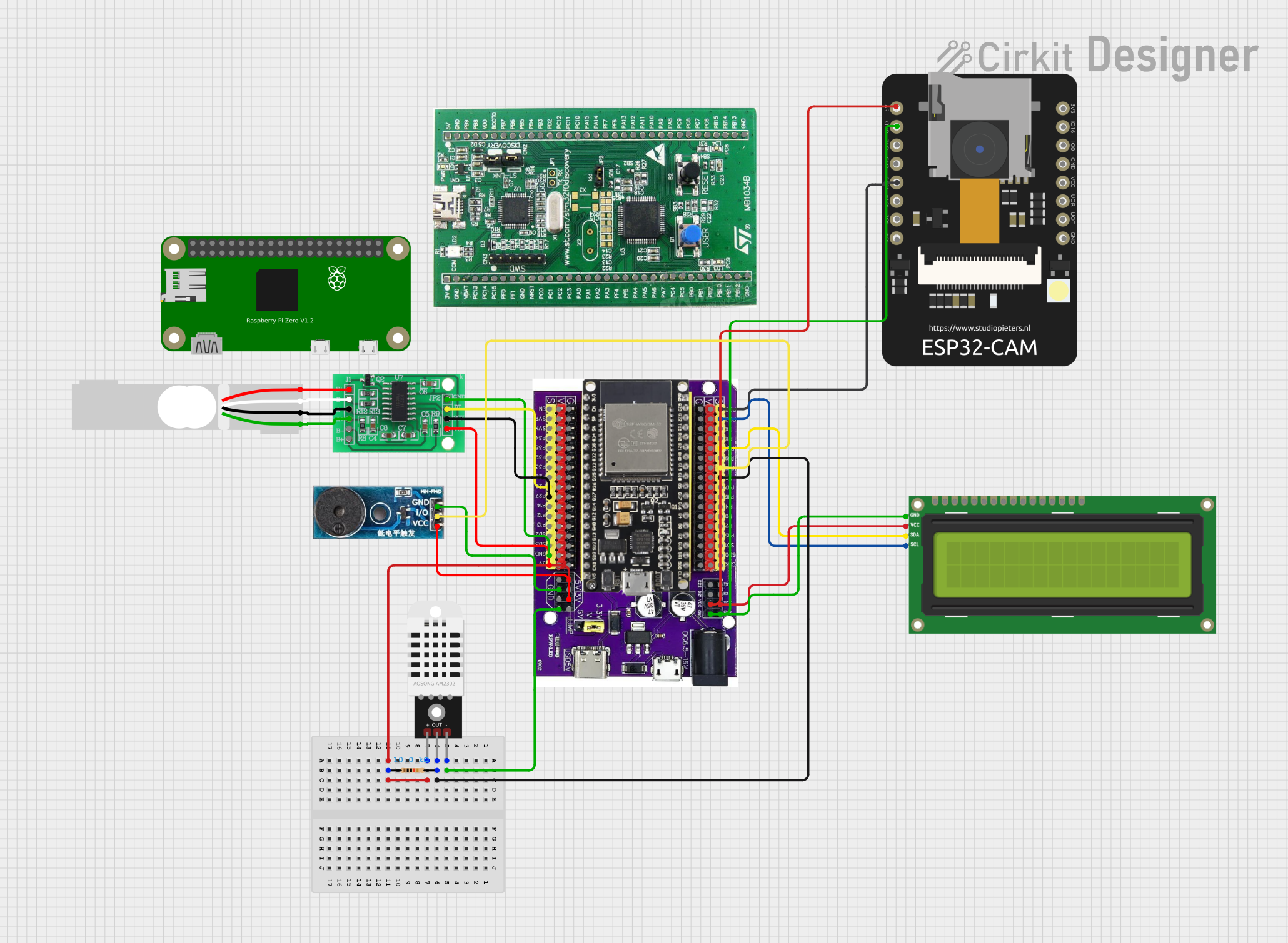
This circuit features an ESP32 microcontroller interfacing with various sensors and modules, including a DHT22 temperature and humidity sensor, an ESP32 CAM for image capture, an I2C LCD screen for display, a load cell with an HX711 interface for weight measurement, and a buzzer for audio alerts. The ESP32 handles data acquisition, processing, and communication with these peripherals to create a multi-functional monitoring and alert system.
Open Project in Cirkit DesignerExplore Projects Built with Seeed Studio XIAO ESP32-S3 Sense
Xiao ESP32 C3 Based Temperature and Humidity Monitoring System
This circuit features a Xiao ESP32 C3 microcontroller connected to a DHT11 Humidity and Temperature Sensor. The ESP32 C3 provides power to the DHT11 sensor through its VUSB pin and receives data from the sensor's DATA pin via the ESP32's D2 pin. The circuit is designed to measure environmental temperature and humidity, with the microcontroller processing and potentially communicating the sensor data.
Open Project in Cirkit DesignerESP32-Based Environmental Monitoring System with Motion Detection
This circuit features an ESP32 microcontroller on a baseboard that interfaces with a PIR sensor for motion detection, a DHT22 sensor for measuring temperature and humidity, and a BH1750 sensor for detecting ambient light levels. The ESP32 is configured to communicate with the BH1750 using I2C protocol, with GPIO22 and GPIO21 serving as the SCL and SDA lines, respectively. Power is supplied to the sensors from the ESP32's voltage output pins, and sensor outputs are connected to designated GPIO pins for data acquisition.
Open Project in Cirkit DesignerESP32C3 and LoRa-Enabled Environmental Sensing Node
This circuit features an ESP32C3 Supermini microcontroller connected to a LORA_RA02 module and a DHT11 temperature and humidity sensor. The ESP32C3 handles communication with the LORA module via SPI (using GPIO05, GPIO06, GPIO10, and GPIO04 for MISO, MOSI, NSS, and SCK respectively) and GPIO01 and GPIO02 for additional control signals. The DHT11 sensor is interfaced through GPIO03 for data reading, and all components share a common power supply through the 3.3V and GND pins.
Open Project in Cirkit DesignerESP32-Based Smart Weather Station with Wi-Fi Connectivity
This circuit features an ESP32 microcontroller interfacing with various sensors and modules, including a DHT22 temperature and humidity sensor, an ESP32 CAM for image capture, an I2C LCD screen for display, a load cell with an HX711 interface for weight measurement, and a buzzer for audio alerts. The ESP32 handles data acquisition, processing, and communication with these peripherals to create a multi-functional monitoring and alert system.
Open Project in Cirkit DesignerCommon Applications
- IoT devices and smart home automation
- Wearable electronics
- Edge AI applications (e.g., voice recognition, image processing)
- Environmental monitoring
- Robotics and automation
Technical Specifications
Key Technical Details
| Parameter | Specification |
|---|---|
| Microcontroller | ESP32-S3 (Xtensa LX7 dual-core, 240 MHz) |
| Wireless Connectivity | Wi-Fi 802.11 b/g/n, Bluetooth 5.0 (LE) |
| Flash Memory | 8 MB (external) |
| PSRAM | 8 MB |
| Operating Voltage | 3.3V |
| Input Voltage Range | 5V (via USB-C) |
| GPIO Pins | 11 (including ADC, I2C, SPI, UART, PWM) |
| Onboard Sensors | IMU (6-axis accelerometer + gyroscope), PDM mic |
| Dimensions | 21 x 17.5 mm |
| Power Consumption | Ultra-low power modes available |
| USB Interface | USB-C (supports programming and power supply) |
Pin Configuration and Descriptions
| Pin Number | Pin Name | Functionality |
|---|---|---|
| 1 | 3V3 | 3.3V power output |
| 2 | GND | Ground |
| 3 | D0 | GPIO0, ADC, UART RX |
| 4 | D1 | GPIO1, ADC, UART TX |
| 5 | D2 | GPIO2, ADC, I2C SDA |
| 6 | D3 | GPIO3, ADC, I2C SCL |
| 7 | D4 | GPIO4, PWM |
| 8 | D5 | GPIO5, PWM |
| 9 | D6 | GPIO6, SPI MOSI |
| 10 | D7 | GPIO7, SPI MISO |
| 11 | D8 | GPIO8, SPI SCK |
| 12 | RST | Reset pin |
Usage Instructions
How to Use the Component in a Circuit
- Powering the Board: Connect the XIAO ESP32-S3 Sense to a 5V power source via the USB-C port. The onboard voltage regulator will step down the voltage to 3.3V.
- Programming: Use the Arduino IDE or other compatible development environments to program the board. Install the ESP32 board package in the Arduino IDE for compatibility.
- Connecting Peripherals: Use the GPIO pins to connect sensors, actuators, or other peripherals. Ensure the voltage levels are compatible with the 3.3V logic of the board.
- Using Onboard Sensors: Access the onboard IMU and PDM microphone using libraries such as
Wire(for I2C) or specific sensor libraries.
Important Considerations and Best Practices
- Voltage Levels: Ensure all connected peripherals operate at 3.3V logic levels to avoid damaging the board.
- Heat Management: While the board is efficient, prolonged high-performance tasks may generate heat. Ensure proper ventilation.
- Firmware Updates: Regularly update the ESP32-S3 firmware to benefit from performance improvements and bug fixes.
- Debugging: Use the USB-C port for serial debugging and monitoring via the Arduino Serial Monitor.
Example Code for Arduino UNO Integration
Below is an example of reading data from the onboard IMU sensor:
#include <Wire.h>
#include <Adafruit_Sensor.h>
#include <Adafruit_LSM6DS33.h>

// Create an instance of the LSM6DS33 sensor
Adafruit_LSM6DS33 lsm6ds;

void setup() {
  Serial.begin(115200); // Initialize serial communication at 115200 baud
  while (!Serial) {
    delay(10); // Wait for Serial Monitor to open
  }

  // Initialize I2C communication
  if (!lsm6ds.begin_I2C()) {
    Serial.println("Failed to initialize LSM6DS33 sensor!");
    while (1) {
      delay(10); // Stay in loop if initialization fails
    }
  }
  Serial.println("LSM6DS33 initialized successfully!");
}

void loop() {
  sensors_event_t accel, gyro, temp;

  // Get sensor data
  lsm6ds.getEvent(&accel, &gyro, &temp);

  // Print accelerometer data
  Serial.print("Accel X: "); Serial.print(accel.acceleration.x); Serial.print(" m/s^2, ");
  Serial.print("Y: "); Serial.print(accel.acceleration.y); Serial.print(" m/s^2, ");
  Serial.print("Z: "); Serial.println(accel.acceleration.z); Serial.println(" m/s^2");

  // Print gyroscope data
  Serial.print("Gyro X: "); Serial.print(gyro.gyro.x); Serial.print(" rad/s, ");
  Serial.print("Y: "); Serial.print(gyro.gyro.y); Serial.print(" rad/s, ");
  Serial.print("Z: "); Serial.println(gyro.gyro.z); Serial.println(" rad/s");

  delay(1000); // Delay for 1 second before next reading
}
Troubleshooting and FAQs
Common Issues
Board Not Detected in Arduino IDE:
- Ensure the correct USB driver is installed for the XIAO ESP32-S3 Sense.
- Check that the ESP32 board package is installed in the Arduino IDE.
- Verify the USB cable is data-capable (not power-only).
Program Upload Fails:
- Double-check the selected board and port in the Arduino IDE.
- Press the reset button on the board before uploading the code.
Onboard Sensors Not Responding:
- Ensure the correct libraries are installed (e.g., Adafruit LSM6DS33 library).
- Verify I2C connections and addresses.
Solutions and Tips
- Resetting the Board: If the board becomes unresponsive, press the reset button or disconnect and reconnect the USB cable.
- Debugging Code: Use
Serial.print()statements to debug your code and monitor sensor outputs. - Power Supply: If using external power, ensure it provides a stable 5V input to the USB-C port.
By following this documentation, you can effectively utilize the Seeed Studio XIAO ESP32-S3 Sense for your IoT and edge computing projects.