
How to Use Vietduino Uno ATmega328P : Examples, Pinouts, and Specs
 Design with Vietduino Uno ATmega328P in Cirkit Designer
Introduction
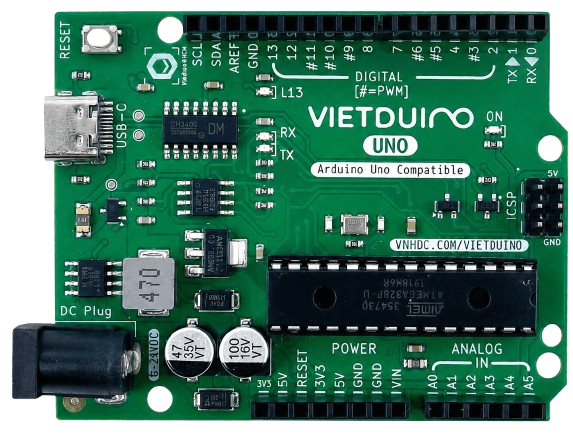
The Vietduino Uno ATmega328P, manufactured by MakerEdu.vn (Part ID: UNO), is a versatile microcontroller board based on the ATmega328P microcontroller. It is designed to provide a robust platform for building a wide range of electronic projects. The board features digital and analog input/output pins, USB connectivity for programming, and compatibility with the Arduino IDE, making it an excellent choice for both beginners and experienced developers.
Explore Projects Built with Vietduino Uno ATmega328P
 Open Project in Cirkit Designer
 Open Project in Cirkit Designer
 Open Project in Cirkit Designer
 Open Project in Cirkit Designer
Explore Projects Built with Vietduino Uno ATmega328P
Open Project in Cirkit DesignerOpen Project in Cirkit DesignerOpen Project in Cirkit DesignerOpen Project in Cirkit DesignerCommon Applications and Use Cases
- Prototyping and development of embedded systems
- Home automation projects
- Robotics and motor control
- IoT (Internet of Things) applications
- Educational purposes for learning microcontroller programming
Technical Specifications
The Vietduino Uno ATmega328P offers the following key technical details:
| Specification | Details |
|---|---|
| Microcontroller | ATmega328P |
| Operating Voltage | 5V |
| Input Voltage (recommended) | 7-12V |
| Input Voltage (limit) | 6-20V |
| Digital I/O Pins | 14 (6 of which provide PWM output) |
| Analog Input Pins | 6 |
| DC Current per I/O Pin | 20 mA |
| Flash Memory | 32 KB (0.5 KB used by bootloader) |
| SRAM | 2 KB |
| EEPROM | 1 KB |
| Clock Speed | 16 MHz |
| USB Connectivity | USB Type-B port for programming and communication |
| Dimensions | 68.6 mm x 53.4 mm |
Pin Configuration and Descriptions
The Vietduino Uno ATmega328P has a total of 28 pins, including digital, analog, power, and communication pins. Below is a detailed description of the pin configuration:
Digital Pins
| Pin Number | Function | Description |
|---|---|---|
| D0 (RX) | UART Receive | Used for serial communication (receives data). |
| D1 (TX) | UART Transmit | Used for serial communication (transmits data). |
| D2-D13 | Digital I/O | General-purpose digital input/output pins. |
| D3, D5, D6, D9, D10, D11 | PWM Output | Provide Pulse Width Modulation (PWM) output. |
Analog Pins
| Pin Number | Function | Description |
|---|---|---|
| A0-A5 | Analog Input | Read analog signals (0-5V) with 10-bit resolution. |
Power Pins
| Pin Name | Function | Description |
|---|---|---|
| VIN | Input Voltage | External power input (7-12V recommended). |
| 5V | Regulated 5V Output | Provides 5V power to external components. |
| 3.3V | Regulated 3.3V Output | Provides 3.3V power to external components. |
| GND | Ground | Common ground for the circuit. |
| RESET | Reset | Resets the microcontroller. |
Communication Pins
| Pin Name | Function | Description |
|---|---|---|
| SDA | I2C Data | Used for I2C communication. |
| SCL | I2C Clock | Used for I2C communication. |
| SPI (D10-D13) | SPI Communication | Used for SPI communication. |
Usage Instructions
How to Use the Vietduino Uno ATmega328P in a Circuit
Powering the Board:
- Connect the board to your computer using a USB Type-B cable for programming and power.
- Alternatively, use the VIN pin or DC barrel jack to power the board with an external power supply (7-12V recommended).
Programming the Board:
- Install the Arduino IDE on your computer.
- Select "Arduino Uno" as the board type in the Arduino IDE.
- Choose the correct COM port under the "Tools" menu.
- Write your code in the Arduino IDE and upload it to the board.
Connecting Components:
- Use the digital and analog pins to connect sensors, actuators, and other components.
- Ensure that the current drawn by connected components does not exceed the maximum ratings of the pins.
Important Considerations and Best Practices
- Avoid short circuits between pins or between pins and ground.
- Use appropriate resistors when connecting LEDs or other components to prevent damage.
- Ensure that the total current drawn by the board and connected components does not exceed the power supply's capacity.
- Use decoupling capacitors for noise-sensitive applications.
Example Code for Arduino UNO
Below is an example code to blink an LED connected to digital pin 13:
// Blink an LED connected to pin 13
// This code toggles the LED on and off every second.

void setup() {
  pinMode(13, OUTPUT); // Set pin 13 as an output pin
}

void loop() {
  digitalWrite(13, HIGH); // Turn the LED on
  delay(1000);            // Wait for 1 second
  digitalWrite(13, LOW);  // Turn the LED off
  delay(1000);            // Wait for 1 second
}
Troubleshooting and FAQs
Common Issues and Solutions
The board is not detected by the computer:
- Ensure the USB cable is properly connected and functional.
- Install the necessary USB drivers for the Vietduino Uno ATmega328P.
Code upload fails:
- Verify that the correct board type ("Arduino Uno") and COM port are selected in the Arduino IDE.
- Press the RESET button on the board before uploading the code.
Components connected to the board are not working:
- Check the wiring and ensure all connections are secure.
- Verify that the components are compatible with the board's voltage and current ratings.
The board overheats:
- Ensure that the input voltage does not exceed the recommended range (7-12V).
- Check for short circuits or excessive current draw from connected components.
FAQs
Q: Can I use the Vietduino Uno ATmega328P with shields designed for Arduino Uno?
A: Yes, the Vietduino Uno ATmega328P is fully compatible with Arduino Uno shields.
Q: What is the maximum current the board can supply?
A: The 5V pin can supply up to 500 mA when powered via USB, and up to 1A when powered via an external power supply.
Q: Can I program the board using other IDEs?
A: Yes, you can use other IDEs like PlatformIO, but ensure the correct board and settings are configured.
Q: Is the board compatible with 3.3V sensors?
A: Yes, the board provides a 3.3V output pin for powering 3.3V sensors. However, ensure the sensor's output is within the board's input voltage range.