
How to Use IC 555 : Examples, Pinouts, and Specs
 Design with IC 555 in Cirkit Designer
Introduction
The IC 555 is a versatile timer integrated circuit widely used in electronics for generating precise time delays, oscillations, and pulse-width modulation (PWM). It is a highly reliable and cost-effective component that can operate in three primary modes: monostable (one-shot pulse generation), astable (oscillator), and bistable (flip-flop). Its flexibility and ease of use make it a staple in both hobbyist and professional electronic projects.
Explore Projects Built with IC 555
 Open Project in Cirkit Designer
 Open Project in Cirkit Designer
 Open Project in Cirkit Designer
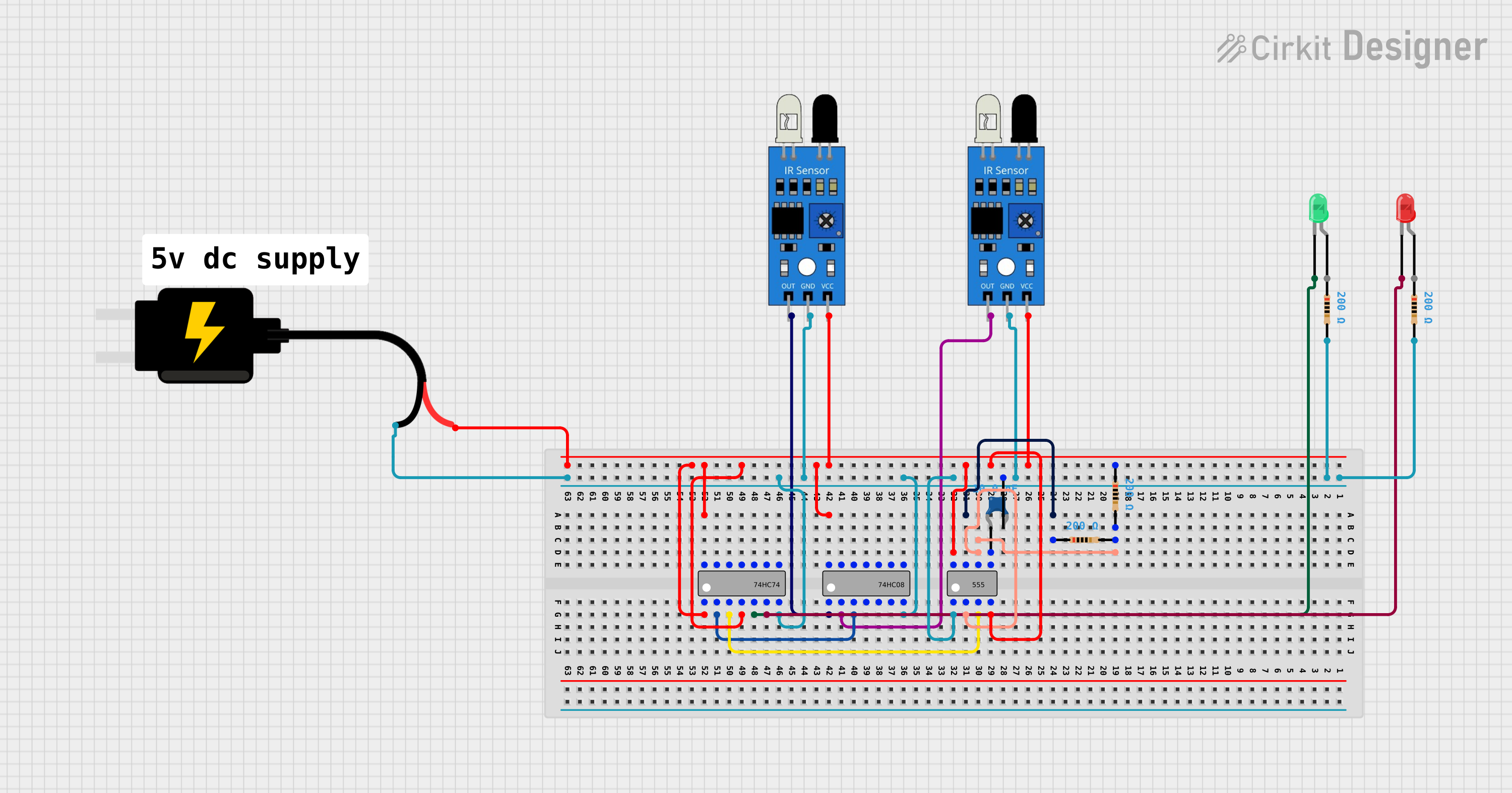 Open Project in Cirkit Designer
Explore Projects Built with IC 555
Open Project in Cirkit DesignerOpen Project in Cirkit DesignerOpen Project in Cirkit DesignerOpen Project in Cirkit DesignerCommon Applications
- Pulse generation and timing circuits
- Frequency generation and oscillators
- Pulse-width modulation (PWM) for motor control
- LED and lamp flashers
- Tone generation in audio circuits
- Debouncing switches
- Sequential timing circuits
Technical Specifications
The IC 555 is available in various packages, such as DIP-8, SOIC-8, and others. Below are its key technical details:
| Parameter | Value |
|---|---|
| Supply Voltage (Vcc) | 4.5V to 15V |
| Supply Current | 3mA to 10mA (typical) |
| Output Voltage | 0V to Vcc (depending on load) |
| Output Current | 200mA (maximum) |
| Operating Temperature | 0°C to 70°C (commercial grade) |
| Timing Accuracy | ±1% (typical) |
| Maximum Frequency | 500 kHz |
Pin Configuration and Descriptions
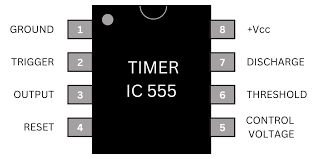
The IC 555 has 8 pins, each serving a specific function. Below is the pinout and description:
| Pin Number | Pin Name | Description |
|---|---|---|
| 1 | GND | Ground pin. Connect to the negative terminal of the power supply. |
| 2 | TRIG | Trigger input. A low voltage (<1/3 Vcc) on this pin starts the timing cycle. |
| 3 | OUT | Output pin. Provides the output signal (high or low) based on the configuration. |
| 4 | RESET | Reset pin. Active low. Resets the timer when pulled to ground. |
| 5 | CTRL | Control voltage. Used to adjust the threshold voltage (optional). |
| 6 | THR | Threshold input. Ends the timing cycle when voltage exceeds 2/3 Vcc. |
| 7 | DISCH | Discharge pin. Used to discharge the timing capacitor. |
| 8 | VCC | Supply voltage. Connect to the positive terminal of the power supply. |
Usage Instructions
The IC 555 can be configured in different modes depending on the application. Below are instructions for its most common configurations:
1. Monostable Mode (One-Shot Pulse)
In monostable mode, the IC 555 generates a single pulse of a specific duration when triggered. The pulse width is determined by an external resistor (R) and capacitor (C).
Circuit Setup:
- Connect Pin 2 (TRIG) to a push button or input signal.
- Connect a resistor (R) between Pin 7 (DISCH) and Vcc.
- Connect a capacitor (C) between Pin 6 (THR) and ground.
- Connect Pin 6 (THR) to Pin 2 (TRIG).
- The pulse width is calculated as:
T = 1.1 × R × C
Example Application:
- Debouncing a mechanical switch.
2. Astable Mode (Oscillator)
In astable mode, the IC 555 generates a continuous square wave. The frequency and duty cycle are determined by two resistors (R1, R2) and a capacitor (C).
Circuit Setup:
- Connect a resistor (R1) between Pin 7 (DISCH) and Vcc.
- Connect another resistor (R2) between Pin 7 (DISCH) and Pin 6 (THR).
- Connect a capacitor (C) between Pin 6 (THR) and ground.
- Connect Pin 6 (THR) to Pin 2 (TRIG).
- The frequency is calculated as:
f = 1.44 / ((R1 + 2R2) × C)
Example Application:
- LED flasher or tone generator.
Arduino Example Code for Astable Mode:
The IC 555 can be used to generate a PWM signal for an Arduino project. Below is an example of how to read the output signal from the IC 555 using an Arduino UNO:
// Example: Reading IC 555 output in astable mode using Arduino UNO
const int ic555OutputPin = 2; // Connect IC 555 output (Pin 3) to Arduino Pin 2
const int ledPin = 13;        // Onboard LED for visual feedback

void setup() {
  pinMode(ic555OutputPin, INPUT); // Set IC 555 output pin as input
  pinMode(ledPin, OUTPUT);        // Set LED pin as output
  Serial.begin(9600);             // Initialize serial communication
}

void loop() {
  int signal = digitalRead(ic555OutputPin); // Read the IC 555 output signal
  digitalWrite(ledPin, signal);             // Reflect the signal on the LED
  Serial.println(signal);                   // Print the signal to the Serial Monitor
  delay(10);                                // Small delay for stability
}
3. Bistable Mode (Flip-Flop)
In bistable mode, the IC 555 acts as a flip-flop, toggling its output state between high and low when triggered.
Circuit Setup:
- Connect Pin 2 (TRIG) to a push button or input signal.
- Connect Pin 4 (RESET) to another push button or input signal.
- No external capacitor is required for timing.
Example Application:
- Toggle switch for turning devices on/off.
Important Considerations
- Use decoupling capacitors (e.g., 0.01 µF) across the power supply pins (Vcc and GND) to reduce noise.
- Ensure the timing capacitor's voltage rating is higher than the supply voltage.
- Avoid exceeding the maximum ratings for voltage and current to prevent damage.
Troubleshooting and FAQs
Common Issues
No Output Signal:
- Check the power supply connections (Vcc and GND).
- Verify that the trigger signal is within the required voltage range.
Incorrect Timing:
- Ensure the resistor and capacitor values are correct and within tolerance.
- Check for loose connections or faulty components.
Output Signal is Unstable:
- Add a decoupling capacitor across the power supply pins.
- Verify that the control voltage (Pin 5) is not floating. If unused, connect it to ground via a 0.01 µF capacitor.
FAQs
Can the IC 555 operate at 3.3V?
No, the minimum supply voltage is 4.5V. For lower voltages, consider using a CMOS version like the IC 7555.What is the maximum output current?
The IC 555 can source or sink up to 200mA, but it is recommended to stay below this limit for reliability.Can I use the IC 555 for audio applications?
Yes, the IC 555 can generate audio tones in astable mode by selecting appropriate resistor and capacitor values.
By following this documentation, users can effectively utilize the IC 555 in a variety of electronic projects.