Cirkit Designer LogoCirkit DesignerYour all-in-one circuit design IDE Launch Cirkit Designer App

How to Use MAX17048: Examples, Pinouts, and Specs

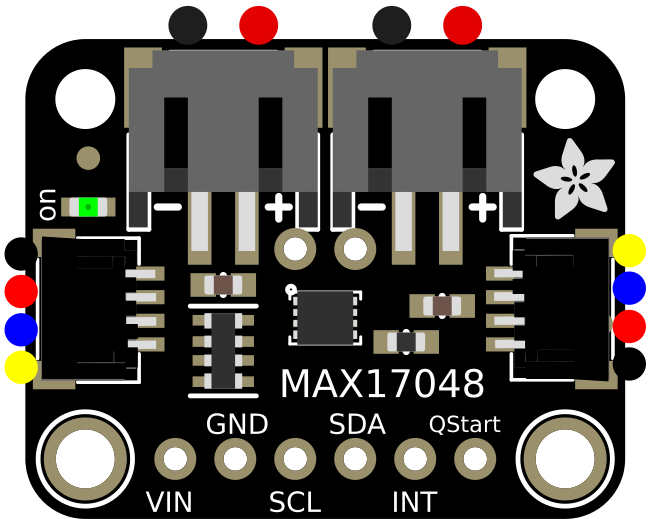
Image of MAX17048Design with MAX17048 in Cirkit Designer

Introduction

The MAX17048 is a battery fuel gauge integrated circuit (IC) designed to provide accurate state-of-charge (SOC) information for single-cell lithium-ion (Li-ion) batteries. Unlike traditional fuel gauges, the MAX17048 employs a sophisticated model-based algorithm to estimate the remaining battery capacity without requiring a current-sense resistor. This makes it highly efficient and easy to integrate into compact designs.

Explore Projects Built with MAX17048

Use Cirkit Designer to design, explore, and prototype these projects online. Some projects support real-time simulation. Click "Open Project" to start designing instantly!
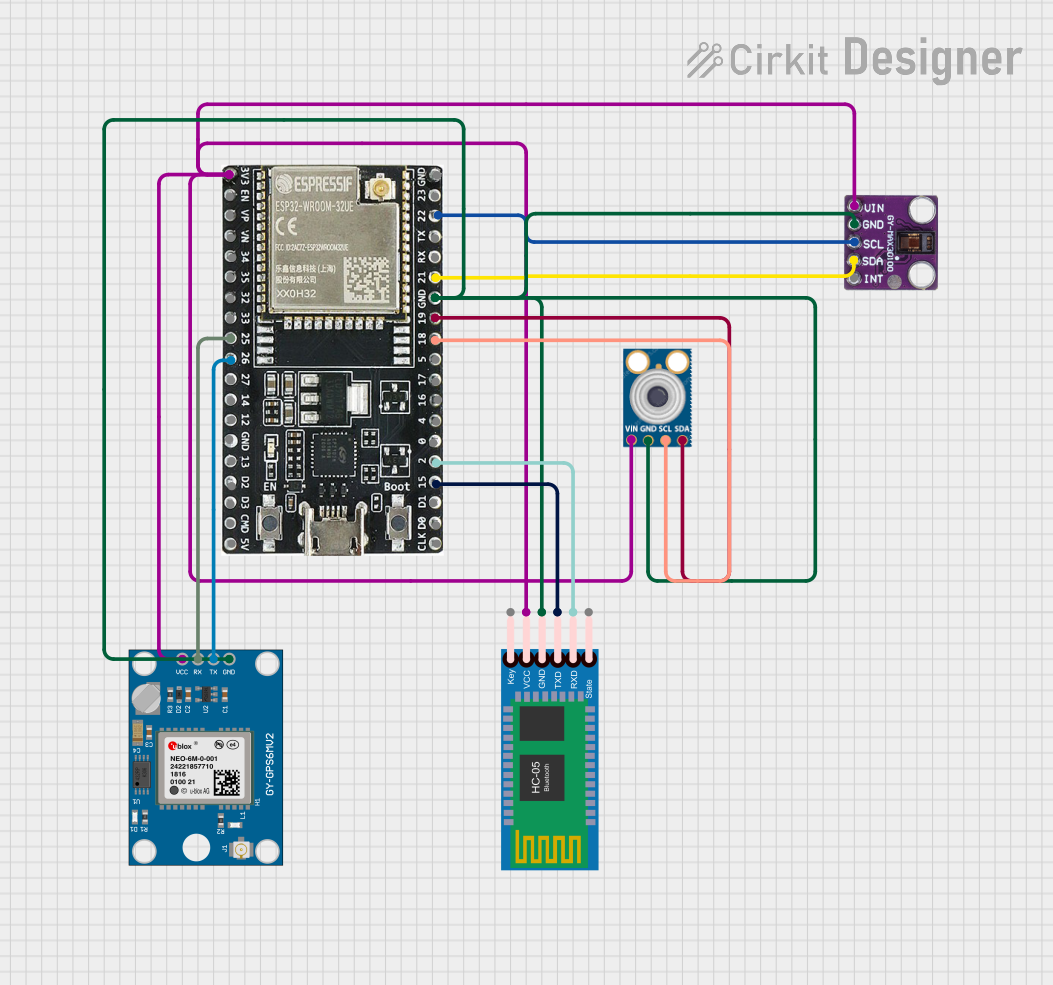
Image of ESP32-Based Multi-Sensor Health Monitoring System with Bluetooth Connectivity: A project utilizing MAX17048 in a practical application
ESP32-Based Multi-Sensor Health Monitoring System with Bluetooth Connectivity

This circuit features an ESP32-WROOM-32UE microcontroller as the central processing unit, interfacing with a variety of sensors and modules. It includes a MAX30100 pulse oximeter and heart-rate sensor, an MLX90614 infrared thermometer, an HC-05 Bluetooth module for wireless communication, and a Neo 6M GPS module for location tracking. All components are powered by a common voltage supply and are connected to specific GPIO pins on the ESP32 for data exchange, with the sensors using I2C communication and the modules using UART.

Open Project in Cirkit Designer
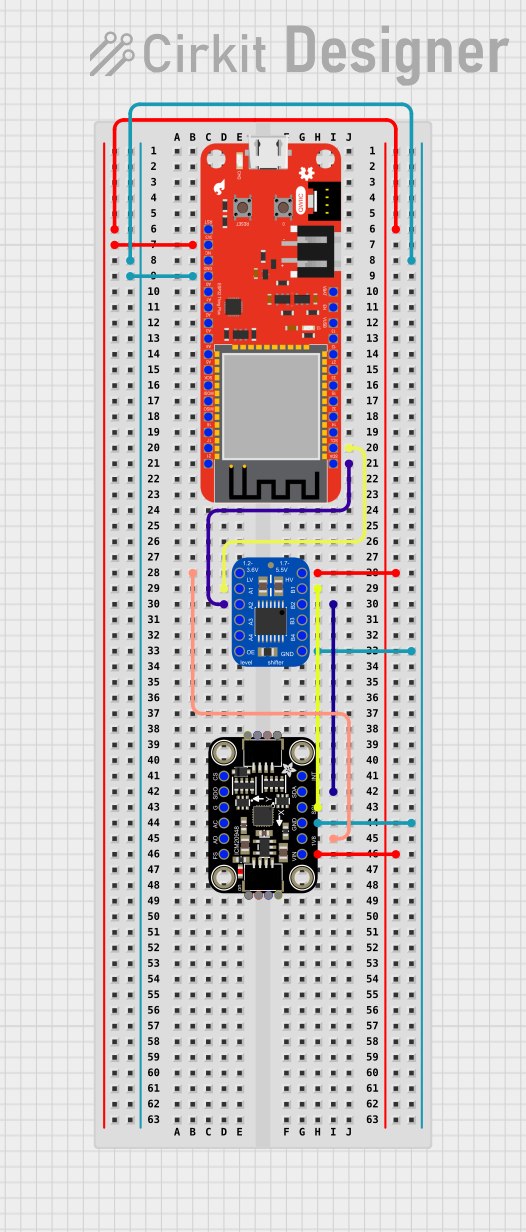
Image of ESP32-Based Motion Tracking System with ICM20948 Sensor: A project utilizing MAX17048 in a practical application
ESP32-Based Motion Tracking System with ICM20948 Sensor

This circuit features a SparkFun ESP32 Thing Plus microcontroller interfaced with an Adafruit ICM20948 9-axis motion sensor via an Adafruit TXB0104 4-channel bi-directional level shifter. The ESP32 reads data from the ICM20948 sensor, calculates orientation angles such as pitch, roll, yaw, and azimuth, and outputs these values to the serial monitor. The level shifter ensures compatibility between the 3.3V logic levels of the ESP32 and the 1.8V logic levels required by the ICM20948.

Open Project in Cirkit Designer
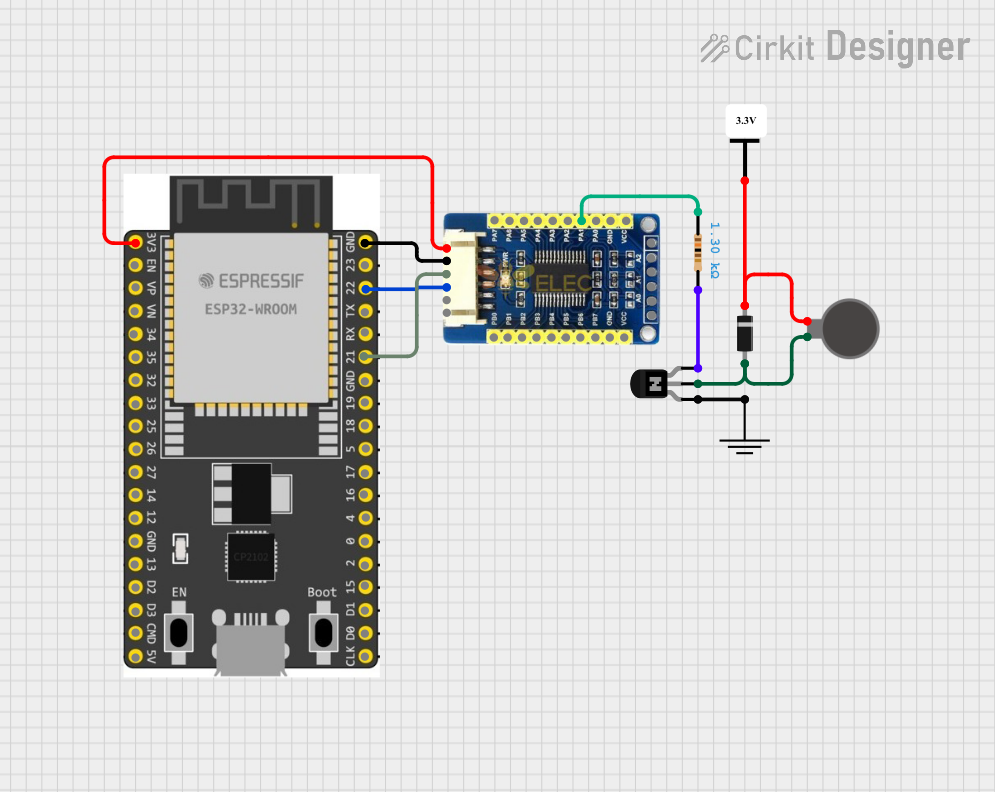
Image of ESP32-Based Vibration Motor Controller with I2C IO Expansion: A project utilizing MAX17048 in a practical application
ESP32-Based Vibration Motor Controller with I2C IO Expansion

This circuit features an ESP32 Wroom Dev Kit microcontroller interfaced with an MCP23017 I/O expansion board via I2C communication, utilizing GPIO 21 and GPIO 22 for SDA and SCL lines, respectively. A vibration motor is controlled by an NPN transistor acting as a switch, with a diode for back EMF protection and a resistor to limit base current. The ESP32 can control the motor by sending signals to the MCP23017, which then interfaces with the transistor to turn the motor on or off.

Open Project in Cirkit Designer

Common Applications

The MAX17048 communicates via an I2C interface, making it compatible with a wide range of microcontrollers and systems.


Technical Specifications

Key Technical Details

Parameter Value
Operating Voltage Range 2.5V to 4.5V
Battery Type Supported Single-cell lithium-ion
Communication Interface I2C (7-bit address: 0x36 default)
Supply Current 1.2µA (typical)
SOC Accuracy ±1%
Operating Temperature Range -40°C to +85°C
Package Type 6-pin µDFN (1.5mm x 1.5mm)

Pin Configuration and Descriptions

Pin Number Pin Name Description
1 VDD Power supply input (2.5V to 4.5V).
2 SDA I2C data line. Connect to the microcontroller.
3 SCL I2C clock line. Connect to the microcontroller.
4 GND Ground. Connect to the system ground.
5 THRM Optional thermistor input for temperature monitoring.
6 BAT Battery connection. Connect to the positive terminal of the battery.

Usage Instructions

How to Use the MAX17048 in a Circuit

  1. Power Supply: Connect the VDD pin to a regulated power supply (2.5V to 4.5V). Ensure the GND pin is connected to the system ground.
  2. Battery Connection: Connect the BAT pin to the positive terminal of the single-cell lithium-ion battery.
  3. I2C Communication: Connect the SDA and SCL pins to the corresponding I2C lines of the microcontroller. Use pull-up resistors (typically 4.7kΩ) on both lines.
  4. Optional Thermistor: If temperature monitoring is required, connect a 10kΩ NTC thermistor to the THRM pin. Otherwise, leave it unconnected.

Important Considerations

Example Code for Arduino UNO

Below is an example of how to interface the MAX17048 with an Arduino UNO to read the state-of-charge (SOC):

#include <Wire.h> // Include the Wire library for I2C communication

#define MAX17048_ADDRESS 0x36 // I2C address of the MAX17048

void setup() {
  Wire.begin(); // Initialize I2C communication
  Serial.begin(9600); // Initialize serial communication for debugging
}

void loop() {
  uint16_t soc = readSOC(); // Read the state-of-charge
  float percentage = soc / 256.0; // Convert to percentage (0-100%)
  
  Serial.print("Battery SOC: ");
  Serial.print(percentage);
  Serial.println("%");
  
  delay(1000); // Wait for 1 second before the next reading
}

uint16_t readSOC() {
  Wire.beginTransmission(MAX17048_ADDRESS); // Start communication with MAX17048
  Wire.write(0x04); // Send the register address for SOC
  Wire.endTransmission(false); // End transmission without releasing the bus
  
  Wire.requestFrom(MAX17048_ADDRESS, 2); // Request 2 bytes of data
  uint8_t msb = Wire.read(); // Read the most significant byte
  uint8_t lsb = Wire.read(); // Read the least significant byte
  
  return (msb << 8) | lsb; // Combine the two bytes into a 16-bit value
}

Code Explanation:


Troubleshooting and FAQs

Common Issues and Solutions

  1. No I2C Communication:

    • Cause: Incorrect wiring or missing pull-up resistors on SDA and SCL lines.
    • Solution: Verify the connections and ensure 4.7kΩ pull-up resistors are present.
  2. Incorrect SOC Readings:

    • Cause: Battery voltage is outside the operating range or the battery is not properly connected.
    • Solution: Check the battery voltage and connections. Ensure the battery is within the 2.5V to 4.5V range.
  3. Device Not Detected on I2C Bus:

    • Cause: Address conflict or incorrect I2C address.
    • Solution: Ensure no other devices on the I2C bus use the 0x36 address. Double-check the wiring.
  4. Temperature Monitoring Not Working:

    • Cause: Thermistor not connected or incorrect thermistor value.
    • Solution: Use a 10kΩ NTC thermistor and verify the connection to the THRM pin.

FAQs


This documentation provides a comprehensive guide to understanding, using, and troubleshooting the MAX17048 battery fuel gauge IC.