
How to Use tfmini-s: Examples, Pinouts, and Specs
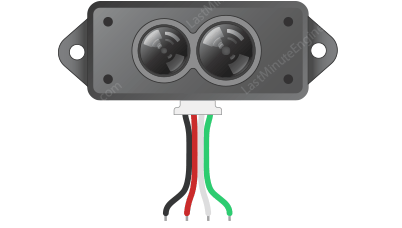
 Design with tfmini-s in Cirkit Designer
Introduction
The TFmini-S is a compact, high-precision LiDAR distance sensor designed for accurate distance measurements in a variety of applications. With a measurement range of up to 12 meters and a small form factor, the TFmini-S is ideal for robotics, drones, and other embedded systems requiring reliable distance sensing. Its simple serial interface ensures easy integration into projects, making it a versatile choice for both hobbyists and professionals.
Explore Projects Built with tfmini-s
 Open Project in Cirkit Designer
 Open Project in Cirkit Designer
 Open Project in Cirkit Designer
 Open Project in Cirkit Designer
Explore Projects Built with tfmini-s
Open Project in Cirkit DesignerOpen Project in Cirkit DesignerOpen Project in Cirkit DesignerOpen Project in Cirkit DesignerCommon Applications
- Obstacle detection in robotics
- Altitude measurement for drones
- Distance sensing in industrial automation
- Smart home devices and security systems
- Educational and research projects
Technical Specifications
The TFmini-S offers robust performance in a compact package. Below are its key technical details:
| Parameter | Specification |
|---|---|
| Measurement Range | 0.1 m to 12 m |
| Accuracy | ±6 cm (0.1–6 m), ±1% (>6 m) |
| Resolution | 1 cm |
| Operating Voltage | 5 V DC |
| Average Current | ≤120 mA |
| Communication Interface | UART (default) / I2C (configurable) |
| Operating Temperature | -20°C to 60°C |
| Frame Rate | 1 Hz to 1000 Hz (adjustable) |
| Dimensions | 42 mm × 15 mm × 16 mm |
| Weight | 5 g |
Pin Configuration
The TFmini-S has a 4-pin interface for power and communication. The pinout is as follows:
| Pin | Name | Description |
|---|---|---|
| 1 | VCC | Power supply (5 V DC) |
| 2 | GND | Ground |
| 3 | TX | UART Transmit (data output) |
| 4 | RX | UART Receive (data input) |
Usage Instructions
Connecting the TFmini-S to an Arduino UNO
To use the TFmini-S with an Arduino UNO, follow these steps:
Wiring:
- Connect the
VCCpin of the TFmini-S to the 5V pin on the Arduino. - Connect the
GNDpin of the TFmini-S to the GND pin on the Arduino. - Connect the
TXpin of the TFmini-S to the Arduino'sD2pin (for software serial). - Connect the
RXpin of the TFmini-S to the Arduino'sD3pin (for software serial).
- Connect the
Install Required Libraries:
- Install the
SoftwareSeriallibrary (pre-installed with the Arduino IDE).
- Install the
Arduino Code: Use the following example code to read distance data from the TFmini-S:
#include <SoftwareSerial.h>

// Define software serial pins for TFmini-S
SoftwareSerial tfminiSerial(2, 3); // RX, TX

void setup() {
  Serial.begin(9600); // Initialize serial monitor
  tfminiSerial.begin(115200); // Initialize TFmini-S serial communication
  Serial.println("TFmini-S Distance Sensor Initialized");
}

void loop() {
  if (tfminiSerial.available()) {
    uint8_t data[9];
    if (tfminiSerial.read() == 0x59) { // Check for frame header
      if (tfminiSerial.read() == 0x59) { // Check for second frame header
        for (int i = 0; i < 7; i++) {
          data[i] = tfminiSerial.read(); // Read remaining data bytes
        }
        uint16_t distance = data[0] + (data[1] << 8); // Calculate distance
        uint16_t strength = data[2] + (data[3] << 8); // Signal strength
        Serial.print("Distance: ");
        Serial.print(distance);
        Serial.print(" cm, Strength: ");
        Serial.println(strength);
      }
    }
  }
}
Important Considerations
- Power Supply: Ensure a stable 5V power supply to avoid measurement errors.
- Baud Rate: The default UART baud rate is 115200. Ensure your microcontroller matches this setting.
- Signal Strength: Low signal strength may indicate poor reflectivity of the target or excessive ambient light.
Troubleshooting and FAQs
Common Issues
No Data Output:
- Cause: Incorrect wiring or baud rate mismatch.
- Solution: Double-check the wiring and ensure the Arduino's baud rate matches the TFmini-S.
Inaccurate Measurements:
- Cause: Target surface is too reflective or not reflective enough.
- Solution: Use a target with moderate reflectivity and avoid direct sunlight.
Intermittent Data:
- Cause: Unstable power supply.
- Solution: Use a regulated 5V power source.
FAQs
Can the TFmini-S be used outdoors?
- Yes, but performance may be affected by direct sunlight or extreme temperatures.
How do I switch between UART and I2C modes?
- The TFmini-S supports mode switching via specific commands. Refer to the manufacturer's datasheet for details.
What is the maximum frame rate?
- The TFmini-S supports frame rates up to 1000 Hz, configurable via commands.
By following this documentation, you can effectively integrate the TFmini-S into your projects and troubleshoot common issues.