
How to Use Lilygo TTGO SIM7600G: Examples, Pinouts, and Specs
 Design with Lilygo TTGO SIM7600G in Cirkit Designer
Introduction
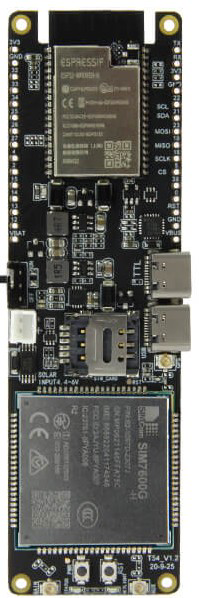
The Lilygo TTGO SIM7600G is a versatile development board that integrates the SIM7600G 4G LTE module, making it an excellent choice for IoT (Internet of Things) applications. This board supports 4G LTE communication, GPS functionality, and various communication protocols such as HTTP, MQTT, and FTP. It is equipped with a microcontroller, enabling seamless integration and programming for a wide range of projects.
Explore Projects Built with Lilygo TTGO SIM7600G
 Open Project in Cirkit Designer
 Open Project in Cirkit Designer
 Open Project in Cirkit Designer
 Open Project in Cirkit Designer
Explore Projects Built with Lilygo TTGO SIM7600G
Open Project in Cirkit DesignerOpen Project in Cirkit DesignerOpen Project in Cirkit DesignerOpen Project in Cirkit DesignerCommon Applications and Use Cases
- IoT devices and smart systems
- GPS tracking and navigation
- Remote monitoring and control
- Data logging and telemetry
- Industrial automation
- Smart agriculture and environmental monitoring
Technical Specifications
Key Technical Details
| Parameter | Specification |
|---|---|
| Module | SIM7600G 4G LTE |
| Microcontroller | ESP32 (dual-core, Wi-Fi, and Bluetooth support) |
| Communication Protocols | HTTP, HTTPS, MQTT, FTP, TCP/IP, UDP |
| GPS Support | Yes (GNSS: GPS, GLONASS, BeiDou, Galileo, QZSS) |
| Input Voltage | 5V (via USB-C) |
| Operating Voltage | 3.3V |
| Power Consumption | ~1.5W (varies based on usage) |
| SIM Card Slot | Nano SIM |
| Antenna Ports | LTE and GPS antennas (external) |
| USB Interface | USB-C (for power, programming, and debugging) |
| Dimensions | 50mm x 25mm |
Pin Configuration and Descriptions
| Pin Name | Description |
|---|---|
| 5V | Power input (5V) |
| GND | Ground |
| TXD | UART Transmit (connect to RX of external device) |
| RXD | UART Receive (connect to TX of external device) |
| GPIO | General-purpose input/output pins (ESP32-controlled) |
| SIM7600 | Dedicated pins for SIM7600G communication |
| GPS_TX | GPS UART Transmit |
| GPS_RX | GPS UART Receive |
| USB-C | USB interface for power, programming, and debugging |
Usage Instructions
How to Use the Component in a Circuit
- Powering the Board: Connect the board to a 5V power source using the USB-C port. Ensure the power supply is stable to avoid damage.
- Connecting Antennas: Attach the provided LTE and GPS antennas to their respective ports for optimal signal reception.
- Inserting a SIM Card: Insert a nano SIM card into the SIM card slot. Ensure the SIM card is activated and supports 4G LTE.
- Programming the Board: Use the USB-C port to connect the board to a computer. Install the necessary drivers for the ESP32 and SIM7600G modules.
- Communication Setup: Use UART pins (TXD and RXD) to communicate with external devices or microcontrollers. Alternatively, program the onboard ESP32 for standalone operation.
Important Considerations and Best Practices
- Ensure the SIM card has an active data plan for internet-based applications.
- Use external pull-up resistors for GPIO pins if required by your circuit design.
- Place the antennas in an open area for better signal reception.
- Avoid powering the board with unstable or noisy power sources to prevent malfunction.
- Use proper libraries for ESP32 and SIM7600G to simplify programming and communication.
Example Code for Arduino UNO
Below is an example of how to send an HTTP GET request using the SIM7600G module with an Arduino UNO:
#include <SoftwareSerial.h>

// Define RX and TX pins for SoftwareSerial
SoftwareSerial sim7600(10, 11); // RX = pin 10, TX = pin 11

void setup() {
  Serial.begin(9600); // Initialize Serial Monitor
  sim7600.begin(9600); // Initialize SIM7600G communication

  // Send AT command to check module status
  sim7600.println("AT");
  delay(1000);
  while (sim7600.available()) {
    Serial.write(sim7600.read()); // Print response to Serial Monitor
  }

  // Configure APN for your network provider
  sim7600.println("AT+CGDCONT=1,\"IP\",\"your_apn_here\"");
  delay(1000);

  // Start HTTP GET request
  sim7600.println("AT+HTTPINIT"); // Initialize HTTP service
  delay(1000);
  sim7600.println("AT+HTTPPARA=\"URL\",\"http://example.com\""); // Set URL
  delay(1000);
  sim7600.println("AT+HTTPACTION=0"); // Start GET request
  delay(5000);

  // Read HTTP response
  sim7600.println("AT+HTTPREAD");
  delay(1000);
  while (sim7600.available()) {
    Serial.write(sim7600.read()); // Print response to Serial Monitor
  }

  sim7600.println("AT+HTTPTERM"); // Terminate HTTP service
}

void loop() {
  // No actions in loop
}
Note: Replace "your_apn_here" with the APN provided by your network operator.
Troubleshooting and FAQs
Common Issues and Solutions
No Response from the Module:
- Ensure the board is powered correctly (5V via USB-C).
- Check the UART connections (TXD and RXD) and ensure they are not swapped.
- Verify that the SIM card is inserted properly and is active.
Poor Signal Reception:
- Ensure the antennas are securely connected to the board.
- Place the board in an open area away from obstructions or interference.
HTTP Requests Failing:
- Verify the APN settings for your network provider.
- Check if the SIM card has an active data plan.
- Ensure the URL used in the HTTP request is correct and accessible.
GPS Not Working:
- Ensure the GPS antenna is connected and placed in an open area.
- Wait for a few minutes to allow the GPS module to acquire satellite signals.
FAQs
Q: Can I use the Lilygo TTGO SIM7600G with Arduino IDE?
A: Yes, the onboard ESP32 can be programmed using the Arduino IDE. Install the ESP32 board package and required libraries for seamless programming.
Q: Does the board support 5G networks?
A: No, the SIM7600G module supports 4G LTE, 3G, and 2G networks but not 5G.
Q: Can I power the board using a battery?
A: Yes, you can use a 3.7V LiPo battery with an appropriate connector, but ensure the battery is compatible with the board's power requirements.
Q: How do I update the firmware of the SIM7600G module?
A: Firmware updates can be performed using the USB-C interface and the official tools provided by SIMCom. Refer to the SIM7600G datasheet for detailed instructions.