Cirkit Designer Logo
Cirkit Designer
Your all-in-one circuit design IDE
Home / 
Component Documentation

How to Use h: Examples, Pinouts, and Specs

Image of h
Cirkit Designer LogoDesign with h in Cirkit Designer

Introduction

A resistor is a fundamental electronic component widely used in various applications to limit or regulate the flow of electric current. The VHB series resistors from manufacturer HH are designed to offer stability and precision in controlling current within electronic circuits. Common applications include setting bias currents, adjusting signal levels, and dividing voltages in both digital and analog circuits.

Explore Projects Built with h
Use Cirkit Designer to design, explore, and prototype these projects online. Some projects support real-time simulation. Click "Open Project" to start designing instantly!
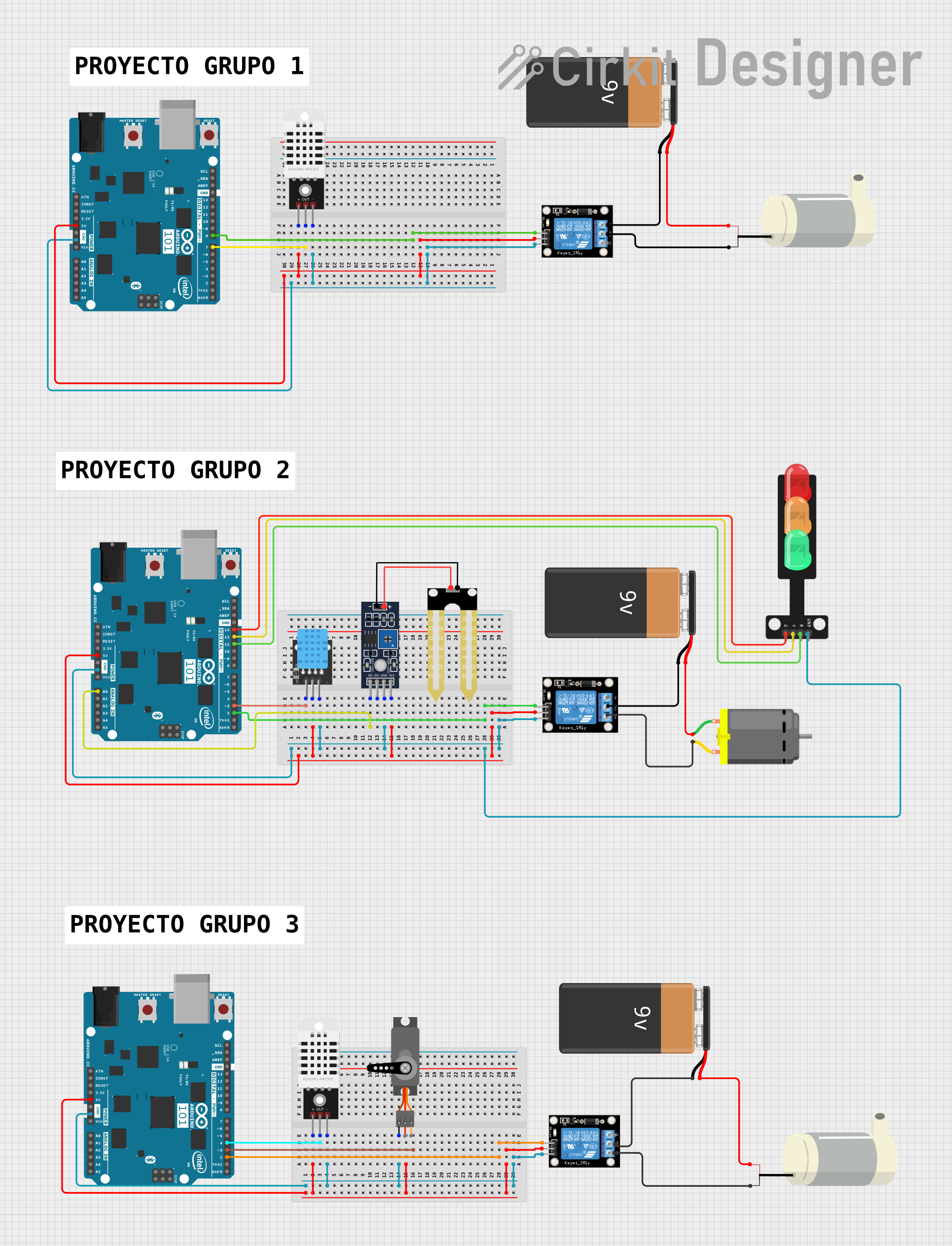
Arduino-Based Smart Environmental Control System with Temperature Sensing and Relay Actuation
Image of Proyectos 903: A project utilizing h in a practical application
This circuit features multiple Arduino 101 microcontrollers used to read temperature and humidity data from DHT22 and DHT11 sensors, control a mini water pump and a DC motor via relay modules, and operate a traffic light. The system is powered by 9V batteries, with the relays serving to switch power to the motor and pump based on sensor inputs or other conditions. The traffic light is directly driven by one of the Arduinos, which manages the signaling.
Cirkit Designer LogoOpen Project in Cirkit Designer
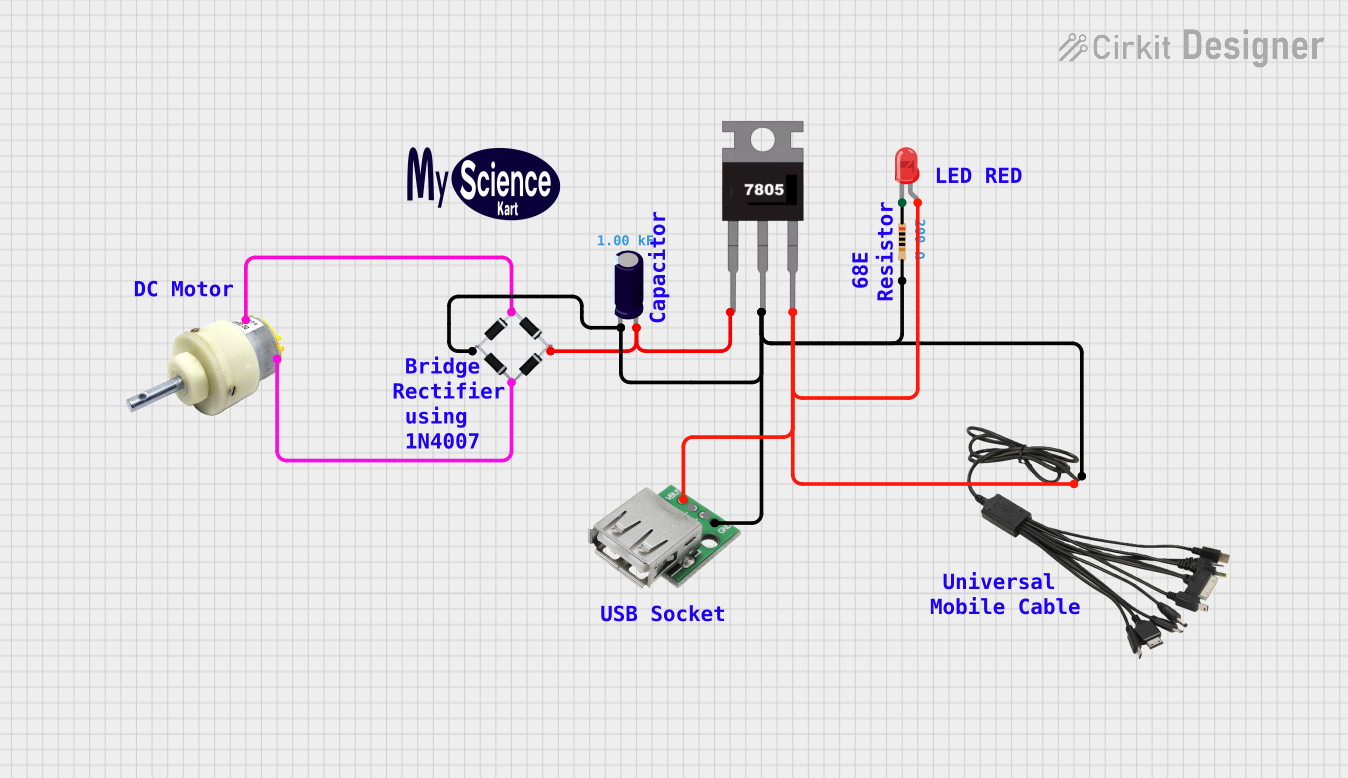
USB-Powered DC Gear Motor with LED Indicator
Image of Hand Crank mobile charger : A project utilizing h in a practical application
This circuit appears to be a power supply unit with a bridge rectifier connected to a DC gear motor, indicating it is designed to convert AC to DC power for the motor. An electrolytic capacitor is used for smoothing the DC output, and a 7805 voltage regulator is included to provide a stable 5V output. Additionally, there is an LED with a series resistor, likely serving as a power indicator light.
Cirkit Designer LogoOpen Project in Cirkit Designer
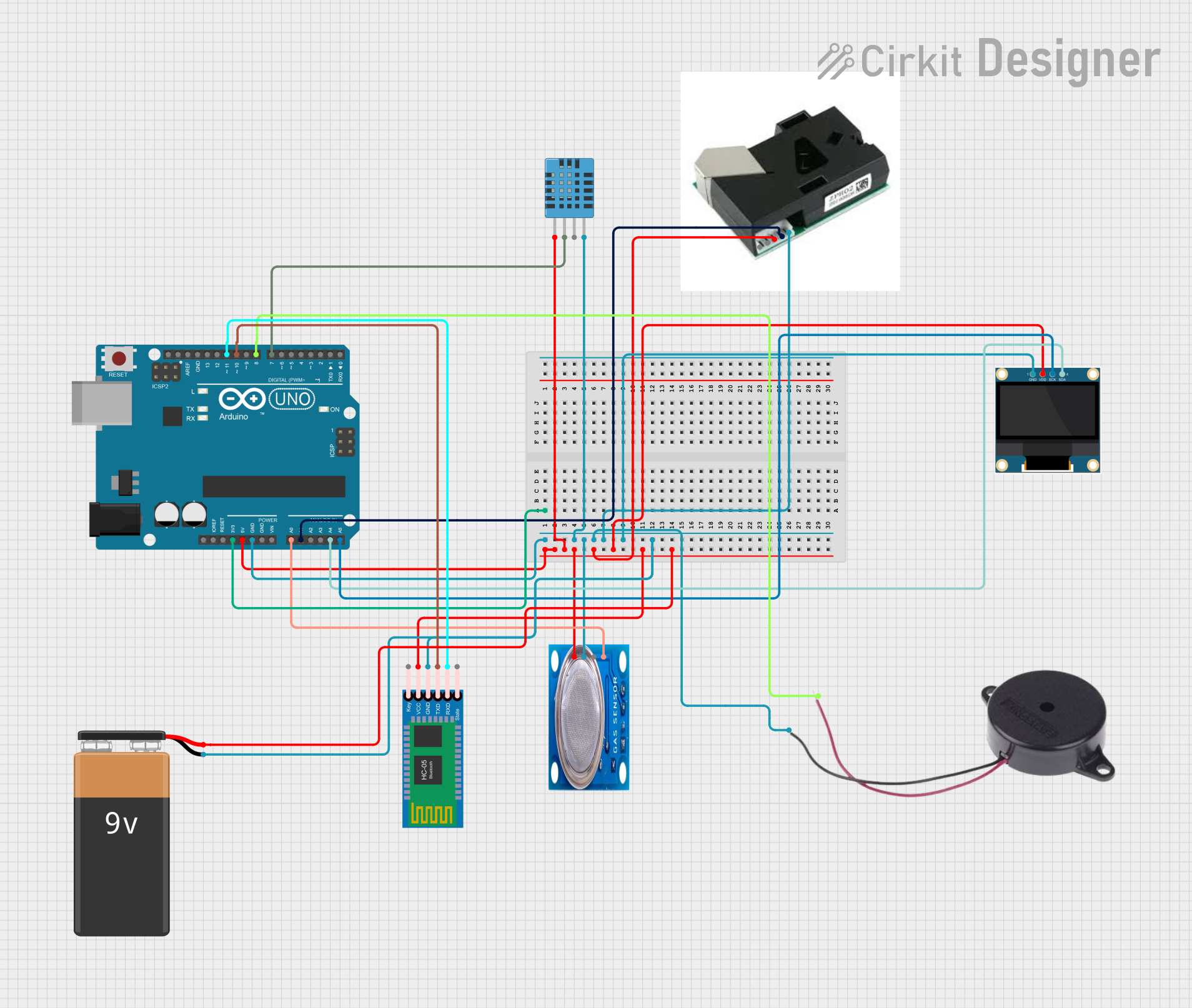
Arduino UNO Based Environmental Monitoring System with Bluetooth Connectivity
Image of Air pollution monitoring: A project utilizing h in a practical application
This circuit is designed around an Arduino UNO microcontroller, which interfaces with a variety of sensors and output devices. It includes a DHT11 humidity and temperature sensor, an MQ-5 gas sensor, and a PM2.5 air quality sensor for environmental monitoring. The circuit also features a 0.96" OLED display for data visualization, a buzzer for alerts, and an HC-05 Bluetooth module for wireless communication, all powered by a 9V battery.
Cirkit Designer LogoOpen Project in Cirkit Designer
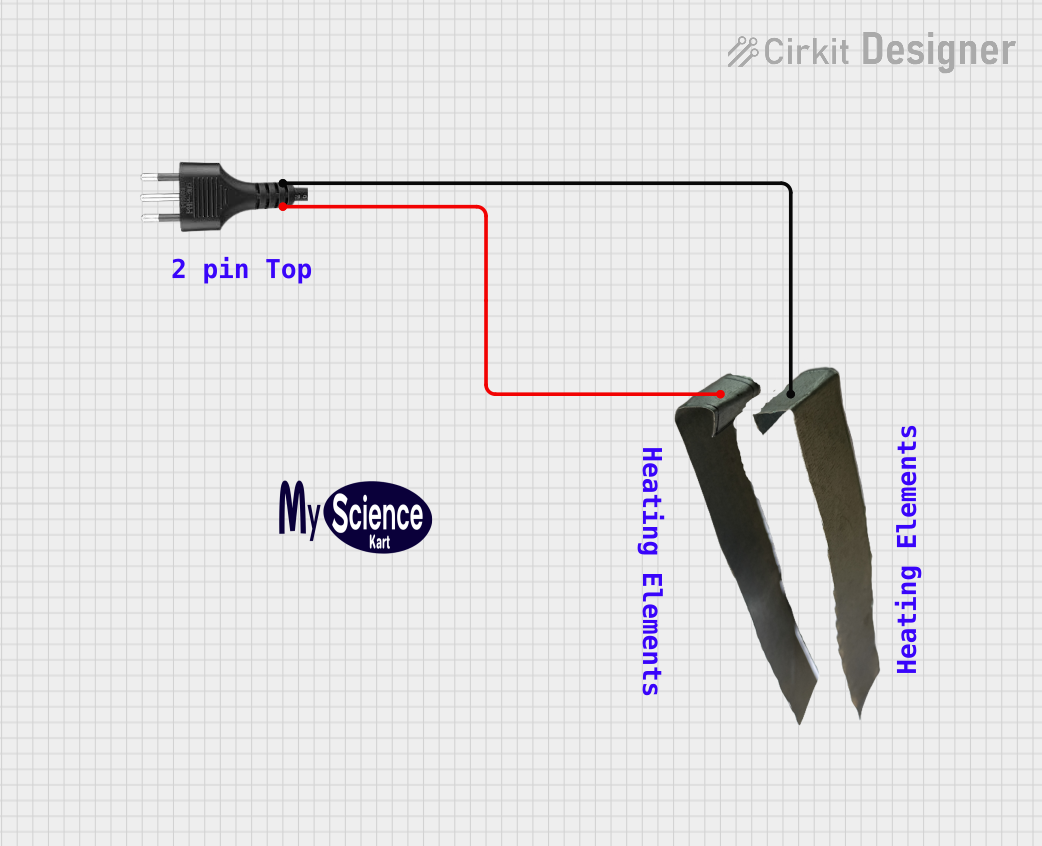
Heater Control Circuit with Power Socket Integration
Image of Simple Water Heater: A project utilizing h in a practical application
The circuit connects a heater to a power source via a socket. The heater is likely to be powered directly from the socket, with the positive and negative terminals of the socket providing the necessary voltage and ground connections to the heater. There are no control elements or sensors present in the circuit, indicating that the heater operates at a constant power level when connected.
Cirkit Designer LogoOpen Project in Cirkit Designer

Explore Projects Built with h

Use Cirkit Designer to design, explore, and prototype these projects online. Some projects support real-time simulation. Click "Open Project" to start designing instantly!
Image of Proyectos 903: A project utilizing h in a practical application
Arduino-Based Smart Environmental Control System with Temperature Sensing and Relay Actuation
This circuit features multiple Arduino 101 microcontrollers used to read temperature and humidity data from DHT22 and DHT11 sensors, control a mini water pump and a DC motor via relay modules, and operate a traffic light. The system is powered by 9V batteries, with the relays serving to switch power to the motor and pump based on sensor inputs or other conditions. The traffic light is directly driven by one of the Arduinos, which manages the signaling.
Cirkit Designer LogoOpen Project in Cirkit Designer
Image of Hand Crank mobile charger : A project utilizing h in a practical application
USB-Powered DC Gear Motor with LED Indicator
This circuit appears to be a power supply unit with a bridge rectifier connected to a DC gear motor, indicating it is designed to convert AC to DC power for the motor. An electrolytic capacitor is used for smoothing the DC output, and a 7805 voltage regulator is included to provide a stable 5V output. Additionally, there is an LED with a series resistor, likely serving as a power indicator light.
Cirkit Designer LogoOpen Project in Cirkit Designer
Image of Air pollution monitoring: A project utilizing h in a practical application
Arduino UNO Based Environmental Monitoring System with Bluetooth Connectivity
This circuit is designed around an Arduino UNO microcontroller, which interfaces with a variety of sensors and output devices. It includes a DHT11 humidity and temperature sensor, an MQ-5 gas sensor, and a PM2.5 air quality sensor for environmental monitoring. The circuit also features a 0.96" OLED display for data visualization, a buzzer for alerts, and an HC-05 Bluetooth module for wireless communication, all powered by a 9V battery.
Cirkit Designer LogoOpen Project in Cirkit Designer
Image of Simple Water Heater: A project utilizing h in a practical application
Heater Control Circuit with Power Socket Integration
The circuit connects a heater to a power source via a socket. The heater is likely to be powered directly from the socket, with the positive and negative terminals of the socket providing the necessary voltage and ground connections to the heater. There are no control elements or sensors present in the circuit, indicating that the heater operates at a constant power level when connected.
Cirkit Designer LogoOpen Project in Cirkit Designer

Technical Specifications

General Characteristics

  • Type: Fixed Resistor
  • Technology: Thick Film / Metal Film / Wirewound (depending on specific model)
  • Resistance Range: 1 ohm to 10 megaohms (Ω)
  • Tolerance: ±1%, ±5%, ±10% (model dependent)
  • Temperature Coefficient: Varies with material and construction
  • Operating Temperature Range: -55°C to +155°C (model dependent)

Electrical Ratings

  • Rated Power: 0.125W to 1W (depending on physical size)
  • Maximum Working Voltage: Varies with resistance value and size
  • Overload Voltage: 2x Rated Voltage or Maximum Working Voltage (whichever is lower)

Physical Characteristics

  • Sizes Available: 0201, 0402, 0603, 0805, 1206, 1210, 2010, 2512 (Imperial code)
  • Termination: Nickel Barrier with 100% Matte Tin Plate (lead-free)

Pin Configuration and Descriptions

Since resistors are two-terminal components, they do not have a complex pin configuration. The two terminals are identical and interchangeable, known as 'A' and 'B'.

Pin Description
A Terminal 1
B Terminal 2

Usage Instructions

Incorporating into a Circuit

  1. Determine the Resistance Value: Calculate the required resistance for your specific application using Ohm's Law or other relevant design principles.
  2. Select the Resistor: Choose a VHB series resistor with the appropriate resistance value and power rating.
  3. Orientation: Connect the resistor in the circuit. Orientation does not matter as resistors are non-polarized components.
  4. Soldering: Use proper soldering techniques to avoid damaging the component with excessive heat.

Best Practices

  • Ensure the power rating of the resistor is suitable for the circuit to prevent overheating.
  • Consider the tolerance and temperature coefficient for precision applications.
  • Use resistors with a higher maximum working voltage than the expected voltage in the circuit for safety.

Troubleshooting and FAQs

Common Issues

  • Excessive Heat: If the resistor is too hot, it may be dissipating more power than its rated capacity. Check the power calculations and replace with a resistor of a higher power rating if necessary.
  • Open Circuit: A lack of continuity could indicate a damaged resistor. Test with a multimeter and replace if defective.
  • Unexpected Voltage Drops: If the voltage drop across the resistor is not as calculated, verify that the actual resistance value matches the specified value.

FAQs

Q: Can I replace a VHB series resistor with a different series? A: Yes, as long as the replacement has the same resistance value, tolerance, and adequate power rating.

Q: Does the direction of current flow matter through a resistor? A: No, resistors are non-polarized and can be connected in any direction.

Q: How do I know if a resistor is failing? A: Signs of a failing resistor include discoloration, cracking, and changes in resistance value. It may also fail open, resulting in no continuity.

Example Arduino UNO Connection

Here's a simple example of how to connect a VHB series resistor to an Arduino UNO for a basic LED circuit:

// Define the LED and resistor pins
const int ledPin = 13; // LED connected to digital pin 13
const int resistorPin = A0; // Resistor connected to analog pin A0

void setup() {
  pinMode(ledPin, OUTPUT); // Set the LED pin as an output
}

void loop() {
  digitalWrite(ledPin, HIGH); // Turn the LED on
  delay(1000); // Wait for a second
  digitalWrite(ledPin, LOW); // Turn the LED off
  delay(1000); // Wait for a second
}

Note: In this example, the resistor would be connected in series with the LED to limit the current. The actual pin used for the resistor is arbitrary since it's not directly controlled by the Arduino but is part of the LED circuit.

Remember to ensure that the resistor value is appropriate for the LED to prevent it from burning out. Typically, a 220Ω to 330Ω resistor is used for a standard 5V LED circuit.