
How to Use relay: Examples, Pinouts, and Specs
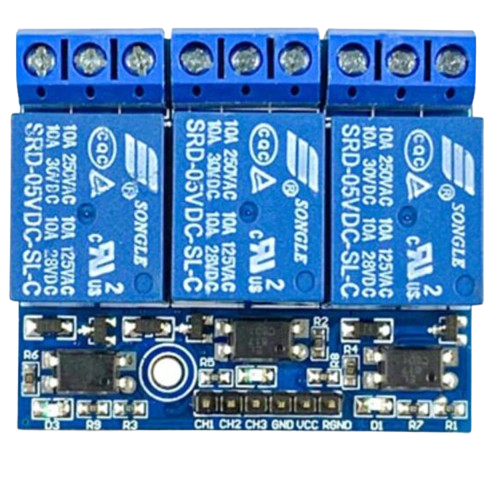
 Design with relay in Cirkit Designer
Introduction
A relay is an electromechanical switch that uses an electromagnetic coil to open or close a circuit. It allows a low-power signal to control a high-power device, making it an essential component in many electronic and electrical systems. Relays are widely used in applications such as home automation, industrial control systems, automotive electronics, and power distribution systems. They are ideal for isolating circuits and controlling high-current loads with minimal input power.
Explore Projects Built with relay
 Open Project in Cirkit Designer
 Open Project in Cirkit Designer
 Open Project in Cirkit Designer
 Open Project in Cirkit Designer
Explore Projects Built with relay
Open Project in Cirkit DesignerOpen Project in Cirkit DesignerOpen Project in Cirkit DesignerOpen Project in Cirkit DesignerTechnical Specifications
Below are the general technical specifications for a standard single-pole, double-throw (SPDT) relay. Specifications may vary depending on the specific relay model.
General Specifications
- Coil Voltage: 5V, 12V, or 24V DC (common options)
- Coil Current: Typically 30–100 mA
- Contact Rating: Up to 10A at 250V AC or 30V DC
- Contact Configuration: SPDT (Single Pole Double Throw) or DPDT (Double Pole Double Throw)
- Switching Time: 5–15 ms
- Dielectric Strength: 1000V AC (coil to contact)
- Insulation Resistance: >100 MΩ at 500V DC
- Mechanical Life: >10 million operations
- Electrical Life: >100,000 operations (at rated load)
Pin Configuration and Descriptions
The pin configuration of a typical SPDT relay is as follows:
| Pin Name | Description |
|---|---|
| Coil (+) | Positive terminal of the electromagnetic coil. |
| Coil (-) | Negative terminal of the electromagnetic coil. |
| Common (COM) | The common terminal that connects to either the Normally Open (NO) or Normally Closed (NC) contact. |
| Normally Open (NO) | The terminal that remains disconnected from COM when the relay is inactive. It connects to COM when the relay is activated. |
| Normally Closed (NC) | The terminal that remains connected to COM when the relay is inactive. It disconnects from COM when the relay is activated. |
Usage Instructions
How to Use the Relay in a Circuit
- Power the Coil: Connect the relay's coil terminals to a DC power source (e.g., 5V or 12V) through a transistor or driver circuit. Ensure the voltage matches the relay's coil rating.
- Control the Coil: Use a low-power control signal (e.g., from a microcontroller like Arduino) to activate the transistor or driver circuit, which energizes the relay coil.
- Connect the Load: Wire the high-power load to the relay's COM and NO or NC terminals, depending on whether you want the load to be normally off or normally on.
- Add Protection: Place a flyback diode across the coil terminals to protect the circuit from voltage spikes caused by the collapsing magnetic field when the relay is deactivated.
Important Considerations and Best Practices
- Flyback Diode: Always use a flyback diode (e.g., 1N4007) across the coil terminals to prevent damage to the control circuit.
- Current Rating: Ensure the relay's contact rating matches or exceeds the current and voltage requirements of the load.
- Isolation: Use optocouplers or isolation circuits if the relay is controlling high-voltage AC loads.
- Switching Speed: Avoid using relays for high-frequency switching applications, as they are mechanical devices with limited speed.
- Heat Dissipation: Ensure proper ventilation or heat dissipation for relays handling high currents.
Example: Connecting a Relay to an Arduino UNO
Below is an example of how to control a 5V relay module using an Arduino UNO.
Circuit Diagram
- Connect the relay module's VCC and GND to the Arduino's 5V and GND pins.
- Connect the relay module's IN pin to Arduino digital pin 7.
- Connect the load (e.g., a light bulb) to the relay's COM and NO terminals.
Arduino Code
// Define the relay control pin
const int relayPin = 7;

void setup() {
  pinMode(relayPin, OUTPUT); // Set the relay pin as an output
  digitalWrite(relayPin, LOW); // Ensure the relay is off at startup
}

void loop() {
  digitalWrite(relayPin, HIGH); // Turn the relay on
  delay(1000); // Keep the relay on for 1 second
  digitalWrite(relayPin, LOW); // Turn the relay off
  delay(1000); // Keep the relay off for 1 second
}
Troubleshooting and FAQs
Common Issues and Solutions
Relay Not Activating:
- Cause: Insufficient voltage or current to the coil.
- Solution: Verify the power supply voltage and current match the relay's coil specifications.
Relay Stuck in One State:
- Cause: Damaged or worn-out contacts.
- Solution: Replace the relay if it has exceeded its electrical or mechanical life.
Voltage Spikes Damaging the Circuit:
- Cause: Absence of a flyback diode.
- Solution: Install a flyback diode across the coil terminals.
Load Not Switching Properly:
- Cause: Incorrect wiring of the COM, NO, or NC terminals.
- Solution: Double-check the wiring and ensure the load is connected to the correct terminals.
FAQs
Q: Can I use a relay to control an AC load?
- A: Yes, relays are commonly used to control AC loads. Ensure the relay's contact rating supports the AC voltage and current.
Q: What is the difference between NO and NC terminals?
- A: The NO (Normally Open) terminal is disconnected from COM when the relay is inactive, while the NC (Normally Closed) terminal is connected to COM when the relay is inactive.
Q: Can I use a relay for high-frequency switching?
- A: No, relays are not suitable for high-frequency switching due to their mechanical nature. Use solid-state relays or transistors for such applications.
Q: How do I protect my circuit from relay-induced voltage spikes?
- A: Use a flyback diode across the relay coil terminals to suppress voltage spikes caused by the collapsing magnetic field.