The ESP32 UWD is a powerful microcontroller developed by MakerFabs with the part ID DW1000. It is designed for Internet of Things (IoT) applications, offering integrated Wi-Fi and Bluetooth capabilities. This versatile module features multiple GPIO pins, analog-to-digital converters (ADCs), and support for various communication protocols, making it an excellent choice for projects requiring wireless connectivity and advanced processing power.
Explore Projects Built with ESP32 UWD
Use Cirkit Designer to design, explore, and prototype these projects online. Some projects support real-time simulation. Click "Open Project" to start designing instantly!
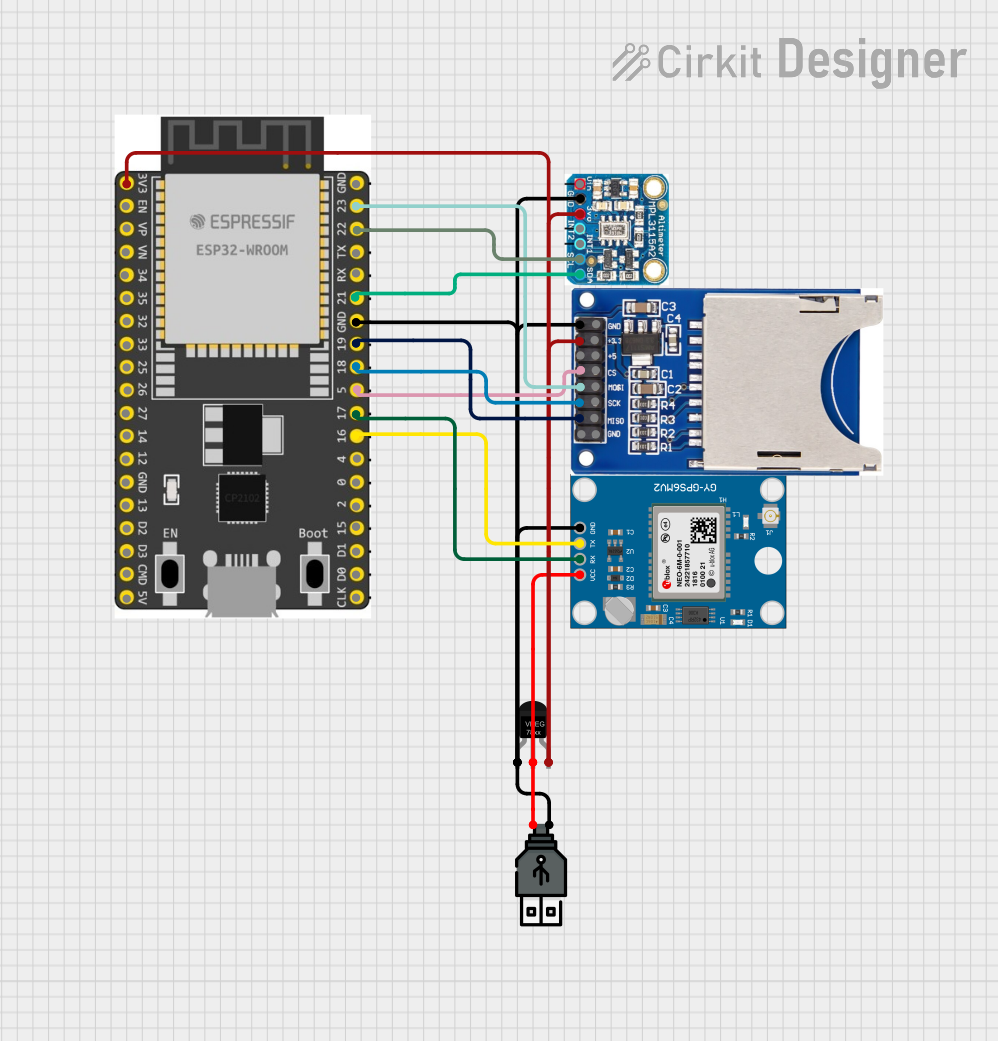
This circuit features an ESP32 Wroom Dev Kit as the main microcontroller, interfaced with an MPL3115A2 sensor for pressure and temperature readings, and a Neo 6M GPS module for location tracking. The ESP32 is also connected to an SD card reader for data logging purposes. A voltage regulator is used to step down the USB power supply to 3.3V, which powers the ESP32, the sensor, and the SD card reader.
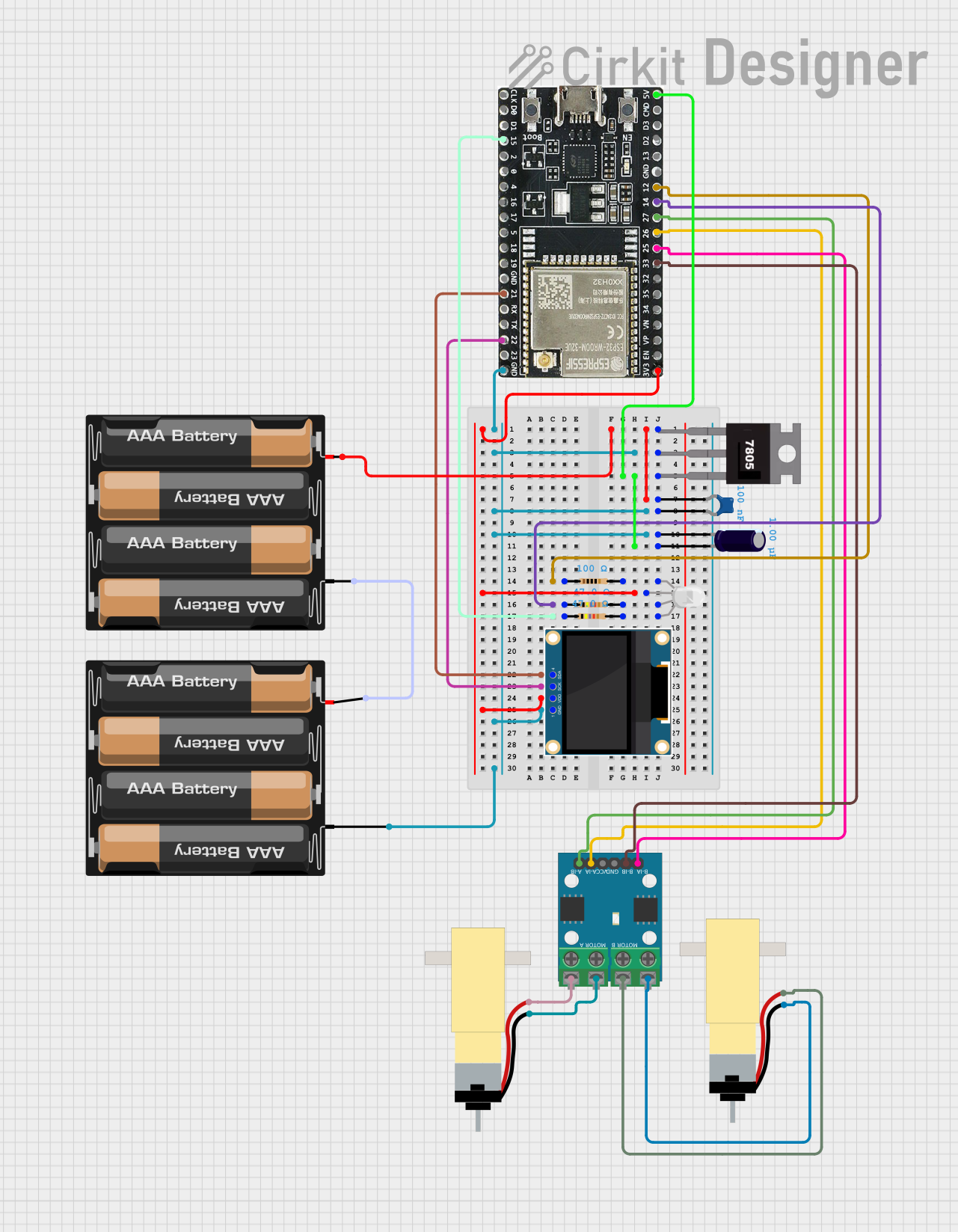
This circuit is a WiFi-controlled robotic system powered by an ESP32 microcontroller. It features an OLED display for status messages, an RGB LED for visual feedback, and dual hobby gearmotors driven by an L9110 motor driver for movement. The system is powered by a 4 x AAA battery pack regulated to 5V using a 7805 voltage regulator.
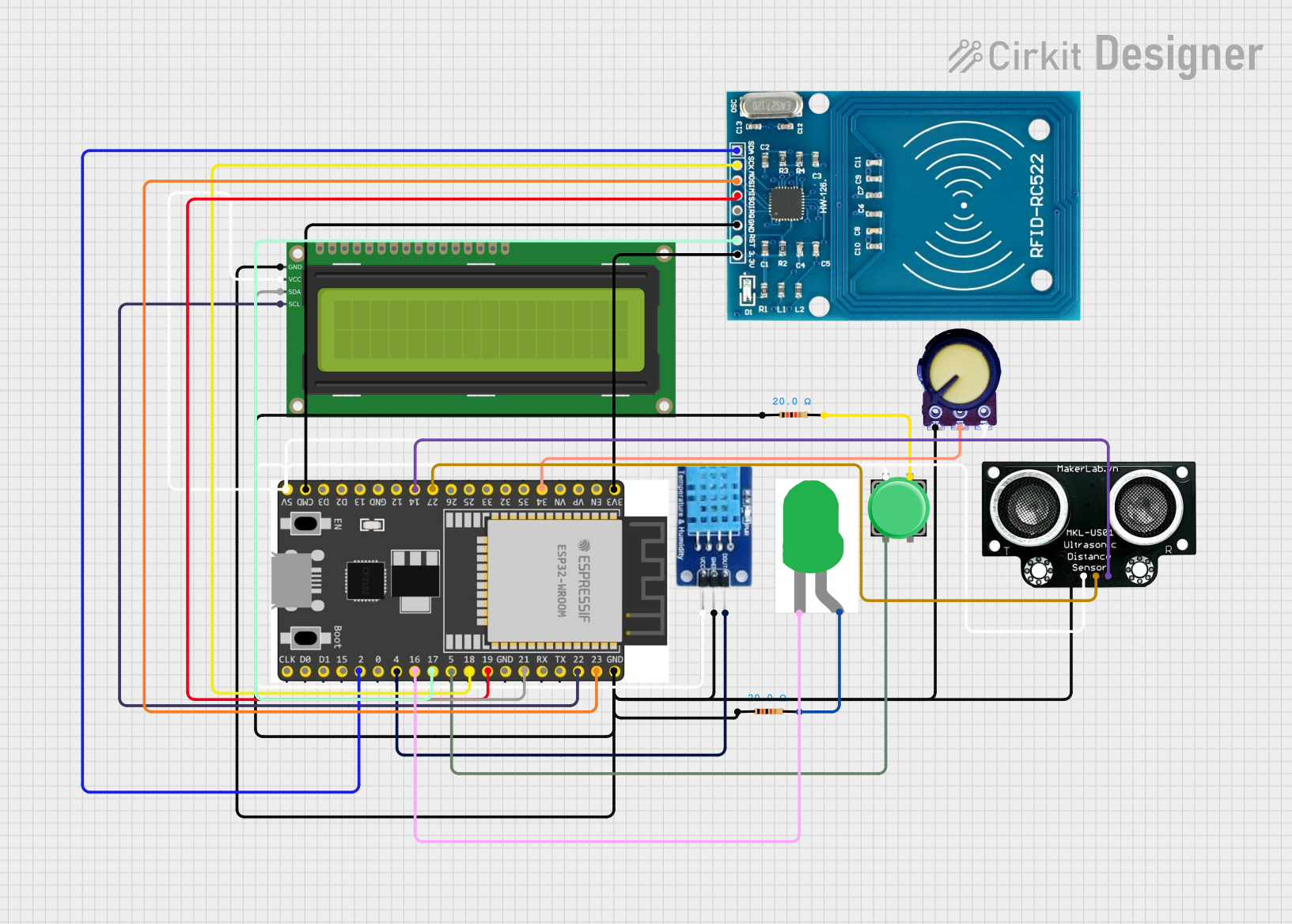
This circuit is an access control system using an ESP32 microcontroller, which integrates an RFID reader, an ultrasonic distance sensor, a DHT11 temperature and humidity sensor, a potentiometer, a pushbutton, an LED, and a 16x2 I2C LCD display. The system reads RFID tags to grant access, displays information on the LCD, and uses the potentiometer to adjust settings, while the ultrasonic sensor measures distance and the DHT11 monitors environmental conditions.
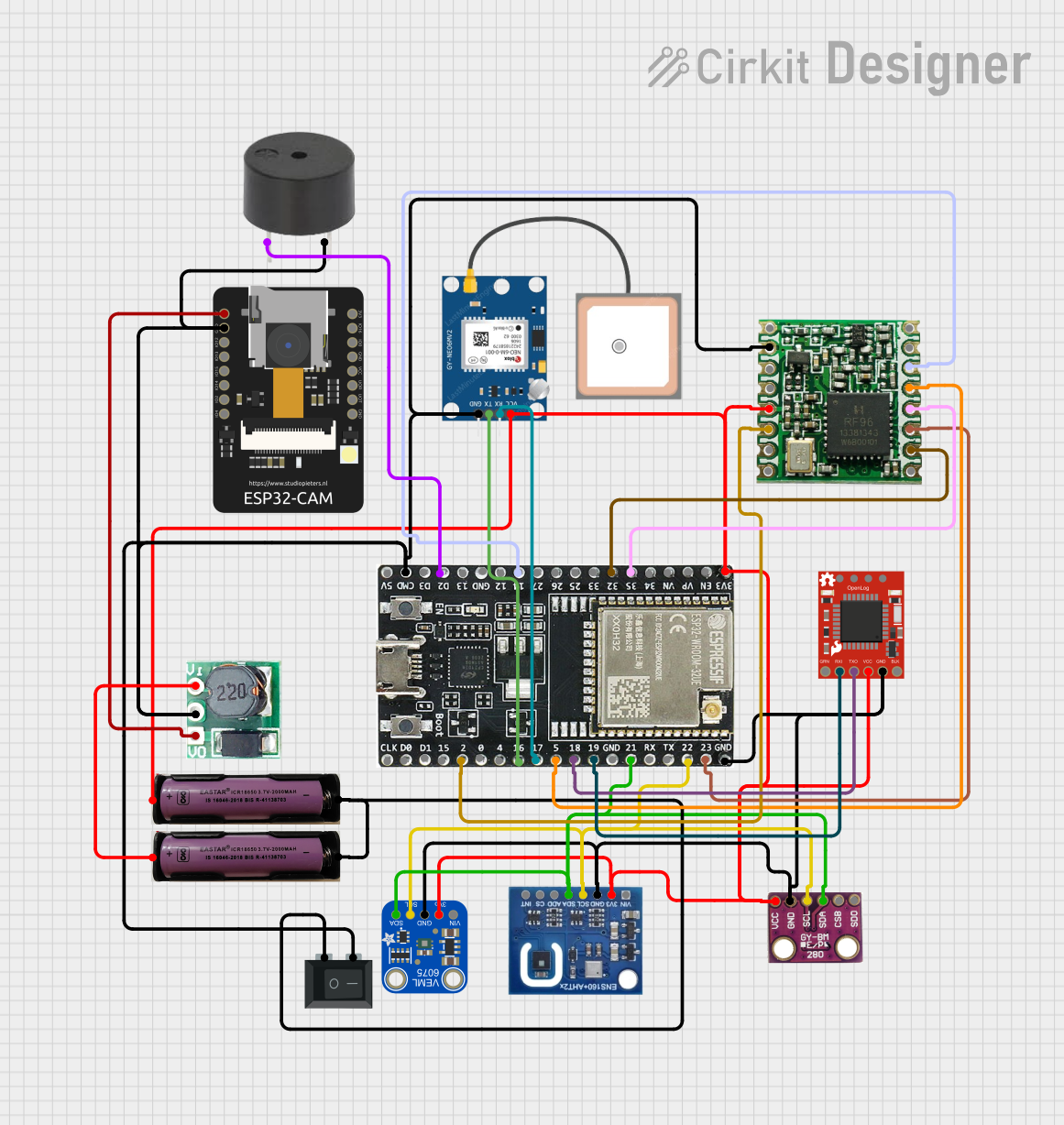
This circuit features an ESP32-WROOM-32UE microcontroller as its central processing unit, interfaced with a variety of sensors including a BMP280 barometric pressure sensor, an Adafruit VEML6075 UV sensor, an ENS160+AHT21 air quality sensor, and a GPS NEO 6M module for location tracking. The ESP32 logs data from these sensors to an SD card using a SparkFun OpenLog and also communicates with an RFM95 LoRa transceiver for wireless data transmission. A step-up boost converter raises the voltage from a 3.7V battery to 5V to power the ESP32-CAM, and a buzzer is included for audio signaling, all controlled by the ESP32 which runs a sketch to read sensor data and log it periodically.
Smart home devices (e.g., smart lights, thermostats, and security systems)
Industrial IoT systems for monitoring and automation
Wearable devices and health monitoring systems
Robotics and automation projects
Wireless sensor networks
Prototyping and educational projects
Technical Specifications
The following table outlines the key technical specifications of the ESP32 UWD:
Parameter
Value
Manufacturer
MakerFabs
Part ID
DW1000
Microcontroller
ESP32 Dual-Core Xtensa LX6
Clock Speed
Up to 240 MHz
Flash Memory
4 MB
SRAM
520 KB
Wi-Fi
802.11 b/g/n (2.4 GHz)
Bluetooth
Bluetooth 4.2 + BLE
GPIO Pins
34 (multipurpose, including ADC and PWM)
ADC Channels
18 (12-bit resolution)
Communication Protocols
UART, SPI, I2C, I2S, CAN, PWM
Operating Voltage
3.3V
Input Voltage Range
3.0V - 3.6V
Power Consumption
5 µA (deep sleep), ~240 mA (active Wi-Fi)
Dimensions
25.5 mm x 18 mm
Pin Configuration and Descriptions
The ESP32 UWD features a total of 34 GPIO pins, which can be configured for various functions. Below is a table summarizing the pin configuration:
Pin Number
Pin Name
Function
1
GND
Ground
2
3V3
3.3V Power Supply
3
EN
Enable Pin (active high)
4
GPIO0
General Purpose I/O, Boot Mode Selection
5
GPIO1
UART TX
6
GPIO2
General Purpose I/O, ADC2 Channel 2
7
GPIO3
UART RX
8
GPIO4
General Purpose I/O, ADC2 Channel 0
...
...
...
34
GPIO33
General Purpose I/O, ADC1 Channel 5
Note: For a complete pinout diagram, refer to the official datasheet provided by MakerFabs.
Usage Instructions
How to Use the ESP32 UWD in a Circuit
Powering the Module: Connect the 3V3 pin to a 3.3V power source and GND to ground. Ensure the power supply is stable and within the specified voltage range (3.0V - 3.6V).
Programming the ESP32 UWD: Use a USB-to-serial adapter to connect the module to your computer. Install the necessary drivers and use the Arduino IDE or ESP-IDF for programming.
Connecting Peripherals: Use the GPIO pins to connect sensors, actuators, or other peripherals. Configure the pins in your code as input or output as needed.
Wireless Connectivity: Use the built-in Wi-Fi and Bluetooth features to connect to networks or pair with other devices.
Important Considerations and Best Practices
Voltage Levels: Ensure all connected peripherals operate at 3.3V logic levels to avoid damaging the module.
Deep Sleep Mode: Use the deep sleep mode to reduce power consumption in battery-powered applications.
Antenna Placement: Avoid placing the module near metal objects or other RF sources to ensure optimal wireless performance.
Boot Mode: To enter bootloader mode, hold the GPIO0 pin low while resetting the module.
Example Code for Arduino UNO Integration
Below is an example of how to use the ESP32 UWD with the Arduino IDE to connect to a Wi-Fi network:
#include <WiFi.h> // Include the Wi-Fi library for ESP32

// Replace with your network credentials
const char* ssid = "Your_SSID";
const char* password = "Your_PASSWORD";

void setup() {
  Serial.begin(115200); // Initialize serial communication at 115200 baud
  delay(1000); // Wait for a second to stabilize

  Serial.println("Connecting to Wi-Fi...");
  WiFi.begin(ssid, password); // Start Wi-Fi connection

  // Wait until the ESP32 connects to the Wi-Fi network
  while (WiFi.status() != WL_CONNECTED) {
    delay(500);
    Serial.print(".");
  }

  Serial.println("\nConnected to Wi-Fi!");
  Serial.print("IP Address: ");
  Serial.println(WiFi.localIP()); // Print the assigned IP address
}

void loop() {
  // Add your main code here
}
Note: Replace Your_SSID and Your_PASSWORD with your Wi-Fi network credentials.
Troubleshooting and FAQs
Common Issues and Solutions
Module Not Powering On
Cause: Insufficient or unstable power supply.
Solution: Ensure the power source provides a stable 3.3V and sufficient current.
Wi-Fi Connection Fails
Cause: Incorrect SSID or password, or weak signal strength.
Solution: Double-check the credentials and ensure the module is within range of the Wi-Fi router.
Code Upload Fails
Cause: Incorrect COM port or missing drivers.
Solution: Verify the correct COM port is selected in the Arduino IDE and install the required USB-to-serial drivers.
GPIO Pin Not Responding
Cause: Pin conflict or incorrect configuration.
Solution: Check the pin configuration in your code and ensure no peripherals are causing conflicts.
FAQs
Q: Can the ESP32 UWD operate on 5V?
A: No, the ESP32 UWD operates at 3.3V. Connecting it to 5V may damage the module.
Q: How do I reset the module?
A: Use the EN pin to reset the module. Pull it low momentarily and release it.
Q: Can I use the ESP32 UWD with Bluetooth and Wi-Fi simultaneously?
A: Yes, the ESP32 UWD supports simultaneous use of Bluetooth and Wi-Fi, but performance may vary depending on the application.
Q: What is the maximum range of the Wi-Fi module?
A: The range depends on environmental factors but typically extends up to 100 meters in open space.
For additional support, refer to the official MakerFabs documentation or community forums.


 Open Project in Cirkit Designer