
How to Use thermocouple: Examples, Pinouts, and Specs
 Design with thermocouple in Cirkit Designer
Introduction
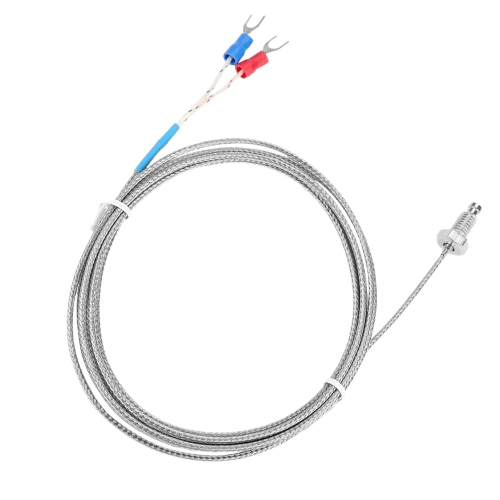
A thermocouple is a temperature sensor that consists of two dissimilar metal wires joined at one end. It operates based on the Seebeck effect, where a voltage is generated proportional to the temperature difference between the joined end (hot junction) and the other ends (cold junction or reference junction). This voltage can be measured and converted into a temperature reading.
Thermocouples are widely used in industrial, scientific, and household applications due to their wide temperature range, durability, and fast response time. Common use cases include:
- Industrial temperature monitoring in furnaces, kilns, and engines.
- Scientific experiments requiring precise temperature measurements.
- Household appliances like ovens and water heaters.
- HVAC systems for environmental control.
Explore Projects Built with thermocouple
 Open Project in Cirkit Designer
 Open Project in Cirkit Designer
 Open Project in Cirkit Designer
 Open Project in Cirkit Designer
Explore Projects Built with thermocouple
Open Project in Cirkit DesignerOpen Project in Cirkit DesignerOpen Project in Cirkit DesignerOpen Project in Cirkit DesignerTechnical Specifications
Thermocouples come in various types (e.g., Type K, J, T, E), each with different characteristics. Below are general specifications for a Type K thermocouple, one of the most commonly used types:
| Parameter | Specification |
|---|---|
| Temperature Range | -200°C to 1,260°C (-328°F to 2,300°F) |
| Accuracy | ±1.5°C or ±0.4% of reading |
| Sensitivity | ~41 µV/°C |
| Wire Material | Chromel (Ni-Cr) and Alumel (Ni-Al) |
| Output Voltage Range | 0 to ~54 mV (depending on temperature) |
| Response Time | <1 second (depending on probe design) |
Pin Configuration and Descriptions
Thermocouples do not have traditional "pins" but consist of two wires. The wire configuration is as follows:
| Wire Color (Type K) | Material | Description |
|---|---|---|
| Yellow | Chromel | Positive terminal |
| Red | Alumel | Negative terminal |
Note: Wire colors may vary depending on the thermocouple type and regional standards.
Usage Instructions
How to Use a Thermocouple in a Circuit
Connect the Thermocouple to a Signal Amplifier:
- Thermocouples generate very small voltages, so an amplifier (e.g., MAX31855 or MAX6675) is required to read the signal accurately.
- Connect the thermocouple wires to the amplifier's input terminals, ensuring correct polarity (positive to positive, negative to negative).
Interface the Amplifier with a Microcontroller:
- Most amplifiers output a digital signal (e.g., SPI protocol) that can be read by a microcontroller like an Arduino UNO.
- Connect the amplifier's output pins (e.g., MISO, SCK, CS) to the corresponding pins on the microcontroller.
Power the Circuit:
- Provide the required power supply to the amplifier and microcontroller (e.g., 3.3V or 5V, depending on the components).
Read and Process the Data:
- Use the microcontroller to read the temperature data from the amplifier and convert it into a human-readable format.
Important Considerations and Best Practices
- Cold Junction Compensation: Since thermocouples measure the temperature difference, the cold junction temperature must be known or compensated for. Most amplifiers handle this automatically.
- Shielding: Use shielded cables or twisted pairs to minimize noise interference, especially in high-EMI environments.
- Calibration: Regularly calibrate the thermocouple for accurate readings.
- Avoid Polarity Reversal: Connecting the wires incorrectly can result in inaccurate readings or damage to the amplifier.
Example: Using a Type K Thermocouple with Arduino UNO
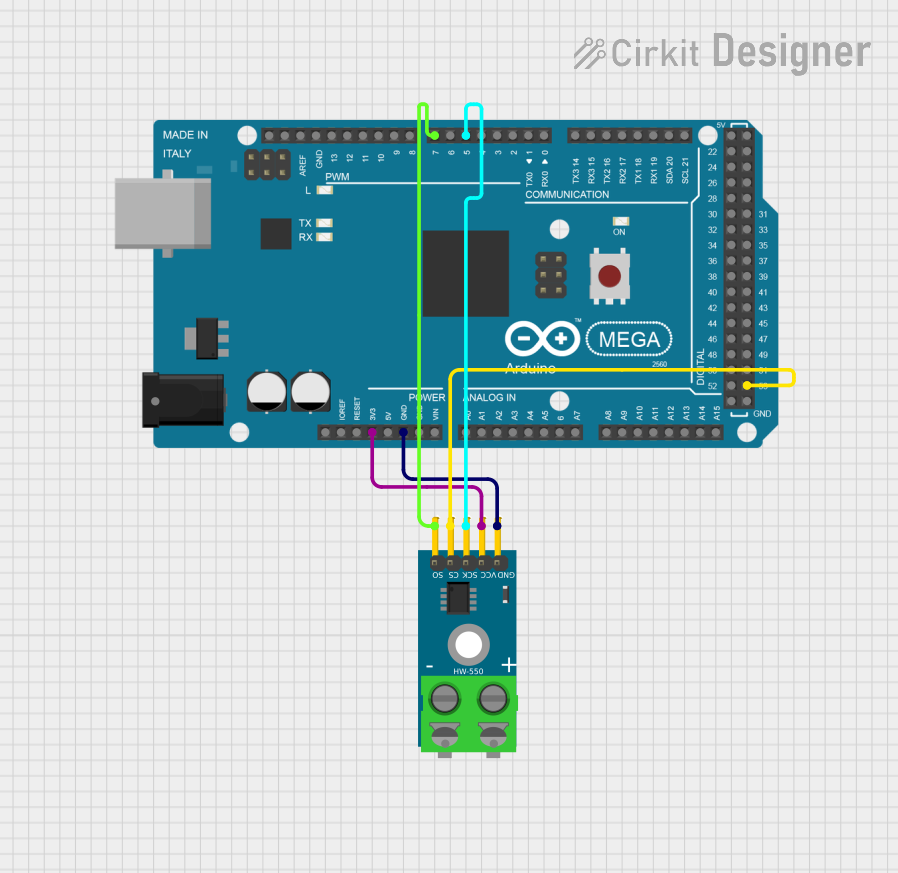
Below is an example of interfacing a Type K thermocouple with an Arduino UNO using the MAX6675 amplifier:
#include <SPI.h>
#include "Adafruit_MAX6675.h"

// Define pins for the MAX6675 module
int thermoDO = 4;  // Data Out (MISO)
int thermoCS = 5;  // Chip Select
int thermoCLK = 6; // Clock (SCK)

// Create a MAX6675 object
Adafruit_MAX6675 thermocouple(thermoCLK, thermoCS, thermoDO);

void setup() {
  Serial.begin(9600); // Initialize serial communication
  Serial.println("Thermocouple Test");
  delay(500); // Allow time for the thermocouple to stabilize
}

void loop() {
  // Read temperature in Celsius
  double celsius = thermocouple.readCelsius();

  // Check if the reading is valid
  if (isnan(celsius)) {
    Serial.println("Error: Thermocouple not connected!");
  } else {
    Serial.print("Temperature: ");
    Serial.print(celsius);
    Serial.println(" °C");
  }

  delay(1000); // Wait 1 second before the next reading
}
Note: Ensure the MAX6675 library is installed in your Arduino IDE before uploading the code.
Troubleshooting and FAQs
Common Issues
No Temperature Reading or NAN Output:
- Cause: Loose or incorrect connections.
- Solution: Verify all connections, especially the thermocouple wires and amplifier pins.
Inaccurate Temperature Readings:
- Cause: Poor cold junction compensation or calibration.
- Solution: Ensure the amplifier is functioning correctly and calibrate the thermocouple.
Fluctuating Readings:
- Cause: Electrical noise or interference.
- Solution: Use shielded cables and keep the thermocouple away from high-EMI sources.
Amplifier Overheating:
- Cause: Incorrect power supply voltage.
- Solution: Check the amplifier's voltage requirements and ensure proper power supply.
FAQs
Q: Can I extend the thermocouple wires?
A: Yes, but use thermocouple extension wires made of the same materials to avoid introducing errors.
Q: What is the maximum distance for thermocouple wiring?
A: It depends on the wire gauge and environment, but typically up to 100 meters with proper shielding.
Q: Can I use a thermocouple without an amplifier?
A: Directly reading the thermocouple's small voltage is impractical without amplification and cold junction compensation.
Q: How do I choose the right thermocouple type?
A: Consider the temperature range, accuracy, and environmental conditions of your application. For general use, Type K is a good choice.