
How to Use 7408: Examples, Pinouts, and Specs
 Design with 7408 in Cirkit Designer
Introduction
The 7408 is a quad 2-input AND gate integrated circuit (IC) that contains four independent AND gates. Each gate outputs a high signal (logic 1) only when both of its inputs are high (logic 1). This IC is part of the 74xx series of TTL (Transistor-Transistor Logic) devices and is widely used in digital logic applications. Its compact design and reliable performance make it a popular choice for implementing basic logic functions in circuits.
Explore Projects Built with 7408
 Open Project in Cirkit Designer
 Open Project in Cirkit Designer
 Open Project in Cirkit Designer
 Open Project in Cirkit Designer
Explore Projects Built with 7408
Open Project in Cirkit DesignerOpen Project in Cirkit DesignerOpen Project in Cirkit DesignerOpen Project in Cirkit DesignerCommon Applications and Use Cases
- Digital logic circuits
- Signal processing
- Data routing and control
- Arithmetic and logic units (ALUs)
- Embedded systems and microcontroller projects
Technical Specifications
The 7408 IC is designed to operate within specific electrical and environmental parameters. Below are its key technical details:
| Parameter | Value |
|---|---|
| Supply Voltage (Vcc) | 4.75V to 5.25V (typical 5V) |
| Input Voltage (VI) | 0V to Vcc |
| High-Level Output Voltage | 2.4V (minimum) |
| Low-Level Output Voltage | 0.4V (maximum) |
| High-Level Input Current | 40 µA (maximum) |
| Low-Level Input Current | -1.6 mA (maximum) |
| Propagation Delay | 10 ns to 22 ns (typical) |
| Power Dissipation | 10 mW (typical) |
| Operating Temperature | 0°C to 70°C |
| Package Types | DIP-14, SOIC-14, and others |
Pin Configuration and Descriptions
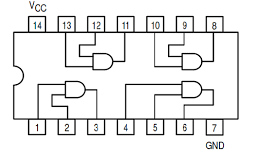
The 7408 IC comes in a 14-pin Dual Inline Package (DIP). Below is the pinout and description:
| Pin Number | Pin Name | Description |
|---|---|---|
| 1 | 1A | Input A for Gate 1 |
| 2 | 1B | Input B for Gate 1 |
| 3 | 1Y | Output of Gate 1 |
| 4 | 2A | Input A for Gate 2 |
| 5 | 2B | Input B for Gate 2 |
| 6 | 2Y | Output of Gate 2 |
| 7 | GND | Ground (0V) |
| 8 | 3Y | Output of Gate 3 |
| 9 | 3A | Input A for Gate 3 |
| 10 | 3B | Input B for Gate 3 |
| 11 | 4Y | Output of Gate 4 |
| 12 | 4A | Input A for Gate 4 |
| 13 | 4B | Input B for Gate 4 |
| 14 | Vcc | Positive Supply Voltage (4.75V to 5.25V) |
Usage Instructions
The 7408 IC is straightforward to use in digital circuits. Follow these steps and guidelines to integrate it into your design:
How to Use the 7408 in a Circuit
- Power the IC: Connect the Vcc pin (Pin 14) to a 5V power supply and the GND pin (Pin 7) to ground.
- Connect Inputs: Provide digital signals (logic 0 or logic 1) to the input pins (e.g., 1A and 1B for Gate 1).
- Obtain Outputs: The output pin (e.g., 1Y for Gate 1) will produce a high signal (logic 1) only when both inputs are high.
- Load Considerations: Ensure the output is connected to a load that does not exceed the IC's current-driving capability.
Important Considerations and Best Practices
- Voltage Levels: Operate the IC within the recommended voltage range (4.75V to 5.25V) to avoid damage.
- Unused Gates: If any gates are unused, connect their inputs to either Vcc or GND to prevent floating inputs, which can cause erratic behavior.
- Decoupling Capacitor: Place a 0.1 µF ceramic capacitor close to the Vcc and GND pins to filter noise and stabilize the power supply.
- Input Protection: Avoid applying voltages higher than Vcc or lower than GND to the input pins to prevent damage.
Example: Connecting the 7408 to an Arduino UNO
The 7408 can be used with an Arduino UNO to implement basic logic operations. Below is an example of how to use the 7408 to perform an AND operation on two digital signals.
Circuit Connections
- Connect Pin 14 (Vcc) of the 7408 to the 5V pin of the Arduino.
- Connect Pin 7 (GND) of the 7408 to the GND pin of the Arduino.
- Connect two Arduino digital pins (e.g., D2 and D3) to the inputs of Gate 1 (Pins 1A and 1B).
- Connect the output of Gate 1 (Pin 1Y) to another Arduino digital pin (e.g., D4).
Arduino Code
// Define input and output pins
const int inputA = 2; // Input A connected to Arduino pin D2
const int inputB = 3; // Input B connected to Arduino pin D3
const int outputY = 4; // Output Y connected to Arduino pin D4

void setup() {
  // Configure pins
  pinMode(inputA, OUTPUT); // Set inputA as output
  pinMode(inputB, OUTPUT); // Set inputB as output
  pinMode(outputY, INPUT); // Set outputY as input

  // Initialize inputs
  digitalWrite(inputA, LOW); // Set inputA to LOW
  digitalWrite(inputB, LOW); // Set inputB to LOW
}

void loop() {
  // Test the AND gate by toggling inputs
  digitalWrite(inputA, HIGH); // Set inputA to HIGH
  digitalWrite(inputB, HIGH); // Set inputB to HIGH
  delay(1000); // Wait for 1 second

  // Read the output of the AND gate
  int andOutput = digitalRead(outputY);

  // Print the output to the Serial Monitor
  Serial.begin(9600);
  Serial.print("AND Gate Output: ");
  Serial.println(andOutput);

  delay(1000); // Wait for 1 second
}
Troubleshooting and FAQs
Common Issues and Solutions
No Output Signal:
- Cause: Incorrect power supply or loose connections.
- Solution: Verify that Vcc and GND are properly connected and the supply voltage is within the recommended range.
Erratic Behavior:
- Cause: Floating inputs or noisy power supply.
- Solution: Tie unused inputs to Vcc or GND and use a decoupling capacitor near the IC.
Output Always Low:
- Cause: One or both inputs are not receiving a high signal.
- Solution: Check the input signals and ensure they are at the correct logic levels.
Overheating:
- Cause: Excessive current draw or incorrect voltage levels.
- Solution: Ensure the load does not exceed the IC's current-driving capability and the supply voltage is within the specified range.
FAQs
Q1: Can the 7408 operate at 3.3V?
A1: No, the 7408 is designed for TTL logic levels and requires a supply voltage between 4.75V and 5.25V.
Q2: What happens if I leave an input pin floating?
A2: Floating inputs can cause unpredictable behavior. Always connect unused inputs to Vcc or GND.
Q3: Can I use the 7408 with CMOS logic ICs?
A3: Yes, but ensure proper voltage level matching between the TTL and CMOS devices. Use level shifters if necessary.