
How to Use M100-5883 GPS: Examples, Pinouts, and Specs
 Design with M100-5883 GPS in Cirkit Designer
Introduction
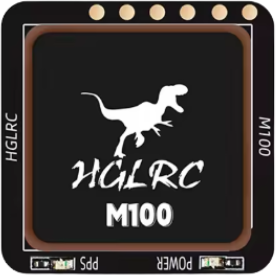
The M100-5883 GPS is a compact and high-performance GPS module manufactured by HGLRC. It is designed to provide accurate positioning and navigation data for a wide range of applications. With its low power consumption, high sensitivity, and fast time-to-first-fix (TTFF), the M100-5883 GPS is ideal for integration into drones, robotics, IoT devices, and other electronic systems requiring reliable location tracking.
Explore Projects Built with M100-5883 GPS
 Open Project in Cirkit Designer
 Open Project in Cirkit Designer
 Open Project in Cirkit Designer
 Open Project in Cirkit Designer
Explore Projects Built with M100-5883 GPS
Open Project in Cirkit DesignerOpen Project in Cirkit DesignerOpen Project in Cirkit DesignerOpen Project in Cirkit DesignerCommon Applications and Use Cases
- Drones and UAVs for navigation and positioning
- Robotics for autonomous movement and mapping
- IoT devices for geolocation services
- Vehicle tracking systems
- Outdoor navigation devices
Technical Specifications
The M100-5883 GPS module is built to deliver reliable performance in a compact form factor. Below are its key technical details:
General Specifications
| Parameter | Value |
|---|---|
| Manufacturer | HGLRC |
| Model | M100-5883 |
| GPS Chipset | MTK3333 |
| Frequency | L1, 1575.42 MHz |
| Positioning Accuracy | < 2.5 meters CEP |
| Time-to-First-Fix (TTFF) | Cold Start: < 35s, Hot Start: < 1s |
| Sensitivity | Tracking: -165 dBm, Acquisition: -148 dBm |
| Update Rate | 1 Hz (default), up to 10 Hz |
| Operating Voltage | 3.3V - 5.0V |
| Power Consumption | < 50 mA @ 3.3V |
| Dimensions | 18mm x 18mm x 6mm |
| Weight | 5 grams |
Pin Configuration and Descriptions
The M100-5883 GPS module has a simple pinout for easy integration into circuits. Below is the pin configuration:
| Pin Number | Pin Name | Description |
|---|---|---|
| 1 | VCC | Power supply input (3.3V - 5.0V) |
| 2 | GND | Ground connection |
| 3 | TX | UART Transmit (GPS data output) |
| 4 | RX | UART Receive (for configuration commands) |
| 5 | SDA | I2C Data Line (for compass functionality) |
| 6 | SCL | I2C Clock Line (for compass functionality) |
Usage Instructions
The M100-5883 GPS module is straightforward to use and can be integrated into a variety of systems. Below are the steps and best practices for using the module:
Connecting the M100-5883 GPS to an Arduino UNO
Wiring the Module:
- Connect the VCC pin of the GPS module to the 5V pin on the Arduino UNO.
- Connect the GND pin of the GPS module to the GND pin on the Arduino UNO.
- Connect the TX pin of the GPS module to the RX pin (Pin 0) on the Arduino UNO.
- Connect the RX pin of the GPS module to the TX pin (Pin 1) on the Arduino UNO.
- If using the compass functionality, connect the SDA and SCL pins to the corresponding I2C pins on the Arduino UNO.
Installing Required Libraries:
- Install the
TinyGPS++library for parsing GPS data. - Install the
Wirelibrary (built-in) for I2C communication if using the compass.
- Install the
Sample Code: Below is an example Arduino sketch to read GPS data from the M100-5883 module:
#include <TinyGPS++.h> // Include TinyGPS++ library for GPS parsing
#include <SoftwareSerial.h> // Include SoftwareSerial for UART communication

// Define GPS module RX and TX pins
SoftwareSerial gpsSerial(4, 3); // RX = Pin 4, TX = Pin 3
TinyGPSPlus gps; // Create a TinyGPS++ object

void setup() {
  Serial.begin(9600); // Initialize Serial Monitor
  gpsSerial.begin(9600); // Initialize GPS module communication
  Serial.println("M100-5883 GPS Module Test");
}

void loop() {
  // Read data from GPS module
  while (gpsSerial.available() > 0) {
    char c = gpsSerial.read();
    if (gps.encode(c)) { // Parse GPS data
      if (gps.location.isUpdated()) {
        // Print latitude and longitude to Serial Monitor
        Serial.print("Latitude: ");
        Serial.print(gps.location.lat(), 6);
        Serial.print(", Longitude: ");
        Serial.println(gps.location.lng(), 6);
      }
    }
  }
}
Important Considerations and Best Practices
- Ensure the GPS module has a clear view of the sky for optimal satellite reception.
- Avoid placing the module near sources of electromagnetic interference (e.g., motors, power supplies).
- Use a decoupling capacitor (e.g., 10 µF) between VCC and GND to stabilize the power supply.
- If using the compass functionality, calibrate the compass in your application for accurate readings.
Troubleshooting and FAQs
Common Issues and Solutions
No GPS Data Received:
- Ensure the module is powered correctly (3.3V - 5.0V).
- Verify the TX and RX connections between the GPS module and the microcontroller.
- Check for a clear view of the sky to acquire satellite signals.
Incorrect or No Location Data:
- Wait for the module to acquire a fix (can take up to 35 seconds in a cold start).
- Ensure the antenna is properly connected and oriented.
Compass Not Working:
- Verify the SDA and SCL connections for I2C communication.
- Use a compatible library for reading compass data (e.g.,
Wirelibrary).
Intermittent GPS Signal:
- Minimize interference by keeping the module away from high-frequency devices.
- Use a ground plane or shielding to improve signal stability.
FAQs
Q: Can the M100-5883 GPS module be used indoors?
A: While the module can function indoors, GPS signal strength may be significantly reduced. For best results, use the module outdoors with a clear view of the sky.
Q: What is the default baud rate of the GPS module?
A: The default baud rate is 9600 bps.
Q: Can I increase the update rate of the GPS module?
A: Yes, the update rate can be configured up to 10 Hz using specific configuration commands sent via UART.
Q: Does the module support GLONASS or other GNSS systems?
A: No, the M100-5883 GPS module is designed to work with GPS satellites only.
Q: How do I calibrate the compass?
A: Calibration typically involves rotating the module in all three axes while collecting data. Refer to your application or library documentation for specific calibration procedures.