
How to Use Mono 2.6W Class D Amplifier: Examples, Pinouts, and Specs
 Design with Mono 2.6W Class D Amplifier in Cirkit Designer
Introduction
The Mono 2.6W Class D Amplifier is a compact and efficient audio amplifier designed to amplify audio signals with minimal power loss. Utilizing Class D technology, this amplifier delivers up to 2.6 watts of power output, making it ideal for driving small speakers in portable devices, DIY audio projects, and embedded systems. Its small size and high efficiency make it a popular choice for battery-powered applications.
Explore Projects Built with Mono 2.6W Class D Amplifier
 Open Project in Cirkit Designer
 Open Project in Cirkit Designer
 Open Project in Cirkit Designer
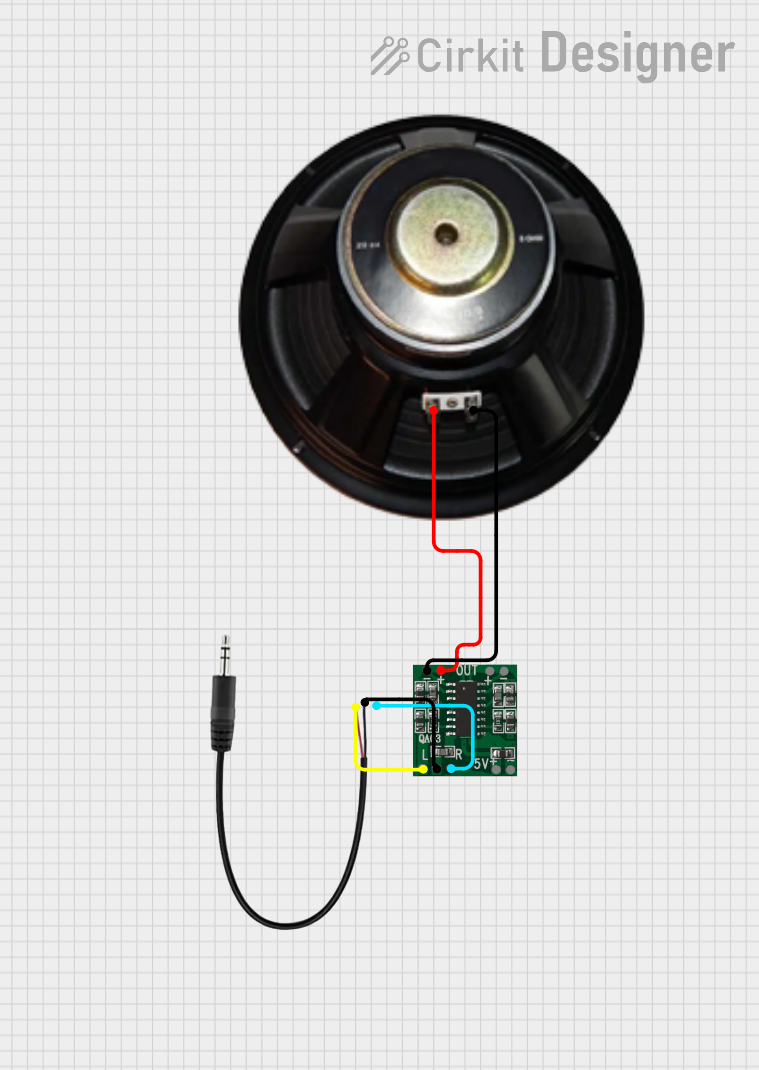 Open Project in Cirkit Designer
Explore Projects Built with Mono 2.6W Class D Amplifier
Open Project in Cirkit DesignerOpen Project in Cirkit DesignerOpen Project in Cirkit DesignerOpen Project in Cirkit DesignerCommon Applications
- Portable speaker systems
- DIY audio projects
- Embedded systems with audio output
- Battery-powered devices
- Audio signal amplification in IoT devices
Technical Specifications
Below are the key technical details of the Mono 2.6W Class D Amplifier:
| Parameter | Value |
|---|---|
| Output Power | 2.6W (at 4Ω, 10% THD) |
| Supply Voltage Range | 2.5V to 5.5V |
| Efficiency | Up to 90% |
| Input Type | Analog (single-ended) |
| Output Type | Mono (single-channel) |
| Load Impedance | 4Ω to 8Ω |
| Total Harmonic Distortion (THD) | ≤10% (at max power) |
| Quiescent Current | ~2mA |
| Shutdown Current | <1µA |
| Operating Temperature | -40°C to +85°C |
Pin Configuration and Descriptions
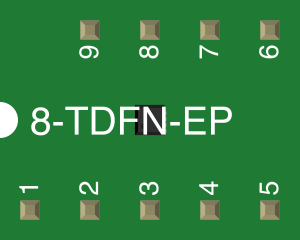
The Mono 2.6W Class D Amplifier typically comes in an 8-pin package. Below is the pinout and description:
| Pin Number | Pin Name | Description |
|---|---|---|
| 1 | IN+ | Positive audio input signal |
| 2 | IN- | Negative audio input signal |
| 3 | GND | Ground connection |
| 4 | VDD | Power supply (2.5V to 5.5V) |
| 5 | OUT+ | Positive speaker output |
| 6 | OUT- | Negative speaker output |
| 7 | SHDN | Shutdown pin (active low, pull high to enable) |
| 8 | BYPASS | Bypass capacitor connection for noise filtering |
Usage Instructions
How to Use the Component in a Circuit
- Power Supply: Connect the VDD pin to a stable power source within the range of 2.5V to 5.5V. Ensure proper decoupling by placing a 0.1µF ceramic capacitor close to the VDD pin.
- Audio Input: Connect the audio signal source to the IN+ and IN- pins. For single-ended input, connect IN- to ground.
- Speaker Connection: Attach the speaker terminals to the OUT+ and OUT- pins. Use a speaker with an impedance of 4Ω or 8Ω for optimal performance.
- Shutdown Control: To enable the amplifier, pull the SHDN pin high. Pull it low to place the amplifier in shutdown mode, reducing power consumption.
- Bypass Capacitor: Connect a capacitor (typically 0.1µF to 1µF) between the BYPASS pin and ground to minimize noise and improve audio quality.
Important Considerations and Best Practices
- Heat Dissipation: Although the amplifier is highly efficient, ensure adequate ventilation to prevent overheating during prolonged use at high power.
- Decoupling Capacitors: Always use decoupling capacitors near the power supply pins to reduce noise and ensure stable operation.
- Speaker Impedance: Use speakers with the recommended impedance (4Ω or 8Ω) to avoid overloading the amplifier.
- Input Signal Levels: Ensure the input signal does not exceed the maximum allowable voltage to prevent distortion or damage to the amplifier.
Example: Connecting to an Arduino UNO
The Mono 2.6W Class D Amplifier can be used with an Arduino UNO to amplify audio signals. Below is an example of how to connect and control the amplifier:
Circuit Connections
- Connect the VDD pin of the amplifier to the 5V pin of the Arduino.
- Connect the GND pin of the amplifier to the GND pin of the Arduino.
- Connect the SHDN pin to a digital output pin on the Arduino (e.g., pin 7).
- Connect the audio input (IN+ and IN-) to an audio signal source.
- Connect the speaker to the OUT+ and OUT- pins.
Arduino Code Example
// Example code to control the Mono 2.6W Class D Amplifier with Arduino UNO

#define SHDN_PIN 7  // Define the shutdown pin connected to Arduino pin 7

void setup() {
  pinMode(SHDN_PIN, OUTPUT);  // Set the shutdown pin as an output
  digitalWrite(SHDN_PIN, HIGH);  // Enable the amplifier by pulling SHDN high
}

void loop() {
  // The amplifier is always enabled in this example
  // Add your audio signal to the input pins (IN+ and IN-)
  // No additional code is required for basic operation
}
Troubleshooting and FAQs
Common Issues and Solutions
No Sound Output:
- Verify that the SHDN pin is pulled high to enable the amplifier.
- Check the power supply voltage and ensure it is within the specified range.
- Confirm that the speaker is properly connected to the OUT+ and OUT- pins.
Distorted Audio:
- Ensure the input signal level is not too high, as this can cause clipping.
- Check the speaker impedance; use a 4Ω or 8Ω speaker as recommended.
- Verify that the bypass capacitor is correctly connected to reduce noise.
Overheating:
- Ensure proper ventilation around the amplifier.
- Avoid driving the amplifier at maximum power for extended periods.
High Noise or Humming:
- Use a high-quality bypass capacitor to filter noise.
- Ensure proper grounding in the circuit to minimize interference.
FAQs
Q1: Can I use this amplifier with a 3.7V Li-ion battery?
A1: Yes, the amplifier supports a supply voltage range of 2.5V to 5.5V, so a 3.7V Li-ion battery is suitable.
Q2: What is the maximum speaker cable length I can use?
A2: For optimal performance, keep the speaker cable length as short as possible to minimize signal loss and interference.
Q3: Can I use this amplifier for stereo audio?
A3: No, this is a mono amplifier. For stereo audio, you will need two amplifiers, one for each channel.
Q4: Is it possible to mute the amplifier without disconnecting power?
A4: Yes, you can pull the SHDN pin low to place the amplifier in shutdown mode, effectively muting it.