
How to Use SCC: Examples, Pinouts, and Specs
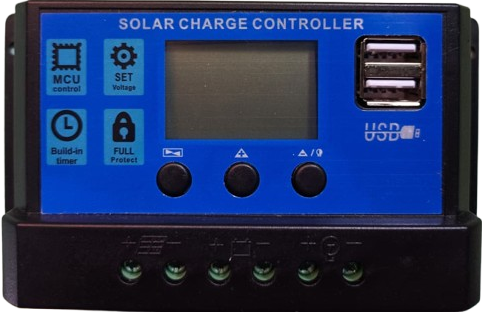
 Design with SCC in Cirkit Designer
Introduction
- A Switching Converter Controller (SCC) is a device designed to regulate the output voltage of a switching power supply. It achieves this by controlling the duty cycle of the switching elements, ensuring efficient power conversion and stable output.
- Common applications of SCCs include:
- DC-DC converters (e.g., buck, boost, or buck-boost converters)
- Power management in battery-operated devices
- Voltage regulation in industrial and automotive systems
- Renewable energy systems, such as solar inverters
Explore Projects Built with SCC
 Open Project in Cirkit Designer
 Open Project in Cirkit Designer
 Open Project in Cirkit Designer
 Open Project in Cirkit Designer
Explore Projects Built with SCC
Open Project in Cirkit DesignerOpen Project in Cirkit DesignerOpen Project in Cirkit DesignerOpen Project in Cirkit DesignerTechnical Specifications
- Below are the key technical details for a typical SCC:
- Input Voltage Range: 4.5V to 40V
- Output Voltage Range: Adjustable (e.g., 0.8V to 30V, depending on feedback configuration)
- Switching Frequency: 100 kHz to 2 MHz (varies by model)
- Efficiency: Up to 95% (depending on load and configuration)
- Operating Temperature: -40°C to +125°C
- Control Method: Pulse Width Modulation (PWM)
- Protection Features: Overcurrent protection (OCP), thermal shutdown, undervoltage lockout (UVLO)
Pin Configuration and Descriptions
The SCC typically comes in an 8-pin or 16-pin package. Below is an example of an 8-pin configuration:
| Pin Number | Pin Name | Description |
|---|---|---|
| 1 | VIN | Input voltage pin. Connects to the input power supply. |
| 2 | GND | Ground pin. Connects to the system ground. |
| 3 | FB | Feedback pin. Used to sense the output voltage for regulation. |
| 4 | COMP | Compensation pin. Connects to external components for loop stability. |
| 5 | EN | Enable pin. Used to turn the SCC on or off. |
| 6 | SW | Switch pin. Connects to the switching element (e.g., MOSFET). |
| 7 | BOOT | Bootstrap pin. Provides the gate drive voltage for the high-side MOSFET. |
| 8 | RT/CLK | Resistor timing or clock input pin. Sets the switching frequency. |
Usage Instructions
How to Use the SCC in a Circuit
Input and Output Connections:
- Connect the input voltage source to the VIN pin.
- Connect the load to the output of the power supply circuit.
- Use appropriate decoupling capacitors near the VIN and GND pins to reduce noise.
Feedback Configuration:
- Use a resistor divider network to connect the output voltage to the FB pin.
- Select resistor values to set the desired output voltage using the formula: [ V_{OUT} = V_{REF} \times \left(1 + \frac{R_1}{R_2}\right) ] where ( V_{REF} ) is the reference voltage (typically 0.8V).
Switching Frequency:
- Connect a resistor to the RT/CLK pin to set the switching frequency.
- Refer to the SCC datasheet for the resistor value corresponding to the desired frequency.
Enable Pin:
- Pull the EN pin high to enable the SCC.
- Pull it low to disable the SCC and reduce power consumption.
Bootstrap Capacitor:
- Connect a bootstrap capacitor (e.g., 0.1 µF) between the BOOT and SW pins to drive the high-side MOSFET.
Important Considerations and Best Practices
- Thermal Management: Ensure proper heat dissipation by using a heatsink or placing the SCC on a PCB with good thermal conductivity.
- Inductor Selection: Choose an inductor with appropriate current rating and low DC resistance to minimize losses.
- Capacitor Selection: Use low-ESR capacitors for input and output filtering to reduce ripple.
- PCB Layout: Minimize the length of high-current paths and place decoupling capacitors close to the SCC pins.
Example: Using SCC with Arduino UNO
Below is an example of controlling the SCC's enable pin using an Arduino UNO:
// Define the pin connected to the SCC's EN pin
const int enablePin = 7;

void setup() {
  // Set the enable pin as an output
  pinMode(enablePin, OUTPUT);

  // Enable the SCC by setting the pin HIGH
  digitalWrite(enablePin, HIGH);
}

void loop() {
  // Example: Toggle the SCC on and off every 5 seconds
  digitalWrite(enablePin, HIGH); // Enable SCC
  delay(5000);                   // Wait for 5 seconds
  digitalWrite(enablePin, LOW);  // Disable SCC
  delay(5000);                   // Wait for 5 seconds
}
Troubleshooting and FAQs
Common Issues and Solutions
Output Voltage is Incorrect:
- Cause: Incorrect feedback resistor values.
- Solution: Verify the resistor divider network and recalculate the values.
SCC Overheats:
- Cause: Insufficient cooling or excessive load current.
- Solution: Improve thermal management (e.g., add a heatsink) and ensure the load is within the SCC's current rating.
No Output Voltage:
- Cause: EN pin is not pulled high or input voltage is too low.
- Solution: Check the EN pin voltage and ensure the input voltage is within the specified range.
High Output Ripple:
- Cause: Poor capacitor selection or layout issues.
- Solution: Use low-ESR capacitors and optimize PCB layout to reduce noise.
FAQs
Q: Can the SCC be used for both step-up and step-down applications?
A: Yes, depending on the circuit configuration, the SCC can be used in buck (step-down), boost (step-up), or buck-boost converters.Q: How do I calculate the switching frequency?
A: Refer to the SCC datasheet for the formula or resistor value required to set the desired frequency.Q: What happens if the input voltage drops below the specified range?
A: The SCC may enter undervoltage lockout (UVLO) mode to protect the circuit.Q: Can I use the SCC with a battery-powered system?
A: Yes, SCCs are commonly used in battery-powered systems for efficient power management.
This concludes the documentation for the Switching Converter Controller (SCC).