
How to Use FPC 16P: Examples, Pinouts, and Specs
 Design with FPC 16P in Cirkit Designer
Introduction
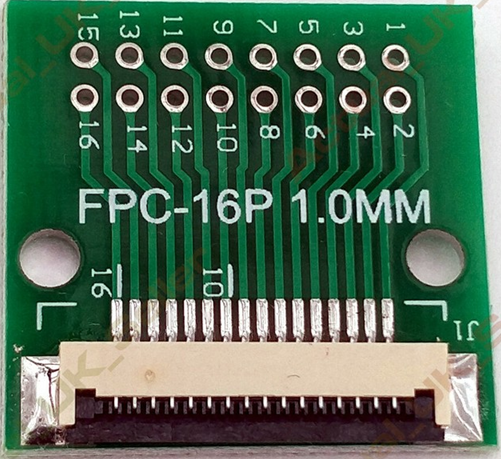
The FPC 16P (Manufacturer Part ID: FPC-16P) is a Flat Printed Circuit (FPC) connector manufactured by MTCELL. This connector features 16 pins and is designed to connect flexible printed circuits to a printed circuit board (PCB). Its compact design and reliable connection make it ideal for applications requiring space-saving and flexible interconnections.
Explore Projects Built with FPC 16P
 Open Project in Cirkit Designer
 Open Project in Cirkit Designer
 Open Project in Cirkit Designer
 Open Project in Cirkit Designer
Explore Projects Built with FPC 16P
Open Project in Cirkit DesignerOpen Project in Cirkit DesignerOpen Project in Cirkit DesignerOpen Project in Cirkit DesignerCommon Applications and Use Cases
- Mobile devices (e.g., smartphones, tablets)
- Wearable electronics
- Consumer electronics (e.g., cameras, gaming devices)
- Automotive systems
- Industrial equipment
- Medical devices
The FPC 16P is widely used in scenarios where compact and flexible designs are critical, enabling seamless integration of flexible circuits into rigid PCBs.
Technical Specifications
Key Technical Details
| Parameter | Specification |
|---|---|
| Manufacturer | MTCELL |
| Part ID | FPC-16P |
| Number of Pins | 16 |
| Connector Type | Flat Printed Circuit (FPC) |
| Mounting Type | Surface Mount (SMT) |
| Pitch (Pin Spacing) | 0.5 mm |
| Operating Voltage | 50V DC |
| Current Rating | 0.5A per pin |
| Operating Temperature | -40°C to +85°C |
| Contact Material | Phosphor Bronze with Gold Plating |
| Insulation Resistance | ≥ 100 MΩ |
| Durability | 20 mating cycles |
Pin Configuration and Descriptions
The FPC 16P connector has 16 pins arranged in a single row with a 0.5 mm pitch. Below is the pin configuration:
| Pin Number | Description | Notes |
|---|---|---|
| 1 | Signal/Power Line 1 | User-defined signal or power |
| 2 | Signal/Power Line 2 | User-defined signal or power |
| 3 | Signal/Power Line 3 | User-defined signal or power |
| 4 | Signal/Power Line 4 | User-defined signal or power |
| 5 | Signal/Power Line 5 | User-defined signal or power |
| 6 | Signal/Power Line 6 | User-defined signal or power |
| 7 | Signal/Power Line 7 | User-defined signal or power |
| 8 | Signal/Power Line 8 | User-defined signal or power |
| 9 | Signal/Power Line 9 | User-defined signal or power |
| 10 | Signal/Power Line 10 | User-defined signal or power |
| 11 | Signal/Power Line 11 | User-defined signal or power |
| 12 | Signal/Power Line 12 | User-defined signal or power |
| 13 | Signal/Power Line 13 | User-defined signal or power |
| 14 | Signal/Power Line 14 | User-defined signal or power |
| 15 | Signal/Power Line 15 | User-defined signal or power |
| 16 | Signal/Power Line 16 | User-defined signal or power |
Usage Instructions
How to Use the FPC 16P in a Circuit
PCB Design:
- Ensure the PCB has a footprint compatible with the FPC 16P connector.
- Maintain a 0.5 mm pitch for the pads to align with the connector pins.
- Use solder mask openings only where necessary to prevent solder bridging.
Mounting the Connector:
- The FPC 16P is a surface-mount component. Use a reflow soldering process for proper mounting.
- Ensure the connector is aligned correctly with the PCB pads before soldering.
Inserting the FPC Cable:
- Open the connector's locking mechanism (if applicable).
- Insert the flexible printed circuit (FPC) cable into the connector, ensuring proper alignment.
- Close the locking mechanism to secure the cable.
Electrical Connections:
- Route the signals or power lines from the FPC cable to the corresponding pins on the PCB.
- Verify the connections using a multimeter to ensure continuity.
Important Considerations and Best Practices
- Avoid Overheating: During soldering, ensure the temperature profile does not exceed the connector's thermal limits.
- Cable Insertion: Insert the FPC cable gently to avoid damaging the connector or the cable.
- Durability: The connector is rated for 20 mating cycles. Avoid frequent disconnections to maintain reliability.
- Signal Integrity: For high-speed signals, ensure proper impedance matching and minimize crosstalk by following good PCB design practices.
Example: Connecting to an Arduino UNO
The FPC 16P can be used to interface an FPC cable carrying signals to an Arduino UNO. Below is an example of Arduino code to read a signal from one of the FPC pins:
// Example: Reading a digital signal from an FPC 16P connector
// Pin 1 of the FPC connector is connected to Arduino digital pin 2

const int fpcPin = 2; // Define the Arduino pin connected to FPC Pin 1

void setup() {
  pinMode(fpcPin, INPUT); // Set the FPC pin as an input
  Serial.begin(9600);     // Initialize serial communication
}

void loop() {
  int signalState = digitalRead(fpcPin); // Read the signal state
  Serial.print("FPC Signal State: ");
  Serial.println(signalState); // Print the signal state to the Serial Monitor
  delay(500); // Wait for 500ms before reading again
}
Troubleshooting and FAQs
Common Issues and Solutions
Issue: FPC cable does not fit into the connector.
- Solution: Ensure the cable width and thickness match the connector's specifications. Check for proper alignment before insertion.
Issue: Poor electrical connection or intermittent signals.
- Solution: Verify that the FPC cable is fully inserted and the locking mechanism is securely closed. Inspect the solder joints for any cold soldering or bridging.
Issue: Connector damaged during soldering.
- Solution: Use a proper reflow soldering profile and avoid excessive heat. If hand soldering, use a temperature-controlled soldering iron.
Issue: Signal integrity issues at high frequencies.
- Solution: Use proper PCB layout techniques, such as controlled impedance traces and ground planes, to minimize noise and crosstalk.
FAQs
Q: Can the FPC 16P handle power signals?
- A: Yes, each pin can handle up to 0.5A, making it suitable for low-power applications.
Q: Is the FPC 16P compatible with 1 mm pitch FPC cables?
- A: No, the FPC 16P is designed for 0.5 mm pitch cables. Ensure the cable matches the connector's pitch.
Q: Can the FPC 16P be used in outdoor environments?
- A: The connector is not specifically rated for outdoor use. Additional protection, such as conformal coating or an enclosure, may be required.
Q: How do I clean the connector?
- A: Use compressed air or a soft brush to remove dust. Avoid using liquids or abrasive materials.
This concludes the documentation for the FPC 16P connector by MTCELL.