
How to Use TP4057: Examples, Pinouts, and Specs
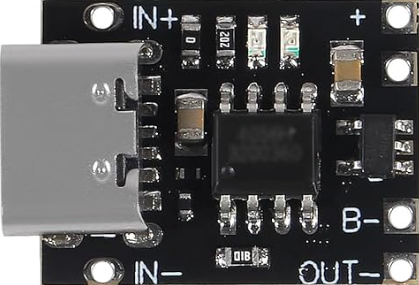
 Design with TP4057 in Cirkit Designer
Introduction
The TP4057, manufactured by RUNCCI-YUN, is a lithium-ion battery charger IC designed for single-cell lithium-ion or lithium-polymer batteries. It provides a constant current/constant voltage (CC/CV) charging profile, ensuring efficient and safe charging. The IC integrates features such as over-voltage protection, under-voltage lockout, and thermal regulation, making it a reliable choice for battery-powered applications.
Explore Projects Built with TP4057
 Open Project in Cirkit Designer
 Open Project in Cirkit Designer
 Open Project in Cirkit Designer
 Open Project in Cirkit Designer
Explore Projects Built with TP4057
Open Project in Cirkit DesignerOpen Project in Cirkit DesignerOpen Project in Cirkit DesignerOpen Project in Cirkit DesignerCommon Applications
- Portable electronic devices (e.g., smartphones, tablets, and wearables)
- Power banks and battery packs
- IoT devices and sensors
- Rechargeable toys and gadgets
- Embedded systems requiring lithium-ion battery management
Technical Specifications
The TP4057 is a compact and efficient charging IC with the following key specifications:
| Parameter | Value |
|---|---|
| Input Voltage Range | 4.0V to 8.0V |
| Charging Voltage | 4.2V ± 1% |
| Maximum Charging Current | 500mA (adjustable via external resistor) |
| Standby Current | < 2µA |
| Thermal Regulation | 120°C (typical) |
| Over-Voltage Protection | Yes |
| Under-Voltage Lockout | Yes |
| Package Type | SOT-23-6 |
Pin Configuration and Descriptions
The TP4057 is available in a 6-pin SOT-23 package. The pinout and descriptions are as follows:
| Pin Number | Pin Name | Description |
|---|---|---|
| 1 | BAT | Battery connection pin. Connect directly to the positive terminal of the battery. |
| 2 | GND | Ground pin. Connect to the system ground. |
| 3 | VCC | Input voltage pin. Connect to the power supply (4.0V to 8.0V). |
| 4 | PROG | Charging current programming pin. Connect a resistor to ground to set the current. |
| 5 | STAT | Status indicator pin. Open-drain output for charging status (e.g., LED indicator). |
| 6 | NC | No connection. Leave this pin unconnected. |
Usage Instructions
Using the TP4057 in a Circuit
- Power Supply: Connect a DC power supply (4.0V to 8.0V) to the VCC pin. Ensure the supply voltage is stable and within the specified range.
- Battery Connection: Connect the positive terminal of the lithium-ion battery to the BAT pin and the negative terminal to GND.
- Programming Charging Current: Use a resistor (RPROG) between the PROG pin and GND to set the desired charging current. The charging current (ICHG) can be calculated using the formula: [ I_{CHG} = \frac{1000}{R_{PROG}} ] where ( R_{PROG} ) is in kΩ and ( I_{CHG} ) is in mA.
- Status Indicator: Connect an LED with a pull-up resistor to the STAT pin to monitor the charging status:
- LED ON: Charging in progress
- LED OFF: Charging complete or no battery connected
- Thermal Considerations: Ensure proper heat dissipation by placing the IC on a PCB with adequate thermal management.
Example Circuit
Below is a basic circuit diagram for using the TP4057 to charge a single-cell lithium-ion battery:
VCC (4.0V-8.0V) ----> VCC
                     |
                     RPROG
                     |
                     PROG
                     |
                     GND
BATTERY + ----------> BAT
BATTERY - ----------> GND
Arduino Integration
The TP4057 can be used with an Arduino UNO to monitor the charging status. Connect the STAT pin to a digital input pin on the Arduino. Below is an example code snippet:
// TP4057 Charging Status Monitoring with Arduino UNO
const int statPin = 2; // STAT pin connected to digital pin 2
const int ledPin = 13; // Onboard LED for status indication

void setup() {
  pinMode(statPin, INPUT); // Set STAT pin as input
  pinMode(ledPin, OUTPUT); // Set onboard LED as output
  Serial.begin(9600);      // Initialize serial communication
}

void loop() {
  int chargingStatus = digitalRead(statPin); // Read STAT pin status

  if (chargingStatus == LOW) {
    // Charging in progress
    digitalWrite(ledPin, HIGH); // Turn on LED
    Serial.println("Charging in progress...");
  } else {
    // Charging complete or no battery connected
    digitalWrite(ledPin, LOW); // Turn off LED
    Serial.println("Charging complete or no battery connected.");
  }

  delay(1000); // Wait for 1 second before checking again
}
Best Practices
- Use a high-quality resistor for RPROG to ensure accurate charging current.
- Avoid exceeding the maximum input voltage (8.0V) to prevent damage to the IC.
- Ensure proper grounding to minimize noise and improve stability.
- Use a decoupling capacitor (e.g., 1µF) between VCC and GND for input voltage stability.
Troubleshooting and FAQs
Common Issues and Solutions
The battery is not charging.
- Verify that the input voltage is within the specified range (4.0V to 8.0V).
- Check the connections to the BAT and GND pins.
- Ensure the RPROG resistor is correctly calculated and connected.
The IC is overheating.
- Ensure proper thermal management on the PCB.
- Reduce the charging current by increasing the RPROG resistor value.
The STAT pin does not indicate charging status.
- Check the pull-up resistor and LED connections.
- Verify that the battery is properly connected to the BAT pin.
The charging current is incorrect.
- Recalculate the RPROG value using the formula ( I_{CHG} = \frac{1000}{R_{PROG}} ).
- Use a precision resistor for accurate current programming.
FAQs
Q: Can the TP4057 charge batteries with capacities greater than 500mAh?
A: Yes, the TP4057 can charge larger capacity batteries, but the charging current should not exceed 500mA. Adjust the RPROG resistor accordingly.
Q: Is the TP4057 suitable for multi-cell battery packs?
A: No, the TP4057 is designed for single-cell lithium-ion or lithium-polymer batteries only.
Q: Can I use the TP4057 with a solar panel as the input source?
A: Yes, as long as the solar panel provides a stable voltage within the 4.0V to 8.0V range. Use a capacitor to stabilize the input voltage.
Q: What happens if the input voltage drops below 4.0V?
A: The TP4057 features under-voltage lockout and will stop charging the battery to prevent damage.
By following this documentation, users can safely and effectively integrate the TP4057 into their projects for reliable lithium-ion battery charging.