
How to Use SOCKET 3 GANG: Examples, Pinouts, and Specs
 Design with SOCKET 3 GANG in Cirkit Designer
Introduction
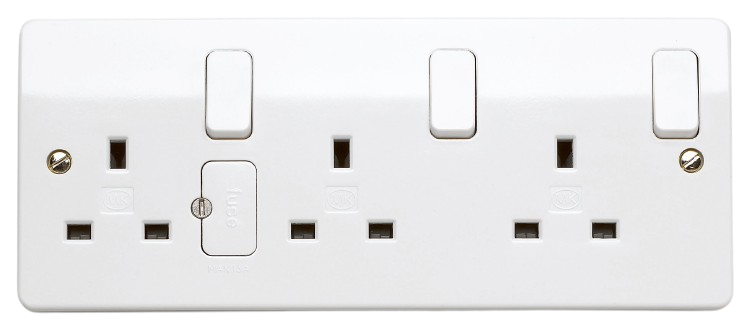
The SOCKET 3 GANG (Manufacturer: MK, Part ID: 13 AMP DOUBLE POLE) is a versatile multi-socket connector designed to allow the simultaneous connection of up to three devices or components. It is commonly used in electronic circuits for power distribution or signal routing. This component is ideal for applications requiring multiple connections in a compact and organized manner, such as home appliances, industrial equipment, and laboratory setups.
Explore Projects Built with SOCKET 3 GANG
 Open Project in Cirkit Designer
 Open Project in Cirkit Designer
 Open Project in Cirkit Designer
 Open Project in Cirkit Designer
Explore Projects Built with SOCKET 3 GANG
Open Project in Cirkit DesignerOpen Project in Cirkit DesignerOpen Project in Cirkit DesignerOpen Project in Cirkit DesignerCommon Applications:
- Power distribution for multiple devices
- Signal routing in electronic circuits
- Use in home, office, or industrial environments
- Temporary or permanent setups requiring multiple connections
Technical Specifications
Key Technical Details:
| Parameter | Value |
|---|---|
| Manufacturer | MK |
| Part ID | 13 AMP DOUBLE POLE |
| Number of Sockets | 3 |
| Rated Voltage | 250V AC |
| Rated Current | 13A |
| Material | High-quality thermoplastic |
| Mounting Type | Surface-mounted |
| Safety Features | Double pole switching |
| Compliance | BS 1363 standards |
Pin Configuration and Descriptions:
The SOCKET 3 GANG does not have traditional pins like an IC but instead features three individual sockets. Each socket is designed to accommodate a standard 3-pin plug. Below is a description of the key connections:
| Socket Pin | Description |
|---|---|
| Live (L) | Supplies the live AC voltage |
| Neutral (N) | Returns the current to the power source |
| Earth (E) | Provides grounding for safety |
Usage Instructions
How to Use the SOCKET 3 GANG:
Mounting the Socket:
- Secure the SOCKET 3 GANG to a flat surface using screws or adhesive, depending on the mounting type.
- Ensure the socket is installed in a location free from moisture or excessive heat.
Wiring the Socket:
- Connect the live (L), neutral (N), and earth (E) wires to the corresponding terminals on the back of the socket.
- Use a screwdriver to tighten the terminal screws securely.
- Double-check all connections to ensure proper wiring.
Connecting Devices:
- Insert the 3-pin plugs of your devices into the sockets.
- Ensure the plugs are fully inserted for a secure connection.
Powering On:
- Switch on the socket using the double pole switch.
- Verify that the connected devices are receiving power.
Important Considerations:
- Always ensure the total current drawn by connected devices does not exceed 13A.
- Use only with devices rated for 250V AC.
- Ensure proper grounding to avoid electrical hazards.
- Do not use the socket in wet or damp environments unless it is specifically rated for such conditions.
Example Use Case with Arduino UNO:
While the SOCKET 3 GANG is not directly connected to an Arduino UNO, it can be used to power external devices (e.g., motors, lights) that are controlled by the Arduino. Below is an example of how to use the socket in a setup:
// Example: Controlling a lamp powered via SOCKET 3 GANG using a relay module
// Ensure the relay module is connected to the Arduino and the lamp is plugged
// into the SOCKET 3 GANG. The relay acts as a switch for the lamp.

int relayPin = 7; // Pin connected to the relay module

void setup() {
  pinMode(relayPin, OUTPUT); // Set relay pin as output
}

void loop() {
  digitalWrite(relayPin, HIGH); // Turn on the lamp
  delay(5000);                 // Keep it on for 5 seconds
  digitalWrite(relayPin, LOW);  // Turn off the lamp
  delay(5000);                 // Keep it off for 5 seconds
}
Note: Ensure the relay module is rated for the voltage and current of the device connected to the SOCKET 3 GANG.
Troubleshooting and FAQs
Common Issues and Solutions:
Issue: Devices do not power on when connected to the socket.
- Solution: Check the wiring of the live, neutral, and earth connections. Ensure the double pole switch is turned on.
Issue: Overheating of the socket.
- Solution: Verify that the total current drawn by connected devices does not exceed 13A. Disconnect any high-power devices.
Issue: Sparks or unusual noise when plugging in devices.
- Solution: Inspect the socket for damage or loose connections. Replace the socket if necessary.
Issue: The socket does not fit the plug.
- Solution: Ensure the plug is a standard 3-pin plug compliant with BS 1363 standards.
FAQs:
Q: Can I use this socket outdoors?
A: The SOCKET 3 GANG is not designed for outdoor use unless specifically rated for weather resistance.Q: Can I connect high-power appliances like heaters?
A: Yes, as long as the total current does not exceed 13A.Q: Is the socket childproof?
A: The SOCKET 3 GANG may include safety shutters, but additional childproofing measures are recommended for households with children.
By following this documentation, users can safely and effectively utilize the SOCKET 3 GANG for their power distribution needs.