
How to Use JST SM Male Connector 3 pin: Examples, Pinouts, and Specs
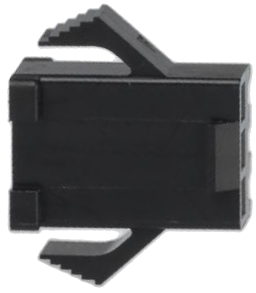
 Design with JST SM Male Connector 3 pin in Cirkit Designer
Introduction
The JST SM Male Connector 3 Pin is a compact and reliable connector designed for secure electrical connections in various electronic applications. It features a durable plastic housing with a locking mechanism that ensures a stable connection, making it ideal for projects requiring robust and vibration-resistant connections. This connector is commonly used in LED lighting systems, RC vehicles, drones, and other low-voltage electronic devices.
Explore Projects Built with JST SM Male Connector 3 pin
 Open Project in Cirkit Designer
 Open Project in Cirkit Designer
 Open Project in Cirkit Designer
 Open Project in Cirkit Designer
Explore Projects Built with JST SM Male Connector 3 pin
Open Project in Cirkit DesignerOpen Project in Cirkit DesignerOpen Project in Cirkit DesignerOpen Project in Cirkit DesignerCommon Applications
- LED strip connections
- RC vehicles and drones
- Power supply connections for small electronic devices
- Signal transmission in low-voltage circuits
Technical Specifications
The following table outlines the key technical details of the JST SM Male Connector 3 Pin:
| Specification | Details |
|---|---|
| Connector Type | JST SM Male Connector |
| Number of Pins | 3 |
| Rated Voltage | 250V AC/DC |
| Rated Current | 3A |
| Wire Gauge Compatibility | 22-28 AWG |
| Material (Housing) | Nylon (UL94V-0 flame retardant) |
| Material (Contacts) | Tin-plated copper |
| Operating Temperature | -25°C to +85°C |
| Locking Mechanism | Yes (snap-lock design) |
Pin Configuration and Descriptions
The JST SM Male Connector 3 Pin has three pins, typically used for power and signal connections. Below is the pinout description:
| Pin Number | Function | Description |
|---|---|---|
| 1 | VCC/Power (+) | Positive voltage input |
| 2 | Signal/Data | Signal or data line for communication |
| 3 | GND/Power (-) | Ground connection |
Usage Instructions
How to Use the JST SM Male Connector 3 Pin in a Circuit
- Prepare the Wires: Strip the insulation from the ends of the wires you want to connect, ensuring the exposed length matches the connector's crimp terminals.
- Crimp the Terminals: Use a crimping tool to attach the crimp terminals to the stripped wire ends. Ensure a secure and firm connection.
- Insert the Terminals: Push the crimped terminals into the connector housing until they click into place. Verify that the locking tabs are engaged.
- Connect to the Female Connector: Align the male connector with the corresponding JST SM Female Connector and push them together until the locking mechanism clicks.
- Verify the Connection: Gently tug on the wires to ensure the connection is secure.
Important Considerations and Best Practices
- Wire Gauge: Use wires within the recommended gauge range (22-28 AWG) for optimal performance.
- Polarity: Double-check the polarity of the connections to avoid damage to your circuit.
- Locking Mechanism: Ensure the locking mechanism is fully engaged to prevent accidental disconnections.
- Avoid Overcurrent: Do not exceed the rated current of 3A to prevent overheating or damage.
- Environmental Conditions: Use the connector within the specified operating temperature range (-25°C to +85°C).
Example: Connecting to an Arduino UNO
The JST SM Male Connector 3 Pin can be used to connect an LED strip to an Arduino UNO. Below is an example code snippet for controlling an LED strip:
// Example code for controlling an LED strip using Arduino UNO
// Ensure the JST SM Male Connector is properly wired to the LED strip and Arduino

#define LED_PIN 6  // Pin connected to the signal/data line of the LED strip

void setup() {
  pinMode(LED_PIN, OUTPUT);  // Set the LED pin as an output
}

void loop() {
  digitalWrite(LED_PIN, HIGH);  // Turn the LED strip on
  delay(1000);                  // Wait for 1 second
  digitalWrite(LED_PIN, LOW);   // Turn the LED strip off
  delay(1000);                  // Wait for 1 second
}
Troubleshooting and FAQs
Common Issues and Solutions
Loose Connection:
- Issue: The connector feels loose or disconnects easily.
- Solution: Ensure the crimp terminals are properly inserted into the housing and the locking mechanism is engaged.
Incorrect Polarity:
- Issue: The connected device does not function or is damaged.
- Solution: Verify the polarity of the connections before powering the circuit.
Overheating:
- Issue: The connector becomes hot during operation.
- Solution: Check that the current does not exceed the rated 3A. Use thicker wires if necessary.
Signal Interference:
- Issue: Data transmission is unreliable.
- Solution: Use shielded cables for the signal line and ensure proper grounding.
FAQs
Q: Can I use this connector for high-current applications?
A: No, the JST SM Male Connector 3 Pin is rated for a maximum current of 3A. For higher currents, consider using connectors with higher current ratings.Q: Is this connector waterproof?
A: No, the standard JST SM Male Connector is not waterproof. For outdoor or moisture-prone environments, use waterproof connectors.Q: Can I reuse the connector after crimping?
A: Yes, but you may need to replace the crimp terminals if they are damaged during removal.Q: What tools do I need for crimping?
A: A dedicated crimping tool designed for JST connectors is recommended for best results.
This concludes the documentation for the JST SM Male Connector 3 Pin.