
How to Use Adafruit CH334F Mini 4-Port USB Hub Breakout: Examples, Pinouts, and Specs
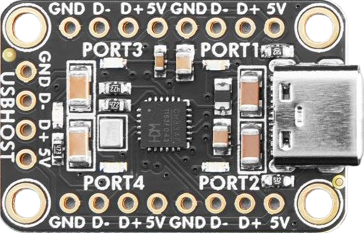
 Design with Adafruit CH334F Mini 4-Port USB Hub Breakout in Cirkit Designer
Introduction
The Adafruit CH334F Mini 4-Port USB Hub Breakout (Part ID: 5997) is a compact and versatile USB hub designed to expand a single USB port into four functional USB ports. Powered by the CH334F chip, this breakout board ensures efficient data transfer and power management, making it ideal for a wide range of USB connectivity applications. Its small form factor and ease of integration make it a perfect choice for embedded systems, prototyping, and DIY projects.
Explore Projects Built with Adafruit CH334F Mini 4-Port USB Hub Breakout
 Open Project in Cirkit Designer
 Open Project in Cirkit Designer
 Open Project in Cirkit Designer
 Open Project in Cirkit Designer
Explore Projects Built with Adafruit CH334F Mini 4-Port USB Hub Breakout
Open Project in Cirkit DesignerOpen Project in Cirkit DesignerOpen Project in Cirkit DesignerOpen Project in Cirkit DesignerCommon Applications and Use Cases
- Expanding USB connectivity for microcontrollers, single-board computers (e.g., Raspberry Pi, Arduino).
- Prototyping USB-based devices and peripherals.
- Adding USB ports to custom enclosures or embedded systems.
- Connecting multiple USB devices such as keyboards, mice, flash drives, and sensors.
Technical Specifications
The Adafruit CH334F Mini 4-Port USB Hub Breakout is built around the CH334F USB hub controller chip. Below are the key technical details:
Key Specifications
| Parameter | Value |
|---|---|
| USB Standard | USB 2.0 (Backward compatible with USB 1.1) |
| Number of USB Ports | 4 |
| Input Voltage | 5V DC (via USB input) |
| Data Transfer Rate | Up to 480 Mbps (High-Speed USB 2.0) |
| Power Management | Built-in overcurrent protection |
| Dimensions | 50mm x 30mm x 10mm |
| Operating Temperature | -40°C to 85°C |
Pin Configuration and Descriptions
The breakout board features a USB input port and four USB output ports. Additionally, it includes solder pads for optional connections. Below is the pin configuration:
| Pin/Port Name | Description |
|---|---|
| USB IN | USB Type-A input port for connecting to the host. |
| USB OUT 1-4 | Four USB Type-A output ports for connecting devices. |
| VCC | 5V power input (optional solder pad). |
| GND | Ground connection (optional solder pad). |
| D+ / D- | USB differential data lines (optional solder pads). |
Usage Instructions
How to Use the Component in a Circuit
- Connect the USB Input Port: Plug the USB IN port into a host device, such as a computer, Raspberry Pi, or microcontroller with USB host capability.
- Connect USB Devices: Attach up to four USB devices to the USB OUT ports. These can include peripherals like keyboards, mice, or USB flash drives.
- Optional Power Input: If additional power is required for high-current USB devices, solder wires to the VCC and GND pads to supply external 5V power.
- Mounting: Use the mounting holes on the breakout board to secure it to your project enclosure or breadboard.
Important Considerations and Best Practices
- Power Supply: Ensure the host device can supply sufficient power for all connected USB devices. For high-power devices, use the optional VCC and GND pads to provide external power.
- Data Transfer: The CH334F supports USB 2.0 high-speed data transfer. Ensure your host device and connected peripherals are compatible with this standard.
- Overcurrent Protection: The hub includes built-in overcurrent protection. Avoid connecting devices that exceed the maximum current rating of the hub.
Example: Connecting to an Arduino UNO
The Adafruit CH334F Mini 4-Port USB Hub Breakout can be used with an Arduino UNO to expand its USB connectivity. Below is an example of how to connect and use the hub:
- Connect the USB IN port of the hub to the Arduino UNO's USB port.
- Attach USB devices (e.g., a USB keyboard or flash drive) to the USB OUT ports.
- Use the following Arduino sketch to detect connected USB devices (requires a USB host shield and library):
#include <USBHost.h> // Include USB Host library

USBHost usb; // Create USBHost object

void setup() {
  Serial.begin(9600); // Initialize serial communication
  while (!Serial);    // Wait for serial monitor to open
  Serial.println("USB Hub Test");

  if (usb.begin()) {
    Serial.println("USB Host initialized successfully.");
  } else {
    Serial.println("Failed to initialize USB Host.");
  }
}

void loop() {
  usb.Task(); // Process USB tasks
  // Add code here to interact with connected USB devices
}
Troubleshooting and FAQs
Common Issues and Solutions
USB Devices Not Detected:
- Ensure the USB IN port is securely connected to the host device.
- Verify that the connected USB devices are functional and compatible with USB 2.0.
- Check if the host device provides sufficient power. If not, use the optional VCC and GND pads for external power.
Overcurrent Protection Triggered:
- Disconnect high-power devices and check the total current draw of all connected devices.
- Use an external 5V power supply if necessary.
Slow Data Transfer Speeds:
- Ensure the host device and connected peripherals support USB 2.0 high-speed mode.
- Avoid using excessively long or poor-quality USB cables.
FAQs
Q: Can I use this hub with a Raspberry Pi?
A: Yes, the Adafruit CH334F Mini 4-Port USB Hub Breakout is fully compatible with Raspberry Pi devices. Simply connect the USB IN port to one of the Raspberry Pi's USB ports.
Q: Does the hub support USB 3.0 devices?
A: The hub is designed for USB 2.0 but is backward compatible with USB 1.1. USB 3.0 devices can be connected, but they will operate at USB 2.0 speeds.
Q: How do I provide external power to the hub?
A: Solder wires to the VCC and GND pads on the breakout board and connect them to a 5V power source. This is useful for powering high-current USB devices.
Q: Is the hub compatible with microcontrollers other than Arduino?
A: Yes, the hub can be used with any microcontroller or single-board computer that supports USB host functionality.