
Cirkit Designer LogoCirkit DesignerYour all-in-one circuit design IDE Launch Cirkit Designer App

How to Use MeanWell HDR-15-12: Examples, Pinouts, and Specs

Image of MeanWell HDR-15-12Design with MeanWell HDR-15-12 in Cirkit Designer

Introduction

The MeanWell HDR-15-12 is a compact, 15W DIN rail power supply designed for industrial applications. It provides a stable 12V DC output and is known for its high efficiency, reliability, and wide input voltage range. Its slim design makes it ideal for space-constrained installations, and it is compatible with standard DIN rail mounting systems.

Explore Projects Built with MeanWell HDR-15-12

Use Cirkit Designer to design, explore, and prototype these projects online. Some projects support real-time simulation. Click "Open Project" to start designing instantly!
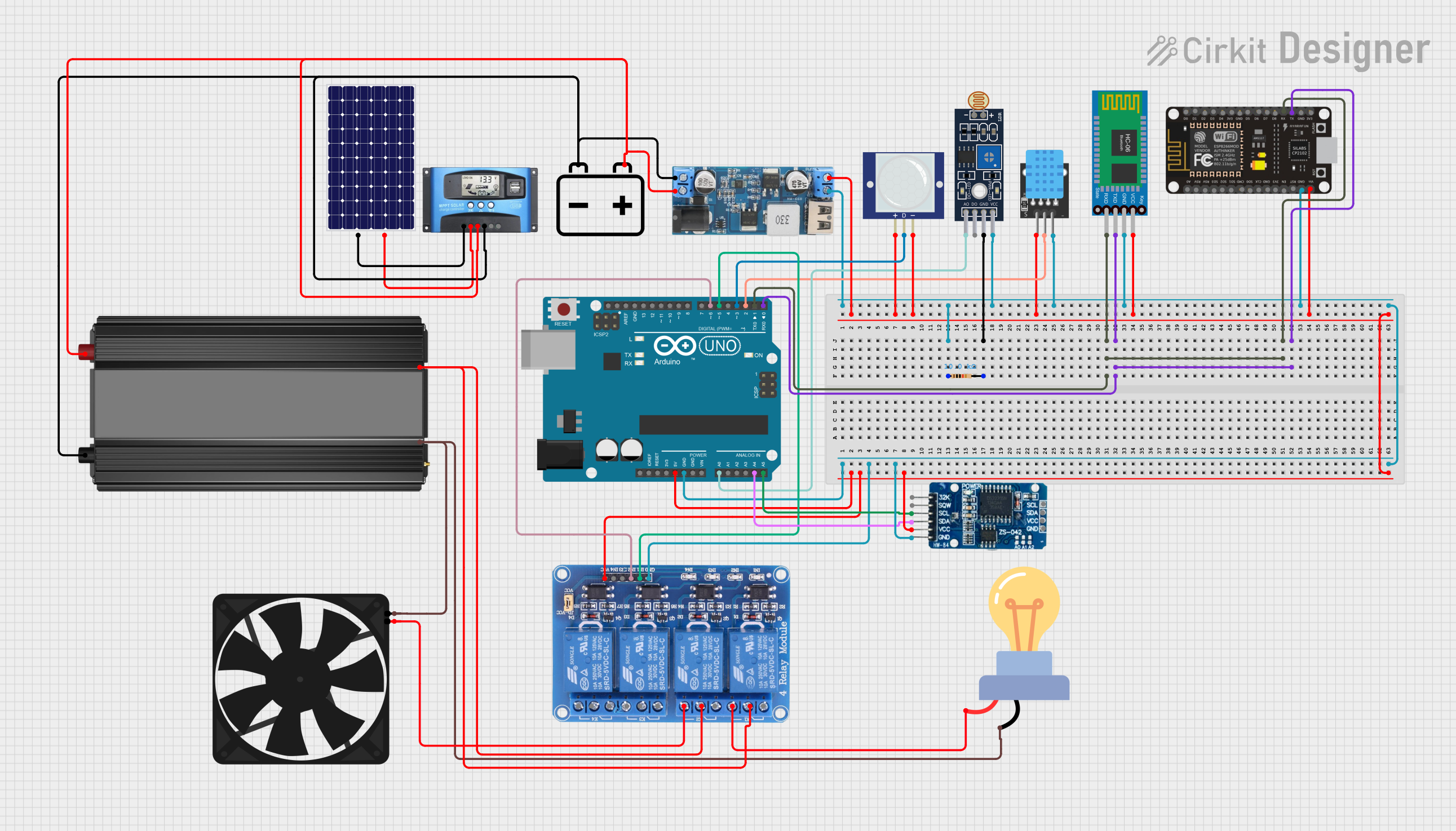
Image of Arduino and ESP8266 Based Smart Climate Control and Lighting System: A project utilizing MeanWell HDR-15-12 in a practical application

Arduino and ESP8266 Based Smart Climate Control and Lighting System

This circuit is designed for environmental monitoring and control, featuring an Arduino UNO microcontroller that interfaces with a DHT11 temperature and humidity sensor, an LDR for light level detection, a PIR motion sensor, and a real-time clock (RTC DS3231). It uses a 12V battery charged by a solar panel through an MPPT SCC, with a step-down converter to provide 5V power. The Arduino controls relays to manage an AC LED bulb and a fan, with manual override available via Bluetooth communication.

Open Project in Cirkit Designer
Common Applications and Use Cases

Technical Specifications

Key Technical Details

Parameter Value
Manufacturer MeanWell
Part Number HDR-15-12
Output Voltage 12V DC
Output Current 1.25A
Output Power 15W
Input Voltage Range 85-264V AC / 120-370V DC
Efficiency Up to 87%
Operating Temperature -30°C to +70°C
Dimensions 17.5 x 90 x 54.5 mm (W x H x D)
Mounting Type DIN rail (TS-35/7.5 or TS-35/15)
Protection Features Overload, overvoltage, short circuit
Certifications UL, CE, EAC, CB, RoHS

Pin Configuration and Descriptions

The HDR-15-12 features screw terminal connections for input and output. Below is the pin configuration:

Pin Number Label Description
1 L AC Line input
2 N AC Neutral input
3 -V Negative DC output
4 +V Positive DC output
- Grounding Grounding terminal for safety (on chassis)

Usage Instructions

How to Use the HDR-15-12 in a Circuit

  1. Mounting: Secure the HDR-15-12 onto a standard DIN rail (TS-35/7.5 or TS-35/15).
  2. Input Connection:
    • Connect the AC line (L) and neutral (N) wires to the input terminals.
    • Ensure the input voltage is within the specified range (85-264V AC or 120-370V DC).
  3. Output Connection:
    • Connect the load to the +V and -V terminals.
    • Ensure the load does not exceed the maximum output current of 1.25A.
  4. Grounding:
    • Properly ground the unit using the grounding terminal on the chassis to ensure safety and reduce electrical noise.
  5. Power On:
    • After verifying all connections, power on the unit and check the output voltage using a multimeter.

Important Considerations and Best Practices

Example: Using HDR-15-12 with an Arduino UNO

The HDR-15-12 can be used to power an Arduino UNO by providing a stable 12V DC output. Below is an example wiring setup:

  1. Connect the +V terminal of the HDR-15-12 to the VIN pin of the Arduino UNO.
  2. Connect the -V terminal of the HDR-15-12 to the GND pin of the Arduino UNO.
  3. Ensure the HDR-15-12 is properly grounded and powered.

Here is a simple Arduino sketch to blink an LED, powered by the HDR-15-12:

// Blink an LED connected to pin 13 of the Arduino UNO
// Ensure the Arduino is powered by the HDR-15-12 via the VIN and GND pins

void setup() {
  pinMode(13, OUTPUT); // Set pin 13 as an output
}

void loop() {
  digitalWrite(13, HIGH); // Turn the LED on
  delay(1000);            // Wait for 1 second
  digitalWrite(13, LOW);  // Turn the LED off
  delay(1000);            // Wait for 1 second
}

Troubleshooting and FAQs

Common Issues and Solutions

Issue Possible Cause Solution
No output voltage Incorrect input wiring Verify AC line and neutral connections.
Output voltage too low or high Load exceeds rated capacity Reduce the load to within 15W limit.
Overheating Poor ventilation or high ambient temp Improve airflow or reduce ambient temp.
Unit not powering on Input voltage out of range Ensure input voltage is within 85-264V AC.

FAQs

  1. Can the HDR-15-12 be used outdoors?

    • No, the HDR-15-12 is not weatherproof and should only be used in indoor environments or within a protective enclosure.
  2. What happens if the load exceeds 15W?

    • The HDR-15-12 has overload protection and will shut down to prevent damage. Reduce the load and restart the unit.
  3. Can I use the HDR-15-12 to power sensitive electronics?

    • Yes, the HDR-15-12 provides a stable 12V DC output suitable for most sensitive electronics.
  4. Is the HDR-15-12 compatible with 24V systems?

    • No, the HDR-15-12 is designed for 12V DC output. For 24V systems, consider using the HDR-15-24 model.

By following this documentation, users can effectively integrate the MeanWell HDR-15-12 into their projects and ensure reliable operation.