
How to Use MCB 3 Phase Chint: Examples, Pinouts, and Specs
 Design with MCB 3 Phase Chint in Cirkit Designer
Introduction
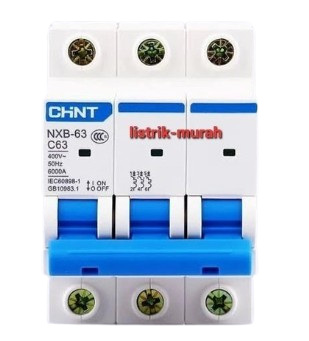
The MCB 3 Phase Chint is a miniature circuit breaker designed specifically for three-phase electrical systems. It provides reliable overcurrent protection by automatically disconnecting the circuit in the event of an overload or short circuit. This ensures the safety of electrical systems and prevents damage to connected equipment. The Chint MCB is widely used in industrial, commercial, and residential applications where three-phase power distribution is required.
Explore Projects Built with MCB 3 Phase Chint
 Open Project in Cirkit Designer
 Open Project in Cirkit Designer
 Open Project in Cirkit Designer
 Open Project in Cirkit Designer
Explore Projects Built with MCB 3 Phase Chint
Open Project in Cirkit DesignerOpen Project in Cirkit DesignerOpen Project in Cirkit DesignerOpen Project in Cirkit DesignerCommon Applications and Use Cases
- Industrial machinery and equipment protection
- Commercial building power distribution systems
- Residential three-phase power systems
- Protection of HVAC systems and large motors
- Electrical panels and distribution boards
Technical Specifications
Key Technical Details
| Parameter | Specification |
|---|---|
| Rated Voltage | 400/415V AC |
| Rated Current | 6A, 10A, 16A, 20A, 32A, 40A, 63A |
| Number of Poles | 3 (Three-phase) |
| Breaking Capacity | 6kA, 10kA |
| Frequency | 50/60 Hz |
| Tripping Curve | B, C, or D (depending on model) |
| Operating Temperature | -5°C to +40°C |
| Mounting Type | DIN Rail |
| Standards Compliance | IEC/EN 60898-1 |
Pin Configuration and Descriptions
The MCB 3 Phase Chint does not have traditional pins but instead features screw terminals for connecting wires. Below is a description of the terminal layout:
| Terminal Label | Description |
|---|---|
| L1 | Input terminal for Phase 1 |
| L2 | Input terminal for Phase 2 |
| L3 | Input terminal for Phase 3 |
| T1 | Output terminal for Phase 1 |
| T2 | Output terminal for Phase 2 |
| T3 | Output terminal for Phase 3 |
Usage Instructions
How to Use the Component in a Circuit
- Mounting the MCB: Securely mount the MCB onto a standard DIN rail in the distribution panel.
- Wiring:
- Connect the three-phase input wires to the input terminals (L1, L2, L3).
- Connect the load wires to the output terminals (T1, T2, T3).
- Ensure all connections are tight to avoid loose contacts.
- Power On:
- After wiring, switch the MCB to the "ON" position to allow current flow.
- The MCB will automatically trip in case of an overload or short circuit.
- Resetting the MCB:
- After a trip, identify and resolve the cause of the fault.
- Switch the MCB to the "OFF" position, then back to "ON" to reset it.
Important Considerations and Best Practices
- Ensure the MCB's rated current matches the load requirements to avoid nuisance tripping.
- Use appropriate wire sizes for the connected load to prevent overheating.
- Regularly inspect the MCB for signs of wear or damage.
- Do not bypass or tamper with the MCB, as this compromises safety.
- For three-phase motors, ensure proper phase sequence to avoid reverse rotation.
Arduino Integration
The MCB 3 Phase Chint is not directly compatible with Arduino or other microcontrollers, as it is a high-power protection device. However, it can be used in conjunction with relays or contactors controlled by an Arduino to manage three-phase loads. Below is an example of how an Arduino can control a three-phase load via a relay:
/*
  Example: Controlling a three-phase load with Arduino and a relay
  Note: This code assumes the relay is connected to pin 7 of the Arduino.
  Ensure the relay is rated for three-phase operation and properly wired.
*/

const int relayPin = 7; // Pin connected to the relay module

void setup() {
  pinMode(relayPin, OUTPUT); // Set relay pin as output
  digitalWrite(relayPin, LOW); // Ensure relay is off at startup
}

void loop() {
  // Turn on the relay to power the three-phase load
  digitalWrite(relayPin, HIGH);
  delay(5000); // Keep the load on for 5 seconds

  // Turn off the relay to disconnect the load
  digitalWrite(relayPin, LOW);
  delay(5000); // Keep the load off for 5 seconds
}
Troubleshooting and FAQs
Common Issues Users Might Face
MCB Trips Frequently:
- Cause: Overload or short circuit in the connected load.
- Solution: Check the load current and ensure it does not exceed the MCB's rated current. Inspect the wiring for short circuits.
MCB Does Not Trip During a Fault:
- Cause: Faulty MCB or incorrect wiring.
- Solution: Verify the wiring and replace the MCB if necessary.
Loose Connections:
- Cause: Improperly tightened terminal screws.
- Solution: Tighten all terminal screws securely.
MCB Overheats:
- Cause: Undersized wires or high ambient temperature.
- Solution: Use wires of appropriate size and ensure adequate ventilation around the MCB.
FAQs
Q: Can the MCB 3 Phase Chint be used for single-phase systems?
A: Yes, but only one pole will be used, which is not an efficient use of the device.Q: How do I select the correct tripping curve (B, C, or D)?
A:- Use curve B for residential or light commercial loads.
- Use curve C for inductive loads like motors.
- Use curve D for heavy industrial loads with high inrush currents.
Q: Can I use this MCB outdoors?
A: The MCB itself is not weatherproof. Use it inside a weatherproof enclosure for outdoor applications.Q: How often should the MCB be tested?
A: Test the MCB at least once a year by manually tripping it to ensure proper operation.