
How to Use Flywoo | ESC 4en1 Goku BLS 35A V3 4S: Examples, Pinouts, and Specs
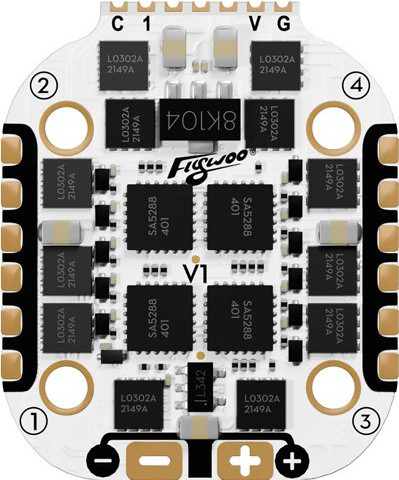
 Design with Flywoo | ESC 4en1 Goku BLS 35A V3 4S in Cirkit Designer
Introduction
The Flywoo ESC 4en1 Goku BLS 35A V3 4S (Manufacturer Part ID: Flywoo | Réf. H043-1-A) is a high-performance electronic speed controller (ESC) designed specifically for multirotor drones. This ESC integrates four individual motor controllers into a single compact board, simplifying wiring and reducing weight. It supports up to 35A of continuous current per motor and is compatible with 4S LiPo battery configurations. The ESC is powered by BLHeli firmware, which ensures smooth motor control, efficient power management, and advanced features such as motor direction configuration and signal filtering.
Explore Projects Built with Flywoo | ESC 4en1 Goku BLS 35A V3 4S
 Open Project in Cirkit Designer
 Open Project in Cirkit Designer
 Open Project in Cirkit Designer
 Open Project in Cirkit Designer
Explore Projects Built with Flywoo | ESC 4en1 Goku BLS 35A V3 4S
Open Project in Cirkit DesignerOpen Project in Cirkit DesignerOpen Project in Cirkit DesignerOpen Project in Cirkit DesignerCommon Applications and Use Cases
- Multirotor drones (quadcopters, hexacopters, etc.)
- FPV (First-Person View) racing drones
- Aerial photography and videography platforms
- Lightweight and compact drone builds
- Hobbyist and professional drone projects requiring reliable motor control
Technical Specifications
The Flywoo ESC 4en1 Goku BLS 35A V3 4S is designed to deliver high performance and reliability. Below are its key technical specifications:
| Parameter | Specification |
|---|---|
| Input Voltage | 2S–4S LiPo (7.4V–16.8V) |
| Continuous Current | 35A per ESC |
| Burst Current | 40A (10 seconds) |
| Firmware | BLHeli_S |
| Signal Input | DShot150/300/600, PWM, Oneshot125/42, Multishot |
| BEC Output | None |
| Dimensions | 36mm x 36mm (30.5mm x 30.5mm mounting holes) |
| Weight | 12g |
| Connector Type | XT60 (power input), solder pads (motor output) |
| Motor Compatibility | Brushless motors |
| Operating Temperature | -20°C to 80°C |
Pin Configuration and Descriptions
The ESC features solder pads for motor connections and a connector for signal input. Below is the pin configuration:
| Pin Name | Description |
|---|---|
| M1 | Motor 1 output (connect to brushless motor) |
| M2 | Motor 2 output (connect to brushless motor) |
| M3 | Motor 3 output (connect to brushless motor) |
| M4 | Motor 4 output (connect to brushless motor) |
| GND | Ground connection for power input |
| VBAT | Positive voltage input (connect to LiPo battery) |
| Signal 1–4 | Signal inputs for motors 1–4 (from flight controller) |
| GND (Signal) | Ground connection for signal inputs |
Usage Instructions
How to Use the Component in a Circuit
- Power Connection: Connect the VBAT and GND pads to the positive and negative terminals of your LiPo battery, respectively. Use an XT60 connector for easy battery connection.
- Motor Connection: Solder the three wires of each brushless motor to the corresponding M1, M2, M3, and M4 pads on the ESC. Ensure proper soldering for reliable connections.
- Signal Connection: Connect the signal wires from your flight controller to the Signal 1–4 pins on the ESC. Also, connect the GND (Signal) pin to the flight controller's ground.
- Firmware Configuration: Use BLHeliSuite software to configure the ESC settings, such as motor direction, signal type, and throttle calibration.
- Mounting: Secure the ESC to your drone frame using the 30.5mm x 30.5mm mounting holes. Use vibration-dampening materials if necessary.
Important Considerations and Best Practices
- Battery Compatibility: Ensure that your LiPo battery is within the 2S–4S range (7.4V–16.8V).
- Current Limits: Do not exceed the 35A continuous current rating to avoid overheating or damaging the ESC.
- Cooling: Provide adequate airflow to the ESC during operation to maintain optimal performance.
- Signal Type: Verify that your flight controller is configured to output a compatible signal type (e.g., DShot600, PWM).
- Firmware Updates: Regularly update the BLHeli firmware to access the latest features and improvements.
Example Code for Arduino UNO (PWM Signal)
If you are using an Arduino UNO to test the ESC, you can generate a PWM signal to control the motor speed. Below is an example code snippet:
// Example code to control a brushless motor using Flywoo ESC and Arduino UNO
// Connect the ESC signal wire to pin 9 on the Arduino UNO

#include <Servo.h> // Include the Servo library for PWM signal generation

Servo esc; // Create a Servo object to control the ESC

void setup() {
  esc.attach(9); // Attach the ESC signal wire to pin 9
  esc.writeMicroseconds(1000); // Send minimum throttle signal (1000us)
  delay(2000); // Wait for 2 seconds to allow ESC initialization
}

void loop() {
  esc.writeMicroseconds(1500); // Set throttle to mid-range (1500us)
  delay(5000); // Run motor at mid-speed for 5 seconds

  esc.writeMicroseconds(1000); // Set throttle to minimum (stop motor)
  delay(5000); // Wait for 5 seconds before repeating
}
Troubleshooting and FAQs
Common Issues and Solutions
Motors Not Spinning
- Cause: Incorrect signal connection or incompatible signal type.
- Solution: Verify that the signal wires are properly connected to the flight controller and that the signal type (e.g., DShot600) is correctly configured.
Overheating
- Cause: Exceeding the current rating or insufficient cooling.
- Solution: Ensure that the motors and propellers are appropriate for the ESC's current rating. Provide adequate airflow to the ESC.
ESC Not Initializing
- Cause: Incorrect power connection or low battery voltage.
- Solution: Check the VBAT and GND connections. Ensure the battery voltage is within the 2S–4S range.
Motor Spinning in the Wrong Direction
- Cause: Incorrect motor wiring or configuration.
- Solution: Swap any two motor wires or use BLHeliSuite to reverse the motor direction.
FAQs
Can this ESC handle 6S batteries? No, the ESC is designed for 2S–4S LiPo batteries only. Using a 6S battery will damage the ESC.
Does the ESC have a built-in BEC? No, this ESC does not include a BEC. You will need an external BEC or a flight controller with a built-in BEC to power your receiver and other components.
How do I update the firmware? Use a BLHeli-compatible USB programmer or your flight controller's passthrough feature to update the firmware via BLHeliSuite.
What is the maximum propeller size I can use? The maximum propeller size depends on your motor specifications and the ESC's current rating. Ensure that the total current draw does not exceed 35A per motor.