
How to Use PLC SCHNEIDER TM251MESC: Examples, Pinouts, and Specs
 Design with PLC SCHNEIDER TM251MESC in Cirkit Designer
Introduction
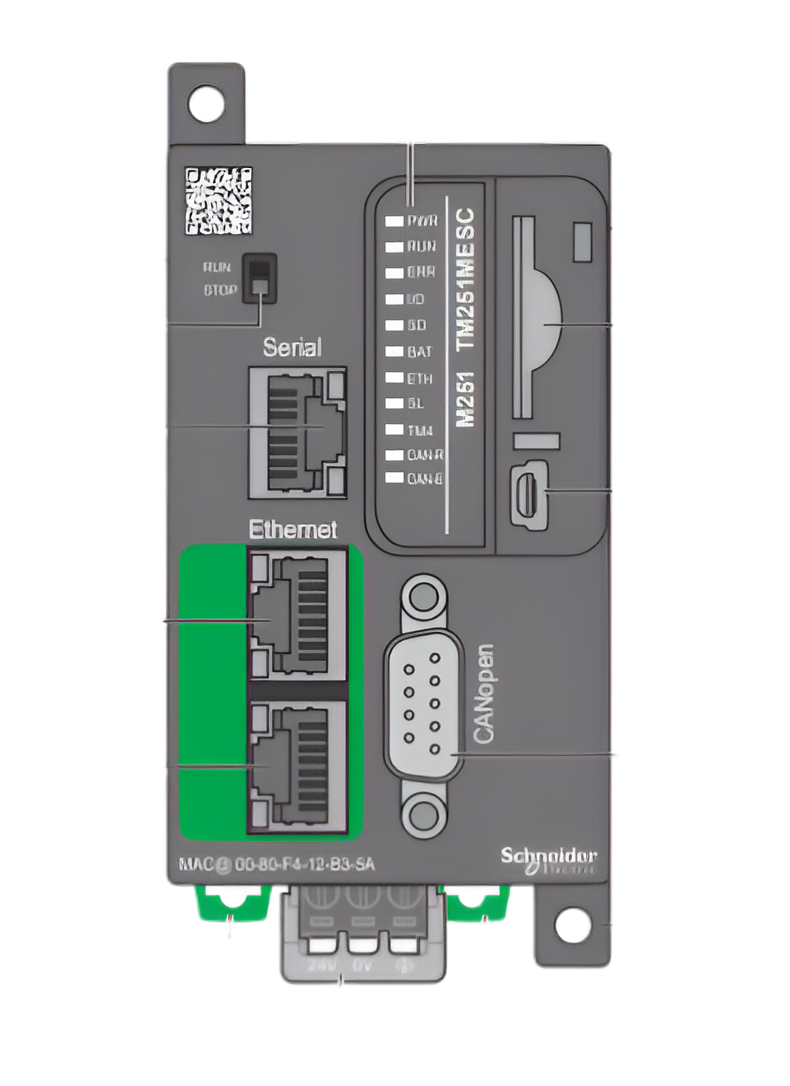
The Schneider TM251MESC, manufactured by Saya, is a high-performance programmable logic controller (PLC) designed for industrial automation and control applications. With its compact design, robust processing capabilities, and versatile I/O options, the TM251MESC is ideal for managing complex processes in manufacturing, energy, and other industrial environments. It supports advanced programming languages such as Structured Text (ST) and Ladder Diagram (LD), enabling flexible and efficient system design. Additionally, the TM251MESC offers multiple connectivity options, making it easy to integrate with other devices and systems.
Explore Projects Built with PLC SCHNEIDER TM251MESC
 Open Project in Cirkit Designer
 Open Project in Cirkit Designer
 Open Project in Cirkit Designer
 Open Project in Cirkit Designer
Explore Projects Built with PLC SCHNEIDER TM251MESC
Open Project in Cirkit DesignerOpen Project in Cirkit DesignerOpen Project in Cirkit DesignerOpen Project in Cirkit DesignerCommon Applications
- Industrial automation and process control
- Machine control and monitoring
- Energy management systems
- Building automation
- Integration with SCADA systems
Technical Specifications
Key Technical Details
| Specification | Value |
|---|---|
| Manufacturer | Saya |
| Model | TM251MESC |
| Processor | 32-bit RISC processor |
| Program Memory | 4 MB |
| Data Memory | 2 MB |
| Communication Ports | 2x Ethernet, 1x Serial (RS485/RS232) |
| Supported Protocols | Modbus TCP/IP, Modbus RTU, Ethernet/IP |
| Input Voltage Range | 24 V DC |
| Digital Inputs | 16 |
| Digital Outputs | 16 (Transistor type) |
| Analog Inputs | 4 (Optional module required) |
| Analog Outputs | 2 (Optional module required) |
| Operating Temperature Range | -10°C to 60°C |
| Dimensions | 150 mm x 90 mm x 60 mm |
| Mounting Type | DIN Rail |
Pin Configuration and Descriptions
Digital Inputs
| Pin Number | Description | Voltage Range | Notes |
|---|---|---|---|
| DI1-DI16 | Digital Input Channels 1-16 | 0-24 V DC | Logic High: >15 V DC |
Digital Outputs
| Pin Number | Description | Voltage Range | Notes |
|---|---|---|---|
| DO1-DO16 | Digital Output Channels 1-16 | 0-24 V DC | Max Current: 0.5 A/output |
Communication Ports
| Port | Description | Protocols Supported |
|---|---|---|
| Ethernet 1 | Primary Ethernet Port | Modbus TCP/IP, Ethernet/IP |
| Ethernet 2 | Secondary Ethernet Port | Modbus TCP/IP, Ethernet/IP |
| Serial | RS485/RS232 Communication | Modbus RTU |
Usage Instructions
How to Use the TM251MESC in a Circuit
- Power Supply: Connect a 24 V DC power supply to the PLC's power input terminals. Ensure the power supply is stable and within the specified voltage range.
- Digital Inputs: Connect sensors or switches to the digital input pins (DI1-DI16). Ensure the input voltage does not exceed 24 V DC.
- Digital Outputs: Connect actuators, relays, or other devices to the digital output pins (DO1-DO16). Verify that the current draw of connected devices does not exceed 0.5 A per output.
- Communication: Use the Ethernet or Serial ports to connect the PLC to other devices or systems. Configure the communication settings (e.g., IP address, baud rate) as required.
- Programming: Use compatible software (e.g., EcoStruxure Machine Expert) to write and upload your control program to the PLC. The TM251MESC supports programming in Ladder Diagram (LD), Structured Text (ST), and other IEC 61131-3 languages.
Important Considerations
- Always follow proper grounding practices to minimize electrical noise and ensure reliable operation.
- Use surge protection devices to protect the PLC from voltage spikes.
- Regularly back up your PLC programs to avoid data loss.
- Ensure adequate ventilation around the PLC to prevent overheating.
Example Code for Modbus Communication with Arduino UNO
#include <ModbusMaster.h>

// Create an instance of the ModbusMaster library
ModbusMaster node;

void setup() {
  // Initialize serial communication for debugging
  Serial.begin(9600);

  // Initialize Modbus communication (RS485/RS232)
  node.begin(1, Serial); // Slave ID = 1

  // Configure the Arduino's serial port for RS485 communication
  Serial.println("Modbus communication initialized.");
}

void loop() {
  uint8_t result;
  uint16_t data;

  // Read a holding register (e.g., register 40001)
  result = node.readHoldingRegisters(0x0000, 1);

  if (result == node.ku8MBSuccess) {
    data = node.getResponseBuffer(0);
    Serial.print("Register Value: ");
    Serial.println(data);
  } else {
    Serial.println("Failed to read register.");
  }

  delay(1000); // Wait 1 second before the next read
}
Note: Ensure proper RS485/RS232 wiring between the Arduino and the TM251MESC. Use a suitable RS485 transceiver module for Arduino.
Troubleshooting and FAQs
Common Issues and Solutions
PLC Not Powering On
- Cause: Insufficient or unstable power supply.
- Solution: Verify the power supply voltage is within the 24 V DC range and check connections.
Digital Inputs Not Responding
- Cause: Incorrect wiring or sensor failure.
- Solution: Check the wiring and ensure the input voltage is within the specified range.
Communication Failure
- Cause: Incorrect communication settings or wiring.
- Solution: Verify the baud rate, parity, and other communication parameters. Check cable connections.
Overheating
- Cause: Poor ventilation or excessive ambient temperature.
- Solution: Ensure proper ventilation and maintain the operating temperature within the specified range.
FAQs
Can the TM251MESC be used with third-party software?
- Yes, the TM251MESC supports standard protocols like Modbus, allowing integration with third-party software.
What programming languages are supported?
- The TM251MESC supports IEC 61131-3 languages, including Ladder Diagram (LD), Structured Text (ST), and Function Block Diagram (FBD).
How do I update the firmware?
- Use the EcoStruxure Machine Expert software to update the firmware. Follow the manufacturer's instructions for a safe update process.
Can I expand the I/O capabilities?
- Yes, the TM251MESC supports expansion modules for additional digital and analog I/O.
By following this documentation, users can effectively utilize the Schneider TM251MESC PLC for their automation and control needs.