
How to Use Power Distribution Board (PDB) 300A - Side Entry: Examples, Pinouts, and Specs
 Design with Power Distribution Board (PDB) 300A - Side Entry in Cirkit Designer
Introduction
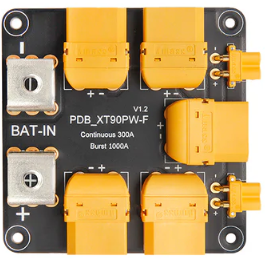
The Holybro Power Distribution Board (PDB) 300A - Side Entry is a high-performance component designed to distribute power efficiently to multiple electronic devices in a circuit. With a maximum current handling capacity of 300A, this PDB is ideal for high-current applications such as drones, RC vehicles, robotics, and other power-intensive projects. Its side entry design simplifies wiring and connections, making it a user-friendly solution for complex setups.
Explore Projects Built with Power Distribution Board (PDB) 300A - Side Entry
 Open Project in Cirkit Designer
 Open Project in Cirkit Designer
 Open Project in Cirkit Designer
 Open Project in Cirkit Designer
Explore Projects Built with Power Distribution Board (PDB) 300A - Side Entry
Open Project in Cirkit DesignerOpen Project in Cirkit DesignerOpen Project in Cirkit DesignerOpen Project in Cirkit DesignerCommon Applications and Use Cases
- Power distribution in high-current drone systems (e.g., FPV racing drones)
- Robotics projects requiring multiple power outputs
- RC vehicles with high-power motors and ESCs
- Custom electronic projects with multiple power-hungry components
Technical Specifications
The following table outlines the key technical details of the Holybro PDB 300A - Side Entry:
| Specification | Details |
|---|---|
| Maximum Current Handling | 300A |
| Input Voltage Range | 3S to 12S LiPo (11.1V to 50.4V) |
| Dimensions | 68mm x 50mm x 10mm |
| Weight | 36g |
| Connector Type | XT90 (input), solder pads (output) |
| PCB Material | 4-layer PCB with 2oz copper |
| Operating Temperature | -20°C to 85°C |
| Mounting Hole Spacing | 30.5mm x 30.5mm (standard M3 holes) |
Pin Configuration and Descriptions
The Holybro PDB 300A features a simple layout with input and output connections. Below is a description of the key connections:
| Pin/Connection | Description |
|---|---|
| XT90 Input | Main power input for the PDB. Connect to the battery using an XT90 connector. |
| Positive Output Pads | Solder pads for distributing positive voltage to connected components. |
| Negative Output Pads | Solder pads for distributing ground to connected components. |
| ESC Signal Pads | Optional pads for connecting ESC signal wires (if applicable). |
| Mounting Holes | Four M3 holes for securely mounting the PDB to your project. |
Usage Instructions
How to Use the Component in a Circuit
Connect the Battery:
- Use an XT90 connector to connect the battery to the PDB's input port.
- Ensure the battery voltage is within the supported range (3S to 12S LiPo).
Distribute Power:
- Solder the positive and negative wires of your components (e.g., ESCs, motors, or other devices) to the corresponding output pads on the PDB.
- Use high-quality wires capable of handling the required current to avoid overheating.
Secure the PDB:
- Mount the PDB securely using the M3 mounting holes. Ensure it is insulated from conductive surfaces to prevent short circuits.
Test the Connections:
- Double-check all connections for proper polarity and secure solder joints.
- Power on the system and verify that all components receive the correct voltage.
Important Considerations and Best Practices
- Wire Gauge: Use appropriately thick wires for high-current connections to minimize voltage drops and heat generation.
- Soldering: Ensure all solder joints are clean and strong to prevent connection failures.
- Insulation: Use heat shrink tubing or electrical tape to insulate exposed wires and solder joints.
- Cooling: In high-current applications, ensure adequate airflow around the PDB to prevent overheating.
- Polarity: Always double-check the polarity of connections to avoid damaging components.
Example: Connecting to an Arduino UNO
While the PDB itself does not directly interface with an Arduino UNO, it can be used to power peripherals connected to the Arduino. Below is an example of powering a motor driver and an Arduino UNO using the PDB:
// Example Arduino code for controlling a motor driver powered by the PDB
// Ensure the motor driver is connected to the PDB's output pads for power.

const int motorPin = 9; // PWM pin connected to the motor driver

void setup() {
  pinMode(motorPin, OUTPUT); // Set motor pin as output
}

void loop() {
  analogWrite(motorPin, 128); // Set motor speed to 50% (PWM value: 128)
  delay(2000);                // Run motor for 2 seconds
  analogWrite(motorPin, 0);   // Stop motor
  delay(2000);                // Wait for 2 seconds
}
Troubleshooting and FAQs
Common Issues and Solutions
No Power Output:
- Cause: Loose or incorrect connections.
- Solution: Verify all connections, ensuring proper polarity and secure solder joints.
Overheating:
- Cause: Excessive current draw or inadequate wire gauge.
- Solution: Use thicker wires and ensure the total current draw does not exceed 300A.
Short Circuit:
- Cause: Exposed wires or solder joints touching conductive surfaces.
- Solution: Insulate all exposed connections and ensure the PDB is mounted on a non-conductive surface.
Voltage Drop:
- Cause: Long wires or insufficient wire gauge.
- Solution: Minimize wire length and use low-resistance wires.
FAQs
Q: Can I use this PDB with a 6S LiPo battery?
A: Yes, the PDB supports input voltages from 3S to 12S LiPo batteries, including 6S (22.2V).
Q: Is the PDB compatible with ESCs?
A: Yes, the PDB can distribute power to ESCs. Ensure the ESCs are rated for the battery voltage.
Q: How do I prevent the PDB from overheating?
A: Use proper wire gauge, avoid exceeding the 300A limit, and ensure adequate airflow around the PDB.
Q: Can I use this PDB for non-drone applications?
A: Absolutely! The PDB is suitable for any high-current application requiring efficient power distribution.