
How to Use 3.7v lipo 80mAh: Examples, Pinouts, and Specs
 Design with 3.7v lipo 80mAh in Cirkit Designer
Introduction
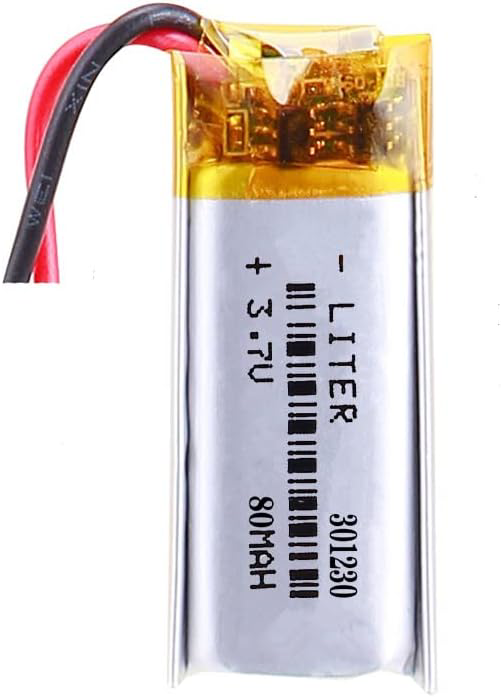
The Liter 301230 is a lithium polymer (LiPo) battery with a nominal voltage of 3.7V and a capacity of 80mAh. This compact and lightweight battery is ideal for powering small, portable electronic devices. Its high energy density and rechargeable nature make it a popular choice for applications requiring reliable and efficient energy storage.
Explore Projects Built with 3.7v lipo 80mAh
 Open Project in Cirkit Designer
 Open Project in Cirkit Designer
 Open Project in Cirkit Designer
 Open Project in Cirkit Designer
Explore Projects Built with 3.7v lipo 80mAh
Open Project in Cirkit DesignerOpen Project in Cirkit DesignerOpen Project in Cirkit DesignerOpen Project in Cirkit DesignerCommon Applications
- Wearable devices (e.g., fitness trackers, smartwatches)
- Small IoT (Internet of Things) devices
- Wireless sensors
- Miniature robotics
- Prototyping and DIY electronics projects
Technical Specifications
The following table outlines the key technical details of the Liter 301230 LiPo battery:
| Parameter | Value |
|---|---|
| Nominal Voltage | 3.7V |
| Capacity | 80mAh |
| Maximum Charging Voltage | 4.2V |
| Discharge Cutoff Voltage | 3.0V |
| Standard Charge Current | 0.5C (40mA) |
| Maximum Charge Current | 1C (80mA) |
| Standard Discharge Current | 0.5C (40mA) |
| Maximum Discharge Current | 1C (80mA) |
| Dimensions (L x W x H) | 30mm x 12mm x 3mm |
| Weight | ~2 grams |
| Connector Type | Bare wire leads (customizable) |
| Chemistry | Lithium Polymer (LiPo) |
Pin Configuration
The battery typically comes with two wire leads for connection. The pinout is as follows:
| Wire Color | Function | Description |
|---|---|---|
| Red | Positive (+) | Connect to the positive terminal of the circuit. |
| Black | Negative (-) | Connect to the ground (GND) of the circuit. |
Usage Instructions
How to Use the 3.7V LiPo Battery in a Circuit
- Connection:
- Connect the red wire to the positive terminal of your circuit.
- Connect the black wire to the ground (GND) terminal of your circuit.
- Charging:
- Use a LiPo-compatible charger with a constant current/constant voltage (CC/CV) charging profile.
- Ensure the charging voltage does not exceed 4.2V.
- Use a standard charge current of 0.5C (40mA) for optimal battery life.
- Discharging:
- Avoid discharging the battery below 3.0V to prevent damage.
- Use a load that does not exceed the maximum discharge current of 1C (80mA).
- Protection:
- Incorporate a battery protection circuit module (PCM) to prevent overcharging, over-discharging, and short circuits.
Important Considerations and Best Practices
- Storage: Store the battery at a voltage of approximately 3.8V in a cool, dry place when not in use for extended periods.
- Safety: Avoid puncturing, short-circuiting, or exposing the battery to high temperatures.
- Balancing: If using multiple batteries in series or parallel, ensure proper balancing to maintain consistent performance.
- Arduino Integration: When using this battery with an Arduino UNO or similar microcontroller, ensure the voltage is regulated to 5V or 3.3V as required by the board.
Example: Using the Battery with an Arduino UNO
To power an Arduino UNO with the 3.7V LiPo battery, you can use a step-up voltage regulator to boost the voltage to 5V. Below is an example circuit and code for reading the battery voltage using the Arduino's analog input:
Circuit Setup:
- Connect the battery's red wire to the input of the step-up regulator.
- Connect the regulator's output to the Arduino's VIN pin.
- Use a voltage divider circuit to measure the battery voltage and connect it to an analog pin (e.g., A0).
Arduino Code:
// Define the analog pin for battery voltage measurement
const int batteryPin = A0;

// Voltage divider resistor values (in ohms)
const float R1 = 10000.0; // Resistor connected to battery positive
const float R2 = 10000.0; // Resistor connected to ground

void setup() {
  Serial.begin(9600); // Initialize serial communication
}

void loop() {
  int rawValue = analogRead(batteryPin); // Read the analog value
  float voltage = (rawValue / 1023.0) * 5.0; // Convert to voltage (Arduino 5V ADC)

  // Adjust for voltage divider
  float batteryVoltage = voltage * (R1 + R2) / R2;

  // Print the battery voltage to the Serial Monitor
  Serial.print("Battery Voltage: ");
  Serial.print(batteryVoltage);
  Serial.println(" V");

  delay(1000); // Wait for 1 second before the next reading
}
Notes:
- Ensure the voltage divider resistors are chosen to keep the analog input voltage below 5V.
- Use a step-up regulator with sufficient current capacity for the Arduino and connected peripherals.
Troubleshooting and FAQs
Common Issues
Battery Not Charging:
- Cause: Charger not compatible or incorrect charging voltage.
- Solution: Use a LiPo-specific charger with a 4.2V output and appropriate current rating.
Battery Drains Quickly:
- Cause: Excessive load or degraded battery capacity.
- Solution: Ensure the load does not exceed the maximum discharge current. Replace the battery if it has reached the end of its lifecycle.
Battery Swells or Overheats:
- Cause: Overcharging, over-discharging, or physical damage.
- Solution: Stop using the battery immediately. Dispose of it safely according to local regulations.
Arduino Not Powering On:
- Cause: Insufficient voltage or current from the battery.
- Solution: Use a step-up regulator to boost the voltage to 5V. Ensure the battery is fully charged.
FAQs
Q1: Can I connect this battery directly to a 5V device?
A1: No, the battery's nominal voltage is 3.7V, which is insufficient for most 5V devices. Use a step-up regulator to boost the voltage.
Q2: How long will the battery last on a single charge?
A2: Battery life depends on the load current. For example, at a 40mA load, the battery will last approximately 2 hours (80mAh ÷ 40mA).
Q3: Is it safe to use this battery in series or parallel configurations?
A3: Yes, but ensure proper balancing and use a protection circuit to prevent overcharging or over-discharging.
Q4: How do I safely dispose of the battery?
A4: Take the battery to a certified e-waste recycling facility. Do not dispose of it in regular trash.