
How to Use T motor Flame 60A ESC: Examples, Pinouts, and Specs
 Design with T motor Flame 60A ESC in Cirkit Designer
Introduction
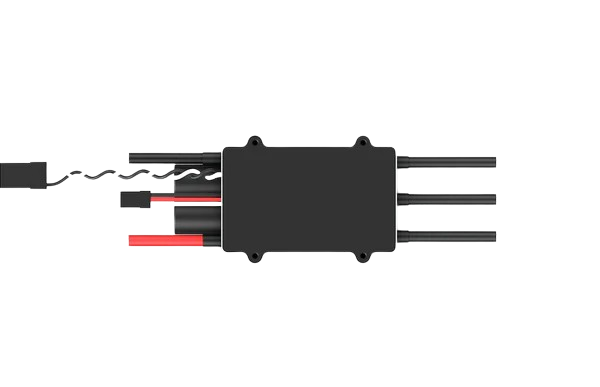
The T motor Flame 60A ESC is a high-performance electronic speed controller (ESC) designed specifically for brushless motors. It is capable of handling up to 60 amps of continuous current, making it suitable for demanding applications. This ESC provides precise control over motor speed and direction, ensuring smooth and efficient operation. Its robust design and advanced features make it ideal for use in drones, RC cars, electric boats, and other electric vehicles.
Explore Projects Built with T motor Flame 60A ESC
 Open Project in Cirkit Designer
 Open Project in Cirkit Designer
 Open Project in Cirkit Designer
 Open Project in Cirkit Designer
Explore Projects Built with T motor Flame 60A ESC
Open Project in Cirkit DesignerOpen Project in Cirkit DesignerOpen Project in Cirkit DesignerOpen Project in Cirkit DesignerCommon Applications
- Multirotor drones (e.g., quadcopters, hexacopters)
- RC cars and trucks
- Electric boats
- Robotics and automation systems
- High-performance electric vehicles
Technical Specifications
Below are the key technical details of the T motor Flame 60A ESC:
| Parameter | Specification |
|---|---|
| Manufacturer | T motor |
| Part ID | ESC |
| Continuous Current | 60A |
| Peak Current | 80A (for 10 seconds) |
| Input Voltage Range | 3S–6S LiPo (11.1V–22.2V) |
| BEC Output | None (Opto-isolated ESC) |
| Motor Compatibility | Brushless motors |
| Signal Frequency | 30–500 Hz |
| Weight | 60g |
| Dimensions | 70mm x 25mm x 12mm |
| Operating Temperature | -20°C to 80°C |
| Firmware | Proprietary (non-programmable) |
Pin Configuration and Descriptions
The T motor Flame 60A ESC has three main connection points:
| Pin/Connection | Description |
|---|---|
| Power Input (Red/Black) | Connects to the positive (red) and negative (black) terminals of the LiPo battery. |
| Motor Output (3 Wires) | Connects to the three-phase wires of the brushless motor. |
| Signal Input (White/Black) | White wire receives the PWM signal from the flight controller or receiver. Black wire is ground. |
Usage Instructions
How to Use the T motor Flame 60A ESC in a Circuit
Connect the Power Input:
- Use a compatible LiPo battery (3S–6S) to power the ESC.
- Ensure the battery voltage matches the ESC's input voltage range (11.1V–22.2V).
Connect the Motor:
- Attach the three output wires of the ESC to the three-phase wires of the brushless motor.
- If the motor spins in the wrong direction, swap any two of the three motor wires.
Connect the Signal Input:
- Connect the white signal wire to the PWM output pin of your flight controller, receiver, or microcontroller.
- Connect the black ground wire to the ground pin of your controller.
Calibrate the ESC (if required):
- Follow the calibration procedure provided by T motor to ensure proper throttle range detection.
Power On:
- Turn on the power supply and ensure all connections are secure.
- Test the motor operation by gradually increasing the throttle signal.
Important Considerations and Best Practices
- Cooling: Ensure adequate airflow around the ESC to prevent overheating during operation.
- Battery Compatibility: Use only high-quality LiPo batteries within the specified voltage range.
- Signal Frequency: Verify that the PWM signal frequency from your controller is within the ESC's supported range (30–500 Hz).
- Mounting: Secure the ESC in a vibration-free location to avoid damage during operation.
- Safety: Always disconnect the battery when making adjustments to the wiring or motor connections.
Example: Using the ESC with an Arduino UNO
Below is an example of how to control the T motor Flame 60A ESC using an Arduino UNO:
#include <Servo.h> // Include the Servo library to generate PWM signals

Servo esc; // Create a Servo object to control the ESC

void setup() {
  esc.attach(9); // Attach the ESC signal wire to pin 9 on the Arduino
  esc.writeMicroseconds(1000); // Send minimum throttle signal (1000 µs)
  delay(2000); // Wait for 2 seconds to allow the ESC to initialize
}

void loop() {
  esc.writeMicroseconds(1500); // Send a mid-throttle signal (1500 µs)
  delay(5000); // Run the motor at mid-throttle for 5 seconds

  esc.writeMicroseconds(1000); // Send minimum throttle signal to stop the motor
  delay(5000); // Wait for 5 seconds before repeating
}
Note: Ensure the ESC is properly calibrated before running the code. Always test the setup in a safe environment.
Troubleshooting and FAQs
Common Issues and Solutions
Motor Does Not Spin:
- Cause: Incorrect wiring or no signal from the controller.
- Solution: Verify all connections, especially the signal wire. Ensure the controller is sending a valid PWM signal.
Motor Spins in the Wrong Direction:
- Cause: Incorrect motor wiring.
- Solution: Swap any two of the three motor wires to reverse the direction.
ESC Overheats:
- Cause: Insufficient cooling or excessive current draw.
- Solution: Improve airflow around the ESC and ensure the motor and propeller are within the ESC's current limits.
No Response from ESC:
- Cause: Throttle calibration not performed.
- Solution: Perform the throttle calibration procedure as per the manufacturer's instructions.
FAQs
Q: Can I use this ESC with a brushed motor?
A: No, the T motor Flame 60A ESC is designed exclusively for brushless motors.Q: Does the ESC have a built-in BEC?
A: No, this is an opto-isolated ESC and does not include a built-in BEC. Use an external BEC if needed.Q: What is the maximum supported battery voltage?
A: The ESC supports up to 6S LiPo batteries (22.2V).Q: Can I program the ESC firmware?
A: No, the ESC uses proprietary firmware and is not user-programmable.
By following this documentation, users can effectively integrate the T motor Flame 60A ESC into their projects and troubleshoot common issues with ease.