
How to Use RUTX50: Examples, Pinouts, and Specs
 Design with RUTX50 in Cirkit Designer
Introduction
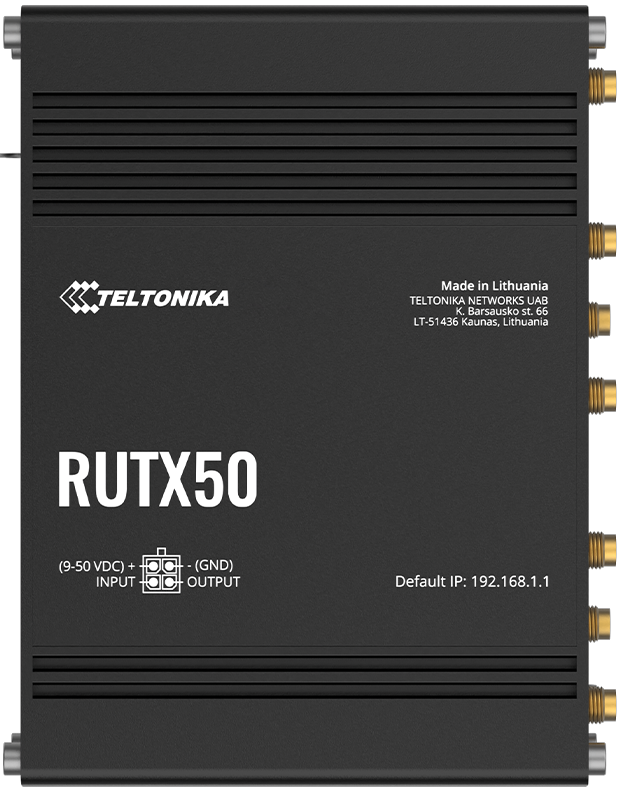
The RUTX50 is a robust industrial-grade router manufactured by Teltonika, designed to deliver reliable and high-performance connectivity in challenging environments. It supports multiple WAN connections, including LTE, and is equipped with advanced security features. This makes it an ideal choice for IoT applications, remote monitoring, and industrial automation.
Explore Projects Built with RUTX50
 Open Project in Cirkit Designer
 Open Project in Cirkit Designer
 Open Project in Cirkit Designer
 Open Project in Cirkit Designer
Explore Projects Built with RUTX50
Open Project in Cirkit DesignerOpen Project in Cirkit DesignerOpen Project in Cirkit DesignerOpen Project in Cirkit DesignerCommon Applications
- IoT Deployments: Ensures stable connectivity for IoT devices in remote or industrial locations.
- Remote Monitoring: Facilitates secure and reliable data transmission for monitoring systems.
- Industrial Automation: Provides robust network solutions for industrial equipment and processes.
- Backup Connectivity: Acts as a failover solution for critical systems requiring uninterrupted internet access.
Technical Specifications
Key Technical Details
| Feature | Specification |
|---|---|
| Processor | Quad-core ARM Cortex A7, 717 MHz |
| Memory | 256 MB DDR3 RAM |
| Storage | 256 MB Flash |
| WAN Connectivity | 5G, LTE Cat 20, 4G LTE, 3G |
| Wi-Fi | Dual-band 802.11ac (2.4 GHz & 5 GHz) |
| Ethernet Ports | 5 x Gigabit Ethernet ports (4 LAN, 1 WAN) |
| Power Supply | 9-50 V DC, passive PoE support |
| Operating Temperature | -40°C to 75°C |
| Security Features | VPN, Firewall, IPsec, OpenVPN, PPTP, L2TP, GRE |
| Dimensions | 115 x 95 x 32 mm |
| Certifications | CE, FCC, RoHS, PTCRB, GCF |
Pin Configuration and Descriptions
The RUTX50 does not have traditional pins like microcontrollers but includes multiple ports and interfaces. Below is a table describing its key interfaces:
| Port/Interface | Description |
|---|---|
| SIM Slots | Dual SIM slots for failover and redundancy in mobile connectivity. |
| Ethernet Ports | 4 LAN ports and 1 WAN port for wired network connections. |
| Power Input | 2-pin terminal block for DC power input (9-50 V). |
| USB Port | USB 2.0 for external device connectivity. |
| Antenna Connectors | SMA connectors for LTE and Wi-Fi antennas. |
| Reset Button | Resets the router to factory settings when pressed and held for 5 seconds. |
Usage Instructions
How to Use the RUTX50 in a Network
Powering the Device:
- Connect a DC power supply (9-50 V) to the 2-pin terminal block or use passive PoE.
- Ensure the power source is stable to avoid interruptions.
Connecting to the Internet:
- Insert one or two SIM cards into the SIM slots for mobile connectivity.
- Alternatively, connect the WAN port to a wired internet source.
Configuring the Router:
- Access the router's web interface by connecting to its default Wi-Fi network or via an Ethernet cable.
- Open a browser and navigate to the default IP address (192.168.1.1).
- Log in using the default credentials (username:
admin, password:admin01). - Follow the setup wizard to configure network settings, security, and other parameters.
Connecting Devices:
- Connect devices to the router via Wi-Fi or Ethernet ports.
- Configure LAN settings as needed for your network.
Enabling Security Features:
- Set up a strong password for the web interface.
- Enable VPN, firewall, and other security features to protect your network.
Important Considerations and Best Practices
- Antenna Placement: Position the antennas for optimal signal strength. Avoid placing the router near metal objects or other sources of interference.
- Firmware Updates: Regularly update the firmware to ensure the latest features and security patches are applied.
- SIM Card Configuration: Ensure the SIM cards are activated and have sufficient data plans for your application.
- Environmental Conditions: Operate the router within the specified temperature range (-40°C to 75°C) to prevent damage.
Example: Using the RUTX50 with an Arduino UNO
The RUTX50 can be used to provide internet connectivity to an Arduino UNO via Ethernet or Wi-Fi. Below is an example of connecting the Arduino UNO to the RUTX50 using an Ethernet shield:
Arduino Code Example
#include <SPI.h>
#include <Ethernet.h>

// MAC address and IP address for the Ethernet shield
byte mac[] = { 0xDE, 0xAD, 0xBE, 0xEF, 0xFE, 0xED };
IPAddress ip(192, 168, 1, 177); // Static IP address for the Arduino
IPAddress server(192, 168, 1, 1); // RUTX50 router's IP address

// Initialize the Ethernet client
EthernetClient client;

void setup() {
  // Start the Ethernet connection
  Ethernet.begin(mac, ip);

  // Allow the Ethernet shield to initialize
  delay(1000);

  // Print connection status
  Serial.begin(9600);
  if (Ethernet.hardwareStatus() == EthernetNoHardware) {
    Serial.println("Ethernet shield not found.");
    while (true);
  }
  if (Ethernet.linkStatus() == LinkOFF) {
    Serial.println("Ethernet cable is not connected.");
  }

  // Attempt to connect to the server
  if (client.connect(server, 80)) {
    Serial.println("Connected to RUTX50!");
    client.println("GET / HTTP/1.1");
    client.println("Host: 192.168.1.1");
    client.println("Connection: close");
    client.println();
  } else {
    Serial.println("Connection to RUTX50 failed.");
  }
}

void loop() {
  // Read and print server response
  while (client.available()) {
    char c = client.read();
    Serial.print(c);
  }

  // Close the connection if the server stops responding
  if (!client.connected()) {
    Serial.println();
    Serial.println("Disconnecting...");
    client.stop();
    while (true);
  }
}
Troubleshooting and FAQs
Common Issues and Solutions
| Issue | Solution |
|---|---|
| Router does not power on. | Check the power supply and ensure it meets the 9-50 V DC requirement. |
| No internet connection via SIM card. | Verify the SIM card is inserted correctly and has an active data plan. |
| Cannot access the web interface. | Ensure the device is connected to the router and use the correct IP address. |
| Weak LTE or Wi-Fi signal. | Adjust the antenna placement or use external antennas for better coverage. |
| Firmware update fails. | Ensure the router is connected to a stable power source during the update. |
FAQs
Can the RUTX50 be used outdoors?
- Yes, but it must be housed in a weatherproof enclosure to protect it from environmental factors.
Does the router support 5G connectivity?
- Yes, the RUTX50 supports 5G for high-speed mobile internet.
How do I reset the router to factory settings?
- Press and hold the reset button for 5 seconds until the LEDs indicate a reset.
Can I use the RUTX50 with solar power?
- Yes, as long as the solar power system provides a stable DC output within the 9-50 V range.
Is the router compatible with VPN services?
- Yes, the RUTX50 supports multiple VPN protocols, including OpenVPN, IPsec, and PPTP.