
How to Use Solenoid Valve 1/2" N/C AC 220V (Male thread): Examples, Pinouts, and Specs
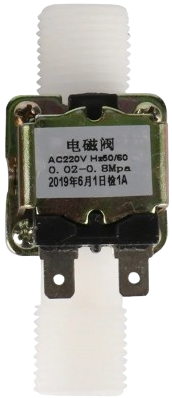
 Design with Solenoid Valve 1/2" N/C AC 220V (Male thread) in Cirkit Designer
Introduction
The Solenoid Valve 1/2" N/C AC 220V is an electromechanical valve designed to control the flow of fluids in a system. This specific model is a normally closed (N/C) valve, meaning it remains closed when no electrical current is applied and opens when powered. It operates on 220V AC and features a 1/2-inch male threaded connection for straightforward integration into pipelines.
Explore Projects Built with Solenoid Valve 1/2" N/C AC 220V (Male thread)
 Open Project in Cirkit Designer
 Open Project in Cirkit Designer
 Open Project in Cirkit Designer
 Open Project in Cirkit Designer
Explore Projects Built with Solenoid Valve 1/2" N/C AC 220V (Male thread)
Open Project in Cirkit DesignerOpen Project in Cirkit DesignerOpen Project in Cirkit DesignerOpen Project in Cirkit DesignerCommon Applications
- Irrigation systems: Automated water flow control for gardens and farms.
- Industrial fluid control: Managing the flow of liquids in manufacturing processes.
- HVAC systems: Regulating water or refrigerant flow in heating and cooling systems.
- Home appliances: Used in washing machines, dishwashers, and water purifiers.
Technical Specifications
Key Technical Details
| Parameter | Specification |
|---|---|
| Valve Type | Normally Closed (N/C) |
| Operating Voltage | 220V AC |
| Power Consumption | ~15W |
| Connection Type | 1/2-inch Male Thread |
| Operating Pressure Range | 0.02 MPa to 0.8 MPa |
| Fluid Type | Water, low-viscosity fluids |
| Body Material | Brass |
| Seal Material | NBR (Nitrile Butadiene Rubber) |
| Response Time | < 1 second |
| Operating Temperature | 0°C to 80°C |
Pin Configuration and Descriptions
The solenoid valve does not have traditional pins like an IC but instead has two electrical terminals for AC power input. Below is a description of the connections:
| Terminal Name | Description |
|---|---|
| Terminal 1 | Live (L) wire connection for 220V AC input |
| Terminal 2 | Neutral (N) wire connection for 220V AC |
Note: Ensure proper insulation and secure connections to avoid electrical hazards.
Usage Instructions
How to Use the Solenoid Valve in a Circuit
- Prepare the Power Supply: Ensure you have a stable 220V AC power source. Use a switch or relay to control the power supply to the valve.
- Connect the Terminals:
- Connect the Live (L) wire to one terminal of the solenoid valve.
- Connect the Neutral (N) wire to the other terminal.
- Install the Valve:
- Screw the valve into the pipeline using the 1/2-inch male thread. Use Teflon tape to ensure a watertight seal.
- Ensure the arrow on the valve body aligns with the direction of fluid flow.
- Test the Valve:
- Power the valve to confirm it opens and closes as expected.
- Check for leaks and ensure proper operation.
Important Considerations and Best Practices
- Voltage Compatibility: Only use the valve with a 220V AC power supply. Using incorrect voltage can damage the valve.
- Fluid Compatibility: This valve is designed for water and low-viscosity fluids. Avoid using it with corrosive or high-viscosity liquids.
- Pressure Range: Ensure the operating pressure is within the specified range (0.02 MPa to 0.8 MPa).
- Safety Precautions: Always disconnect the power supply before installing or servicing the valve.
- Relay Control: If integrating with a microcontroller like an Arduino, use a relay module to safely control the 220V AC power.
Example: Controlling the Valve with an Arduino UNO
To control the solenoid valve using an Arduino UNO, you can use a relay module to switch the 220V AC power. Below is an example code snippet:
// Example code to control a solenoid valve using Arduino and a relay module

const int relayPin = 7; // Pin connected to the relay module

void setup() {
  pinMode(relayPin, OUTPUT); // Set the relay pin as an output
  digitalWrite(relayPin, LOW); // Ensure the relay is off initially
}

void loop() {
  digitalWrite(relayPin, HIGH); // Turn on the relay (valve opens)
  delay(5000); // Keep the valve open for 5 seconds
  digitalWrite(relayPin, LOW); // Turn off the relay (valve closes)
  delay(5000); // Wait for 5 seconds before repeating
}
Note: Ensure proper isolation between the Arduino and the high-voltage AC circuit. Use an optocoupler-based relay module for safety.
Troubleshooting and FAQs
Common Issues and Solutions
| Issue | Possible Cause | Solution |
|---|---|---|
| Valve does not open | No power supply or incorrect wiring | Check the power source and wiring. |
| Valve leaks when closed | Damaged seal or debris in the valve | Inspect and clean the valve; replace seal if needed. |
| Valve makes a buzzing noise | Loose coil or improper voltage | Ensure proper voltage and secure the coil. |
| Fluid flow is restricted | Blockage in the pipeline or valve | Clean the pipeline and valve. |
FAQs
Can this valve be used with DC power? No, this valve is designed specifically for 220V AC operation.
What happens if the power supply is interrupted? Since this is a normally closed (N/C) valve, it will automatically close when power is lost.
Can this valve handle hot water? Yes, it can handle fluids up to 80°C, making it suitable for hot water applications.
How do I know the flow direction? The valve body has an arrow indicating the correct flow direction.
By following this documentation, you can effectively integrate and troubleshoot the Solenoid Valve 1/2" N/C AC 220V in your projects.