
How to Use Servo MG90S: Examples, Pinouts, and Specs
 Design with Servo MG90S in Cirkit Designer
Introduction
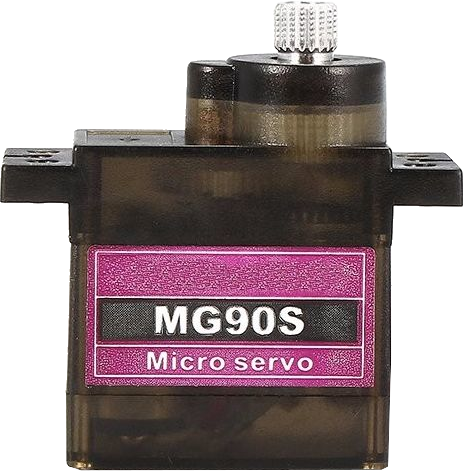
The Servo MG90S is a small, lightweight servo motor widely used in robotics, RC vehicles, and hobby electronics projects. It features a 180-degree range of motion, making it ideal for applications requiring precise angular positioning. With a torque rating of approximately 2.5 kg/cm, the MG90S is capable of handling moderate loads while maintaining compact dimensions. Its metal gear construction ensures durability and reliability, even under continuous use.
Explore Projects Built with Servo MG90S
 Open Project in Cirkit Designer
 Open Project in Cirkit Designer
 Open Project in Cirkit Designer
 Open Project in Cirkit Designer
Explore Projects Built with Servo MG90S
Open Project in Cirkit DesignerOpen Project in Cirkit DesignerOpen Project in Cirkit DesignerOpen Project in Cirkit DesignerCommon Applications
- Robotic arms and grippers
- RC vehicles (cars, boats, and planes)
- Pan-tilt camera systems
- Automated mechanisms and animatronics
- DIY hobby projects requiring angular motion control
Technical Specifications
The Servo MG90S is designed for ease of use and compatibility with a wide range of microcontrollers and power sources. Below are its key technical details:
| Parameter | Specification |
|---|---|
| Operating Voltage | 4.8V to 6.0V |
| Stall Torque | 2.2 kg/cm (4.8V), 2.5 kg/cm (6.0V) |
| Operating Speed | 0.1 sec/60° (4.8V), 0.08 sec/60° (6.0V) |
| Range of Motion | 0° to 180° |
| Gear Type | Metal |
| Weight | 13.4 g |
| Dimensions | 22.8 x 12.2 x 31 mm |
| Connector Type | 3-pin female header |
Pin Configuration
The MG90S servo motor has a 3-pin connector for power, ground, and signal. Below is the pinout description:
| Pin | Wire Color | Description |
|---|---|---|
| 1 | Brown | Ground (GND) |
| 2 | Red | Power (VCC, 4.8V–6.0V) |
| 3 | Orange | Signal (PWM input) |
Usage Instructions
How to Use the Servo MG90S in a Circuit
- Power Connection: Connect the red wire to a 5V or 6V power source and the brown wire to ground. Ensure the power supply can provide sufficient current (at least 1A) to avoid voltage drops.
- Signal Connection: Connect the orange wire to a PWM-capable pin on your microcontroller (e.g., Arduino).
- PWM Signal: The servo is controlled by a PWM signal with a pulse width between 1 ms and 2 ms:
- 1 ms corresponds to 0°.
- 1.5 ms corresponds to 90° (center position).
- 2 ms corresponds to 180°.
Example: Connecting to an Arduino UNO
Below is an example of how to control the MG90S using an Arduino UNO:
Circuit Diagram
- Connect the servo's red wire to the Arduino's 5V pin.
- Connect the brown wire to the Arduino's GND pin.
- Connect the orange wire to digital pin 9 on the Arduino.
Arduino Code
#include <Servo.h> // Include the Servo library

Servo myServo; // Create a Servo object to control the MG90S

void setup() {
  myServo.attach(9); // Attach the servo to pin 9
}

void loop() {
  myServo.write(0); // Move the servo to 0 degrees
  delay(1000); // Wait for 1 second

  myServo.write(90); // Move the servo to 90 degrees
  delay(1000); // Wait for 1 second

  myServo.write(180); // Move the servo to 180 degrees
  delay(1000); // Wait for 1 second
}
Important Considerations
- Power Supply: Use a stable power source to prevent erratic behavior. Avoid powering the servo directly from the Arduino if multiple servos or high torque is required.
- PWM Signal: Ensure the PWM signal is within the specified range (1 ms to 2 ms pulse width).
- Mechanical Load: Avoid exceeding the torque rating (2.5 kg/cm) to prevent damage to the servo.
Troubleshooting and FAQs
Common Issues and Solutions
Servo Not Moving
- Cause: Incorrect wiring or insufficient power supply.
- Solution: Double-check the wiring and ensure the power source can provide at least 1A.
Erratic or Jittery Movement
- Cause: Noise in the PWM signal or unstable power supply.
- Solution: Use a decoupling capacitor (e.g., 100 µF) across the power lines and ensure a clean PWM signal.
Servo Stuck at One Position
- Cause: PWM signal out of range or mechanical obstruction.
- Solution: Verify the PWM signal is within the 1 ms to 2 ms range and check for physical obstructions.
Overheating
- Cause: Prolonged operation under high torque or insufficient ventilation.
- Solution: Reduce the load on the servo and ensure proper ventilation.
FAQs
Q: Can I use the MG90S with a 3.3V microcontroller?
A: Yes, but you must provide a separate 5V or 6V power source for the servo. Use a level shifter if the PWM signal voltage is too low.
Q: How many MG90S servos can I control with an Arduino?
A: The number depends on the power supply and available PWM pins. Ensure the power supply can handle the total current draw of all servos.
Q: Can the MG90S rotate more than 180 degrees?
A: No, the MG90S is designed for a maximum range of 180 degrees. For continuous rotation, consider a continuous rotation servo.
Q: What is the lifespan of the MG90S?
A: The lifespan depends on usage conditions, but the metal gears provide better durability compared to plastic gear servos. Regular maintenance and avoiding overloads can extend its life.