
How to Use Stepper Driver TB6600: Examples, Pinouts, and Specs
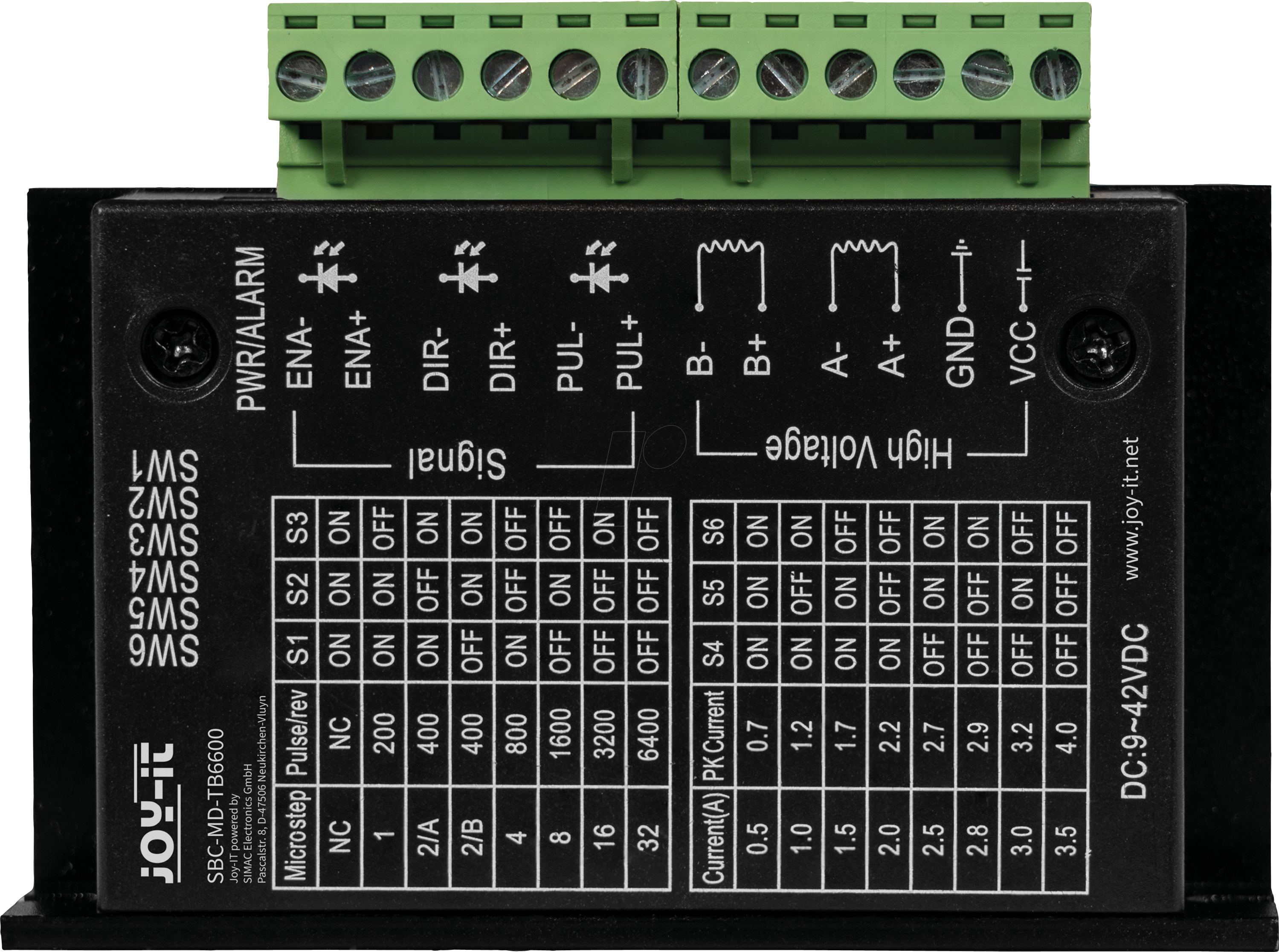
 Design with Stepper Driver TB6600 in Cirkit Designer
Introduction
The TB6600 Stepper Motor Driver (Manufacturer: JOY-IT, Part ID: SBC-MD-TB6600) is a high-performance driver designed to control bipolar stepper motors with precision and efficiency. It supports microstepping, enabling smoother motion and reduced vibration, making it ideal for applications requiring precise motor control. The TB6600 is widely used in robotics, CNC machinery, 3D printers, and other automation systems due to its robust design and versatility.
Explore Projects Built with Stepper Driver TB6600
 Open Project in Cirkit Designer
 Open Project in Cirkit Designer
 Open Project in Cirkit Designer
 Open Project in Cirkit Designer
Explore Projects Built with Stepper Driver TB6600
Open Project in Cirkit DesignerOpen Project in Cirkit DesignerOpen Project in Cirkit DesignerOpen Project in Cirkit DesignerCommon Applications
- CNC machines for precise motion control
- Robotics for smooth and accurate motor movements
- 3D printers for layer-by-layer precision
- Conveyor systems in industrial automation
- Camera sliders and other motion control systems
Technical Specifications
Key Technical Details
| Parameter | Value |
|---|---|
| Input Voltage Range | 9V to 42V DC |
| Output Current Range | 0.5A to 4.0A (adjustable via DIP switches) |
| Microstepping Modes | Full, 1/2, 1/4, 1/8, 1/16 |
| Control Signal Voltage | 3.3V to 5V (compatible with Arduino, etc.) |
| Step Pulse Frequency | Up to 200 kHz |
| Operating Temperature | -10°C to +45°C |
| Dimensions | 96mm x 56mm x 33mm |
Pin Configuration and Descriptions
The TB6600 driver has several input and output terminals for motor control and power connections. Below is the pin configuration:
Input Terminals
| Pin Name | Description |
|---|---|
| PUL+ | Positive terminal for step pulse signal (connect to controller) |
| PUL- | Negative terminal for step pulse signal (connect to controller ground) |
| DIR+ | Positive terminal for direction signal (connect to controller) |
| DIR- | Negative terminal for direction signal (connect to controller ground) |
| ENA+ | Positive terminal for enable signal (optional, connect to controller) |
| ENA- | Negative terminal for enable signal (optional, connect to controller ground) |
Output Terminals
| Pin Name | Description |
|---|---|
| A+ | Positive terminal for motor coil A |
| A- | Negative terminal for motor coil A |
| B+ | Positive terminal for motor coil B |
| B- | Negative terminal for motor coil B |
Power Terminals
| Pin Name | Description |
|---|---|
| VCC | Positive terminal for power supply (9V to 42V DC) |
| GND | Ground terminal for power supply |
Usage Instructions
Connecting the TB6600 to a Stepper Motor
- Power Supply: Connect a DC power supply (9V to 42V) to the VCC and GND terminals.
- Motor Connections: Connect the stepper motor's coils to the A+, A-, B+, and B- terminals. Ensure the correct pairing of motor wires for proper operation.
- Controller Connections:
- Connect the PUL+, DIR+, and ENA+ pins to the corresponding control pins on your microcontroller (e.g., Arduino).
- Connect the PUL-, DIR-, and ENA- pins to the ground of your microcontroller.
- DIP Switch Settings: Configure the DIP switches on the driver to set the desired microstepping mode and current limit. Refer to the driver’s datasheet for detailed DIP switch settings.
Example: Using TB6600 with Arduino UNO
Below is an example of how to control a stepper motor using the TB6600 and an Arduino UNO:
Circuit Diagram
- Connect the TB6600's PUL+, DIR+, and ENA+ to Arduino pins 2, 3, and 4, respectively.
- Connect the PUL-, DIR-, and ENA- to the Arduino's GND.
- Connect the stepper motor and power supply as described above.
Arduino Code
// Define control pins for the TB6600 driver
#define PUL_PIN 2  // Step pulse pin
#define DIR_PIN 3  // Direction pin
#define ENA_PIN 4  // Enable pin

void setup() {
  // Set control pins as outputs
  pinMode(PUL_PIN, OUTPUT);
  pinMode(DIR_PIN, OUTPUT);
  pinMode(ENA_PIN, OUTPUT);

  // Enable the driver
  digitalWrite(ENA_PIN, LOW);  // LOW enables the driver
}

void loop() {
  // Set direction to clockwise
  digitalWrite(DIR_PIN, HIGH);

  // Generate step pulses
  for (int i = 0; i < 200; i++) {  // 200 steps for one revolution (1.8°/step)
    digitalWrite(PUL_PIN, HIGH);
    delayMicroseconds(500);  // Pulse width (500 µs)
    digitalWrite(PUL_PIN, LOW);
    delayMicroseconds(500);  // Pulse interval (500 µs)
  }

  delay(1000);  // Wait 1 second

  // Set direction to counterclockwise
  digitalWrite(DIR_PIN, LOW);

  // Generate step pulses
  for (int i = 0; i < 200; i++) {
    digitalWrite(PUL_PIN, HIGH);
    delayMicroseconds(500);
    digitalWrite(PUL_PIN, LOW);
    delayMicroseconds(500);
  }

  delay(1000);  // Wait 1 second
}
Best Practices
- Use a power supply with sufficient current capacity to handle the motor's requirements.
- Ensure proper heat dissipation for the TB6600 driver, as it may heat up during operation.
- Double-check motor wiring to avoid damage to the driver or motor.
- Use shielded cables for control signals to minimize noise interference.
Troubleshooting and FAQs
Common Issues and Solutions
Motor Not Moving:
- Verify power supply connections and ensure the voltage is within the specified range.
- Check the motor wiring and ensure the coils are correctly paired.
- Confirm that the control signals (PUL, DIR, ENA) are being sent from the microcontroller.
Motor Vibrates but Does Not Rotate:
- Check the microstepping settings on the DIP switches.
- Ensure the motor's rated current matches the current setting on the driver.
Driver Overheating:
- Ensure proper ventilation and consider adding a heatsink or fan.
- Reduce the current setting if possible.
Inconsistent Motor Movement:
- Verify the step pulse frequency and ensure it is within the driver's supported range.
- Check for loose connections in the wiring.
FAQs
Q: Can the TB6600 drive unipolar stepper motors?
A: No, the TB6600 is designed for bipolar stepper motors only.
Q: What is the maximum step pulse frequency supported?
A: The TB6600 supports step pulse frequencies up to 200 kHz.
Q: Is the ENA (Enable) signal mandatory?
A: No, the ENA signal is optional. If not used, leave the ENA+ and ENA- pins disconnected.
Q: Can I use the TB6600 with a 3.3V microcontroller?
A: Yes, the TB6600 is compatible with both 3.3V and 5V control signals.
This concludes the documentation for the TB6600 Stepper Driver. For further assistance, refer to the manufacturer's datasheet or contact JOY-IT support.