
How to Use 3.7V 5000mAh LiPo Battery : Examples, Pinouts, and Specs
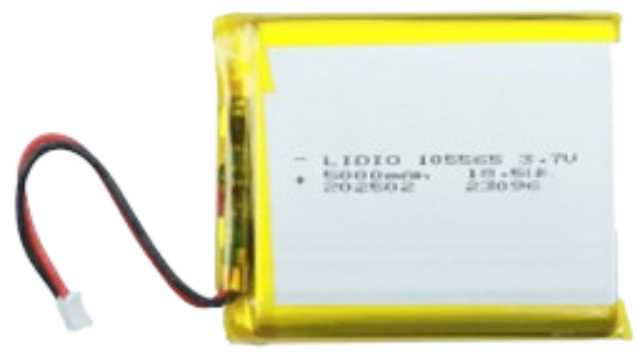
 Design with 3.7V 5000mAh LiPo Battery in Cirkit Designer
Introduction
The 3.7V 5000mAh LiPo (Lithium Polymer) battery is a rechargeable energy storage device known for its lightweight design, high energy density, and consistent power output. With a nominal voltage of 3.7V and a capacity of 5000mAh, this battery is widely used in portable electronics, remote-controlled (RC) devices, drones, robotics, and other applications requiring compact and efficient power sources.
Explore Projects Built with 3.7V 5000mAh LiPo Battery
 Open Project in Cirkit Designer
 Open Project in Cirkit Designer
 Open Project in Cirkit Designer
 Open Project in Cirkit Designer
Explore Projects Built with 3.7V 5000mAh LiPo Battery
Open Project in Cirkit DesignerOpen Project in Cirkit DesignerOpen Project in Cirkit DesignerOpen Project in Cirkit DesignerCommon Applications and Use Cases
- Portable Electronics: Smartphones, tablets, and handheld gaming devices.
- RC Devices: Remote-controlled cars, drones, and airplanes.
- Wearable Technology: Smartwatches and fitness trackers.
- DIY Projects: Arduino-based systems, IoT devices, and robotics.
- Backup Power: Small uninterruptible power supplies (UPS) and emergency lighting.
Technical Specifications
The following table outlines the key technical details of the 3.7V 5000mAh LiPo battery:
| Parameter | Specification |
|---|---|
| Nominal Voltage | 3.7V |
| Capacity | 5000mAh |
| Maximum Charge Voltage | 4.2V |
| Minimum Discharge Voltage | 3.0V |
| Continuous Discharge Current | Typically 1C (5A) |
| Peak Discharge Current | Up to 2C (10A) |
| Charging Current | Standard: 0.5C (2.5A), Max: 1C (5A) |
| Chemistry | Lithium Polymer (LiPo) |
| Weight | ~100-120g (varies by manufacturer) |
| Dimensions | ~10mm x 50mm x 90mm (varies) |
| Connector Type | JST, XT60, or bare leads (varies) |
Pin Configuration and Descriptions
LiPo batteries typically have two or three wires for connection. The pin configuration is as follows:
| Pin | Wire Color | Description |
|---|---|---|
| 1 | Red | Positive terminal (+) |
| 2 | Black | Negative terminal (-) |
| 3 | (Optional) White or Yellow | Balance lead for charging |
Note: The balance lead is used in multi-cell LiPo batteries for safe charging. For single-cell batteries like this one, it may not be present.
Usage Instructions
How to Use the Component in a Circuit
Connection:
- Connect the red wire to the positive terminal of your circuit.
- Connect the black wire to the negative terminal of your circuit.
- If using a battery management system (BMS) or charger, ensure the connectors match the battery's pinout.
Charging:
- Use a LiPo-compatible charger with a constant current/constant voltage (CC/CV) charging profile.
- Set the charger to 4.2V and a current of 0.5C (2.5A) for standard charging or 1C (5A) for faster charging.
- Monitor the charging process to prevent overcharging or overheating.
Discharging:
- Ensure the load does not exceed the battery's continuous discharge current (5A).
- Avoid discharging below 3.0V to prevent damage to the battery.
Protection:
- Use a BMS or protection circuit to prevent overcharging, over-discharging, and short circuits.
- Store the battery in a cool, dry place when not in use.
Important Considerations and Best Practices
- Safety: LiPo batteries are sensitive to overcharging, over-discharging, and physical damage. Always handle with care.
- Storage: Store the battery at ~3.8V (storage voltage) if not in use for extended periods.
- Temperature: Avoid exposing the battery to extreme temperatures (below 0°C or above 60°C).
- Inspection: Regularly check for swelling, punctures, or other signs of damage. Do not use a damaged battery.
Example: Using the Battery with an Arduino UNO
To power an Arduino UNO with the 3.7V 5000mAh LiPo battery, you will need a DC-DC boost converter to step up the voltage to 5V. Below is an example circuit and code:
Circuit Setup
- Connect the battery's positive and negative terminals to the input of the DC-DC boost converter.
- Set the boost converter's output to 5V.
- Connect the boost converter's output to the Arduino UNO's 5V and GND pins.
Arduino Code Example
// Example code to blink an LED using Arduino UNO powered by a 3.7V LiPo battery
// Ensure the battery is connected via a DC-DC boost converter to provide 5V.

const int ledPin = 13; // Pin connected to the onboard LED

void setup() {
  pinMode(ledPin, OUTPUT); // Set the LED pin as an output
}

void loop() {
  digitalWrite(ledPin, HIGH); // Turn the LED on
  delay(1000);               // Wait for 1 second
  digitalWrite(ledPin, LOW);  // Turn the LED off
  delay(1000);               // Wait for 1 second
}
Note: Ensure the boost converter is properly configured to output 5V before connecting it to the Arduino.
Troubleshooting and FAQs
Common Issues and Solutions
Battery Not Charging:
- Cause: Charger not compatible or incorrect settings.
- Solution: Use a LiPo-compatible charger and ensure the voltage and current settings are correct.
Battery Swelling:
- Cause: Overcharging, over-discharging, or physical damage.
- Solution: Stop using the battery immediately and dispose of it safely.
Short Runtime:
- Cause: Battery not fully charged or degraded capacity.
- Solution: Fully charge the battery and check its capacity using a battery tester.
Overheating During Use:
- Cause: Load exceeds the battery's discharge rating.
- Solution: Reduce the load or use a battery with a higher discharge rating.
FAQs
Q: Can I use this battery directly with a 5V device?
A: No, you will need a DC-DC boost converter to step up the voltage to 5V.Q: How long will this battery last on a 1A load?
A: The runtime can be estimated as5000mAh / 1000mA = 5 hours.Q: Is it safe to leave the battery connected to the charger?
A: No, disconnect the battery once fully charged to prevent overcharging.Q: Can I use this battery in series or parallel with others?
A: Yes, but ensure all batteries are of the same type, capacity, and charge level, and use a proper BMS for safety.