A magnetic contactor is an electrically controlled switch designed for switching power circuits. Manufactured by CIRKIT (Part ID: MAGNETIC CONTACTOR), this component is ideal for controlling high-current applications. Unlike standard relays, magnetic contactors are specifically engineered to handle large electrical loads, making them indispensable in industrial and commercial environments.
Explore Projects Built with MAGNETIC CONTACTOR
Use Cirkit Designer to design, explore, and prototype these projects online. Some projects support real-time simulation. Click "Open Project" to start designing instantly!
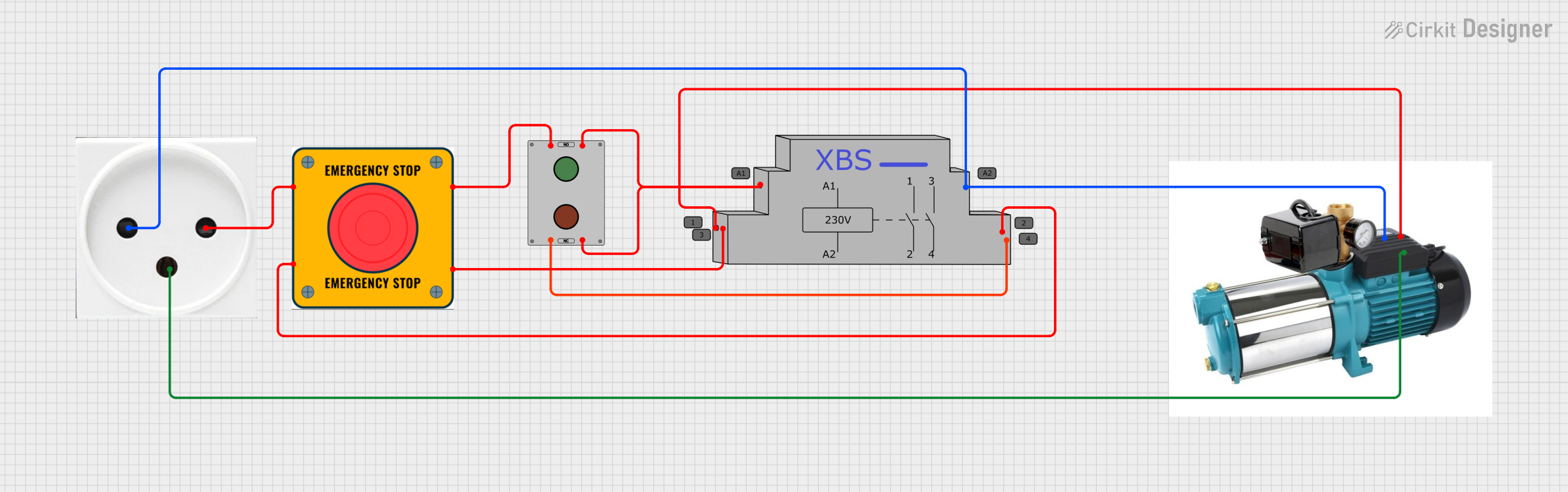
This circuit is designed to control a pump using a contactor that is manually operated by a switch and can be overridden by an emergency stop. The contactor enables power from an AC power outlet to the pump, and the emergency stop can interrupt the power circuit for safety purposes.
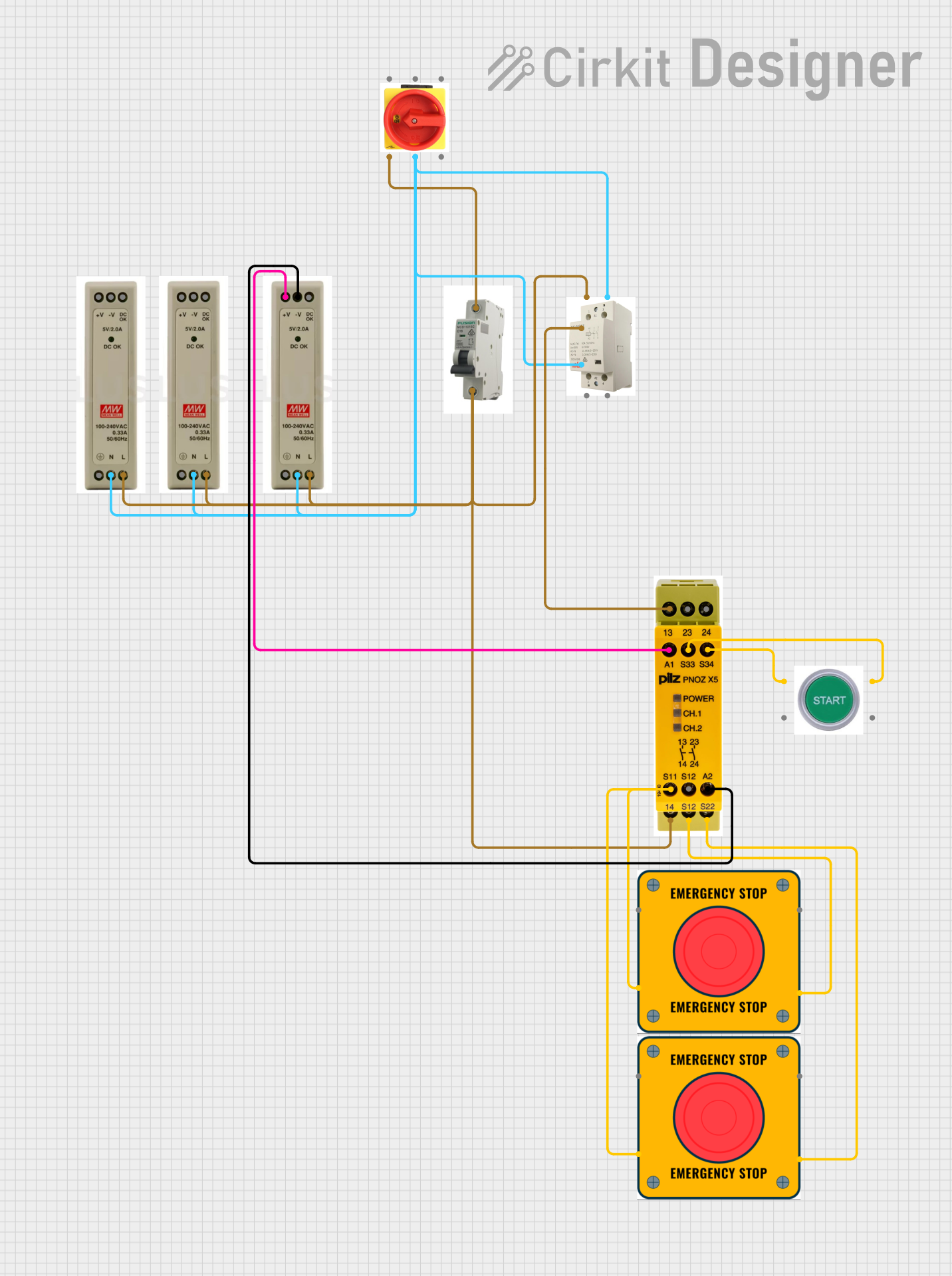
This circuit is designed for power distribution and safety control in an industrial setting. It features a main isolator and circuit breaker for power management, multiple PSUs for 5V, 12V, and 24V outputs, and a safety relay system that interfaces with E-stop buttons and a start switch to control a main contactor, ensuring safe operation and emergency power cut-off capabilities.
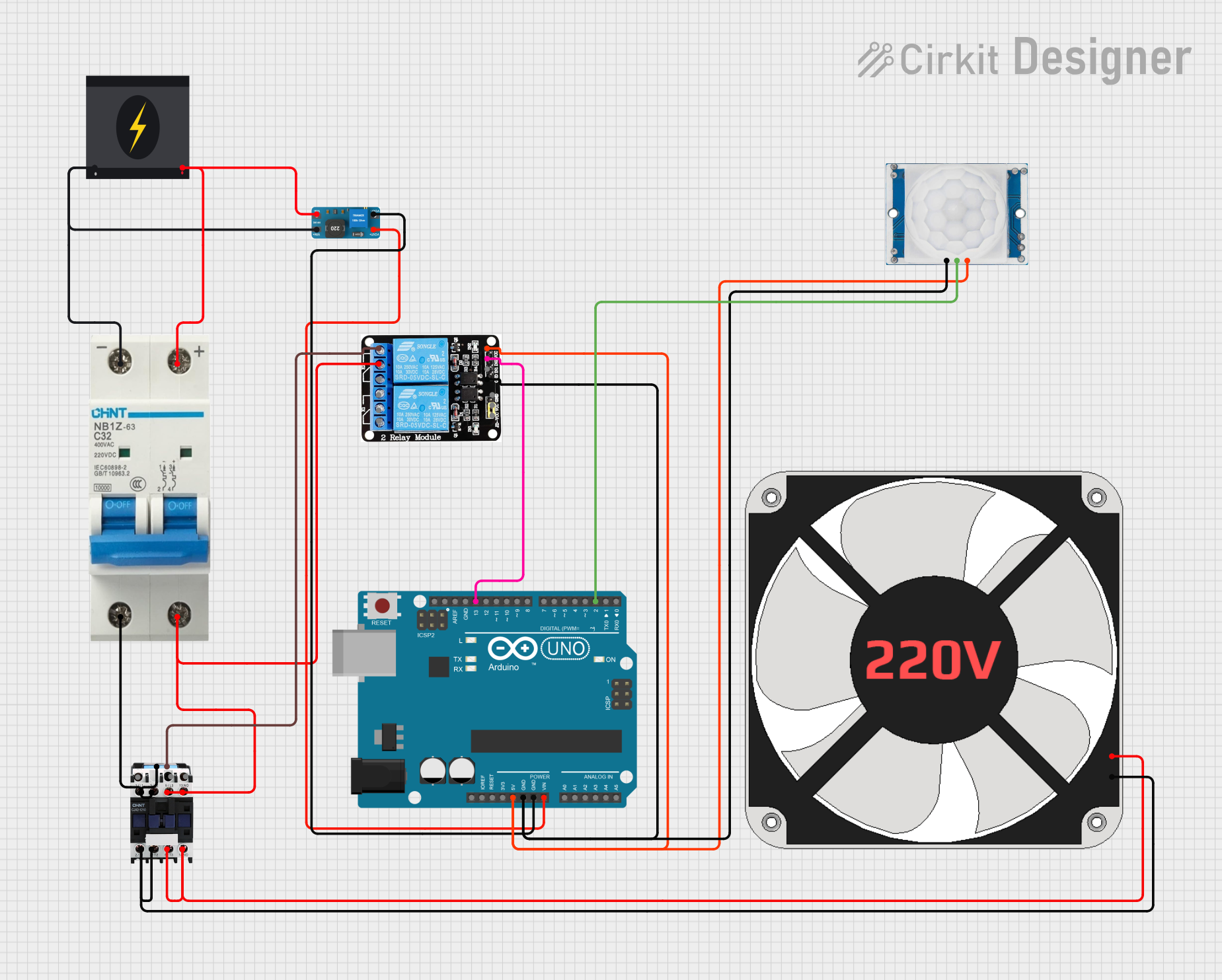
This circuit is designed to detect motion using an HC-SR501 PIR motion sensor and control a 220V fan via a magnetic contactor, with an Arduino UNO as the central processing unit. The Arduino is powered by a DC to DC boost converter connected to a 240V power source through a circuit breaker for safety. Upon detection of motion, the Arduino triggers a relay that activates the magnetic contactor, which in turn powers the fan.
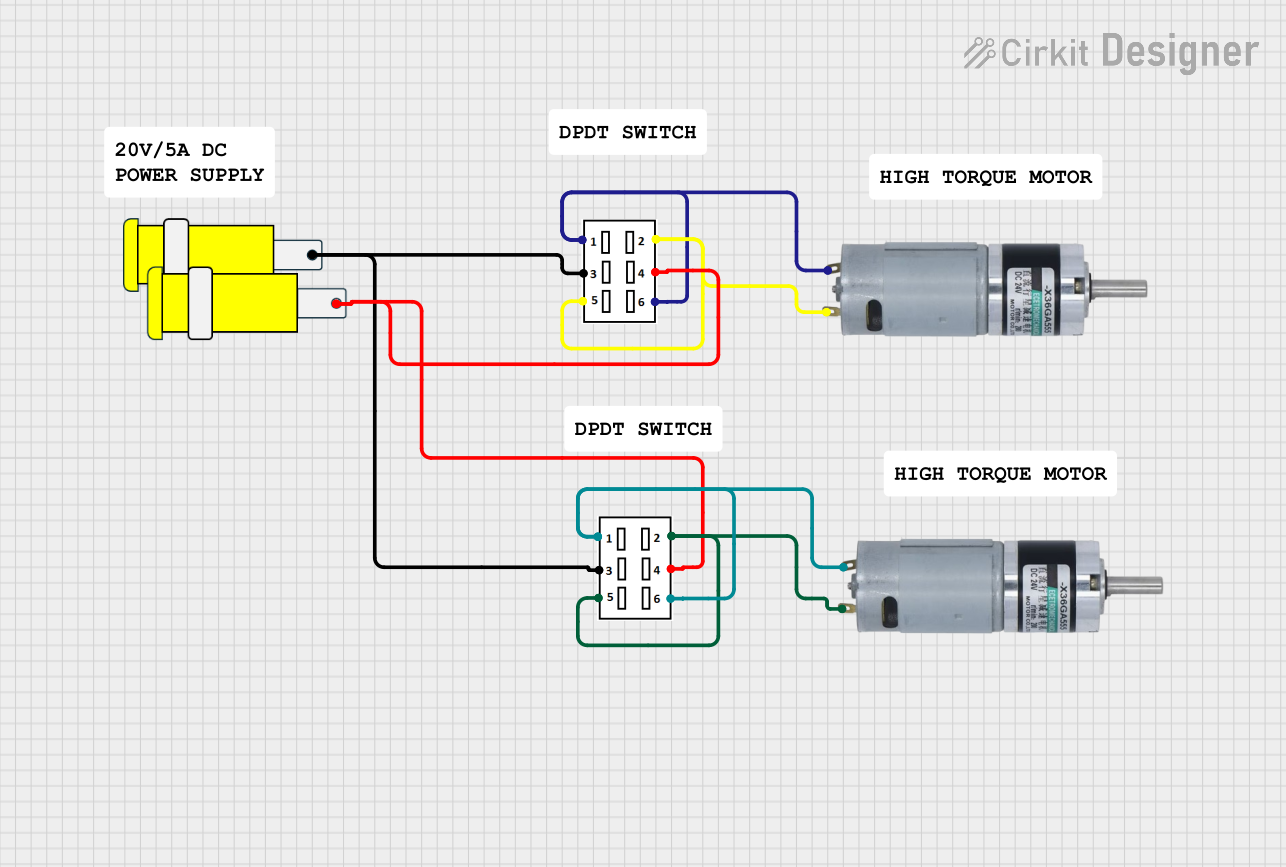
This circuit features two DPDT switches that control the direction of two MRB Planetary gearbox motors. The switches are connected to a connector, allowing for external control inputs to change the motor directions.
Automation systems requiring high-current switching
Technical Specifications
Key Technical Details
Manufacturer: CIRKIT
Part ID: MAGNETIC CONTACTOR
Rated Voltage: 24V DC (coil voltage)
Rated Current: 32A (main contacts)
Contact Configuration: 3-pole (3NO)
Operating Frequency: 50/60 Hz
Insulation Voltage: 690V
Mechanical Life: 10 million operations
Electrical Life: 1 million operations (at rated load)
Operating Temperature: -25°C to +55°C
Mounting: DIN rail or panel mount
Pin Configuration and Descriptions
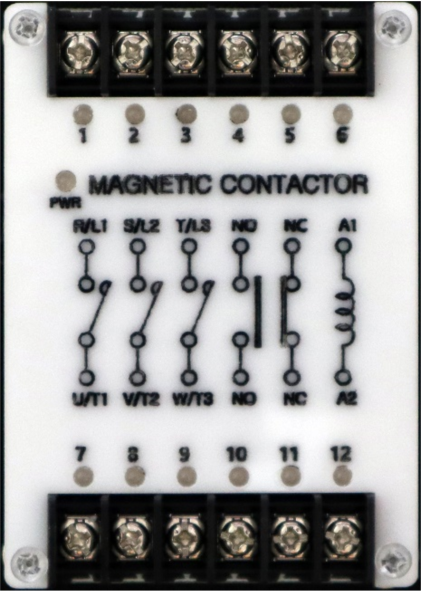
The magnetic contactor has two main sections: the coil terminals and the main contact terminals. Below is the pin configuration:
Coil Terminals
Pin Label
Description
Notes
A1
Coil positive terminal
Connect to the positive voltage source.
A2
Coil negative terminal
Connect to the ground or negative terminal.
Main Contact Terminals
Pin Label
Description
Notes
L1
Input for phase 1
Connect to the power source.
L2
Input for phase 2
Connect to the power source.
L3
Input for phase 3
Connect to the power source.
T1
Output for phase 1
Connect to the load.
T2
Output for phase 2
Connect to the load.
T3
Output for phase 3
Connect to the load.
Auxiliary Contacts (if applicable)
Pin Label
Description
Notes
NO
Normally Open auxiliary contact
Used for control circuits.
NC
Normally Closed auxiliary contact
Used for control circuits.
Usage Instructions
How to Use the Component in a Circuit
Power the Coil:
Connect the coil terminals (A1 and A2) to a 24V DC power source. Ensure the polarity is correct.
When the coil is energized, the electromagnet activates, closing the main contacts (L1-T1, L2-T2, L3-T3).
Connect the Load:
Connect the power source to the input terminals (L1, L2, L3).
Connect the load (e.g., motor, lighting system) to the output terminals (T1, T2, T3).
Control Circuit (Optional):
Use the auxiliary contacts (NO/NC) for control or feedback purposes in automation systems.
Mounting:
Secure the contactor to a DIN rail or panel using the provided mounting slots.
Important Considerations and Best Practices
Voltage Matching: Ensure the coil voltage matches the rated 24V DC. Overvoltage or undervoltage can damage the coil.
Current Rating: Verify that the load current does not exceed the rated 32A.
Overload Protection: Use an appropriate overload relay or circuit breaker to protect the contactor and connected equipment.
Wiring: Use appropriately rated wires for the current and voltage levels. Ensure all connections are secure.
Environment: Avoid exposure to excessive moisture, dust, or temperatures outside the -25°C to +55°C range.
Example: Controlling a Motor with Arduino UNO
The magnetic contactor can be controlled using an Arduino UNO. Below is an example circuit and code to control a motor using the contactor.
Circuit Description
The Arduino controls the contactor coil via a relay module.
The contactor switches the motor on/off based on the Arduino's signal.
Code Example
// Magnetic Contactor Control with Arduino UNO
// This code toggles the contactor coil using a relay module connected to pin 7.

const int relayPin = 7; // Pin connected to the relay module

void setup() {
  pinMode(relayPin, OUTPUT); // Set relay pin as output
  digitalWrite(relayPin, LOW); // Ensure relay is off at startup
}

void loop() {
  // Turn on the contactor (energize the coil)
  digitalWrite(relayPin, HIGH);
  delay(5000); // Keep the contactor on for 5 seconds

  // Turn off the contactor (de-energize the coil)
  digitalWrite(relayPin, LOW);
  delay(5000); // Keep the contactor off for 5 seconds
}
Note: Ensure the relay module is rated for the contactor's coil voltage and current.
Troubleshooting and FAQs
Common Issues and Solutions
Contactor Does Not Activate:
Cause: Coil voltage is incorrect or insufficient.
Solution: Verify the power supply voltage and ensure it matches the rated 24V DC.
Excessive Heating:
Cause: Overcurrent through the main contacts.
Solution: Check the load current and ensure it does not exceed 32A. Use an overload relay if necessary.
Chattering Noise:
Cause: Unstable power supply to the coil.
Solution: Use a stable DC power source and check for loose connections.
Auxiliary Contacts Not Working:
Cause: Miswiring or damaged auxiliary contacts.
Solution: Verify the wiring and test the auxiliary contacts with a multimeter.
FAQs
Q: Can I use this contactor for single-phase loads? A: Yes, connect only one phase (L1-T1) and leave the other terminals unconnected.
Q: Is the contactor suitable for DC loads? A: This contactor is primarily designed for AC loads. For DC loads, consult the manufacturer for compatibility.
Q: How do I know if the contactor is faulty? A: Test the coil resistance with a multimeter. A very high or infinite resistance indicates a damaged coil.
Q: Can I mount the contactor horizontally? A: Yes, the contactor can be mounted in any orientation, but ensure proper ventilation.
This concludes the documentation for the CIRKIT MAGNETIC CONTACTOR. For further assistance, refer to the manufacturer's datasheet or contact technical support.

 Open Project in Cirkit Designer