
How to Use MB102 Breadboard Power Supply Module 3.3V/5V: Examples, Pinouts, and Specs
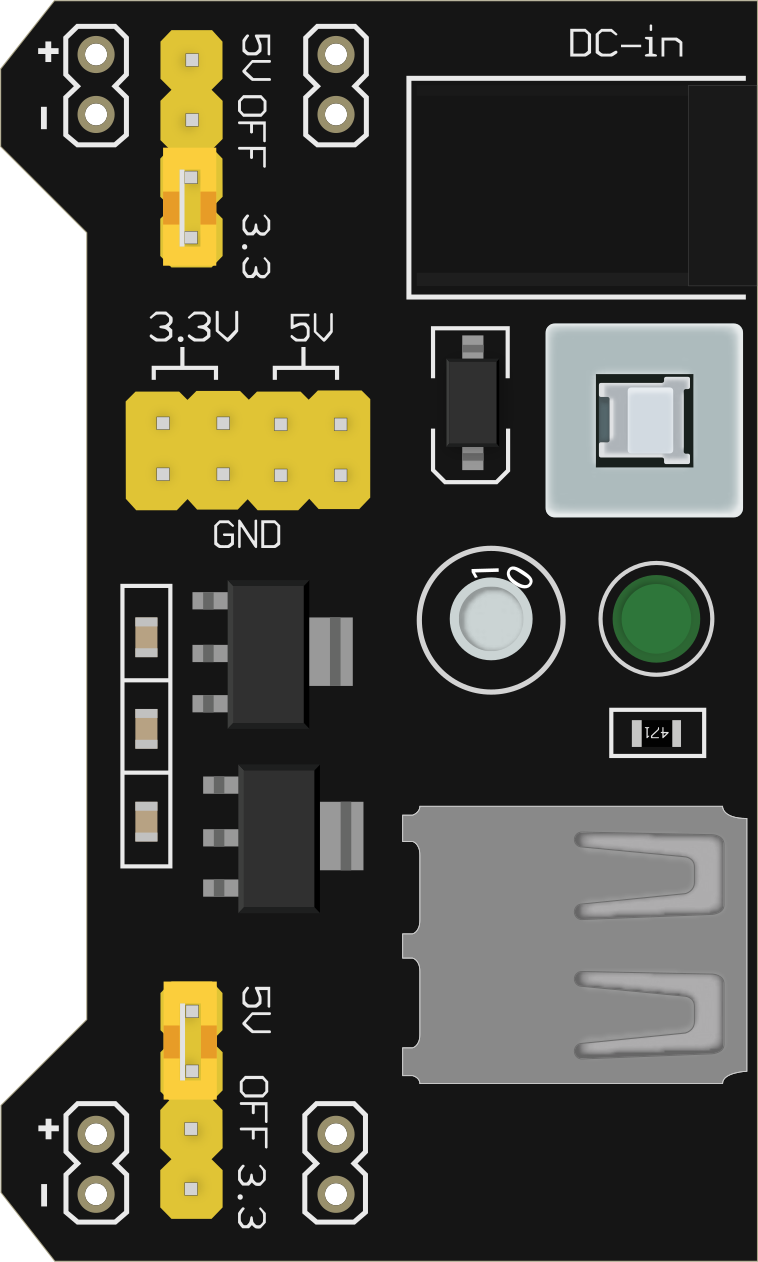
 Design with MB102 Breadboard Power Supply Module 3.3V/5V in Cirkit Designer
Introduction
The MB102 Breadboard Power Supply Module by CorpCo (Part ID: Uno) is a compact and versatile power supply solution designed specifically for breadboards. It provides stable output voltages of 3.3V and 5V, making it ideal for powering a wide range of electronic projects and components. This module is particularly useful for prototyping and development, as it eliminates the need for external power supplies or complex wiring.
Explore Projects Built with MB102 Breadboard Power Supply Module 3.3V/5V
 Open Project in Cirkit Designer
 Open Project in Cirkit Designer
 Open Project in Cirkit Designer
 Open Project in Cirkit Designer
Explore Projects Built with MB102 Breadboard Power Supply Module 3.3V/5V
Open Project in Cirkit DesignerOpen Project in Cirkit DesignerOpen Project in Cirkit DesignerOpen Project in Cirkit DesignerCommon Applications and Use Cases
- Powering microcontrollers such as Arduino, ESP32, and Raspberry Pi Pico.
- Supplying power to sensors, modules, and other low-power electronic components.
- Prototyping circuits on breadboards for educational or development purposes.
- Providing dual voltage outputs (3.3V and 5V) for mixed-voltage systems.
Technical Specifications
The MB102 Breadboard Power Supply Module is designed to fit standard breadboards and offers the following technical features:
Key Technical Details
| Parameter | Specification |
|---|---|
| Input Voltage | 6.5V to 12V (via DC barrel jack) |
| USB Input Voltage | 5V (via USB Type-A port) |
| Output Voltage Options | 3.3V, 5V |
| Maximum Output Current | 700mA (per rail) |
| Dimensions | 53mm x 35mm x 20mm |
| Power Indicator | LED (indicates power status) |
Pin Configuration and Descriptions
The module has several key pins and connectors for input and output. Below is a detailed description:
| Pin/Connector | Description |
|---|---|
| DC Barrel Jack | Accepts 6.5V to 12V input for powering the module. |
| USB Type-A Port | Accepts 5V input as an alternative power source. |
| Breadboard Pins (VCC) | Outputs 3.3V or 5V to the breadboard power rails (selectable via jumpers). |
| Breadboard Pins (GND) | Provides ground connection to the breadboard. |
| Voltage Selection Jumper | Allows switching between 3.3V and 5V output for each power rail. |
| Power Switch | Turns the module ON or OFF. |
| LED Indicator | Lights up when the module is powered. |
Usage Instructions
How to Use the MB102 Breadboard Power Supply Module
Connect the Power Source:
- Use a DC adapter (6.5V to 12V) and plug it into the DC barrel jack.
- Alternatively, connect a 5V USB power source to the USB Type-A port.
Insert the Module into the Breadboard:
- Align the module's pins with the power rails of the breadboard.
- Gently press the module into the breadboard until it is securely seated.
Set the Output Voltage:
- Use the voltage selection jumpers to choose between 3.3V and 5V for each power rail.
- Ensure the jumpers are correctly positioned to avoid incorrect voltage output.
Power On the Module:
- Slide the power switch to the ON position.
- Verify that the LED indicator lights up, confirming the module is powered.
Connect Your Circuit:
- Use the breadboard power rails to supply power to your components or circuits.
Important Considerations and Best Practices
- Input Voltage: Ensure the input voltage is within the specified range (6.5V to 12V for DC input or 5V for USB input).
- Current Limitations: Do not exceed the maximum output current of 700mA per rail to avoid overheating or damage.
- Voltage Selection: Double-check the voltage selection jumpers before connecting sensitive components.
- Heat Dissipation: Avoid prolonged operation at maximum current to prevent overheating.
Example: Using with Arduino UNO
The MB102 module can be used to power an Arduino UNO via the breadboard. Below is an example of how to connect and use it:
- Insert the MB102 module into the breadboard.
- Set the output voltage to 5V using the jumpers.
- Connect the breadboard's 5V rail to the Arduino UNO's 5V pin.
- Connect the breadboard's GND rail to the Arduino UNO's GND pin.
Here is a simple Arduino code example to blink an LED using the MB102 module as the power source:
// Simple LED Blink Example
// Connect an LED to pin 13 of the Arduino UNO with a 220-ohm resistor.

void setup() {
  pinMode(13, OUTPUT); // Set pin 13 as an output pin
}

void loop() {
  digitalWrite(13, HIGH); // Turn the LED on
  delay(1000);            // Wait for 1 second
  digitalWrite(13, LOW);  // Turn the LED off
  delay(1000);            // Wait for 1 second
}
Troubleshooting and FAQs
Common Issues and Solutions
Module Does Not Power On:
- Ensure the power source is connected and providing the correct voltage.
- Check that the power switch is in the ON position.
- Verify the LED indicator is lit. If not, inspect the input connections.
Incorrect Output Voltage:
- Double-check the voltage selection jumpers for proper placement.
- Measure the output voltage with a multimeter to confirm.
Overheating:
- Ensure the current draw does not exceed 700mA per rail.
- Use a lower input voltage if possible to reduce heat generation.
No Power to Breadboard:
- Confirm the module is properly seated in the breadboard.
- Check for loose or damaged connections.
FAQs
Q: Can I use both the DC barrel jack and USB input simultaneously?
A: No, only one power source should be connected at a time to avoid damage.
Q: What happens if I exceed the maximum current rating?
A: The module may overheat or shut down. Prolonged overcurrent conditions can damage the module.
Q: Can I use this module with a Raspberry Pi?
A: The MB102 module can power a Raspberry Pi Pico, but it is not recommended for full-sized Raspberry Pi boards due to their higher current requirements.
Q: Is the module compatible with all breadboards?
A: The MB102 module is designed for standard breadboards. Ensure your breadboard has compatible power rail spacing.
By following this documentation, you can effectively use the MB102 Breadboard Power Supply Module for your electronic projects.