
How to Use Charging Module: Examples, Pinouts, and Specs
 Design with Charging Module in Cirkit Designer
Introduction
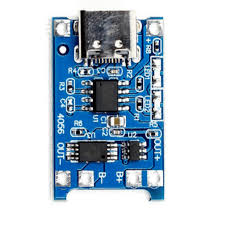
The TP4056 Charging Module, manufactured by Arduino, is a compact and efficient device designed to manage the charging of lithium-ion and lithium-polymer batteries. It ensures safe and efficient charging by incorporating features such as overcharge protection, voltage regulation, and current control. This module is widely used in battery-powered projects due to its reliability and ease of integration.
Explore Projects Built with Charging Module
 Open Project in Cirkit Designer
 Open Project in Cirkit Designer
 Open Project in Cirkit Designer
 Open Project in Cirkit Designer
Explore Projects Built with Charging Module
Open Project in Cirkit DesignerOpen Project in Cirkit DesignerOpen Project in Cirkit DesignerOpen Project in Cirkit DesignerCommon Applications and Use Cases
- Charging single-cell lithium-ion or lithium-polymer batteries.
- Power management in portable electronic devices.
- DIY electronics projects requiring rechargeable battery support.
- Battery-powered IoT devices and wearables.
- Backup power systems and small robotics.
Technical Specifications
The TP4056 Charging Module is designed to provide a safe and efficient charging solution. Below are its key technical details:
Key Technical Details
| Parameter | Value |
|---|---|
| Input Voltage Range | 4.5V to 5.5V |
| Charging Voltage | 4.2V ± 1% |
| Maximum Charging Current | 1A (adjustable via resistor) |
| Battery Type Supported | Single-cell Li-ion/LiPo |
| Overcharge Protection | Yes |
| Over-discharge Protection | Yes |
| Operating Temperature | -10°C to +85°C |
| Dimensions | ~25mm x 19mm x 10mm |
Pin Configuration and Descriptions
The TP4056 Charging Module has six pins, as described in the table below:
| Pin Name | Type | Description |
|---|---|---|
| IN+ | Input | Positive input voltage (4.5V to 5.5V). Connect to a USB 5V source or adapter. |
| IN- | Input | Negative input voltage (ground). Connect to the ground of the power source. |
| BAT+ | Output | Positive terminal for the battery connection. |
| BAT- | Output | Negative terminal for the battery connection. |
| OUT+ | Output | Positive output voltage for the load (connected to the battery). |
| OUT- | Output | Negative output voltage for the load (connected to the battery). |
Usage Instructions
How to Use the TP4056 Charging Module in a Circuit
Connect the Power Source:
- Connect the
IN+pin to the positive terminal of a 5V power source (e.g., USB adapter). - Connect the
IN-pin to the ground of the power source.
- Connect the
Connect the Battery:
- Attach the positive terminal of the battery to the
BAT+pin. - Attach the negative terminal of the battery to the
BAT-pin.
- Attach the positive terminal of the battery to the
Connect the Load (Optional):
- If you want to power a load while charging the battery, connect the load's positive terminal to
OUT+and the negative terminal toOUT-.
- If you want to power a load while charging the battery, connect the load's positive terminal to
Monitor the Charging Status:
- The module has two onboard LEDs:
- Red LED: Indicates charging is in progress.
- Blue LED: Indicates charging is complete.
- The module has two onboard LEDs:
Important Considerations and Best Practices
- Ensure the input voltage does not exceed 5.5V to avoid damaging the module.
- Use a heat sink or proper ventilation if charging at high currents (close to 1A).
- Do not reverse the polarity of the battery connections, as this may damage the module.
- For adjustable charging current, replace the onboard resistor (default is 1.2kΩ for 1A charging).
- Avoid using the module with batteries that have a capacity below 500mAh, as the default charging current may be too high.
Example: Using the TP4056 with an Arduino UNO
The TP4056 can be used to charge a battery that powers an Arduino UNO. Below is an example of how to monitor the charging status using the Arduino:
// Example code to monitor TP4056 charging status with Arduino UNO
// Connect the TP4056 module's status pins to Arduino digital pins

const int chargingPin = 2; // Connect to TP4056 Red LED (charging status)
const int chargedPin = 3;  // Connect to TP4056 Blue LED (charged status)

void setup() {
  pinMode(chargingPin, INPUT); // Set chargingPin as input
  pinMode(chargedPin, INPUT);  // Set chargedPin as input
  Serial.begin(9600);          // Initialize serial communication
}

void loop() {
  bool isCharging = digitalRead(chargingPin); // Read charging status
  bool isCharged = digitalRead(chargedPin);  // Read charged status

  if (isCharging == LOW) {
    // Red LED is active low, so LOW means charging
    Serial.println("Battery is charging...");
  } else if (isCharged == LOW) {
    // Blue LED is active low, so LOW means fully charged
    Serial.println("Battery is fully charged!");
  } else {
    Serial.println("No battery detected or idle state.");
  }

  delay(1000); // Wait for 1 second before checking again
}
Troubleshooting and FAQs
Common Issues and Solutions
The module overheats during charging.
- Solution: Ensure the input voltage does not exceed 5.5V. If charging at high currents, use proper ventilation or a heat sink.
The battery does not charge.
- Solution: Check the battery connections to
BAT+andBAT-. Ensure the battery is not damaged or over-discharged.
- Solution: Check the battery connections to
The LEDs do not light up.
- Solution: Verify the input voltage and connections to
IN+andIN-. Ensure the power source is functioning correctly.
- Solution: Verify the input voltage and connections to
The module stops charging before the battery is full.
- Solution: Check the battery's specifications. The TP4056 is designed for single-cell lithium-ion or lithium-polymer batteries only.
FAQs
Can I use the TP4056 to charge multiple batteries in series?
No, the TP4056 is designed for single-cell batteries only. Charging multiple batteries in series may result in uneven charging and damage.How do I adjust the charging current?
Replace the onboard resistor (Rprog) with a different value. For example, a 2kΩ resistor sets the charging current to 500mA.Can I use the module without a battery?
No, the TP4056 requires a battery to function properly. It is not designed to act as a standalone power supply.
By following this documentation, you can safely and effectively use the TP4056 Charging Module in your projects.