
How to Use Seeeduino XIAO: Examples, Pinouts, and Specs
 Design with Seeeduino XIAO in Cirkit Designer
Introduction
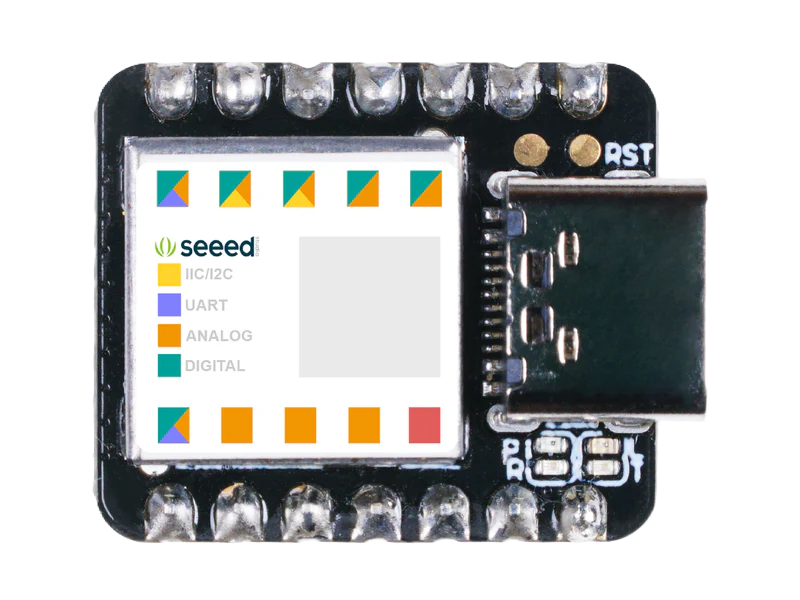
The Seeeduino XIAO (Manufacturer Part ID: 102010328) is a compact and powerful microcontroller board developed by Seeed Technology Co., Ltd. It is based on the Microchip SAMD21G18 ARM Cortex-M0+ 32-bit microcontroller, making it an excellent choice for IoT applications, wearable devices, and other embedded systems. Despite its small size (20mm x 17.5mm), the Seeeduino XIAO offers robust functionality, including multiple GPIO pins, USB-C connectivity, and compatibility with the Arduino IDE.
Explore Projects Built with Seeeduino XIAO
 Open Project in Cirkit Designer
 Open Project in Cirkit Designer
 Open Project in Cirkit Designer
 Open Project in Cirkit Designer
Explore Projects Built with Seeeduino XIAO
Open Project in Cirkit DesignerOpen Project in Cirkit DesignerOpen Project in Cirkit DesignerOpen Project in Cirkit DesignerCommon Applications and Use Cases
- IoT (Internet of Things) devices
- Wearable electronics
- Prototyping for embedded systems
- Robotics and automation
- Sensor data acquisition and processing
- Compact DIY projects requiring low power consumption
Technical Specifications
Key Technical Details
| Parameter | Specification |
|---|---|
| Microcontroller | Microchip SAMD21G18 (ARM Cortex-M0+) |
| Operating Voltage | 3.3V |
| Input Voltage (USB-C) | 5V |
| Digital I/O Pins | 11 |
| PWM Pins | 11 |
| Analog Input Pins | 6 (12-bit ADC) |
| Analog Output Pins | 1 (10-bit DAC) |
| Flash Memory | 256 KB |
| SRAM | 32 KB |
| Clock Speed | 48 MHz |
| USB Interface | USB-C (supports programming and power) |
| Dimensions | 20mm x 17.5mm |
| Weight | 2g |
Pin Configuration and Descriptions
The Seeeduino XIAO features 14 pins, including power, digital, and analog pins. Below is the pinout description:
| Pin Number | Pin Name | Functionality |
|---|---|---|
| 1 | 3.3V | Power output (3.3V) |
| 2 | GND | Ground |
| 3 | A0/D0 | Analog input (A0) / Digital I/O (D0) |
| 4 | A1/D1 | Analog input (A1) / Digital I/O (D1) |
| 5 | A2/D2 | Analog input (A2) / Digital I/O (D2) |
| 6 | A3/D3 | Analog input (A3) / Digital I/O (D3) |
| 7 | A4/D4 | Analog input (A4) / Digital I/O (D4) |
| 8 | A5/D5 | Analog input (A5) / Digital I/O (D5) |
| 9 | D6 | Digital I/O (D6) |
| 10 | D7 | Digital I/O (D7) |
| 11 | D8 | Digital I/O (D8) |
| 12 | D9 | Digital I/O (D9) |
| 13 | SWCLK | Debugging (SWD Clock) |
| 14 | SWDIO | Debugging (SWD I/O) |
Usage Instructions
How to Use the Seeeduino XIAO in a Circuit
Powering the Board:
- Connect the Seeeduino XIAO to your computer or power source using a USB-C cable. The board operates at 3.3V internally, but the USB-C port accepts 5V input.
Programming the Board:
- Install the Arduino IDE and add the Seeeduino XIAO board package via the Arduino Boards Manager.
- Select "Seeeduino XIAO" as the board type and the appropriate COM port.
- Write your code and upload it to the board using the USB-C connection.
Connecting Peripherals:
- Use the GPIO pins for connecting sensors, actuators, or other peripherals.
- Ensure that all connected components operate at 3.3V logic levels to avoid damaging the board.
Using Analog and Digital Pins:
- The analog pins (A0–A5) can read sensor data with a resolution of 12 bits.
- The digital pins (D0–D9) can be used for input/output operations, including PWM.
Important Considerations and Best Practices
- Voltage Levels: Ensure all connected devices operate at 3.3V logic levels. Use level shifters if interfacing with 5V devices.
- Heat Management: Avoid overloading the GPIO pins to prevent overheating.
- Debugging: Use the SWCLK and SWDIO pins for debugging with an SWD-compatible debugger.
- USB-C Cable: Use a high-quality USB-C cable for reliable power and data transfer.
Example Code for Arduino IDE
The following example demonstrates how to blink an LED connected to pin D6:
// Define the pin number for the LED
const int ledPin = 6;

void setup() {
  // Set the LED pin as an output
  pinMode(ledPin, OUTPUT);
}

void loop() {
  // Turn the LED on
  digitalWrite(ledPin, HIGH);
  delay(1000); // Wait for 1 second

  // Turn the LED off
  digitalWrite(ledPin, LOW);
  delay(1000); // Wait for 1 second
}
Troubleshooting and FAQs
Common Issues and Solutions
The board is not recognized by the computer:
- Ensure the USB-C cable supports data transfer (not just charging).
- Check if the correct COM port is selected in the Arduino IDE.
- Try reinstalling the Seeeduino XIAO board package in the Arduino IDE.
Upload error in Arduino IDE:
- Double-check the selected board type and COM port.
- Press the reset button twice quickly to enter bootloader mode, then try uploading again.
Connected peripherals are not working:
- Verify that the peripherals are compatible with 3.3V logic levels.
- Check the wiring and connections for loose or incorrect setups.
The board overheats:
- Ensure that the GPIO pins are not overloaded.
- Avoid drawing excessive current from the 3.3V power pin.
FAQs
Q: Can I power the Seeeduino XIAO with a battery?
A: Yes, you can power the board using a 3.7V LiPo battery connected to the 3.3V and GND pins. Ensure proper voltage regulation.Q: Is the Seeeduino XIAO compatible with Arduino libraries?
A: Yes, the board is fully compatible with most Arduino libraries, thanks to its SAMD21 microcontroller.Q: How do I reset the board?
A: Press the reset button once to restart the board. Press it twice quickly to enter bootloader mode.Q: Can I use the Seeeduino XIAO for low-power applications?
A: Yes, the SAMD21 microcontroller supports low-power modes, making it suitable for battery-powered projects.
This concludes the documentation for the Seeeduino XIAO. For further details, refer to the official Seeed Technology Co., Ltd resources.